Listed from the MCP registry; nobody on Odel publishes it.
NovaSolver Studio
Free desktop CAE: import CAD/STL, solve FEM structural/thermal and CFD, verify the answer.
Runs on your machine from its package; the steps are below.
What it does
- Reads
- Writes
- High impact
At most: moves money, runs code or commands, deletes data, or sends messages for you.
What it costs
FreeOdel charges nothing per call. The publisher may charge for its own service.
Runs locally over stdio
This server isn't hosted — your MCP client launches it from a package registry. Use one of the commands below, or drop the config into your client (e.g. Claude Desktop).
Distributed as an MCP bundle (`https://github.com/novasolver/novasolver-studio/releases/download/v0.8.0/novasolver-studio-0.8.0-win64.mcpb`) — download it and import the bundle in your MCP client.
Run
uvx novasolver-studio
MCP client config
{
  "mcpServers": {
    "novasolver-studio": {
      "command": "uvx",
      "args": [
        "novasolver-studio"
      ]
    }
  }
}Free, local engineering simulation that your AI assistant can drive — and every answer is checked. Structural FEM, heat and CFD (CalculiX, OpenFOAM® and a built-in quadratic-tet solver) on your own PC, with an MCP server so Claude or any MCP client can import your STEP/STL, set the loads, run, refine the mesh and verify the result.
日本語 · 中文 · Try it in your browser (no install) · Download for Windows · novasolver.jp/studio
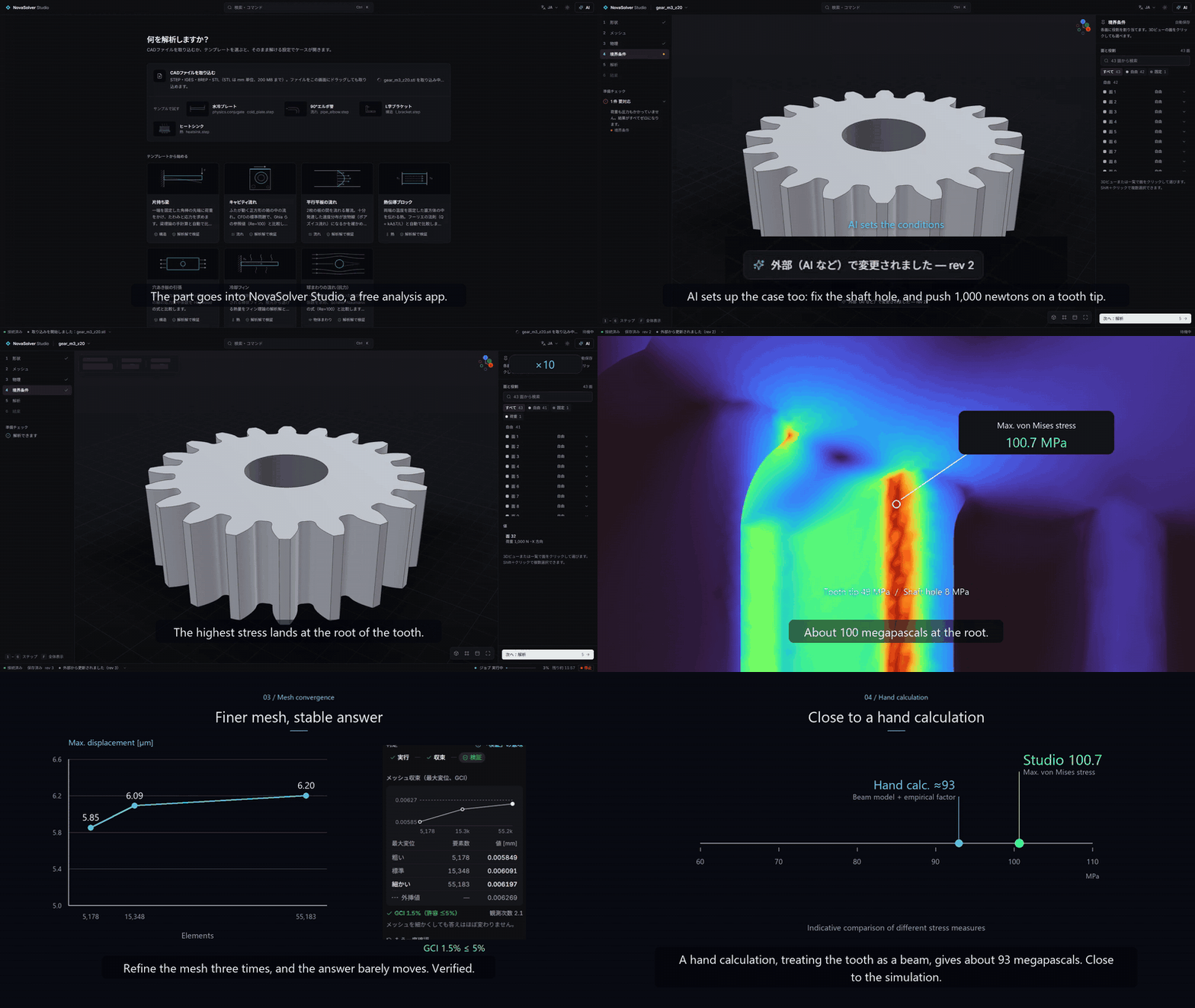
One sentence to the AI → Studio sets up and solves the case → mesh refined three times (GCI 1.5 %) → compared with a hand calculation. Real app, real numbers.
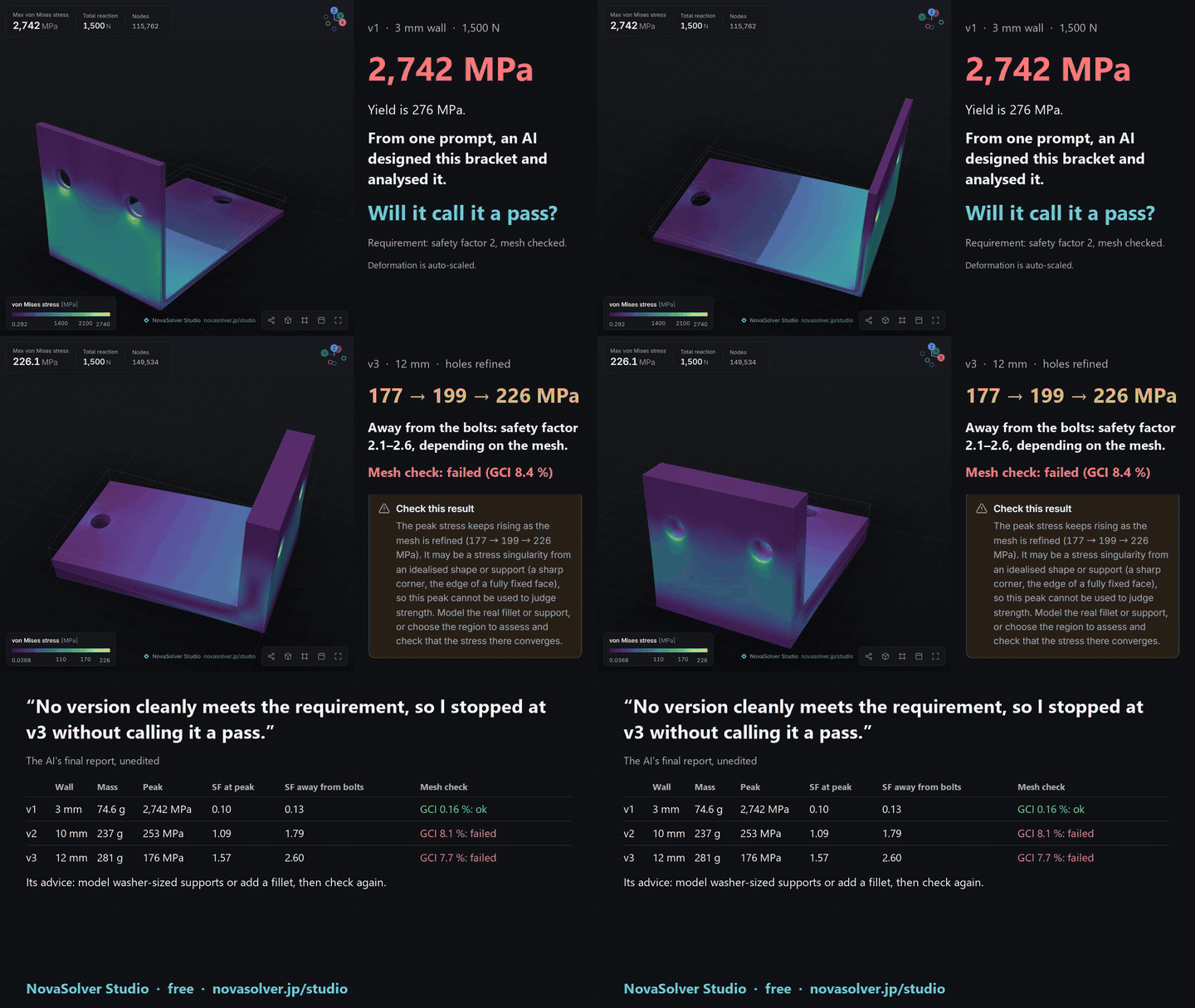
From one prompt, an AI modelled a bracket in SolidCraft and analysed three versions in Studio. It stopped without calling any of them a pass, because the mesh check had failed. 40 s video.
Why Studio
- Ran ≠ right. Every result carries three separate checks: ran → converged → mesh convergence. The third refines the mesh in three steps and reports the GCI (Roache), so you know the answer does not depend on the mesh; the built-in examples are also compared with closed-form or literature answers. None of this checks the boundary conditions or the design, and the AI is told to say exactly what was checked. Warnings that matter (stress above yield, a stress singularity at a sharp corner) are passed on, not hidden.
- Your models stay on your computer. No account, no upload, no telemetry. The only network use is the optional update check and example download (offline mode turns those off), and a public test fails if any other code starts using the network. For confidential work with a cloud AI, numbers-only mode keeps even pictures of the part away from the AI. See docs/PRIVACY.md.
- Real solvers, no licence fee. CalculiX for structural/thermal, OpenFOAM® for flow and water cooling, a built-in tet10 FEM for answers in seconds. Japanese, English and Chinese UI.
- Typed MCP tools, no shell. 37 tools (create/import, set conditions, mesh, run, convergence, verify, probe, sweep, render). The AI fills a case schema; Studio writes the solver input. Your AI's edits appear live in the window, and you can undo them.
- NovaSolver Flash: build an instant model of your own case.
build_surrogatesolves about 60 variants of a case in the background (loads, materials, template dimensions; a Gaussian process, checked on points held out of the fit).surrogate_predictthen answers in milliseconds with an error bar for the interpolation, and refuses outside the ranges. An imported CAD shape has no dimensions to vary yet. - Examples made with Flash: seven standard shapes. The
instant_estimatetool computes the peak stress or deflection, including for dimensions never solved, from a Gaussian process fitted to 1,396 solved points. No mesh, no solve. It gives the error bar and refuses outside the solved ranges. On 224 new solves it had never seen, 287 of 288 answers landed inside the bar. See the data. - NovaSolver Genesis: keep only the shape you need (0.8). Topology optimisation on the part itself: with its
supports and loads, it seeks a higher-stiffness shape for the volume you choose (for heat, a lower-temperature layout for its sources and
sinks). 3D-print overhang, extrusion and symmetry constraints; the result is a closed STL, and an extruded part is
also written as a flat-faced STEP. Example: a cantilever on 40,000 cells at 30 % volume keeps 62 % of the full
part's stiffness. MCP:
run_genesis,genesis_result. Exported and smoothed shapes need their own analysis; see the 0.8.0 reanalysis results and limits.
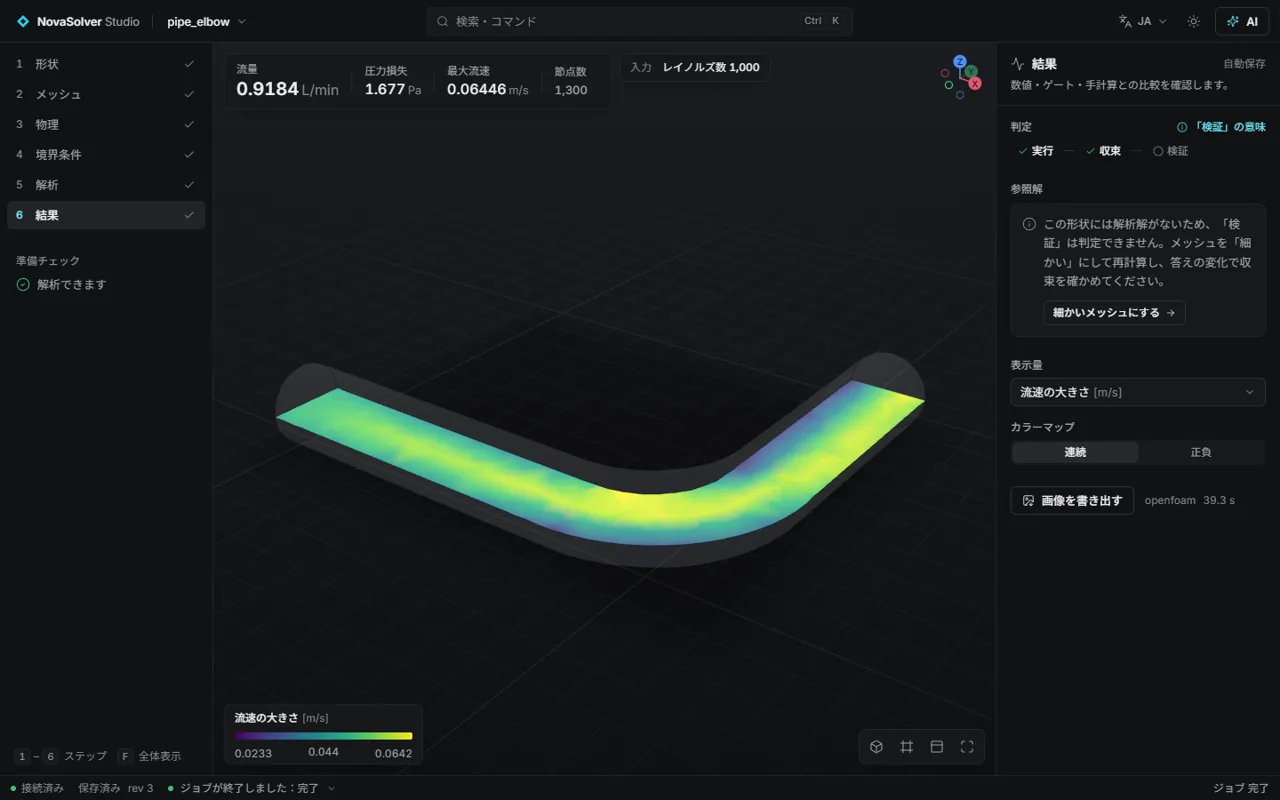 | 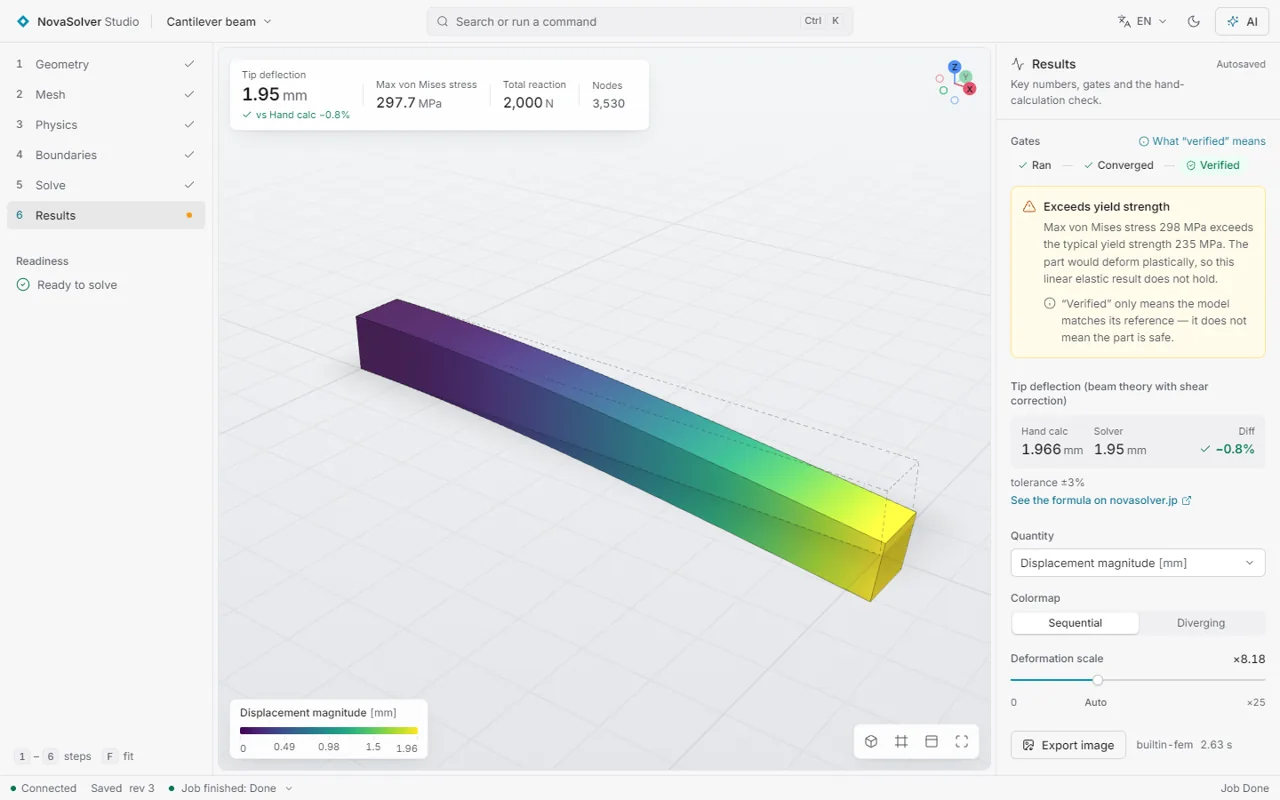 |
| Pipe elbow, OpenFOAM® (pressure drop) | Cantilever vs beam theory |
Checked against known answers
A sample of the references Studio compares itself with (the full validation suite with every case, tolerance and
mesh-convergence column is published with each release as docs/VALIDATION.md):
| Case | Reference | Studio |
|---|---|---|
| Cantilever tip deflection | Euler–Bernoulli + shear | −0.9 % (built-in tet10, also in the browser demo) |
| Cylinder on a flat block, contact pressure | Hertz line contact | −0.04 % (mortar contact, 0.7) |
| Sphere drag, external flow | Schiller–Naumann | +0.3 % (OpenFOAM®, snappyHexMesh + wall layers) |
| Water-cooled plate | heat balance | 0.03 % |
| Lid-driven cavity | Ghia et al. | profile match (built-in and OpenFOAM®) |
How often does it get through a part it has never seen? docs/PART_TEST.md counts 246 STEP files, including every one that failed and why. Does it tell you when your setup is wrong? docs/SETUP_MISTAKES.md breaks correct setups in 34 ways, with the list fixed before the run, and shows what it said, misses included.
What it does / できること
| Analysis | Geometry | Quick preview (built-in, seconds) | Final solve | Verification |
|---|---|---|---|---|
| Structural: linear static, modal, nonlinear (plasticity, large deformation) | templates · import STEP / IGES / BREP / STL | quadratic tetrahedral FEM | CalculiX | beam theory, Heywood Kt, mesh convergence (GCI) |
| Buckling, contact (mortar, tied), fatigue (Goodman, S-N) — 0.7 | templates · import | quadratic tetrahedral FEM | — | Euler columns, Hertz, Goodman |
| Thermal (steady conduction), thermal stress | templates · import | quadratic tetrahedral FEM | CalculiX | Fourier's law, fin theory, GCI |
| Electrostatics, DC current and Joule heating | templates · import | quadratic tetrahedral FEM | — | εA/d, 2πεL/ln(b/a), L/(σA) |
| Internal flow | templates · import | 2D cavity (built-in) | OpenFOAM® | Ghia (cavity), Poiseuille, mass balance |
| Flow around a body | import | — | OpenFOAM® (snappyHexMesh + wall layers) | sphere drag vs Schiller–Naumann (+0.3%) |
| Water cooling (conjugate heat transfer) | import (2+ bodies) | — | OpenFOAM® (chtMultiRegionSimpleFoam) | heat balance (0.03%) |
Also: a Blender add-on (send the active object to Studio, PLA/PETG/ABS or metals),
a FreeCAD workbench (send the part as STEP, bring the Genesis result back into the document),
a 3D-print strength check (safety factor for each print direction in PLA/PETG/ABS, layer lines included), ParaView VTU / CSV / printable HTML report export, and a Windows installer with .nscase
file association.
Linux program (no Python needed)
Download NovaSolverStudio-<version>-linux-x86_64.tar.gz from Releases,
unpack it and run ./NovaSolverStudio. Each build is started and test-solved on Ubuntu 22.04 (x86-64) before release.
AI assistants connect with ./NovaSolverStudio mcp.
Install with Python (macOS / Linux / Windows)
Available on PyPI. Launch the GUI with uvx novasolver-studio, or install once with
pipx install novasolver-studio and run novasolver-studio. Python 3.10+ is required; Python 3.12 is tested in CI.
Older Python versions use compatible NumPy/SciPy/Matplotlib/WebSocket releases. The built-in FEM needs no external
solver. For an MCP client:
{
  "mcpServers": {
    "novasolver-studio": {
      "command": "uvx",
      "args": ["novasolver-studio", "mcp"]
    }
  }
}
With pipx, use "command": "novasolver-studio", "args": ["mcp"] instead.
Cases go to ~/NovaSolverStudio/workspace on macOS/Linux and ~/Documents/NovaSolverStudio/workspace on Windows;
NOVASTUDIO_WORKSPACE overrides this. Source checkouts keep their workspace/ folder.
| OS | CalculiX (optional structural/thermal solver) | OpenFOAM (optional CFD solver) |
|---|---|---|
| macOS | brew install costerwi/calculix/calculix-ccx | brew install gerlero/openfoam/openfoam (Apple Silicon, macOS 14+) |
| Linux | sudo apt install calculix-ccx or the distro package | Install ESI packages from openfoam.com; detected under /usr/lib/openfoam or via WM_PROJECT_DIR. |
| Windows | Put ccx_static.exe in solvers/calculix/ or set NOVASTUDIO_CCX. | ESI Windows MinGW build plus Microsoft MPI, as described below. |
On headless Linux, Gmsh needs libglu1-mesa libgl1 libxrender1 libxcursor1 libxft2 libxinerama1.
NOVASTUDIO_CCX and NOVASTUDIO_OPENFOAM can select an installation on every OS.
macOS OpenFOAM tools run through the app environment launcher; Linux tools source the installation's etc/bashrc.
Quick start (developers) / 開発者向けの起動手順
python -m venv .venv
.venv\Scripts\python -m pip install "mcp>=2.3,<3" fastapi "uvicorn[standard]" numpy scipy matplotlib gmsh meshio psutil pyamg pymeshlab zstandard pytest
cd frontend && npm install && npm run build && cd ..
cd backend
set PYTHONPATH=%CD%
..\.venv\Scripts\python -m novastudio serve        # open http://127.0.0.1:8765
Solvers are found automatically when installed (without them, the built-in preview solvers still work):
- CalculiX: put
ccx_static.exeundersolvers/calculix/or setNOVASTUDIO_CCX. - OpenFOAM (ESI Windows MinGW build): install to
%LOCALAPPDATA%\NovaSolverStudio\solvers\openfoam(an ASCII-only path) or setNOVASTUDIO_OPENFOAM. Put Microsoft MPI'smsmpi.dllin%LOCALAPPDATA%\NovaSolverStudio\solvers\msmpi.
Use it from an AI assistant (MCP) / AI アシスタントから使う
Easiest (Claude Desktop and other MCPB-aware apps): download novasolver-studio-<version>-win64.mcpb from
Releases and open it — the app installs it as an extension.
Also listed in the MCP Registry as io.github.novasolver/novasolver-studio.
Client-specific setup guides / アプリ別の導入手順 / 客户端安装指南:
| Client | Guide | Verification scope |
|---|---|---|
| Claude Code | Plugin installation | Windows: plugin installation and a model-driven cantilever solve checked |
| Gemini CLI | Extension setup | Windows: isolated extension installation and MCP connection checked; no model-driven solve |
| Codex | Configuration and optional helper | Windows: configuration handling and a model-driven cantilever solve checked |
| Qwen Code | 中文・日本語・English guide | Windows with DeepSeek Flash: a model-driven cantilever solve checked; Alibaba Qwen model not tested |
These are NovaSolver's setup guides, not claims of approval or listing in each provider's official directory.
With the downloaded zip: point any MCP client at the exe.
{
  "mcpServers": {
    "novasolver-studio": {
      "command": "C:\\path\\to\\NovaSolverStudio\\NovaSolverStudio.exe",
      "args": ["mcp"]
    }
  }
}
From source:
{
  "mcpServers": {
    "novasolver-studio": {
      "command": "<studio>\\.venv\\Scripts\\python.exe",
      "args": ["-m", "novastudio", "mcp"],
      "env": { "PYTHONPATH": "<studio>\\backend" }
    }
  }
}
Then ask, for example: "Import bracket.step, fix the bottom face, push 500 N on the top face, run it, check mesh convergence and tell me the safety factor."
Electromagnetics (0.3) / 電磁気
The built-in tet10 solver now computes electrostatic potential, electric field and electrode charge, or DC current with optional steady Joule heating. STEP assemblies can assign a dielectric or conductor to each body. Three editable templates include analytic checks: capacitor against εA/d, coax against 2πεL/ln(b/a), and busbar against L/(σA) and the temperature rise σΔV²/(8k) with both ends cooled.
内蔵 FEM で静電場・電流・ジュール発熱による温度を計算できます。平行平板コンデンサ・同軸ケーブル・銅母線の 3 テンプレートには解析解との比較があり、任意形状ではメッシュ収束を確認できます。
Share face selection with an AI (0.4) / 選んだ面をAIと共有する
Select faces in the boundaries viewport, then ask “fix the faces I selected” or “put 500 N here”.
The assistant reads get_gui_selection, shows a numbered render_view(quantity="faces", highlight=[...])
to confirm the setup, and applies conditions through update_case. GUI and AI changes share one Undo/Redo
history. Ctrl+Z undoes the latest change by either of you; Ctrl+Shift+Z or Ctrl+Y redoes it.
Named face groups can be reused with boundaries.@<group>.role and other boundary fields.
画面で面を選んでから「選んだ面を固定して」のように頼めます。AIが選択内容を読み取り、面番号付きの画像で 確認してから条件を設定します。画面とAIの変更は共通の履歴に残り、どちらの変更も元に戻せます。 Hで選択した面を隠し、Alt+Hですべて表示。Ctrl+ドラッグで矩形選択、Xで透過表示を切り替えます。
在视图中选择面后,可以说“固定我选中的面”。AI会读取选择内容,用带面编号的图片确认设置,再应用边界条件。 界面与AI共用撤销和重做历史,双方的更改都可以撤销。面组可以保存并重复使用。
Documentation
- Tried Studio? Share a short experience or report a problem. English, 日本語 and 中文 welcome. Posts and GitHub profiles are public; omit personal details and confidential models/results.
- Design:
docs/DESIGN.md· Roadmap:docs/ROADMAP.md· Development notes:docs/DEVELOPMENT.md - Tests:
python -m pytest backend/tests -q
License
GPL-3.0 — see LICENSE. Programs called by Studio keep their own licenses — see
THIRD_PARTY_NOTICES.md.
The license covers the code, not the name. If you distribute a modified version, please give it a different name and do not present it as NovaSolver Studio or NovaSolver Flash.
This offering is not approved or endorsed by OpenCFD Limited, producer and distributor of the OpenFOAM software via www.openfoam.com, and owner of the OPENFOAM® and OpenCFD® trade marks.
Made by NovaSolver — interactive engineering simulators.