Listed from the MCP registry; nobody on Odel publishes it.

Tweetkit X
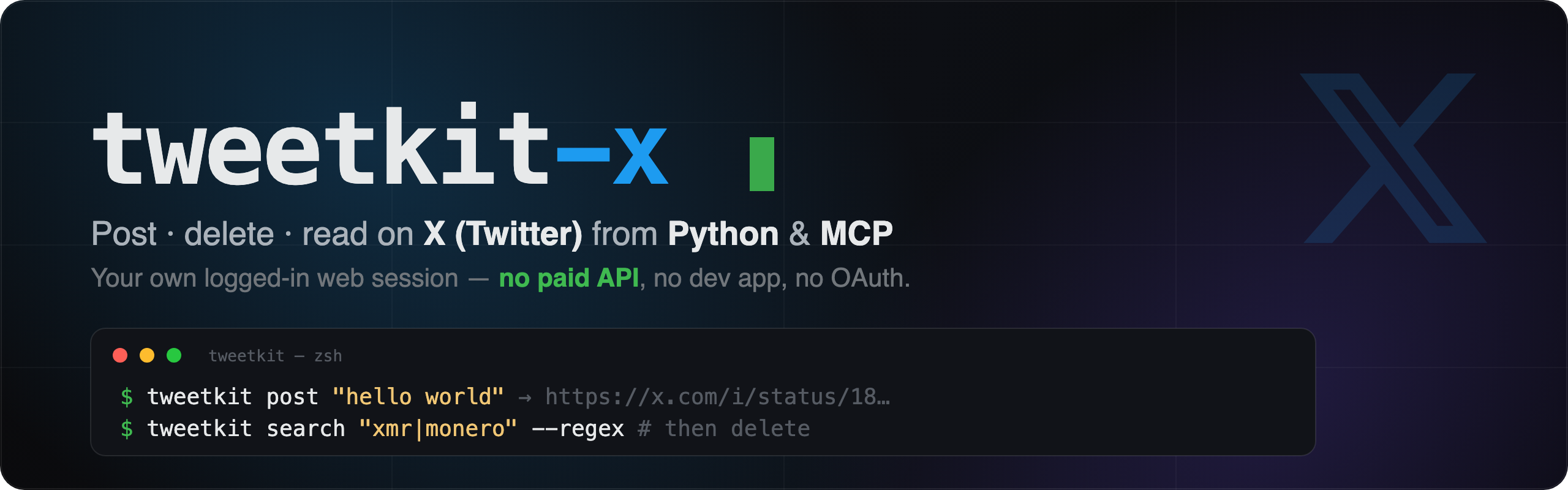
Post, delete & read on X (Twitter) using your own logged-in web session — no paid API.
Runs on your machine from its package; the steps are below.
What it does
- Reads
- Writes
- High impact
At most: moves money, runs code or commands, deletes data, or sends messages for you.
What it costs
FreeOdel charges nothing per call. The publisher may charge for its own service.
Runs locally over stdio
This server isn't hosted — your MCP client launches it from a package registry. Use one of the commands below, or drop the config into your client (e.g. Claude Desktop).
Run
uvx tweetkit-x
MCP client config
{
  "mcpServers": {
    "tweetkit-x": {
      "command": "uvx",
      "args": [
        "tweetkit-x"
      ]
    }
  }
}
tweetkit-x
tweetkit-x is a free, open-source Python library, CLI and MCP server that posts, deletes and reads on X (Twitter) with your own logged-in web session, including images and threads, with no paid API.
No paid API. No developer app. No OAuth dance. Just your session cookie.






twitter x mcp-server python cli twitter-api-alternative no-api-key threads image-upload claude cursor
📘 Docs site · 🤖 AGENTS.md (for coding agents) · 📦 Releases
Quick start · Screenshots · Get your cookie · Python · CLI · MCP server · How it works · FAQ · Alternatives · Changelog · Disclaimer
Screenshots
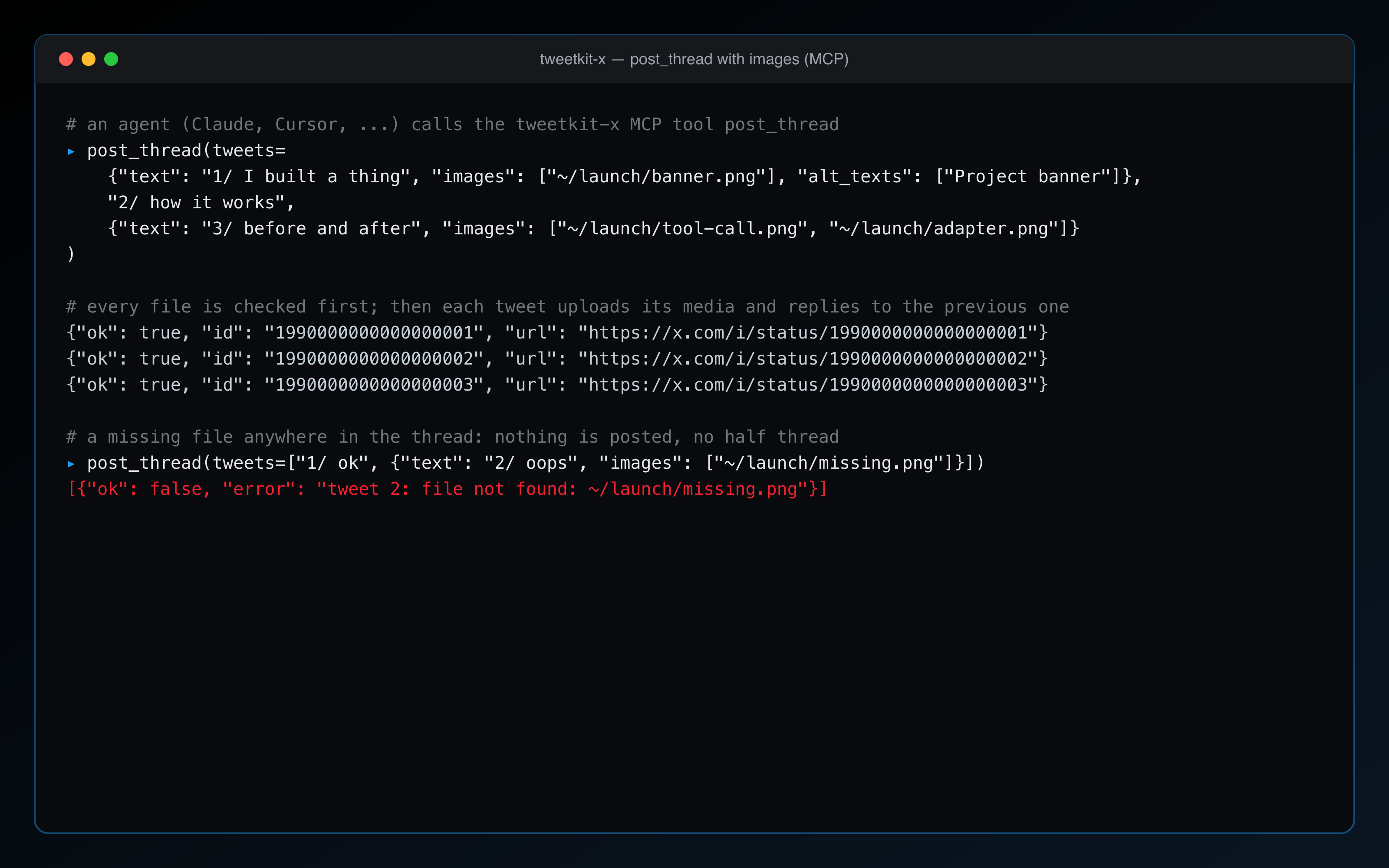
The MCP tool post_thread posting a three-tweet thread with images, as shipped in 0.5.0. Generated by python3 scripts/make_screenshots.py: the tools run unchanged, but the X transport is an in-memory stand-in, so no request reaches X and the ids and URLs are made up.
Why
Since February 6, 2026, X's official API has no free tier for new developers — it's pay-per-use: ~$0.015 per post, ~$0.20 per post with a link, plus per-read charges. For publishing your own tweets (a bot posting your content, a scheduled thread, a cleanup script that deletes old posts), that's a recurring bill for something your browser already does for free.
tweetkit-x skips the API entirely. It replays the exact internal HTTP calls your browser makes when you click Post, Delete, or scroll your profile — authenticated with the session cookie you already have. Post, delete, and read the full timeline, at zero API cost.
⚠️ Automating your web session is against X's Terms of Service. This is a grey-area tool for personal automation. Account risk is entirely yours. See the Disclaimer.
Features
- ✅ Post — text, up to 4 images, GIF & video (with alt text), replies, threads, quote-tweets, long-form note tweets, and scheduled tweets
- 🖼️ Images through MCP, in single tweets and in threads —
post_tweettakes up to 4 files with alt text, and every tweet of apost_threadcan carry its own up to 4 files; the whole thread is checked before the first tweet is posted - 🗑️ Delete — one id, a list of ids, or "find matching & delete" cleanup loops
- ❤️ Engage — like, retweet, bookmark, follow, block, mute, pin — each with an undo
- 🔔 Per-account bell & bulk follow — turn notifications on/off per account, follow a list resumably with a journal and rate-limit stops
- 🌐 Search all of X — the real
SearchTimeline(operators likefrom:,min_faves:,filter:media), plus local regex over your own tweets - 📖 Read — your home feed, any timeline, a tweet's replies/conversation, followers/following, likers/retweeters, bookmarks, a user's likes, notifications, and full profiles
- 🔌 MCP server — 48 tools; drop into Claude Desktop / Claude Code / Cursor; tools that explain the cookie and set it up with one paste
- 🔑 Frictionless auth — paste a
Cookie:header, drop a HAR file, or a storage-dump zip; store in a file or the macOS Keychain - 🐍 Python API and a CLI (
tweetkit …) - 🪶 Tiny footprint — no headless browser, no Selenium
Quick start
# v0.5.0 (48 MCP tools, images in MCP tweets and threads) — from the GitHub release tag:
pip install "tweetkit-x[mcp] @ git+https://github.com/nsozturk/tweetkit-x@v0.5.0"
#   or download the wheel from https://github.com/nsozturk/tweetkit-x/releases/tag/v0.5.0
#   PyPI (`pip install "tweetkit-x[mcp]"`) still serves 0.3.0, which lacks the 0.5.0 MCP features.

# 1. Import your session cookie (three ways — see the next section)
tweetkit import --paste                       # paste the Cookie: header, Ctrl-D
#   or:  tweetkit import --file x.com.har
#   or:  tweetkit --keychain tweetkit import --file storagedump_x.com.zip

# 2. Verify (no network call)
tweetkit whoami
# {"ready": true, "user_id": "1986...", "ct0_len": 160}

# 3. Use it
tweetkit post "hello world 👋"
tweetkit search "xmr|monero" --regex          # your tweets that match
tweetkit delete 2063240404980445603
--keychain and --cookie-file are global options: they go before the subcommand (tweetkit --keychain tweetkit post "hi").
Getting your session cookie
The only secret tweetkit needs is your X session cookie — the same Cookie: header your logged-in browser sends. It must contain at least two values:
| Cookie | What it is | Required | HttpOnly? |
|---|---|---|---|
auth_token | your login/session token | yes | yes (hidden from document.cookie) |
ct0 | CSRF token (sent back as x-csrf-token) | yes | no |
twid | your user id (u=<id>) — lets tweetkit read your timeline with no extra lookup | recommended | no |
guest_id, kdt, att, personalization_id | misc session state | optional | mixed |
❗
auth_tokenis HttpOnly, so adocument.cookiecopy in the JS console will NOT include it. Use one of the reliable methods below.
Method A — copy the Cookie: header (most reliable, one paste)
- Open x.com while logged in.
- Open DevTools (F12) → the Network tab.
- Click any request to
x.com(e.g.HomeTimeline). - Under Request Headers, find
cookie:and copy the entire value. - Feed it in:
tweetkit import --paste
# paste the cookie header, then press Ctrl-D
Method B — an F12 "Preserve log" HAR file
- Open x.com logged in → DevTools (F12) → Network.
- Tick "Preserve log", then reload / click around so requests are captured.
- Right-click any request → "Save all as HAR" (or use the ⬇ export icon).
- Import it:
tweetkit import --file ~/Downloads/x.com.har
Modern Chrome can redact cookies from exported HARs. If tweetkit reports
auth_tokenmissing, either enable "Allow to generate HAR with sensitive data" in the Network settings, or fall back to Method A / Method C.
Method C — the storagedump browser extension (zip)
The easiest no-DevTools route. storagedump (a Chrome extension built by this project's author) exports a tab's browser storage — including the HttpOnly auth_token, which document.cookie can't reach — as a .zip containing cookies.json. On x.com (logged in), click the extension → export, then:
tweetkit import --file storagedump_x.com_2026-07-05.zip
tweetkit reads the extension's native format, { "data": [ { "key": "...", "value": "..." }, ... ] }, and also accepts a plain list or a {name: value} map. Cookie-Editor / EditThisCookie JSON exports (--file export.json) work too.
Install: storagedump on the Chrome Web Store.
Where the cookie is stored
By default tweetkit import writes ~/.config/tweetkit/cookie.txt (chmod 600; also git-ignored). Prefer the macOS Keychain? Pass the global --keychain <slug> option:
tweetkit --keychain tweetkit import --paste
export TWEETKIT_COOKIE_KEYCHAIN=tweetkit
Resolution order at runtime (first hit wins): explicit cookie arg → TWEETKIT_COOKIE → explicit cookie_file / --cookie-file → TWEETKIT_COOKIE_FILE → ./cookie.txt → ~/.config/tweetkit/cookie.txt → Keychain (--keychain / TWEETKIT_COOKIE_KEYCHAIN).
Python usage
from tweetkit_x import TweetKit

tk = TweetKit(keychain_slug="tweetkit")          # or cookie="auth_token=...; ct0=..."

tk.whoami()                                       # {'ready': True, 'user_id': '...', 'ct0_len': 160}

# post
tk.post("hello world")
tk.post("with a picture", image_path="chart.png")
tk.post("two charts", images=["a.png", "b.png"], alt_texts=["Chart A", "Chart B"])  # up to 4
tk.post("a reply", reply_to="1800000000000000000")

# thread — strings, (text, image_path) tuples, or dicts with up to 4 images each;
# each tweet replies to the previous, and every item is checked before the first post
tk.post_thread([
    "1/ intro",
    ("2/ chart", "chart.png"),
    {"text": "3/ before and after", "images": ["before.png", "after.png"],
     "alt_texts": ["Before", "After"]},
])
TweetKit.thread_items(items)                      # normalize + validate only; raises ValueError, posts nothing

# read
mine = tk.get_tweets(limit=100)                   # your tweets, newest first
theirs = tk.get_tweets(username="jack", limit=50) # anyone's

# search (local filter over the timeline — no paid search API)
hits = tk.search("monero")                        # substring
hits = tk.search(r"xmr|monero", regex=True)       # regex

# delete
tk.delete("1800000000000000000")
tk.delete_many([t["id"] for t in hits])

# quote-tweet
tk.quote("this is great", quote_tweet_id="1800000000000000000")

# engage (each has an undo)
tk.like("1800000000000000000");     tk.unlike("1800000000000000000")
tk.retweet("1800000000000000000");  tk.unretweet("1800000000000000000")
tk.bookmark("1800000000000000000"); tk.unbookmark("1800000000000000000")

# read a single tweet, and search ALL of X (real search + operators)
tk.get_tweet("1800000000000000000")
tk.search_x("mcp server", product="Latest", limit=40)
tk.search_x("from:jack min_faves:1000")     # X search operators work
Writes return {'ok': True, 'id': '...'} (posts also carry 'url') on success, or {'ok': False, 'status': ..., 'error': '...'} on failure — easy to log or retry. A failed media upload raises RuntimeError instead.
See examples/ for a full "find my $XMR tweets and delete them" cleanup loop.
CLI usage
tweetkit whoami
tweetkit post "just some text"
tweetkit post "text + media" --image pic.png    # the CLI attaches one file; use Python or MCP for up to 4
tweetkit post "a reply" --reply-to 1800000000000000000
tweetkit thread thread.txt                 # tweets separated by blank lines (text only)
tweetkit delete 1800000000000000000 1800000000000000001
tweetkit tweets --limit 100                # your tweets
tweetkit tweets @jack --limit 50           # someone else's
tweetkit search monero                     # your tweets containing "monero"
tweetkit search "xmr|monero" --regex
tweetkit searchx "mcp server" --latest     # search ALL of X (real search + operators)
tweetkit get 1800000000000000000           # one tweet by id
tweetkit quote "great thread" 1800000000000000000
tweetkit like 1800000000000000000          # also: unlike / retweet / unretweet / bookmark / unbookmark
tweetkit note "a long-form post …"         # also: schedule <text> <epoch> / unschedule <id>
tweetkit home --following                  # also: replies / bookmarks / likes / notifications / profile
tweetkit follow @jack --notify --dry-run   # also: unfollow / block / unblock / mute / unmute / pin / unpin
tweetkit bulk-follow handles.csv --dry-run # resumable, rate-limited; also: bulk-notify / suggest / suggestions
A thread.txt is just tweets separated by blank lines. tweetkit --help lists every command; AGENTS.md has the full table.
MCP server
tweetkit ships a first-class MCP server so an AI client can post/delete/read for you — and it walks the user through auth, explaining what the cookie is and setting it up with a single paste.
Configure your client
Claude Desktop / Claude Code / Cursor — add to your MCP config (claude_desktop_config.json, .mcp.json, …):
{
  "mcpServers": {
    "tweetkit": {
      "command": "uvx",
      "args": ["--from", "tweetkit-x[mcp] @ git+https://github.com/nsozturk/tweetkit-x@v0.5.0", "tweetkit-mcp"],
      "env": { "TWEETKIT_COOKIE_KEYCHAIN": "tweetkit" }
    }
  }
}
"--from", "tweetkit-x[mcp]" (PyPI) also works, but PyPI still serves 0.3.0, without multi-image post_tweet or image threads.
Already pip installed? Use the console script directly:
{ "mcpServers": { "tweetkit": { "command": "tweetkit-mcp",
  "env": { "TWEETKIT_COOKIE_KEYCHAIN": "tweetkit" } } } }
If you don't set any cookie env var, that's fine — the server starts unauthenticated and asks the user to set the cookie from inside the chat (below).
Frictionless auth, from inside the chat
The server describes each value and offers the lowest-effort path. A typical first run:
- The client calls
auth_status→ not authenticated. - The server’s instructions tell the assistant to ask you for your cookie and explain what
auth_tokenandct0are and how to copy them. - You paste the
Cookie:header once →set_session_cookie("<paste>")→ stored (Keychain or file) and activated. Or pointimport_cookie_from_file("~/Downloads/x.com.har")at a HAR / storage-dump zip.
The raw cookie is never echoed back.
Tools
48 tools. ? marks an optional argument.
Auth
| Tool | What it does |
|---|---|
auth_status() | Is a valid session loaded? (call first) |
set_session_cookie(cookie_header) | Set auth from a pasted Cookie: header — explains exactly what to copy |
import_cookie_from_file(path) | Set auth from a HAR / storage-dump .zip / cookie JSON |
Post and delete
| Tool | What it does |
|---|---|
post_tweet(text, image_path?, reply_to?, images?, alt_texts?) | Post a tweet; images = up to 4 files (PNG, JPEG, WebP, GIF, MP4) with optional parallel alt_texts |
post_thread(tweets) | Post a thread; each item is text or {"text", "images", "alt_texts"} with up to 4 files |
quote_tweet(text, quote_tweet_id, image_path?) | Quote-tweet an existing tweet (one optional image) |
post_note(text, image_path?, reply_to?) | Long-form note tweet, beyond 280 characters |
schedule_tweet(text, at_epoch) | Schedule a tweet for a unix timestamp |
unschedule_tweet(scheduled_tweet_id) | Cancel a scheduled tweet |
delete_tweet(tweet_id) | Delete one of your tweets (irreversible) |
delete_tweets(tweet_ids) | Delete several tweets (irreversible) |
Engage
| Tool | What it does |
|---|---|
like_tweet(tweet_id) | Like a tweet |
unlike_tweet(tweet_id) | Remove a like |
retweet(tweet_id) | Repost a tweet |
unretweet(tweet_id) | Undo a repost (pass the original tweet id) |
bookmark_tweet(tweet_id) | Bookmark a tweet (private) |
unbookmark_tweet(tweet_id) | Remove a bookmark |
pin_tweet(tweet_id) | Pin one of your tweets to your profile |
unpin_tweet(tweet_id) | Unpin your pinned tweet |
Read and search
| Tool | What it does |
|---|---|
get_my_tweets(limit?) | Your own recent tweets, newest first |
get_user_tweets(username, limit?) | A user's recent tweets, newest first |
search_my_tweets(query, regex?, limit?) | Find your own tweets (local filter — great for cleanup) |
get_tweet(tweet_id) | Fetch one tweet by id: text, author, counts, reply target, media (with alt text) |
search_x(query, latest?, limit?) | Search all of X (real search, supports operators) |
get_home_timeline(following?, limit?) | Your home feed (For You, or Following) |
get_replies(tweet_id, limit?) | A tweet's conversation (its replies) |
get_bookmarks(limit?) | Your bookmarked tweets |
get_user_likes(username, limit?) | Tweets a user has liked |
get_notifications(limit?) | Your notifications timeline |
People
| Tool | What it does |
|---|---|
get_user_profile(username) | A user's full profile: bio, counts, verified, created_at |
get_followers(username, limit?) | A user's followers |
get_following(username, limit?) | Accounts a user follows |
get_likers(tweet_id, limit?) | Users who liked a tweet |
get_retweeters(tweet_id, limit?) | Users who retweeted a tweet |
get_friendship(username) | Your relationship with a user and its bell / repost settings |
Social graph
| Tool | What it does |
|---|---|
follow_user(username, notify?, dry_run?) | Follow a user; notify=True also turns the bell on |
unfollow_user(username) | Unfollow a user |
block_user(username) | Block a user |
unblock_user(username) | Unblock a user |
mute_user(username) | Mute a user (they are not notified) |
unmute_user(username) | Unmute a user |
Notifications and bulk actions
| Tool | What it does |
|---|---|
set_user_notifications(username, on?, kind?, dry_run?) | Per-account bell on/off (kind = posts or live) |
set_user_retweets(username, on?, dry_run?) | Show or hide a user's reposts in your timeline |
bulk_follow(usernames, notify?, max_actions?, journal_path?, dry_run?, capture_suggestions?) | Follow many accounts, resumable via a journal, stops on rate limits |
bulk_set_notifications(usernames, on?, kind?, max_actions?, journal_path?, dry_run?) | Bell on/off for many followed accounts, resumable |
Account suggestions
| Tool | What it does |
|---|---|
get_suggestions(source?, username?, limit?, save?) | Fetch X's account suggestions and save them to a local SQLite store |
list_saved_suggestions(for_username?, source?, distinct?, limit?) | List saved suggestions |
export_saved_suggestions(path, for_username?, source?, distinct?) | Export saved suggestions to .csv / .json / .jsonl |
Example: a thread with images
What an agent sends to post a three-tweet thread, the first and third with images:
post_thread(tweets=[
  {"text": "1/ I built a thing", "images": ["/abs/path/banner.png"], "alt_texts": ["Project banner"]},
  "2/ how it works ...",
  {"text": "3/ the result", "images": ["/abs/path/a.png", "/abs/path/b.png"]}
])
Every tweet's text and files are checked before the first tweet is posted: an empty text, a missing file, or more than 4 media per tweet returns an error and nothing is posted. Once posting starts, the thread stops at the first tweet that fails (for example a rejected upload), and the tweets already posted stay up — check the returned list.
Not (yet) supported: DMs, polls (create/vote), Lists, profile editing, Spaces, hide-reply. These need a captured HAR of that exact action to pin down the endpoint — easy to add on request.
How it works
When you act in the browser, x.com calls a handful of internal endpoints. tweetkit reproduces them 1:1:
x-client-transaction-id— X requires an anti-bot header derived from the page'sondemand.sJS and a home fetch. Generated with the standalonex-client-transaction-idpackage.- Media upload (images, GIF, video) —
POST upload.x.com/i/media/upload.jsonasINIT→APPEND→FINALIZE, yielding amedia_id. - Write / delete —
POST /i/api/graphql/<queryId>/CreateTweetand.../DeleteTweet. - Read —
GET /i/api/graphql/<queryId>/UserTweets(paginated by cursor), plusUserByScreenNameto resolve@handles.
Auth is just your cookie + the public web bearer token (the same non-secret bearer embedded in x.com for every visitor) + the ct0 CSRF value echoed as x-csrf-token.
your cookie ──► x-client-transaction-id ──► CreateTweet / DeleteTweet / UserTweets ──► result
The GraphQL query IDs live in
tweetkit_x/constants.py. X rotates them every few weeks; if a call starts failing, refresh them from a fresh HAR (the file has step-by-step notes).
Security
- The cookie is the only secret. It's stored chmod 600 in
~/.config/tweetkit/cookie.txtor the macOS Keychain, and.gitignoreblockscookie.txt,.env,*.har, and*.zip. - tweetkit never prints the cookie value — importers report only which cookies were found and their lengths.
- The bundled bearer is X's public web bearer, identical for every visitor — not a secret.
FAQ
Can I post a thread with images from Claude?
Yes, since 0.5.0. Connect the MCP server and ask for a thread; the assistant calls post_thread with items like {"text": "...", "images": ["/abs/path/a.png"], "alt_texts": ["..."]}, up to 4 files per tweet. See the example. The files must be on the machine that runs the MCP server.
Does it need an X API key?
No. It needs only your X session cookie (auth_token and ct0), which you copy from your logged-in browser. There is no developer app, no OAuth and no API key.
Is it against X's terms?
Yes. Automating your web session is against X's Terms of Service, and your account can be rate-limited, locked or suspended. Use it for your own account, at your own risk. See the Disclaimer.
Where is my cookie stored?
In ~/.config/tweetkit/cookie.txt (chmod 600) or, with --keychain <slug>, in the macOS Keychain. tweetkit never prints it. See Where the cookie is stored.
Is it an alternative to the official X API?
For posting, deleting and reading as your own account, yes, without the per-post charges. It is not a replacement for app-level use: it acts only as the logged-in account, has no service guarantee, and can break when X changes its internal web endpoints. See Alternatives / compared with.
Which media files can I attach?
PNG, JPEG, WebP, GIF and MP4, up to 4 per tweet, each with optional alt text. Through MCP, post_tweet and post_thread take several files; quote_tweet and post_note take one image_path. The CLI attaches one file per post.
Why does PyPI show an older version?
PyPI still has 0.3.0. Version 0.5.0 ships as a GitHub release with a wheel and an sdist; install it from the tag as shown in Quick start.
Alternatives / compared with
- The official X API — the supported way to build on X, with a stable contract and OAuth developer apps. Paid: pay-per-use since February 2026. tweetkit-x is free but unofficial and works only as your own logged-in account.
- twikit-based MCP servers — MCP servers built on the
twikitlibrary, which also uses an X web session instead of the paid API. tweetkit-x has its own client and does not depend on twikit. - OAuth-based X MCP servers (for example
mbelinky/x-mcp-server) — use the official X API with developer credentials, so the official API's pricing and rules apply.
Changelog
0.5.0 — 2026-11-21
- MCP
post_tweettakesimages(up to 4 local files: PNG, JPEG, WebP, GIF or MP4) with an optional parallelalt_textslist;image_pathstill works. - MCP
post_threaditems can be objects{"text", "images", "alt_texts"}with up to 4 files per tweet; plain text items still work. - Every tweet of a thread (text and files) is checked before the first tweet is posted: a missing file or more than 4 media returns an error and nothing is posted.
- Python:
TweetKit.post_threadaccepts the same dict items besides strings and(text, image_path)tuples; newTweetKit.thread_items(items)normalizes and validates. - Before 0.5.0 the MCP tools could attach at most one image and
post_threadtook text only. - New no-network test:
python tests/test_media_tools.pyprintsmedia tools ok;pytest tests/runs everything. - The MCP server lists 48 tools.
Full history: Releases.
Disclaimer
This project automates your own X web session for personal use. Automating the web session is against X's Terms of Service, and using it may put your account at risk of rate-limiting, suspension, or ban. You are solely responsible for how you use it. Provided as-is, without warranty. Not affiliated with X Corp.
License
MIT © 2026 tweetkit-x contributors







