Listed from the MCP registry; nobody on Odel publishes it.

WHOOP (read-only)
Read-only access to your WHOOP recovery, HRV, sleep, strain, workouts and trends.
Runs on your machine from its package; the steps are below.
What it does
- Reads
- Writes
- High impact
Not assessed yet.
What it costs
FreeOdel charges nothing per call. The publisher may charge for its own service.
Runs locally over stdio
This server isn't hosted — your MCP client launches it from a package registry. Use one of the commands below, or drop the config into your client (e.g. Claude Desktop).
Run
npx -y @oryanomer/whoop-mcp
MCP client config
{
  "mcpServers": {
    "whoop-read-only": {
      "command": "npx",
      "args": [
        "-y",
        "@oryanomer/whoop-mcp"
      ]
    }
  }
}WHOOP MCP Server (read-only)


Ask Claude, Cursor, VS Code or any MCP client about your WHOOP recovery, HRV, sleep, strain and workouts, without giving it any way to change your data.
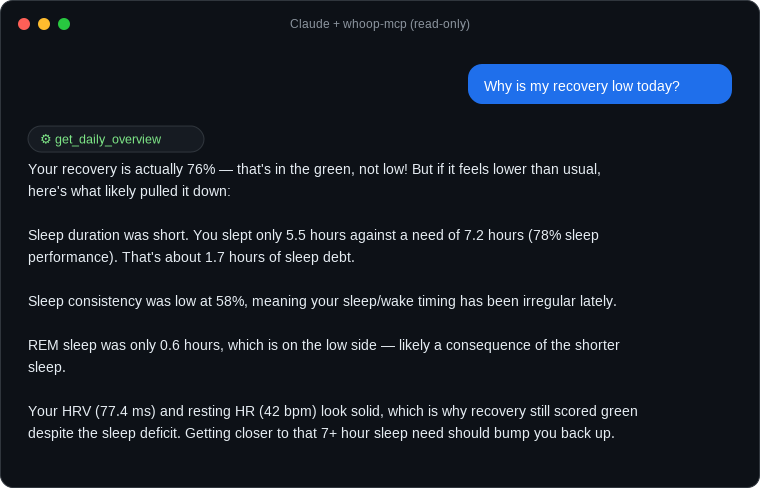
A real answer from real WHOOP data, recorded with npm run demo.
"How did I sleep last night, and why is my recovery only 41% today?" "Compare my HRV and resting heart rate over the last 30 days." "How many runs did I do this month, and what was my average strain?" "Do I recover worse after days with strain above 15?"


(Run the one-time auth step before or after installing.)
Why this server
- Read-only, enforced. It requests only WHOOP's
read:*scopes. The HTTP client can only sendGET, a test fails the build otherwise, and every tool carriesreadOnlyHint: true. - Answers whole questions in one call.
get_daily_overviewreturns a day's recovery, sleep, naps, strain and workouts together.get_trendsreturns averages, ranges and recovery zones over up to 90 days. - Model-friendly output. It returns compact JSON with hours, km, kcal and local times instead of milliseconds and kilojoules, which saves tokens and avoids conversion mistakes. Pass
raw: truefor WHOOP's original objects. - Your tokens stay on your machine. Your own WHOOP developer app, a
0600token file, and safe handling of WHOOP's rotating refresh tokens. No third-party servers. - Current API. It's built on the WHOOP Developer API v2.
- Tested. Unit, MCP integration, end-to-end and packaging tests run on Linux, macOS and Windows with Node 20, 22 and 24.
Quick start
You need Node.js 20.11+ and a WHOOP membership.
1. Create a WHOOP developer app (2 minutes)
- Open the WHOOP Developer Dashboard and create a team if prompted.
- Create an app:
- Scopes: select all the
read:*scopes (recovery, cycles, workout, sleep, profile, body measurement). - Redirect URI:
http://localhost:8787/callback
- Scopes: select all the
- Copy the Client ID and Client Secret.
2. Connect your WHOOP account
npx -y @oryanomer/whoop-mcp auth
Paste your Client ID and Client Secret when asked. The secret isn't echoed, so it stays out of your screen and shell history. Your browser then opens WHOOP's consent page. When you approve, the tokens are saved to ~/.config/whoop-mcp/tokens.json and refreshed automatically from then on.
(For scripts, you can set WHOOP_CLIENT_ID and WHOOP_CLIENT_SECRET in the environment instead of answering the prompts.)
By connecting, you agree to the Terms of Use (EULA) and to WHOOP's API Terms of Use. See the Privacy Policy for how your data is handled.
3. Add it to your MCP client
Claude Code
As a plugin (recommended). Adds the server plus a /whoop:auth skill that walks you through connecting:
/plugin marketplace add oryanomer1/whoop-mcp
/plugin install whoop@whoop-mcp
Or just the MCP server:
claude mcp add whoop --scope user -- npx -y @oryanomer/whoop-mcp
Use one or the other, not both, or you'll see every tool twice.
Claude Desktop
One click: download whoop-mcp-<version>.mcpb from the latest release and double-click it (or drag it onto Claude Desktop's Settings → Extensions page).
Or by hand: open Settings → Developer → Edit Config, and add:
{
  "mcpServers": {
    "whoop": {
      "command": "npx",
      "args": ["-y", "@oryanomer/whoop-mcp"]
    }
  }
}
Restart Claude Desktop. On Windows, if the server doesn't start, use "command": "cmd" and "args": ["/c", "npx", "-y", "@oryanomer/whoop-mcp"].
Cursor
Click the Install in Cursor button above, or add this to ~/.cursor/mcp.json:
{
  "mcpServers": {
    "whoop": {
      "command": "npx",
      "args": ["-y", "@oryanomer/whoop-mcp"]
    }
  }
}
VS Code (GitHub Copilot)
Click the Install in VS Code button above, or add this to .vscode/mcp.json (or your user mcp.json):
{
  "servers": {
    "whoop": {
      "type": "stdio",
      "command": "npx",
      "args": ["-y", "@oryanomer/whoop-mcp"]
    }
  }
}
Windsurf
Add this to ~/.codeium/windsurf/mcp_config.json:
{
  "mcpServers": {
    "whoop": {
      "command": "npx",
      "args": ["-y", "@oryanomer/whoop-mcp"]
    }
  }
}
OpenAI Codex CLI
Add this to ~/.codex/config.toml:
[mcp_servers.whoop]
command = "npx"
args = ["-y", "@oryanomer/whoop-mcp"]
Docker
Run auth on the host first (step 2), then mount the token directory:
docker build -t whoop-mcp https://github.com/oryanomer1/whoop-mcp.git
docker run -i --rm -v ~/.config/whoop-mcp:/home/node/.config/whoop-mcp whoop-mcp
Use the docker run command as the stdio command in your MCP client.
Any other MCP client
Run npx -y @oryanomer/whoop-mcp as a stdio server. No environment variables are needed: the client ID and secret are stored with your tokens during auth.
Then ask: "Give me my WHOOP overview for today."
Tools
| Tool | What it returns |
|---|---|
get_daily_overview | One day's recovery, sleep, naps, strain, calories and workouts (defaults to today) |
get_trends | Day-by-day table plus avg/min/max for recovery, HRV, resting HR, strain, sleep and more, over 1–90 days |
get_profile | Name, email, height, weight, max heart rate |
list_cycles / get_cycle | Physiological days: strain, calories, average/max heart rate, steps |
list_recoveries | Recovery %, HRV (RMSSD), resting heart rate, SpO2, skin temperature |
list_sleeps / get_sleep | Sleep performance, efficiency, consistency, stages, disturbances, respiratory rate, sleep need |
list_workouts / get_workout | Sport, duration, strain, heart rate, calories, distance, time in heart-rate zones (filterable by sport) |
List tools accept start / end (YYYY-MM-DD or ISO date-time), a days shortcut, limit (up to 200, with automatic pagination) and next_token. See the tool reference for every parameter and example outputs.
Configuration
| Variable | Default | Purpose |
|---|---|---|
WHOOP_CLIENT_ID | from token file | Your app's client ID (auth asks if unset) |
WHOOP_CLIENT_SECRET | from token file | Your app's client secret (auth asks, without echoing, if unset) |
WHOOP_REDIRECT_URI | http://localhost:8787/callback | Must exactly match a redirect URI registered on your app |
WHOOP_TOKEN_PATH | ~/.config/whoop-mcp/tokens.json | Where credentials are stored. Must be absolute (~/ is expanded). Honours XDG_CONFIG_HOME. |
whoop-mcp            Start the MCP server on stdio (what your MCP client runs)
whoop-mcp auth       Connect your WHOOP account (opens your browser)
whoop-mcp status     Check the stored connection
whoop-mcp logout     Delete the locally stored tokens
whoop-mcp --version
All commands run via npx -y @oryanomer/whoop-mcp <command>, or install globally with npm install -g @oryanomer/whoop-mcp.
Privacy and security
Read the full Privacy Policy. In short:
- whoop-mcp talks only to
api.prod.whoop.com. There is no telemetry and no intermediary server. - Tokens and your client secret live in one file that only your user can read (
0600). They are never logged or returned by tools. - Your MCP client sends tool results to its language model. Health data you ask about is shared with that model provider under its terms, so use a client and provider you trust.
- To disconnect, run
whoop-mcp logoutto delete the local tokens. To revoke access completely, delete the app or rotate its secret in the WHOOP Developer Dashboard.
The full threat model is in SECURITY.md. Please report vulnerabilities privately through GitHub security advisories.
How authentication works
- WHOOP access tokens last one hour. whoop-mcp refreshes them about a minute before they expire, and again if WHOOP returns a 401.
- WHOOP issues a new refresh token on every refresh and rejects concurrent refreshes. whoop-mcp refreshes one request at a time, takes a lock file so several clients on one machine (e.g. Claude Desktop and Claude Code) never refresh at once, and writes new tokens atomically. If a write fails, the new tokens stay in memory, so a full disk can't log you out.
- Rate limits (429), WHOOP server errors, timeouts (30s per request) and network errors are retried with backoff, honouring
Retry-After. Cancelling a request in your client stops its WHOOP calls.
Troubleshooting
| Symptom | Fix |
|---|---|
WHOOP's sign-in page shows 400 Bad Request: Request Header Or Cookie Too Large | Your browser has too many whoop.com cookies. Copy the link that auth prints into a private/incognito window, or clear cookies for whoop.com, then try again. |
| WHOOP shows an error about the redirect URI | The redirect URI on your WHOOP app must match WHOOP_REDIRECT_URI exactly, including http://, the port and /callback, with no trailing slash or spaces. |
Port 8787 is in use | Register another URI on your app (e.g. http://localhost:9876/callback) and run auth with WHOOP_REDIRECT_URI set to it. |
Tool error Not connected to WHOOP | Run the auth step. If your client runs as a different user or with a different HOME, set WHOOP_TOKEN_PATH in the client config to your token file. |
Tool error WHOOP rejected the refresh token | Run auth again. This happens if the app's secret was rotated, access was revoked, or the token file was copied to another machine and used there. Run auth on each machine instead of copying tokens. |
Tool error 403 ... missing a scope | Enable all read:* scopes on your WHOOP app, then run auth again. |
Values missing, score_state: PENDING_SCORE | WHOOP hasn't finished scoring that sleep, recovery or workout. Ask again later. |
| The server doesn't appear in the client | Run npx -y @oryanomer/whoop-mcp --version in a terminal to check Node and npx, then restart the client. The first start downloads the package and can take a few seconds. |
Check the connection at any time:
npx -y @oryanomer/whoop-mcp status
Uninstall
npx -y @oryanomer/whoop-mcp logout
Then remove the whoop entry from your MCP client's config, and delete the app in the WHOOP Developer Dashboard if you no longer need it.
Contributing
Issues and pull requests are welcome; see CONTRIBUTING.md. The one hard rule: whoop-mcp stays read-only. Release notes are in CHANGELOG.md.
Legal
- License: MIT © Oryan Omer
- Terms of use (EULA): EULA.md. By installing or using whoop-mcp you agree to these terms.
- Privacy policy: PRIVACY.md
- Security policy: SECURITY.md
This is an unofficial project, not affiliated with or endorsed by WHOOP, Inc. "WHOOP" is a trademark of WHOOP, Inc. Nothing here is medical advice.