
Popcraft
AI video, images, music & SFX: Seedance 2.5, Veo 3.1, Kling 3.0, Nano Banana Pro, 20+ models.
One address for any MCP client. You sign in once, after adding it.
What it does
- Reads
- Writes
- High impact
At most: creates or changes data: records, files, settings.
What it costs
FreeOdel charges nothing per call. The publisher may charge for its own service.
Tools
None listed · checked 28 Sep 2026Odel could not list its tools without signing in.




Docs & one-click setup · Models · Pricing · Recipes
https://popcraft.ai/api/mcp
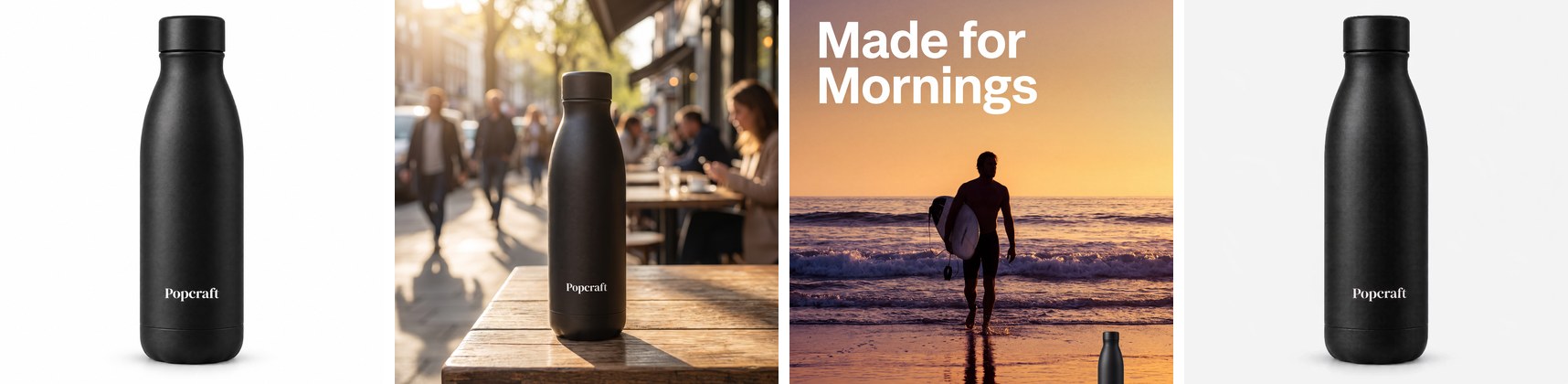
One product photo in, a whole listing out — packshot, lifestyle scene, campaign poster and product loop, generated through the connector in recipe 04.
Quick start
Every client connects the same endpoint; only the "add server" step differs. The first tool call opens the Popcraft sign-in in your browser — press Allow once and the connection stays live with automatic token refresh. New accounts get 100 free credits.
| Client | Setup | Guide |
|---|---|---|
| Claude (web / desktop) | Settings → Connectors → Add custom connector → name Popcraft → paste the URL → Connect → Allow | clients/claude.md |
| Claude Code | claude mcp add --transport http popcraft https://popcraft.ai/api/mcp then /mcp → popcraft → Authenticate | clients/claude-code.md |
| Cursor | Add to ~/.cursor/mcp.json (below), enable popcraft in MCP settings, sign in on first use | clients/cursor.md |
| ChatGPT | Settings → Apps & Connectors → Advanced → Developer mode on → Create → name Popcraft → paste the URL | clients/chatgpt.md |
| Codex | Paste: "Help me connect the Popcraft MCP at https://popcraft.ai/api/mcp — add it as a streamable HTTP server named popcraft, then walk me through the sign-in." | clients/codex.md |
| Anything else (OpenClaw, Hermes, your own agent) | Streamable HTTP + OAuth 2.1 with discovery metadata and dynamic client registration — the URL alone is enough | clients/other.md |
Cursor config snippet
{
  "mcpServers": {
    "popcraft": {
      "url": "https://popcraft.ai/api/mcp"
    }
  }
}
Try it
Paste any of these into a fresh chat once the connector is on:
Use the Popcraft MCP to make a 10-second cinematic product teaser — preview the credit cost first.
Make me a 15-second vertical UGC ad for my product on Popcraft — hook people in the first second. (loads the
ugc-adskill)
I need a YouTube thumbnail for my video about why cheap mechanical keyboards beat expensive ones — make it pop, using Popcraft. (loads the
thumbnail-proskill)
Shoot a brand image set for the citrus soda — hero can, lifestyle scene, pattern tile — then voice a 15-second tagline.
What your agent gets
| Group | Tools | What they do |
|---|---|---|
| Create | popcraft_generate_videopopcraft_generate_imagepopcraft_generate_audiopopcraft_generate_3dpopcraft_effects_showpopcraft_list_voices | Text-to-video, image-to-video, first/last frame, reference- and audio-driven video Every frontier image model, edits with references TTS, sound effects, music 3D generation Curated video effects Playable voice samples |
| Enhance | popcraft_upscale_imagepopcraft_upscale_videopopcraft_upgrade_videopopcraft_postprocess_3d | Topaz 2×/4×, nine modes 2×/4× with fps control Re-render a Seedance 2.5 draft at 1080p 3D post-processing |
| Media & references | popcraft_media_uploadpopcraft_media_import_urlpopcraft_media_upload_widgetpopcraft_media_upload_inlinepopcraft_media_confirmpopcraft_show_mediaspopcraft_show_elements | Signed direct upload — shell recipes, so a 200 MB reference streams from disk, not through the context window Any public URL → reference Interactive file picker Small files without a shell Verify an upload landed Your media library Reusable characters and styles |
| Jobs & catalog | popcraft_models_explorepopcraft_job_displaypopcraft_show_generationspopcraft_projects | Capabilities, reference limits, aspect ratios, durations and credit costs per model Result cards that refresh themselves — no polling loops Revisit and chain past results File results into projects |
| Skills | popcraft_get_workflow_instructionspopcraft_get_workflow_bundle_file | Production playbooks served live from the server — see below Per-step reference modules |
| Account | popcraft_balancepopcraft_show_plans_and_creditspopcraft_transactions | Credits and plan before spending Plans and one-click top-up Every charge and refund |
Skills, served live
Ask for a deliverable rather than an asset and the agent loads the matching production recipe before it generates anything. Nothing to install, nothing to paste.
ugc-ad— one vertical 9:16 creator-style ad, up to 15 s, with speech and sound rendered natively in the clip.
intake → creator identity → script → storyboard → realism pass → cost preview → one Seedance 2.0 clip → QAthumbnail-pro— click-optimised YouTube / Instagram thumbnails with an identity lock for your own face.
16 concept frameworks → one intake question → 11-block prompt → parallel variants → micro-edits → 4K upscaleh3-product-ad— minimalist, typography-led product ad on Hailuo 3, 5–15 s, with a native score.
intake → copy → three anchor photos → storyboard → cost preview → one generation → QAvoiceover— narration that does not sound like TTS: voice lock, words-per-second budget, per-line direction.
script rewrite → voice pick → line-by-line delivery tagssd25-prompting/sd25-prompting-zh— ByteDance's official Seedance 2.5 prompt optimizer, served verbatim (English and Chinese editions); compiles your brief and references into one submission-ready prompt.gpt-image-25-prompting/h3-prompting— model-specific prompt formats for GPT Image 2.5 (change-vs-preserve structure) and Hailuo 3 (structured format with sound and speech fields).
Cost preview on every spend
Every generate tool accepts get_cost: true and returns the exact credit price without submitting anything. Rates come from popcraft_models_explore; the numbers below are as of 2026-09-25 and apply before plan discounts.
| Video model | Credits / second (720p) | Image model | Credits / image |
|---|---|---|---|
| Seedance 2.0 Mini | 14 | Seedream 4.0 | 5 |
| Seedance 2.0 Fast | 20 | GPT Image 2.5 Fast | 10 |
| Seedance 2.0 | 26 | GPT Image 2.5 | 11 |
| Seedance 2.5 · 480p draft | 42 · 24 | Nano Banana 2 | 15 |
| Veo 3.1 Fast · Veo 3.1 | 15 · 58 | Nano Banana Pro · 4K | 20 · 35 |
| Kling 3.0 Omni | 16 | ||
| Wan 3.0 · Hailuo 3 | 20 |
Pro and Max include a daily Seedance 2.0 Fast & Mini allowance at no credit cost, and Nano Banana / Seedream images are unlimited from Plus upward — see unlimited-ai-video and pricing.
How a good agent run looks
- Pick the model —
popcraft_models_explore: read itsreference_limits, thevideo_input/image_input/audio_inputenvelope, durations and aspect ratios. - Get references in —
popcraft_media_import_urlfor anything with a public URL; otherwisepopcraft_media_uploadand run the returned shell recipe (curl -T file "<proxy_upload_url>"). Pre-check each file against the envelope — an out-of-envelope reference is rejected, or worse, wastes credits. - Bind references in the prompt with the model's tokens —
Image 1,Video 1,Audio 1for the Seedance family;<Picture 1>for Hailuo 3. - Preview, then spend —
get_cost: true, show the number, then generate. The result card refreshes itself; do not poll in a loop. - Chain — any result URL is a valid
medias[].valuefor the next call: upscale it, animate it, edit it.
Recipes
Each recipe is a complete run — the tool calls, the prompts and the outputs, shown inline.
| # | Recipe | What you get |
|---|---|---|
| 01 | UGC ad from one product photo | The ugc-ad skill end to end, one real run: locked creator → script → storyboard → first frame → a 15 s Seedance 2.0 clip with native speech |
| 02 | Thumbnail with identity lock | thumbnail-pro with your own face held constant across variants |
| 03 | Seedance 2.5 single take | Timestamped shot list, 480p draft, then popcraft_upgrade_video to 1080p |
| 04 | Product image set with an exact wordmark | Packshot → lifestyle → background swap → poster → product loop, with the brand's exact wordmark |
| 05 | Batch product images | N products × K scenes in one loop, with consistency rules and cost math |
FAQ
Does it need a paid plan?
No. The connector works on the free tier (100 credits on sign-up). Some premium models are reserved for paid plans; the agent gets a clear message and can pick an alternative from the catalogue.Where do generations go?
Into your Popcraft account. Everything made over MCP appears in your web-app history for editing on the Canvas, upscaling or downloading;popcraft_show_generations lists them inside the chat.
How long does a job take?
Images a minute or two (Midjourney longer); video a few minutes depending on model and length. Jobs are asynchronous — the agent gets a job id instantly and the card updates when the result lands.Can I use my own images, video or audio as references?
Yes — viapopcraft_media_import_url for public URLs or the popcraft_media_upload shell recipe for local files. Generated results chain directly too.
What about real people in references?
The Seedance 2.0 family runs a real-person verification on reference media before generating; a reference that fails (typically a recognisable public figure) is rejected before any charge.
popcraft.ai/mcp · Models · Pricing · Unlimited
MIT licence — see LICENSE. Model names belong to their owners.





