Listed from the MCP registry; nobody on Odel publishes it.

stackhint
Recommends MCP servers, plugins and skills for a repo, from what is actually in it.
Runs on your machine from its package; the steps are below.
What it does
- Reads
- Writes
- High impact
At most: creates or changes data: records, files, settings.
What it costs
FreeOdel charges nothing per call. The publisher may charge for its own service.
Runs locally over stdio
This server isn't hosted — your MCP client launches it from a package registry. Use one of the commands below, or drop the config into your client (e.g. Claude Desktop).
Distributed as an MCP bundle (`https://github.com/Protemir/stackhint/releases/download/v0.2.1/stackhint-0.2.1.mcpb`) — download it and import the bundle in your MCP client.


Which MCP servers, plugins and skills does your repo actually need? stackhint looks at the project and at what Claude Code and Codex already have set up, then tells you, pointing at the file that made it think so. It can also add a server for you, after showing the exact change.
It runs locally, has no dependencies and sends nothing anywhere.
Try it in any project (Node.js 20+, nothing to install):
npx -y github:Protemir/stackhint recommend
Or add it to Claude Code and ask "which MCP servers would help here?":
/plugin marketplace add Protemir/stackhint
/plugin install stackhint@stackhint
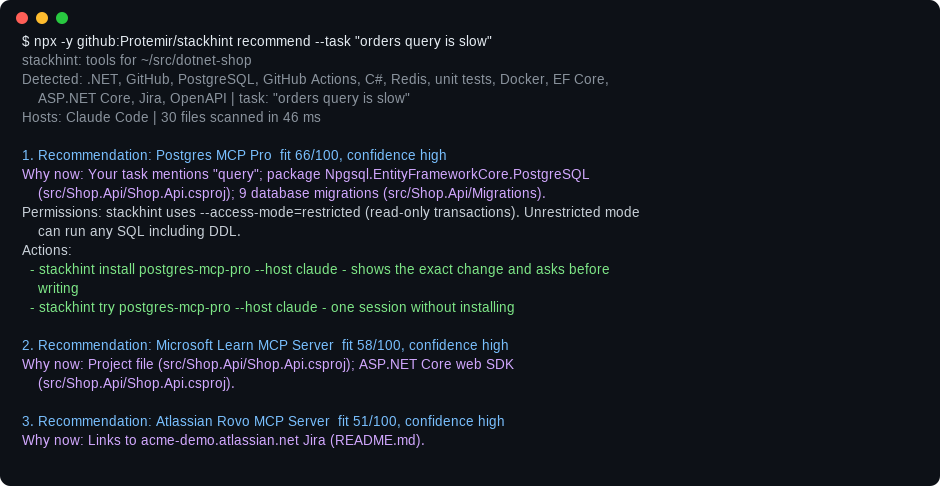
That is the real output on examples/dotnet-shop, a small ASP.NET Core API (npm run demo reproduces it). Every line in "Why now" points at a file; a README that only says "we might try Kubernetes one day" gets no Kubernetes suggestion.
What it reads: manifests (*.csproj, package.json, pyproject.toml, go.mod, Cargo.toml, Gradle, Composer, Gemfile), compose files, Kubernetes and Terraform files, CI, .env.example key names, README links and git history, plus your Claude Code and Codex configs. It knows 143 tools (MCP servers, plugins, skills, CLIs), checked by hand against the vendors' docs, including the retired ones, so stackhint check can tell you what to replace.
Why I built it
There are thousands of MCP servers, and a good share of the "top 10" lists still point at servers that were archived in 2025. The reference Postgres server, for example, has a known read-only bypass and no fixes. I wanted something that looks at my repo, knows what I already have configured in Claude Code and Codex, and tells me what is worth adding and what to replace, without sending my code anywhere and without touching my config behind my back.
How it compares to what exists:
- Anthropic's
claude-code-setupplugin has Claude itself look at the codebase and suggest automations. It is good, but it works only in Claude Code, costs tokens on every run, doesn't check what you already have, and doesn't install anything. - MCP Advisor and MCP Compass search MCP directories from a natural-language query. They don't look at your project.
- stackhint is deterministic and local. It covers Claude Code and Codex, knows your existing setup, keeps a hand-checked registry with exact install commands and read-only defaults, and handles installs with a diff, a backup and a rollback.
Install
stackhint needs Node.js 20 or newer. It has no runtime dependencies.
Run it without installing (downloads from GitHub):
npx -y github:Protemir/stackhint recommend
Or install the command globally:
npm install -g github:Protemir/stackhint
Claude Code
The plugin adds a stackhint skill, so Claude can answer "which MCP servers would help here?", and a quiet session-start hint (see Proactive mode).
/plugin marketplace add Protemir/stackhint
/plugin install stackhint@stackhint
From a shell: claude plugin marketplace add Protemir/stackhint and then claude plugin install stackhint@stackhint.
Codex
Codex reads the same repository as a plugin marketplace:
codex plugin marketplace add Protemir/stackhint
Then install stackhint from /plugins. Codex asks you to approve plugin hooks in /hooks before they run.
Claude Desktop
Download stackhint-<version>.mcpb from the latest release and open it: Claude Desktop installs it as an extension. Pass the project folder as path when you ask for recommendations. The same server is in the official MCP Registry as io.github.Protemir/stackhint.
Without plugins: MCP server
stackhint can also run as a read-only MCP server with five tools (recommend_tools, explain_tool, search_tools, tooling_status, plan_install). It can never install anything; plan_install only shows the plan and the command for you to run.
stackhint setup claude # or: stackhint setup codex
setup shows what it will add (an MCP server entry and the skill file) and asks first. To do it by hand:
claude mcp add --scope user stackhint -- npx -y github:Protemir/stackhint mcp
codex mcp add stackhint -- npx -y github:Protemir/stackhint mcp
Commands
| Command | What it does |
|---|---|
stackhint scan [path] | Shows what it detected and the evidence for each signal |
stackhint recommend [path] | Ranked suggestions. --task "..." for task-specific advice, --host claude|codex, --all |
stackhint explain <id> | Why, what it can access, setup, the exact JSON/TOML it would add, and the vendor's own command |
stackhint install <id> --host <h> | Shows the plan and diff, asks, then applies. --dry-run, --scope user|project|local, --access read|write, --param k=v |
stackhint try <id> --host <h> | Starts a server for one session without changing any config |
stackhint status | What is configured for Claude Code and Codex |
stackhint check | Reviews it: archived servers, secrets written into config, write access where read-only exists, duplicates. --strict exits 1 on problems (useful in CI) |
stackhint registry search <words> | Searches the local registry. --remote also queries the official MCP Registry (opt-in) |
stackhint dismiss <id> | Never suggest again. --for 14d to snooze, --project for this repo only |
stackhint rollback [id] | Lists installs made by stackhint, or undoes one |
stackhint config ... | show, get <key>, set <key> <value> |
stackhint doctor | Checks Node, config files, host CLIs and common problems |
stackhint mcp | Runs the read-only MCP server over stdio |
Every command takes --format text|md|json. Exit codes: 0 ok, 1 error, 2 usage error, 3 not approved, 4 blocked.
What it looks at
- Package manifests:
*.csproj,Directory.Packages.props,package.json,requirements*.txt(alsorequirements/folders and UTF-16 files),pyproject.toml(Poetry, uv, PDM),Pipfile,go.mod(direct requirements only),Cargo.toml,pom.xml,build.gradle(.kts), Gradle version catalogs,composer.json,Gemfile,pubspec.yaml, Prisma schemas. - Infrastructure: Dockerfiles, compose files (service images like
postgres:17), Kubernetes manifests, Helm charts, Argo CD and Flux objects, Terraform providers, Pulumi, Bicep, CDK, and the configs of Wrangler, Vercel, Netlify, Fly.io, Render, Railway, Heroku, DigitalOcean, Firebase and Supabase. - Frameworks and engines: Angular, Svelte, Nuxt, Astro, Next.js, Expo, Flutter, Shopify apps and themes, Laravel, Storybook, Nx, shadcn/ui, Xcode, Unity, Unreal, browser extensions, browser games (three.js, Phaser, Pixi) and plain pages with scripts.
- CI: GitHub Actions, GitLab CI, Azure Pipelines, CircleCI, Jenkins, Buildkite, Bitbucket.
- APIs and tests: OpenAPI files,
.httpfiles, Postman collections, protobuf, GraphQL, Playwright/Cypress/Jest/Vitest/pytest configs. - Settings files:
appsettings*.jsonconnection strings and.env.examplekey names, only to learn which database or service is used. Values are never stored or printed. - Links in README/CONTRIBUTING: Jira, Confluence, Linear, Asana, monday.com, ClickUp, Figma, Notion.
- Git: remote hosts, branch names, recent commit subjects (local
git log). Issue keys likeSHOP-123suggest Jira; 8+ commits with the same shape ("add migration ...") suggest a skill. - MCP servers your team already configured for VS Code or Cursor (
.vscode/mcp.json,.cursor/mcp.json). - Your task, if you pass one. English and Russian keywords both work.
A project that merely mentions a technology in prose does not get a recommendation for it. Signals carry a strength, and most entries need concrete evidence (requiresAny).
How ranking works
Each registry entry lists the signals that make it relevant, with a weight. The score is:
fit   = relevance × (0.55 + 0.25 × value + 0.2 × immediacy) × compatibility × overlap
score = 100 × (fit − setup cost − risk), clamped to 0..100
- relevance combines matching signals (noisy-OR of weight × strength);
- value comes from the registry's estimate of time saved and how often you'd use it;
- immediacy is higher when the evidence comes from your task;
- overlap goes down when an equivalent tool is already set up (a CLI like
ghcounts partially); - setup cost covers effort, auth and missing prerequisites; risk covers write/admin access, community or preview status and incomplete metadata.
These numbers are editorial estimates, not measurements, and stackhint says so in its output. Confidence (high/medium/low) reflects how strong the evidence is and whether compatibility and metadata are verified. stackhint explain <id> prints the full breakdown.
What it knows about your setup
Claude Code: ~/.claude.json (user scope and per-project local scope), the project .mcp.json, approvals in .claude/settings*.json, enabled plugins and the MCP servers they bundle, skills and commands, and an admin-managed managed-mcp.json.
Codex: ~/.codex/config.toml (or $CODEX_HOME), a trusted project's .codex/config.toml, enabled plugins, and skills in ~/.agents/skills, .agents/skills and ~/.codex/skills.
It reports each tool as configured, disabled, not configured, incompatible or unknown (for example when a config file can't be parsed). "Configured" means it is in the config. stackhint does not claim a server is running unless you ask it to verify with the host's CLI (install --verify).
Installing safely
Installing changes your configuration, so stackhint follows the same steps every time:
- It builds a plan: the official source, the scope, the exact diff or command, permissions, auth, network access, required environment variables (by name only) and side effects.
- It asks. Without a terminal it refuses unless you pass
--yes.--dry-runnever asks and never writes. - Before writing, it checks the file hasn't changed since the plan was made, and saves a backup.
- It writes atomically, then parses the result back and checks the new server is there. If anything is off, the original is restored.
- For Codex it can confirm with
codex mcp get. For Claude Code,--verifyrunsclaude mcp get. - It prints the undo command.
stackhint rollback <id>restores the file byte-for-byte, or runsclaude mcp remove. If you edited the file after the install, rollback refuses unless you pass--force.
Where it writes:
| Host | Scope | How |
|---|---|---|
| Claude Code | project | merges into .mcp.json (usually committed; Claude asks each person to approve it) |
| Claude Code | local (default), user | runs claude mcp add, because ~/.claude.json is rewritten by Claude Code all the time |
| Codex | user (default) | appends one [mcp_servers.<name>] table to ~/.codex/config.toml, leaving the rest byte-for-byte |
| Codex | project | appends to .codex/config.toml (Codex reads it only in trusted projects) |
Rules it follows:
- Read-only variants are the default where the vendor offers one (
X-MCP-Readonlyfor GitHub,--access-mode=restrictedfor Postgres MCP Pro,--read-onlyfor Kubernetes,read_only=truefor Supabase, and so on). Use--access writeto opt out. - Secrets are referenced by environment variable name only:
${VAR}in Claude Code configs,bearer_token_env_varandenv_varsin Codex. stackhint never asks for a token and never writes one. - Package versions are pinned where they could be checked (for example
kubernetes-mcp-server@0.0.67). - It never runs remote scripts, never installs packages and never changes anything else. Plugins, skills and CLIs are shown as steps (Claude Code plugins can be installed through
claude plugin installafter you confirm). - On native Windows,
npxservers are wrapped incmd /c, as both clients require. - It won't install archived or deprecated entries, won't overwrite a server with the same name, and won't touch Claude Code when an admin-managed MCP config is active.
Proactive hints
The plugin installs two hooks. What they do depends on mode:
| Mode | Session start | Each prompt |
|---|---|---|
manual | nothing | nothing |
balanced (default) | up to 2 high-confidence suggestions, at most once a day per project | nothing |
proactive | up to 3 suggestions plus a one-line visible notice | if the prompt starts a new kind of task (a PR review, a slow query) and a missing tool fits, one suggestion |
Suggestions go into the agent's context, with the instruction to mention them only when relevant and never to install anything itself. The same item is not repeated for 14 days, dismissed items never come back, and a new dependency in the project can break through the daily limit. The prompt hook keeps the prompt in memory only; it is never written anywhere.
stackhint config set mode manual       # turn hints off
stackhint config set mode proactive    # more hints
Limitations, honestly:
- Neither client has a background notification API, so "proactive" means session-start and prompt hooks. There is no file watcher.
- Hook suggestions reach the model, not you directly (except the one-line notice in proactive mode). Whether it mentions them depends on the conversation.
- Codex requires you to approve hooks in
/hooksbefore they run.
Privacy
- Only files that a detector needs are read, with size limits and a time budget.
.env,.env.local, private keys,secrets.jsonandappsettings.*secret*are never opened. - Connection strings, tokens and URLs with credentials are never stored or printed; evidence names the file and the kind of finding, not the value. All output, the audit log and errors pass through redaction.
- No network access by default.
registry search --remotequeries the official MCP Registry only afterstackhint config set network true, and caches results for 24 hours. git logruns locally to read commit subjects. Turn it off withstackhint config set gitHistory false.- State lives in
~/.stackhint(or$STACKHINT_HOME):config.json,state.json(dismissals and cooldowns, keyed by a hash of the project path),audit.log,backups/.
The registry
registry/registry.json has 143 entries: 120 recommendable tools (89 MCP servers, 28 plugins, 2 CLIs, 1 skill) and 23 deprecated or archived ones that stackhint detects in your config so it can suggest the replacement. Every URL, package name, flag and plugin id was checked against the vendor's repository or docs on the date in verifiedAt (October 2026). Effort, time saved and frequency are my estimates.
It covers source control (GitHub, GitLab, Azure DevOps), issue trackers (Jira/Confluence, Linear), databases (Postgres, MySQL, SQL Server, ClickHouse, MongoDB, Redis, Supabase, Neon, Firebase), containers and infrastructure (Kubernetes, Docker, Terraform, Argo CD, Flux), clouds (AWS, Azure, Google Cloud, Cloudflare, Vercel), docs (Context7, Microsoft Learn, DeepWiki), CI (CircleCI, Buildkite, Jenkins), quality (SonarQube, Semgrep, Snyk), observability (Sentry, Grafana), design (Figma), payments (Stripe), browser testing (Playwright, Chrome DevTools), Claude Code LSP and review plugins, and project skills for repeated workflows.
Adding your own tools
Put a JSON file in ~/.stackhint/registry.d/ (or point STACKHINT_REGISTRY at one). Custom entries are validated just like built-in ones, are always treated as community-maintained, and can override a built-in entry with the same id.
{
  "entries": [
    {
      "id": "team-db",
      "name": "Our analytics DB server",
      "kind": "mcp",
      "category": "database",
      "description": "Read-only access to the analytics warehouse.",
      "docs": "https://wiki.example.com/mcp/analytics",
      "status": "active",
      "triggers": [{ "signal": "db:clickhouse", "weight": 0.8 }, { "signal": "task:db", "weight": 0.6 }],
      "requiresAny": ["db:clickhouse"],
      "problem": "Analysts paste query results into the chat by hand.",
      "workflow": "Ask the agent to check yesterday's event counts.",
      "benefits": ["Schema and SELECT queries"],
      "access": { "level": "read", "summary": "SELECT only", "readOnlyAvailable": true },
      "auth": { "type": "oauth", "detail": "Company SSO" },
      "hosts": { "claude": { "support": "yes" }, "codex": { "support": "yes" } },
      "install": { "serverName": "analytics", "readOnly": { "transport": "http", "url": "https://mcp.example.com/analytics" } },
      "match": { "urls": ["mcp.example.com/analytics"] }
    }
  ]
}
Validation rejects entries that could be abused: shell metacharacters or quotes in arguments, interpreters and downloaders as commands (bash, curl, powershell, node...), privileged Docker flags and host mounts, plain-HTTP URLs (except localhost), literal secrets in headers, env or arguments, and text that tries to instruct the agent ("ignore previous instructions", fake </system> tags). Missing metadata is filled with cautious defaults (unknown access is treated as write) and lowers confidence.
stackhint scan shows the signal ids found in a project; the full set the analyzer can produce lives in src/context/ (packages.ts, analyzer.ts, task.ts). To add a built-in tool, open a pull request with the entry plus the sources you checked; npm test verifies that every trigger is a signal the analyzer emits, that install specs render valid JSON and TOML for both hosts, and that plugin ids exist in the official marketplace.
Configuration
stackhint config show prints the current values. Keys:
| Key | Default | Meaning |
|---|---|---|
mode | balanced | manual, balanced or proactive (see above) |
minScore | 30 | lowest score recommend shows |
hookMinScore.balanced / .proactive | 50 / 40 | lowest score for hook suggestions |
hookMaxItems.balanced / .proactive | 2 / 3 | suggestions per hook run |
itemCooldownDays | 14 | don't repeat the same suggestion sooner |
projectCooldownHours | 24 | at most one session-start batch per project in this window |
network | false | allow registry search --remote |
gitHistory | true | read recent commit subjects with git log |
Environment variables: STACKHINT_HOME (state folder), STACKHINT_REGISTRY (extra registry files, separated by your OS path delimiter), CLAUDE_CONFIG_DIR and CODEX_HOME (respected like the clients do), NO_COLOR.
Architecture
src/
  context/    project analyzer: file walk with budgets, manifest parsers, git, task keywords -> signals
  registry/   registry loading and validation, search, opt-in official MCP Registry client
  hosts/      read-only adapters: Claude Code and Codex configs, plugins, skills, PATH -> inventory
  engine/     ranking (recommend.ts) and configuration review (check.ts); pure functions
  install/    spec resolution, planning, applying with backup/validation, rollback
  hooks/      SessionStart and UserPromptSubmit hooks
  mcp/        minimal stdio MCP server (read-only tools)
  render/     text, Markdown and JSON output
  state/      config, dismissals, cooldowns, audit log
  cli.ts, commands.ts
The engine knows nothing about host config formats; adapters turn configs into a common inventory and the install module turns a registry spec into Claude JSON or Codex TOML. TypeScript is compiled by stripping types with Node's built-in stripper (scripts/build.mjs), so there are no runtime or build dependencies; CI checks that the committed dist/ matches the sources.
Development
npm install          # TypeScript and @types/node, for type checking only
npm run typecheck
npm run lint
npm test             # 300+ tests: node --test on the TypeScript sources (Node 22.18+)
npm run build        # writes dist/
npm run test:dist    # smoke tests on the built JavaScript (works on Node 20)
The tests run in throwaway sandboxes (fake home, Claude and Codex config dirs) and cover detection, ranking, duplicate detection, config merging, approval enforcement, dry runs, rollback, redaction, malicious registry entries, network failures, hooks and the MCP protocol. CI also runs the real claude and codex CLIs against configs written by stackhint (tests/host-real.test.ts).
Troubleshooting
- "No terminal to confirm in": you ran
installfrom a script or an agent. Run it in a terminal, or pass--yesonce you've read the plan. - "Claude Code CLI not found on PATH": user and local scopes need
claude. Use--scope project, or run the printed command yourself. - A server shows "Failed to connect": check that the environment variables listed in the plan are set in the shell that starts the client, and that
npx/uvx/dockercan download packages. - Codex ignores
.codex/config.toml: Codex reads project config only in trusted projects. - Codex times out starting a server on first run: stackhint sets
startup_timeout_sec = 60for package-runner servers; raise it if downloads are slow. - Something looks wrong:
stackhint doctor, then open an issue with the output ofstackhint scan --format json(it contains no secrets, but read it before sharing).
Uninstall
- Undo installs:
stackhint rollbacklists them;stackhint rollback <id>reverts one. - Claude Code plugin:
/plugin uninstall stackhint@stackhintand/plugin marketplace remove stackhint. - Codex plugin: remove it in
/plugins, thencodex plugin marketplace remove stackhint. - MCP server registered by
setup:claude mcp remove stackhint --scope useror delete[mcp_servers.stackhint]from~/.codex/config.toml; the skill lives in~/.claude/skills/stackhintor~/.agents/skills/stackhint. - Global command:
npm uninstall -g stackhint. - State: delete
~/.stackhint.
Limitations
- The registry is curated by hand and checked in October 2026. Vendors change endpoints and flags;
verifiedAttells you how old a fact is, andcheckflags known deprecations. - Detection is heuristic. It reads the files that commonly reveal a stack; unusual layouts may be missed (
stackhint scanshows what it found). - Scores are estimates. They are useful for ordering, not as a measure of time saved.
- stackhint does not install packages, plugins or CLIs itself (Claude Code plugins go through
claude plugin installafter you confirm). - Codex support was verified against the docs and the Codex CLI in CI; I use Claude Code daily on Windows, so that path has had more real use.
License
MIT. If stackhint saved you some time, a star on GitHub helps other people find it.







