Listed from the MCP registry; nobody on Odel publishes it.

Covate
Learning sidebar for AI coding assistants: quizzes on your changes, debug memory, term explanations
Runs on your machine from its package; the steps are below.
What it does
- Reads
- Writes
- High impact
At most: creates or changes data: records, files, settings.
What it costs
FreeOdel charges nothing per call. The publisher may charge for its own service.
Runs locally over stdio
This server isn't hosted — your MCP client launches it from a package registry. Use one of the commands below, or drop the config into your client (e.g. Claude Desktop).
Run
docker run -i --rm ghcr.io/sunflowerslwtech/covate:1.2.0
MCP client config
{
  "mcpServers": {
    "covate": {
      "command": "docker",
      "args": [
        "run",
        "-i",
        "--rm",
        "ghcr.io/sunflowerslwtech/covate:1.2.0"
      ]
    }
  }
} Covate
A context-aware Model Context Protocol (MCP) server that acts as a learning sidecar for AI coding assistants. It helps developers learn from AI-generated code changes through interactive quizzes and provides agents with a persistent project-specific debugging memory.





🌐 Resources
| Resource | Description |
|---|---|
| Glama MCP Marketplace | Official MCP server listing with installation guides |
| DeepWiki Documentation | AI-generated deep analysis of the codebase |
| GitHub Repository | Source code, issues, and contributions |
🚀 Why Use This?
| For | Benefit |
|---|---|
| Developers | Don't just accept AI code—understand it. Request a quiz to verify your grasp of the logic, security, or performance implications. |
| AI Agents | Stop solving the same bug twice. The server quietly records debugging solutions and retrieves them automatically when similar errors occur. |
☁️ Covate learning ledger (free)
The MCP server in this repo is free and open-source (MIT) — run it locally, no account required.
The optional hosted learning ledger is free too: sign in with
GitHub, then run COVATE_SYNC_URL=https://covate.org COVATE_SYNC_TOKEN=<your token> python -m covate.platform_sync from a project to push your local sessions up and review them in a browser:
- ☁️ Sync your learning sessions from any machine
- 📖 Every synced session, newest first, with its score
- 📊 Totals — sessions, questions, correct answers, running accuracy
- 🎯 The topics you answer worst, ranked
- 🔑 Your sync token — reveal or rotate it whenever you want
Not built yet, so not promised: progress-over-time charts, spaced-repetition study plans, team accounts. There is no paid tier and nothing to buy — the MCP works fully without the ledger, and the ledger costs nothing.
🔁 Spaced review (local, offline)
covate review keeps a small local ledger of concepts and when to ask about them again. It
never talks to the network or to a model; your own agent writes the questions and publishes
the page (for example with the FoldRender command line).
covate review page questions.json -o page.html   # questions -> a quiz page (answers marked)
foldrender publish page.html                      # your agent publishes it
foldrender answers <page> --json | covate review record   # score the first answers
covate review due                                 # what to ask about again today
covate review status                              # every concept + first-answer accuracy
Only the first pick on each question counts, so changing an answer after seeing the
explanation cannot raise the score. (FoldRender shows the explanation during its few-second
undo window, so an answer you take back inside that window does not count; one you leave
alone does.) A new concept comes back after 1 day, then 7, then 30
days; a wrong answer sends it back to the 1-day step; passing all three means mastered.
The ledger lives in the global Covate storage (override with COVATE_REVIEW_LEDGER).
questions.json is {"title": ..., "questions": [{"concept", "question", "options": [...], "correct": <0-based index>, "explanation"?}]}.
In Claude Code, add the marketplace, then install covate for /covate:review and
/covate:review-record, which walk your agent through the steps above (no hooks, no server,
nothing runs unless you call it), and covate-mcp for the MCP server:
/plugin marketplace add SunflowersLwtech/covate
/plugin install covate@covate
/plugin install covate-mcp@covate
covate is the one listed in Anthropic's plugin directory; covate-mcp is only in this
marketplace, because the directory accepts servers that run on your computer only from
organizations it has verified.
Installed covate@covate before 12 November 2026? It no longer includes the MCP server, and
updating drops it without a message: run /plugin install covate-mcp@covate to keep it. Its
tools are now named under plugin:covate-mcp:covate, so add any saved permission rules again.
📦 Available Tools
| Tool | Type | Description |
|---|---|---|
learning_session | 🎓 Interactive | Opens a WebUI quiz based on recent code changes. Blocks until user completes learning. |
debug_search | 🔍 Silent RAG | Searches project debug history for relevant past solutions. Auto-triggered on errors. |
debug_record | 📝 Silent | Records debugging experiences to project knowledge base. Auto-triggered after fixes. |
term_get | 📚 Reference | Fetches programming terms/concepts. Tracks shown terms to avoid repetition. |
Tool Details
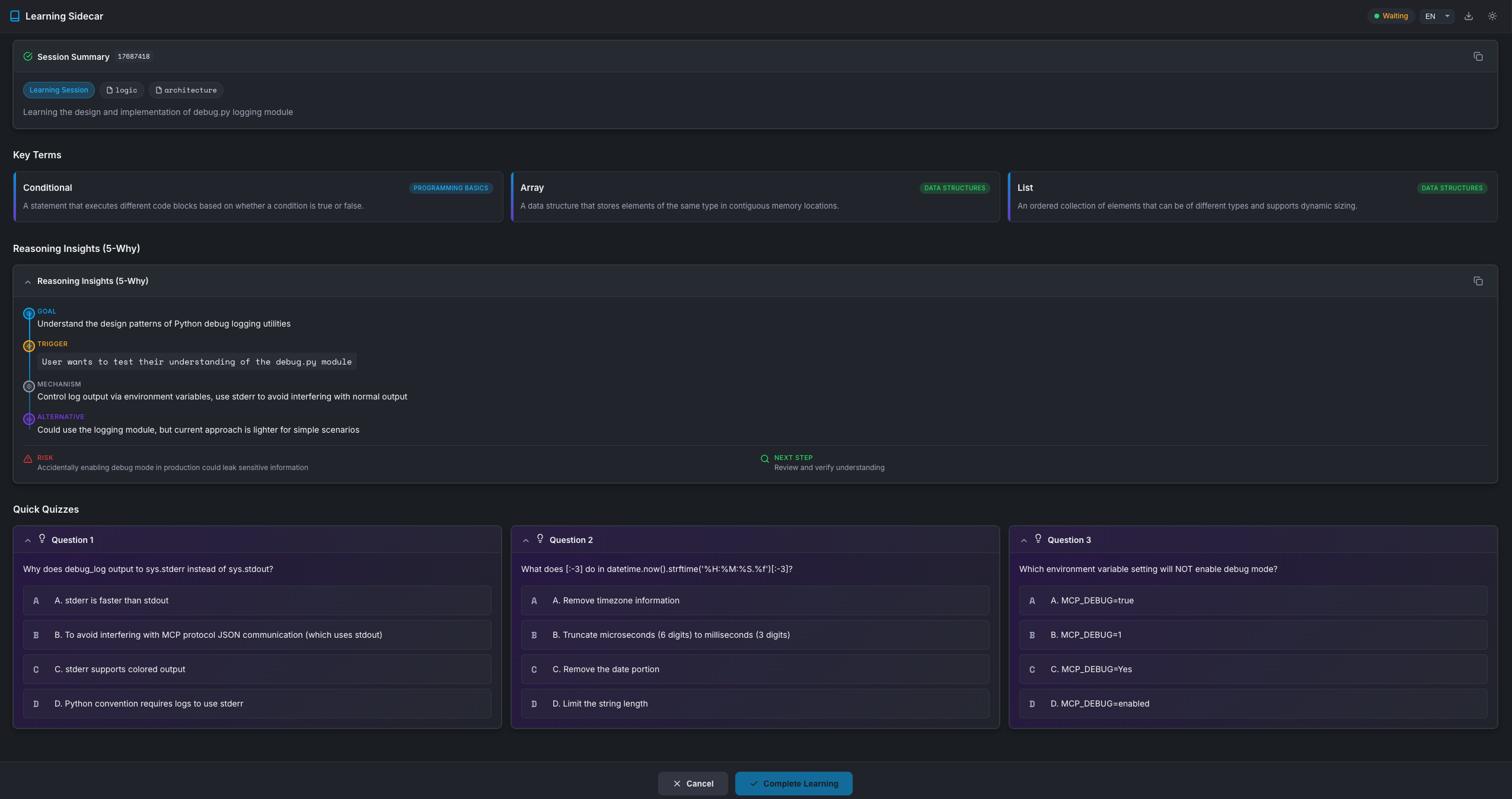
🎓 learning_session - Interactive Learning Card
Trigger: User explicitly requests (e.g., "Quiz me", "Test my understanding")
Parameters:
| Parameter | Type | Default | Description |
|---|---|---|---|
project_directory | string | "." | Project directory path |
summary | string | — | Structured summary of Agent's actions |
reasoning | object | null | 5-Why reasoning (goal, trigger, mechanism, alternatives, risks) |
quizzes | array | auto-generated | 3 quiz questions with options, answer, explanation |
focus_areas | array | ["logic"] | Focus areas: logic, security, performance, architecture, syntax |
timeout | int | 600 | Timeout in seconds (60-7200) |
Returns: {"status": "completed", "action": "HALT_GENERATION"}
🔍 debug_search - Search Debug History
Trigger: Auto-called when encountering errors (silent, no UI)
Parameters:
| Parameter | Type | Default | Description |
|---|---|---|---|
query | string | — | Error message or description to search |
project_directory | string | "." | Project directory path |
error_type | string | null | Filter by error type (e.g., ImportError) |
tags | array | null | Filter by tags |
limit | int | 5 | Maximum results (1-20) |
Returns: {"results": [...], "count": N}
📝 debug_record - Record Debug Experience
Trigger: Auto-called after fixing bugs (silent, background)
Parameters:
| Parameter | Type | Default | Description |
|---|---|---|---|
context | object | — | Error context: {error_type, error_message, file, line} |
cause | string | — | Root cause analysis |
solution | string | — | Solution that worked |
project_directory | string | "." | Project directory path |
tags | array | null | Tags for categorization |
Returns: {"ok": true, "id": "..."}
📚 term_get - Get Programming Terms
Available Domains: programming_basics, data_structures, algorithms, software_design, web_development, version_control, testing, security, databases, devops
Parameters:
| Parameter | Type | Default | Description |
|---|---|---|---|
project_directory | string | "." | Project directory path |
count | int | 3 | Number of terms (1-5) |
domain | string | null | Filter by domain |
Returns: {"terms": [...], "count": N, "remaining": N}
🛠️ Installation
One-Line Install (Recommended)
| Platform | Command |
|---|---|
| macOS / Linux |
bash |
| Windows (PowerShell) |
powershell |
The installer will:
- Auto-detect your Python environment (uv → conda → venv)
- Clone the repository to
~/covate - Create virtual environment and install dependencies
- Print the exact command to configure your IDE
Manual Installation
Click to expand manual installation steps
Prerequisites: Python 3.11+ or uv
# 1. Clone the repository
git clone https://github.com/SunflowersLwtech/covate.git
cd covate

# 2. Create virtual environment and install
# Using uv (recommended)
uv venv --python 3.11 covate
source covate/bin/activate          # macOS/Linux
# covate\Scripts\activate           # Windows
uv pip install -e '.[dev]'

# Or using standard venv
python -m venv covate
source covate/bin/activate           # macOS/Linux
# covate\Scripts\activate            # Windows
pip install -e '.[dev]'
Docker Installation
Click to expand Docker installation steps
Prerequisites: Docker installed on your system
# 1. Pull from Docker Hub
docker pull sunflowerslwtech/covate:latest

# Or build locally
git clone https://github.com/SunflowersLwtech/covate.git
cd covate
docker build -t covate .

# 2. Run with Docker
docker run -i covate

# 3. Or use Docker Compose
docker-compose up -d
For detailed Docker usage, persistent storage, and Claude Desktop integration, see DOCKER.md.
⚙️ IDE Configuration
Claude Code (CLI) — One Command Setup
After installation, configure your AI coding IDE to use this MCP server.
Claude Code
Option 1: CLI (Recommended)
# macOS / Linux
claude mcp add covate -- ~/covate/covate/bin/covate

# Windows
claude mcp add covate -- %USERPROFILE%\covate\covate\Scripts\covate.exe
Option 2: Config File
Add to ~/.claude.json:
{
  "mcpServers": {
    "covate": {
      "command": "~/covate/covate/bin/covate"
    }
  }
}
For Windows:
{
  "mcpServers": {
    "covate": {
      "command": "C:\\Users\\YourName\\covate\\covate\\Scripts\\covate.exe"
    }
  }
}
Example paths:
- Unix (uv):
~/covate/covate/bin/covate - Windows (uv):
C:\\Users\\YourName\\covate\\covate\\Scripts\\covate.exe - Windows (conda):
C:\\Users\\YourName\\anaconda3\\envs\\covate\\Scripts\\covate.exe
Path breakdown (Unix example):
~/covate→ repository directorycovate→ virtual environment directory created by uv/venvbin/covate→ executable
Cursor
Add to Cursor MCP settings (Settings → MCP → Add Server):
{
  "covate": {
    "command": "~/covate/covate/bin/covate"
  }
}
For Windows:
{
  "covate": {
    "command": "C:\\Users\\YourName\\covate\\covate\\Scripts\\covate.exe"
  }
}
Windsurf
Add to ~/.codeium/windsurf/mcp_config.json:
{
  "mcpServers": {
    "covate": {
      "command": "~/covate/covate/bin/covate"
    }
  }
}
Docker Configuration
To use Docker with any MCP-compatible IDE:
{
  "mcpServers": {
    "covate": {
      "command": "docker",
      "args": [
        "run",
        "-i",
        "--rm",
        "-v",
        "/path/to/your/project:/workspace",
        "-w",
        "/workspace",
        "covate"
      ]
    }
  }
}
See DOCKER.md for detailed Docker configuration examples for Claude Desktop, Cursor, and other IDEs.
Other IDEs
For any MCP-compatible IDE, use these settings:
- Command:
<install-path>/covate/bin/covate(orcovate\Scripts\covate.exeon Windows) - Transport: stdio
After configuration, restart your IDE.
Usage
Available Tools
| Tool | Trigger | For | Returns |
|---|---|---|---|
learning_session | User explicit request | User | {status, action} - minimal |
debug_search | Automatic (on error) | Agent | Compact summaries |
debug_record | Automatic (after fix) | Agent | {ok, id} - minimal |
For Users: Learning Session
Say to your AI assistant:
- "Quiz me on this change"
- "Test my understanding"
- "Help me learn about what you did"
The agent will create an interactive learning card and wait until you complete it.
Note: Quiz scores are saved locally for your self-tracking but are NOT returned to the agent - this keeps the context clean.
For Agents: Debug Tools
The debug tools work silently in the background:
- Search first: When encountering errors, agent searches past solutions
- Record after: When fixing errors, agent records the solution
- Progressive disclosure: Returns compact summaries, not full records
- Fast lookups: Uses inverted index for keyword-based searches
Updating
One-Line Update (Recommended)
The remote update script automatically detects your installation and works with any path format (including Chinese/non-ASCII paths):
| macOS / Linux |
bash |
| Windows (PowerShell) |
powershell |
The update script will:
- Auto-detect your installation location (supports multiple installations)
- Pull the latest changes from the repository
- Force-reinstall dependencies to ensure version synchronization
- Verify installation integrity and report any issues
- Detect if MCP server is in use and provide clear instructions
Why remote update?
- ✅ Works with Chinese/non-ASCII paths without
cdnavigation- ✅ Always uses the latest update logic from the repository
- ✅ Auto-detects installation location even if you forgot where it is
- ✅ Handles multiple installations gracefully
Local Update (Alternative)
macOS / Linux:
~/covate/scripts/update.sh
Windows (PowerShell):
~\covate\scripts\update.ps1
Manual Update
Click to expand manual update steps
# Navigate to installation directory
cd ~/covate  # or your custom installation path

# Pull latest changes
git pull origin main

# Update dependencies
# Using uv
source covate/bin/activate          # macOS/Linux
# covate\Scripts\activate           # Windows
uv pip install -e '.[dev]' --upgrade

# Or using standard venv
source covate/bin/activate           # macOS/Linux
# covate\Scripts\activate            # Windows
pip install -e '.[dev]' --upgrade
🖼️ Screenshots
Learning Session WebUI
🔒 Security & Privacy
| Aspect | Details |
|---|---|
| Local First | All data stored in .mcp-sidecar/ directory within your project |
| No Telemetry | Zero data sent to external servers |
| Full Control | Delete .mcp-sidecar/ anytime to reset all data |
🔮 Roadmap
We're building toward a Personalized Learning Center that grows with you. Here's what's coming:
🔍 Advanced Search & Indexing (v1.3)
| Feature | Description |
|---|---|
| SQLite FTS5 | Full-text search with Chinese support, prefix matching, and boolean queries |
| BM25 Ranking | Industry-standard relevance scoring for better search results |
| Semantic Search | Vector embeddings for meaning-based matching (e.g., "权限错误" finds "permission denied") |
| Cross-project Search | Search debug experiences across all your projects |
📱 Mobile App (v2.0)
| Feature | Description |
|---|---|
| Learning History Sync | Access your quiz history and learning progress on mobile |
| Spaced Repetition | Smart review scheduling based on forgetting curves |
| Offline Mode | Learn anywhere, sync when connected |
| Push Notifications | Gentle reminders to review concepts you're forgetting |
🎯 Personalized Learning Center (v2.5)
| Feature | Description |
|---|---|
| Knowledge Graph | Visual map of concepts you've learned and their connections |
| Weakness Analysis | AI identifies areas where you struggle and suggests focused practice |
| Learning Streaks | Gamification to keep you motivated |
| Team Insights | (Optional) Share anonymized learning patterns with your team |
🤖 AI Enhancements (v3.0)
| Feature | Description |
|---|---|
| Adaptive Quizzes | Questions adjust difficulty based on your performance |
| Code Pattern Recognition | Learn from patterns in your own codebase |
| Multi-language Support | Explanations in your preferred language |
| Voice Interface | "Hey Claude, quiz me on what we did yesterday" |
Want to influence the roadmap? Open an issue or join the discussion!
🔧 Environment Variables
| Variable | Default | Description |
|---|---|---|
MCP_DEBUG | false | Enable debug logging (true, 1, yes, on) |
MCP_TIMEOUT | 120000 | MCP server startup timeout in ms |
MAX_MCP_OUTPUT_TOKENS | 25000 | Maximum tokens for MCP output |
🤝 Contributing
We welcome contributions! Please follow these steps:
- Fork the repository
- Create a feature branch:
git checkout -b feature/amazing-feature - Install dev dependencies:
uv pip install -e '.[dev]' - Make changes and run tests:
pytest - Submit a Pull Request
See CONTRIBUTING.md for detailed guidelines.
📬 Contact
| Channel | Address |
|---|---|
| sunflowers0607@outlook.com | |
| weiliu0607@gmail.com | |
| GitHub Issues | Open an Issue |
📄 License
This project is licensed under the MIT License.
Built with FastMCP • MCP Standard • Glama MCP