Listed from the MCP registry; nobody on Odel publishes it.

Sphior Code
Deterministic security findings + fix guidance for your AI agent. Runs locally, no account needed.
Runs on your machine from its package; the steps are below.
What it does
- Reads
- Writes
- High impact
At most: moves money, runs code or commands, deletes data, or sends messages for you.
What it costs
FreeOdel charges nothing per call. The publisher may charge for its own service.
Runs locally over stdio
This server isn't hosted — your MCP client launches it from a package registry. Use one of the commands below, or drop the config into your client (e.g. Claude Desktop).
Run
npx -y sphior-code-mcp
MCP client config
{
  "mcpServers": {
    "sphior-code": {
      "command": "npx",
      "args": [
        "-y",
        "sphior-code-mcp"
      ]
    }
  }
}Deterministic security scanning for source code — hard-coded secrets, insecure patterns mapped to CWE, and data-flow (taint) analysis — in your terminal, CI, VS Code, JetBrains IDEs and AI coding assistants. It runs entirely on your machine.
No AI in detection. No source upload. No telemetry. No account. The same code always produces the same findings.








Contents
- Try it in 10 seconds
- Where you can use it
- What it detects
- What a finding looks like
- Command line
- CI and GitHub code scanning
- Excluding paths and accepting findings
- VS Code
- JetBrains IDEs
- AI coding assistants (MCP)
- Agent skills — Claude Code, Codex, Cursor, Gemini CLI, GitHub Copilot, claude.ai
- Scan on every edit — Claude Code, Codex, Cursor
- Evidence records
- Privacy and data boundary
- What it does not do
- SPHIOR CODE on GitHub
- AI governance MCP server
- Versions
- Repository layout and building from source
Try it in 10 seconds
No install, no account, no config. Requires Node.js 18+.
npx @sphior/scan run .
In a terminal you get a table sorted by severity:
  critical app.js:4   Stripe Live Secret Key (CWE-798)
  critical app.js:6   SQL injection (untrusted input → query) (CWE-89)
  critical app.js:9   Command injection (untrusted input → shell) (CWE-78)
  high     app.js:12  XSS (untrusted input → HTML sink) (CWE-79)
  high     util.py:3  Unsafe pickle deserialization (CWE-502)
  high     util.py:5  TLS verification disabled (verify=False) (CWE-295)
  medium   util.py:2  Weak hash algorithm (CWE-327)

SPHIOR CODE: 9 findings (critical=3 high=5 medium=1 low=0) 3 files scanned engine=0.1.0 ruleset=2026.10.23-24
Piped, the same command prints SARIF instead, so npx @sphior/scan run . | jq works.
Then hand the findings to the AI assistant you already use:
claude mcp add sphior-code -- npx -y sphior-code-mcp
and ask it: "Scan this project and fix the critical issues."
Where you can use it
One detection engine, several ways in. Everything in this table runs locally and needs no account.
| Surface | Package | What you get |
|---|---|---|
| Command line | @sphior/scan | Scan a directory or a single file. Table, SARIF, JSON or AI fix context. Fails the build by severity. |
| CI | @sphior/scan | SARIF for GitHub code scanning and most CI dashboards. --fail-on gate. |
| GitHub Actions | Toraastrta/sphior-scan-action | One step: scan, job summary, Security tab, fail-on gate. |
| pre-commit | hook in this repository | Scan before every commit and stop it on serious findings. |
| VS Code (and Cursor, Windsurf, VSCodium) | sphior.sphior-code · Open VSX | Findings as you type. A quick fix that hands the finding to your AI. |
| JetBrains IDEs | plugin 33696 | The same in IntelliJ IDEA, PyCharm, WebStorm, GoLand, Rider, PhpStorm, RubyMine, CLion and others. |
| Zed | packages/sphior-zed | Findings as you type, and the MCP server for Zed's agent. Two extensions. |
| AI coding assistants | sphior-code-mcp | An MCP server. Your assistant scans the workspace and receives the location and the remediation for each finding. |
| Agent skills | plugin/skills | Four skills — fix, triage, set up CI, pre-release gate — for Claude Code, Codex, Cursor, GitHub Copilot and claude.ai. |
| Claude Code | plugin in this repository | All four skills in one install; add the MCP server with one command. |
| Cursor | plugin in this repository | The same plugin for Cursor's agent: the MCP server and all four skills. |
| Kiro | agent-plugin/ | The four skills and the MCP server as a Kiro power (Agent Plugins format). |
| Gemini CLI | extension in this repository | The MCP server and all four skills in one install. |
| Scan on every edit | guard/ | Each file your agent writes is scanned, and serious findings go straight back to it to fix. Claude Code, Codex and Cursor. |
What it detects
Ruleset 2026.11.16-25, the version shipped in @sphior/scan 0.1.11 and later, sphior-code-mcp 1.1.13 and later,
the VS Code extension 0.1.6 and later, the JetBrains plugin 0.1.3 and later, and sphior-code-guard 0.1.2 and later.
1. Hard-coded secrets — 36 rules
Provider-specific signatures plus one generic high-entropy rule.
| Providers | AWS · Anthropic · OpenAI · GitHub · GitLab · Google · Stripe (live and test) · Slack · Twilio · SendGrid · Mailchimp · Shopify · Square · DigitalOcean · Discord · Databricks · Linear · Postman · HashiCorp Vault · Grafana · Sentry · npm · PyPI · Doppler · Terraform Cloud · New Relic · SonarQube · Figma · Telegram · JWT · PEM private keys |
| Generic rule | A quoted value of 16+ characters assigned to a name such as secret, token, password, api_key or credential, with Shannon entropy ≥ 3.5 bits/char. Reported as needs_review. |
| Noise control | Published documentation examples, placeholders (your…, example, xxxx, <…>) and repeated-character values are not reported. A PEM header on its own is not reported as a private key. |
| What is kept | Never the value. A masked preview (sk_…Pq) and a SHA-256 of the match. The fingerprint is built from rule + path + that hash, so it survives line shifts. |
| Mapping | CWE-798 · OWASP A07:2021 |
Secrets are searched in every text file, not only source files. .env*, .github/ and
*.example files are deliberately scanned, because real keys end up there.
2. Insecure code patterns — 85 rules
Rules for constructs that are dangerous on their own, each mapped to a CWE and an OWASP Top 10 (2021) category.
| Language | Rules | Language | Rules |
|---|---|---|---|
| Python | 19 | Ruby | 6 |
| Java | 12 | Go | 5 |
| JavaScript / TypeScript | 13 | C# | 4 |
| PHP | 8 | Kotlin | 4 |
| C / C++ | 3 | Rust | 3 |
| SQL | 3 | Swift | 3 |
| Scala | 2 |
Covered weaknesses include OS command injection (CWE-78), SQL injection (CWE-89), code injection
and eval (CWE-94/95), XSS sinks (CWE-79), path traversal (CWE-22), SSRF (CWE-918), unsafe
deserialization (CWE-502), disabled TLS verification (CWE-295), weak hashes and ciphers (CWE-327),
insecure randomness (CWE-330), cookies without Secure (CWE-614), XXE (CWE-611), LDAP / XPath /
NoSQL injection (CWE-90 / 643 / 943), file inclusion (CWE-98), open redirect (CWE-601), header
injection (CWE-113), prototype pollution (CWE-1321), format strings (CWE-134) and buffer overflows
(CWE-120).
3. Data-flow (taint) analysis — 69 rules across 13 languages
Tracks untrusted input from where it enters to where it is used, so
db.query("… " + req.query.id) is reported as SQL injection, not as a generic string
concatenation. Flows are followed through local variables and across functions in the same
file, including calls more than one level deep.
| Language | Parser | Sinks |
|---|---|---|
| JavaScript / TypeScript | Babel AST | command · code (eval, vm, new Function, dynamic require) · SQL · XSS · SSRF · path traversal (fs, res.sendFile, res.download, through path.join / resolve) · open redirect · NoSQL · header injection · prototype pollution |
| Python | tree-sitter | code · command · SQL · SSRF · template injection · XSS · deserialization · NoSQL · XXE · XPath · LDAP · path traversal |
| PHP | tree-sitter | command · code · SQL · file inclusion · path traversal · XSS |
| Ruby | tree-sitter | command · code · SQL · SSRF · path traversal · XSS |
| C# | tree-sitter | command · SQL · SSRF · path traversal · XSS |
| Go · Java · Kotlin · Scala | tree-sitter | command · SQL · SSRF · path traversal |
| C · C++ | tree-sitter | command · path traversal · format string · buffer overflow |
| Rust · Swift | tree-sitter | command · path traversal · SSRF |
Typical sources: req.query / req.body / req.params / req.headers / req.cookies,
location.*, document.cookie, URLSearchParams.get and FormData.get in JavaScript;
request.args / request.form / request.GET in Python; $_GET / $_POST in PHP; params in
Ruby; getParameter in Java; FormValue / URL.Query() in Go; argv / getenv in C.
Taint findings are reported with confidence likely. A pattern rule and a taint rule can fire on
the same line; the AI fix context groups them into one place to fix.
Languages and parsing
| Languages | |
|---|---|
| Parsed with a real grammar | JavaScript, TypeScript, JSX, TSX (.js .jsx .ts .tsx .mjs .cjs) · Python · Go · PHP · Ruby · Java · C# · Rust · Kotlin · C · C++ · Scala · Swift |
| Pattern rules only | SQL files |
Grammars are bundled as WebAssembly, so nothing is downloaded at run time. If a file cannot be parsed, the scan falls back to the pattern rules for that file instead of skipping it.
Detection is regression-gated against a fixed corpus: a rule change that loses a detection, or that starts firing on a known-safe variant, fails the build rather than shipping.
What a finding looks like
--json out.json writes an array of findings. Keys are sorted and the order is stable
(path → line → column → kind → rule), so two runs on the same code produce byte-identical files.
{
  "rule_id": "secret.stripe.live",
  "kind": "sast_secret",
  "title": "Stripe Live Secret Key",
  "severity": "critical",
  "confidence": "confirmed",
  "cwe": "CWE-798",
  "owasp": "A07:2021",
  "provider": "Stripe",
  "masked": "sk_…Pq",
  "location": { "path": "app.js", "start_line": 4, "start_col": 21, "end_line": 4, "end_col": 73 },
  "message": "Stripe secret detected in source. Rotate it and move to a secrets manager / environment variable.",
  "remediation": "Revoke/rotate the exposed credential immediately, remove it from source (and Git history), and load it from a secrets manager or environment variable at runtime.",
  "references": ["https://cwe.mitre.org/data/definitions/798.html"],
  "fingerprint": "4b8f19ea…6e89",
  "snippet_hash": "fab5c9c9…96c7",
  "schema_version": 1
}
| Field | Values |
|---|---|
severity | critical · high · medium · low · info |
confidence | confirmed (the construct itself is the problem) · likely · needs_review |
kind | sast_secret · sast_pattern |
fingerprint | SHA-256. Stable across runs and machines, used to track the same finding over time. |
Command line
npx @sphior/scan run <dir|file> [options]

# or install it
npm install -g @sphior/scan
sphior-scan run <dir|file> [options]

# or with Homebrew
brew install toraastrta/sphior/sphior-scan
| Option | What it does |
|---|---|
--sarif <file> | Write SARIF 2.1.0. Accepted by GitHub code scanning and most CI dashboards. |
--json <file> | Write the findings as JSON. |
--fix-context <file> | Write one entry per place to fix, with remediation steps and instructions for an AI agent. Source code is not included. |
--suppressed <file> | Write the findings you accepted through .sphiorignore or inline comments, with the reason. |
--fail-on <severity> | Exit 1 if any finding is at or above critical, high, medium, low or info. |
--no-ignore-file | Ignore .sphiorignore for this run. |
Options accept --option value and --option=value; --fail-on is case-insensitive. From 0.1.8 a
mistyped option or threshold stops the run with exit 2 and says why, so a typo in CI can never
quietly turn the gate off.
Output. With none of --sarif, --json or --fix-context, results go to standard output:
a table when it is a terminal, SARIF when it is piped or redirected. A one-line summary with the
engine and ruleset versions is always written to standard error.
Exit codes.
| Code | Meaning |
|---|---|
0 | Scan completed, and nothing reached the --fail-on threshold (or no threshold was given). |
1 | At least one finding at or above --fail-on. |
2 | Nothing was scanned: the path does not exist, or an option is unknown or has an invalid value. Never reported as a clean result. |
A directory with no scannable files is reported as such, with a warning, instead of as "0 findings".
A single file. From 0.1.10 you can pass one file instead of a directory, which is what editor
and agent hooks need after each save. .sphiorignore is read from the current directory and
paths are reported relative to it, the same as a directory scan from there. A file that is skipped
(binary, over 512 KB) is reported with the reason.
What is read. Text files up to 512 KB. Files with a NUL byte in the first 8 KB are treated as
binary and skipped. Build output and fetched dependencies are skipped by directory name:
node_modules, dist, build, out, coverage, .next, .nuxt, .svelte-kit, .vercel,
.venv, venv, __pycache__, target, .gradle, vendor, Pods, .terraform, .git and
similar. .gitignore is not read.
CI and GitHub code scanning
# .github/workflows/sphior-code.yml
name: SPHIOR CODE
on: [push, pull_request]

jobs:
  scan:
    runs-on: ubuntu-latest
    permissions:
      contents: read
      security-events: write   # only needed for the upload step
    steps:
      - uses: actions/checkout@v4
      - uses: actions/setup-node@v4
        with:
          node-version: 20
      - run: npx -y @sphior/scan@0.1.11 run . --sarif sphior.sarif --fail-on high
      - uses: github/codeql-action/upload-sarif@v3
        if: always()
        with:
          sarif_file: sphior.sarif
- Pin the version (
@sphior/scan@0.1.11) so a ruleset update never changes results without a commit on your side. - Each SARIF rule carries
security-severity(9.5 / 8.0 / 5.5 / 3.0 / 1.0 for critical → info) and CWE / OWASP tags, and each result asphiorFingerprint, so GitHub ranks alerts and tracks them across commits. - Accepted findings are not written to SARIF, because GitHub code scanning ignores SARIF
suppressions and would show them as open alerts. Use
--suppressedto keep that record. - Uploading SARIF to a private repository requires GitHub Advanced Security. Without it, keep the
--fail-onstep and drop the upload.
Any other CI works the same way: run the command, read the exit code, archive the SARIF or JSON.
On GitHub, the SPHIOR CODE Security Scan
action does all of this in one step (uses: Toraastrta/sphior-scan-action@v1) and adds a job summary.
pre-commit
Scan before every commit with pre-commit. Add to .pre-commit-config.yaml:
repos:
  - repo: https://github.com/Toraastrta/sphior-code
    rev: main  # pin to a commit SHA for reproducible results
    hooks:
      - id: sphior-code
        # args: [--fail-on, critical]  # default: high
Then run pre-commit install. The hook scans the repository and lists each finding with its file,
line and fix; a finding at or above the threshold stops the commit. It needs Node.js 18 or later,
which pre-commit provides if it is not installed.
Excluding paths and accepting findings
Two different things, kept apart on purpose:
- Exclude — do not read the file at all (generated code, vendored code). No findings are produced; the summary reports how many files were excluded.
- Accept — the file is scanned and the finding is produced, then recorded as accepted with a
reason (test vectors, fixtures, a deliberate fixed input). Accepted findings move out of the
results and into
--suppressed.
.sphiorignore
Put it at the root of the scanned directory. One entry per line:
<glob> [rule_id] [# reason].
# exclude: no rule id
generated/**
third_party/

# accept one rule (or a family, with a trailing *) in a path, with a reason
test/fixtures/**   secret.*                 # fake keys used by the test suite
docs/examples.py   pattern.py.weak_hash     # shown as a bad example on purpose
**matches across directories,*and?within one. A glob without wildcards also matches everything below it.- Lines it cannot interpret are reported as warnings, never silently dropped.
Inline comments
Works with any line-comment syntax (//, #, --, ;). The marker must end the line, apart
from an optional : reason.
eval(template); // sphior-ignore: input is a constant from build time

// sphior-ignore-next-line secret.private_key: header string used in documentation
const header = "-----BEGIN RSA PRIVATE KEY-----";
A rule id is optional (without one, every finding on that line is accepted). Accepting without a reason is allowed, but the CLI counts and reports those so they can be reviewed.
VS Code
Install SPHIOR CODE from the Visual Studio Marketplace or Open VSX (for Cursor, Windsurf, VSCodium). Requires VS Code 1.85 or later. Node.js does not need to be installed separately.
- Findings appear in the editor and the Problems panel as you open and edit a file, with the
source
SPHIOR, the rule id as the code, and a link to the CWE. - Severity maps to the editor's levels: critical and high → Error, medium → Warning, low → Information.
- Each finding offers a quick fix, SPHIOR: Fix "…" with your AI. It copies a ready-to-paste prompt (finding, location, why it matters, remediation steps) to the clipboard and writes it to the SPHIOR CODE output channel.
- Because the diagnostic message already contains the remediation, the "Fix with AI" action in Copilot or Cursor works on it directly.
- Setting:
sphior.enable(defaulttrue). Reload the window after changing it.
The extension analyses the files you open. To scan the whole repository, use the
command line or the MCP server.
AI-AUTOFIX.md has rules you can give Cursor, Copilot or
Claude Code so they fix SPHIOR findings without being asked.
JetBrains IDEs
Install SPHIOR CODE from the JetBrains Marketplace. It works in every JetBrains IDE from 2024.2, because files are matched by name rather than through a language plugin.
- Requires Node.js. The plugin looks for
nodeinSPHIOR_NODE_PATH, then onPATH, then in common install locations (Homebrew,/usr/local/bin, nvm, fnm, Volta,Program Files\nodejs). If none is found, it shows a notification with a download link. - Requires LSP4IJ. The Marketplace installs it automatically.
- Findings appear in the editor with the same messages, severities and quick fix as in VS Code.
Zed
Two extensions, because Zed keeps language servers and MCP servers apart:
| Extension | What it does |
|---|---|
sphior-code-lsp | Findings in the editor as you type, in JavaScript, TypeScript, Python, Go, Rust, C, C++, PHP, Ruby, Java, Kotlin, Scala, Swift and C#. |
sphior-code-mcp-server | Connects Zed's agent to the MCP server. |
Both use Zed's own Node.js and install the scanner from npm on first use (@sphior/scan and
sphior-code-mcp), so there is nothing else to set up. Neither needs an account; the MCP server
takes an optional API key in its settings.
They are submitted to Zed's extension registry. Until they appear there, install them from a clone:
open Extensions, choose Install Dev Extension, and select packages/sphior-zed/lsp, then
packages/sphior-zed/mcp-server.
AI coding assistants (MCP)
sphior-code-mcp is a Model Context Protocol server. It lets the assistant you already use —
Claude Code, Cursor, GitHub Copilot, Windsurf, Cline, Continue, Zed, JetBrains AI Assistant —
scan your workspace and fix what it finds. SPHIOR finds; your assistant writes the fix.
Set it up
# Claude Code
claude mcp add sphior-code -- npx -y sphior-code-mcp
// Cursor (~/.cursor/mcp.json), Windsurf, Cline, Claude Desktop and others
{
  "mcpServers": {
    "sphior-code": { "command": "npx", "args": ["-y", "sphior-code-mcp"] }
  }
}
// GitHub Copilot in VS Code (.vscode/mcp.json)
{
  "servers": {
    "sphior-code": { "type": "stdio", "command": "npx", "args": ["-y", "sphior-code-mcp"] }
  }
}
It is also listed in the MCP Registry as io.github.Toraastrta/sphior-code-mcp.
What the assistant can do with no account
| Tool | What it does |
|---|---|
get_fix_context | Scans the workspace (or path) and returns one entry per place to fix. Filter with severity or a findingId. |
health_check | Reports the mode, the version and which tools need an account. |
Each entry in get_fix_context contains:
location— file and line. The code itself is not included; the assistant opens the file in your workspace.whyandremediation_steps— deterministic guidance, written per finding.also— other findings on the same line, so one edit clears all of them.masked_preview,cwe,owasp,references.agent_instructions— tells the assistant not to dismiss the finding, never to print or commit a secret value, and that a human reviews the change before merge.
Environment variables
| Variable | Default | Purpose |
|---|---|---|
SPHIOR_WORKSPACE | the directory the client started in | Directory to scan |
SPHIOR_TIMEOUT | 30000 | Scan or request timeout in ms (1000–300000) |
SPHIOR_DEBUG | off | Verbose logs to standard error |
SPHIOR_API_KEY | — | Optional. Connects to your SPHIOR account (below). |
SPHIOR_API_BASE | https://sphior.com/api/v1 | Override the account API endpoint |
With a SPHIOR account
Setting SPHIOR_API_KEY (create one under Settings → API at
sphior.com/app) adds tools that read the repositories you
connected on GitHub:
| Tool | What it does |
|---|---|
list_findings | Open or resolved findings, filtered by severity, up to 100 at a time |
get_finding | One finding in full |
get_security_summary | Open findings by severity, last scan, repositories monitored |
resolve_finding | Mark a finding as fixed, with a reason |
mark_false_positive | Mark a finding as a false positive, with a reason |
verify_evidence | Verify the scan-record chain of a repository, optionally with a downloadable evidence pack |
Keys start with sk_live_; any other value stops the server at start-up with the reason, rather
than failing later. Without a key these tools return a message explaining what they need, rather
than failing silently. The local scan never contacts SPHIOR's servers in either mode.
Agent skills
Four skills teach a coding agent how to work with SPHIOR CODE — not just how to run it, but what
to do with the result. They use the open SKILL.md format, so the same files work in Claude
Code, Codex, Cursor, GitHub Copilot and claude.ai. They live in
plugin/skills/.
| Skill | Starts when you say | What the agent does |
|---|---|---|
| fix-security-findings | "scan this project", "fix the security issues", "any hard-coded keys?" | Scans, opens each location, applies the remediation (one edit for everything in also), scans again to confirm, runs your tests, and tells you which credentials must be rotated |
| triage-security-findings | "these are false positives", "this is test data", "too many findings" | Reads each finding in context and sorts it into real / test data / false positive / not our code. Fixes the real ones; records the others in the narrowest form, always with a rule id and a reason; re-scans to prove nothing else disappeared; gives you a table to review |
| setup-security-ci | "add security scanning to CI", "block merges with secrets" | Measures the current state, agrees a --fail-on threshold with you, pins the scanner version, and writes the GitHub Actions, GitLab CI or other CI step — with SARIF upload where your repository supports it |
| pre-release-security-check | "is this ready to ship?", "check before release" | Runs one scan against fixed criteria — no exposed secrets, no open critical or high — and reports Ready or Not ready with the evidence and the versions used |
What every skill is told: never make a finding disappear without fixing it or recording a reason, never print or commit a secret, never present a clean scan as more than it is, and leave the final decision to a human before merge.
The skills get findings from the MCP server when it is installed, otherwise from the command line. Neither needs an account.
Claude Code
This repository is a Claude Code plugin marketplace. One install adds all four skills:
/plugin marketplace add Toraastrta/sphior-code
/plugin install sphior-code@sphior
The skills run the scanner through the command line (npx @sphior/scan). To give them the MCP
server as well, add it once:
claude mcp add sphior-code -- npx -y sphior-code-mcp
Cursor
This repository is also a Cursor plugin. It adds the MCP server (pinned to
sphior-code-mcp@1.1.13) and all four skills to Cursor's agent. To install it from a clone:
git clone --depth 1 https://github.com/Toraastrta/sphior-code.git ~/.sphior-code
mkdir -p ~/.cursor/plugins/local
ln -s ~/.sphior-code/plugin ~/.cursor/plugins/local/sphior-code
Then run Developer: Reload Window. The skills appear under the plugin, and Cursor asks you to
approve the MCP server plugin-sphior-code-sphior-code the first time it starts. Neither needs an
account. To update, run git -C ~/.sphior-code pull and reload.
If you only want the skills, copy them as described in the next section.
Gemini CLI
This repository is a Gemini CLI extension: the MCP server and all four skills in one install.
gemini extensions install https://github.com/Toraastrta/sphior-code
Then ask: "Scan this project for security issues and fix the critical ones." Update with
gemini extensions update sphior-code.
Kiro and other Agent Plugins hosts
agent-plugin/ is the same four skills and MCP server in the open
Agent Plugins format. In Kiro, add it as a power from GitHub with
https://github.com/Toraastrta/sphior-code/tree/main/agent-plugin.
Codex, Cursor, GitHub Copilot
With the skills CLI, one command installs them for the agents you use:
npx skills add Toraastrta/sphior-code
Or copy the skill folders into the directory your agent reads:
| Agent | In one repository | For all your projects |
|---|---|---|
| Codex | .agents/skills/ | ~/.agents/skills/ |
| Cursor | .agents/skills/ or .cursor/skills/ | ~/.agents/skills/ or ~/.cursor/skills/ |
| GitHub Copilot (VS Code agent mode, Copilot CLI) | .agents/skills/ or .github/skills/ | — |
All three read .agents/skills/, so one copy in the repository covers them all:
git clone --depth 1 https://github.com/Toraastrta/sphior-code.git /tmp/sphior-code
mkdir -p .agents/skills
cp -R /tmp/sphior-code/plugin/skills/* .agents/skills/
Restart the agent if a skill does not appear. In Codex you can also call one explicitly, for
example $pre-release-security-check. For the MCP server, see
Set it up; without it, the skills run the command line through npx.
claude.ai and Claude Desktop
- Download the skill ZIPs from the latest release.
- In Settings → Capabilities, make sure code execution is on, then under Skills choose Upload skill and upload each ZIP.
claude.ai cannot see your local files, so attach the scan output instead: run
npx @sphior/scan run . --fix-context sphior-fix.json (or --json) on your machine and add the
file to the conversation. The skill works from it.
Scan on every edit
sphior-code-guard is a separate plugin with no skills: after every file your agent writes or
edits, it scans that one file and hands anything high or critical straight back to the agent —
the line, why it matters and how to fix it. The agent fixes it before moving on, and the next edit
is scanned again. When the file is clean it says nothing.
It runs npx @sphior/scan@0.1.11 run <file> on your machine. No account, nothing uploaded. Paths
in .sphiorignore are skipped as usual. If the scanner cannot run (no Node.js, offline on first
use), the agent keeps working and you see one line saying the file was not scanned.
| Agent | When it scans | How findings reach the agent |
|---|---|---|
| Claude Code | Right after each write or edit | Returned with the tool result |
| Codex | Right after each patch | Added to the turn's context |
| Cursor | Right after each edit | Added after the tool result |
Claude Code
/plugin marketplace add Toraastrta/sphior-code
/plugin install sphior-code-guard@sphior
Codex
codex plugin marketplace add Toraastrta/sphior-code
Install sphior-code-guard from /plugins, then approve its hook in /hooks (in the app:
Settings → Hooks). Codex does not run plugin hooks until you approve them.
Cursor
git clone --depth 1 https://github.com/Toraastrta/sphior-code.git ~/.sphior-code
mkdir -p ~/.cursor/plugins/local
ln -s ~/.sphior-code/guard ~/.cursor/plugins/local/sphior-code-guard
Then run Developer: Reload Window.
Optional settings, as environment variables: SPHIOR_GUARD_FAIL_ON (critical, high — the
default — medium or low) and SPHIOR_GUARD_DISABLE=1 to turn it off.
Evidence records
packages/sphior-scan/src/engine/evidence is the
tamper-evident side of the engine, published in the open so that anyone can check a record without
trusting whoever produced it:
../canonical.ts | Canonical JSON (RFC 8785) so the same data always hashes the same |
record.ts | One scan as one record: repository, branch, commit, engine and ruleset versions, time, finding counts, scan scope, the Merkle root of the findings, and the hash of the previous record |
../scope.ts | What a scan covered and what it did not: files considered and analysed, files left out by reason, languages, and the limits applied. Recorded inside the hashed record, so the gaps are as verifiable as the findings |
merkle.ts | Merkle root over finding fingerprints, in sorted order |
chain.ts | Recompute each record hash and check the link to the previous record |
pack.ts | Evidence pack: per-file SHA-256 and a manifest hash, and the check that verifies it |
verify-rows.ts | Verify a chain from stored rows and rebuild the pack |
These are library functions exported from the engine. The CLI does not write records on its own;
the hosted service writes one per scan, and verify_evidence checks them.
Privacy and data boundary
- The scanner makes no network requests. No source upload, no telemetry, no analytics, no update check. It works with networking disabled.
- Verify it yourself.
git grep 'fetch('inpackages/sphior-scan/srcdoes return hits. All of them are either detection rules that look forfetch/axiosas an SSRF sink in your code, or builders for reference links that are printed, never requested. The same holds for the bundledserver.cjsin the published extensions. - Secret values are never stored or transmitted. Findings carry a masked preview and a hash.
- AI fix context contains no source code. Only the location, the rule, and the remediation.
- The MCP server's local scan never contacts SPHIOR. With
SPHIOR_API_KEYset, the account tools send finding identifiers and your reasons for resolving them — not source code.
What it does not do
Stated plainly, so a clean result is not read as more than it is:
- Data flow stays within one file. Untrusted input that crosses files, or passes through closures and callbacks, is not followed. The engine stays silent rather than guessing.
- It does not scan dependencies. The CLI reads source files, not lockfiles. Known-vulnerable dependencies are checked by SPHIOR CODE on GitHub.
- It is not a penetration test, and it does not see your runtime: vulnerabilities in the language runtime or in a server you deploy are invisible to a source scanner.
- It does not judge compliance. It records what it found; it does not decide whether you pass an audit.
- The editors scan open files, and the editor integrations do not read
.sphiorignore(inline comments do work there).
SPHIOR CODE on GitHub
Everything above is free, unlimited and local. The hosted service adds what a laptop cannot keep: continuous scanning of your repositories and a history that outlasts any single run.
Install the SPHIOR CODE GitHub App and it:
- scans every pull request and every push to the default branch, with no configuration;
- reviews the pull request in comments: one summary of what the PR introduces, fixes and leaves
as it was, and an inline comment on each line it added with the rule, the CWE, how to fix it and a
prompt to paste into Claude Code, Codex or Cursor.
When a later push fixes a finding or accepts it in
.sphiorignore, its thread is resolved automatically. The summary is updated in place, so a busy PR never fills up with repeated comments; - reports the result in a Check Run with line annotations. By default it fails only for Critical
or High findings that the PR itself introduces; the threshold (Critical, High, Medium or never) and
whether findings already in the code count are settings. A finding you accept goes in
.sphiorignorewith a reason, and the summary shows when a PR adds one; - checks dependencies in 8 ecosystems (npm, PyPI, Go, RubyGems, Packagist and others) against OSV advisory data, with the version to upgrade to;
- keeps a monthly ledger of dependency versions, re-checks it daily against new advisories, and alerts you when a dependency you already ship becomes vulnerable;
- marks findings resolved automatically when a later scan no longer sees them, and records the fixing commit;
- writes a chained, verifiable record of every scan (the evidence records
above), which
verify_evidenceand the API can check independently; - shows findings, dependencies and settings in the SPHIOR console, with links that open the fix in Claude Code, Cursor or Codex.
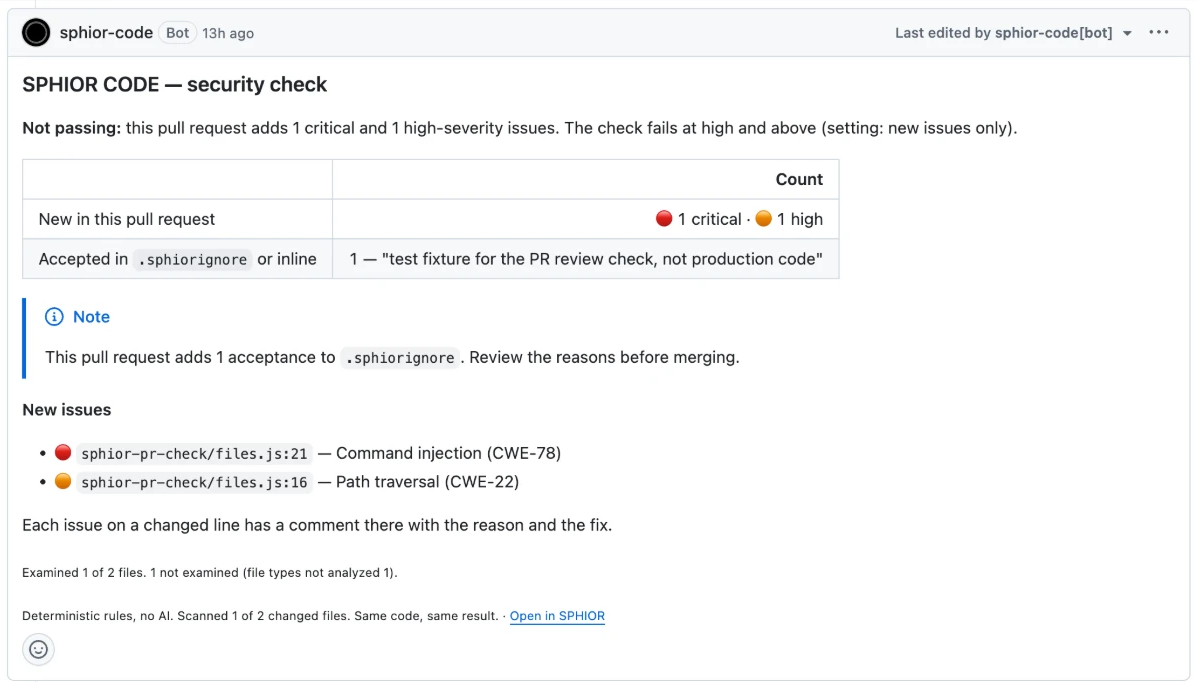
From an actual run on a test pull request: the summary, a line comment, and a thread that SPHIOR
CODE resolved on its own after the finding was accepted in .sphiorignore with a reason.
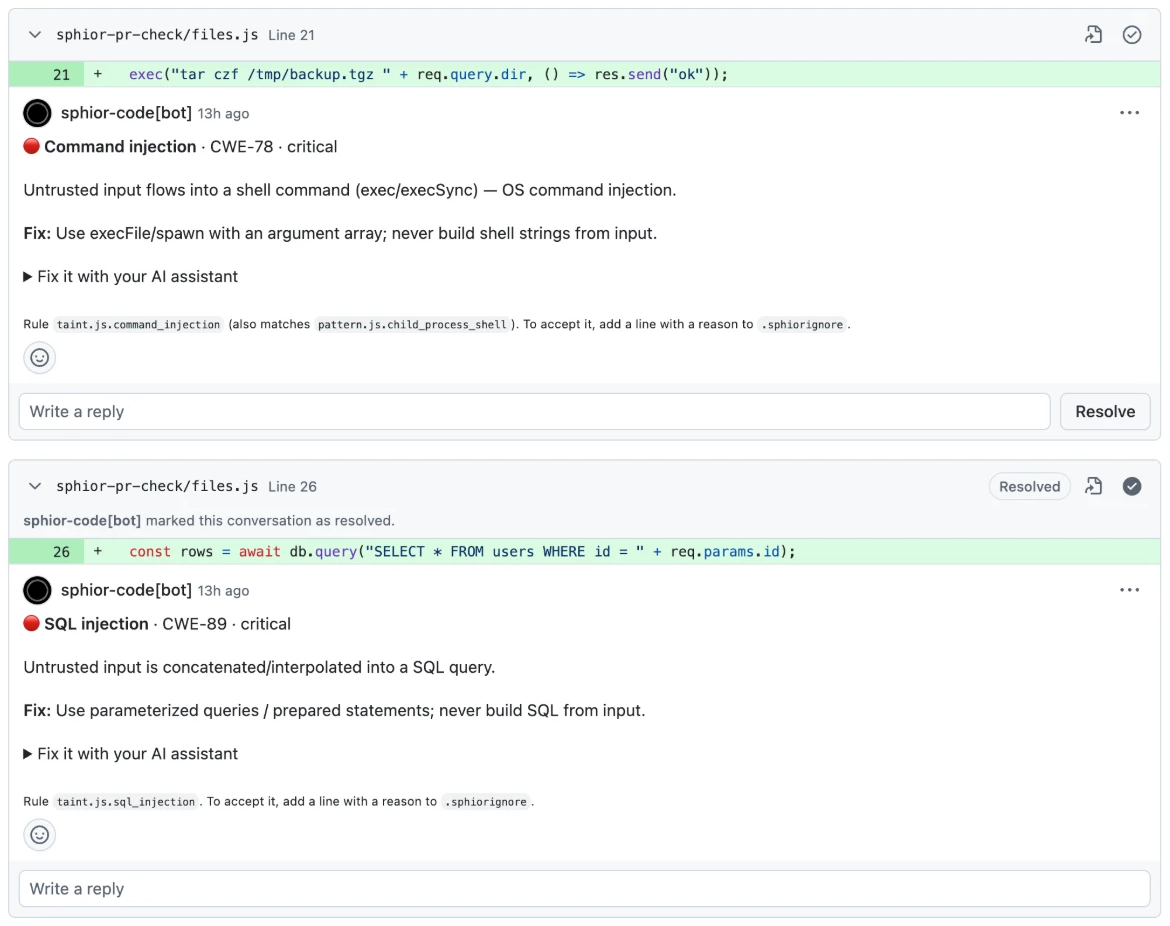
Source is read in memory during the scan and is not stored. On the hosted service, data-flow analysis currently covers JavaScript and TypeScript, and other languages are checked with the pattern rules; for the full multi-language data-flow analysis described above, also run the CLI in your CI.
The free plan includes dependency scanning. Code scanning is part of the paid plans — see sphior.com/code for current plans.
AI governance MCP server
packages/ai-governance-mcp (sphior-ai-governance-mcp, Apache-2.0)
is a separate MCP server for recording what AI agents did — actor, model, provider, policy
decision, tokens (optionally split into input, output and cache), cost, latency, trace id — as
tamper-evident evidence for ISO/IEC 42001,
the EU AI Act and SOC 2 reviews. Only hashes and metadata are kept, never prompts or outputs.
- Tools:
record_ai_execution(one event) andrecord_ai_executions(up to 200 events). - Requires
SPHIOR_AIGOV_TOKEN, created under Settings at sphior.com/app. Without it the server still starts and explains how to get one. - It records facts. It does not decide whether you comply.
See its README for setup.
Versions
| Package | Version | Ruleset bundled |
|---|---|---|
@sphior/scan (CLI, language server) | 0.1.11 | 2026.11.16-25 |
sphior-code-mcp | 1.1.13 | 2026.11.16-25 (through @sphior/scan 0.1.11) |
Claude Code / Cursor plugin and Gemini CLI extension sphior-code | 0.3.3 | four skills; the Cursor plugin also starts sphior-code-mcp@1.1.13 |
Claude Code / Codex / Cursor plugin sphior-code-guard | 0.1.2 | runs @sphior/scan@0.1.11 on each edited file |
| VS Code extension, Visual Studio Marketplace | 0.1.6 | 2026.11.16-25 |
| VS Code extension, Open VSX | 0.1.6 | 2026.11.16-25 |
| JetBrains plugin | 0.1.3 | 2026.11.16-25 |
sphior-ai-governance-mcp | 0.2.4 | — |
All surfaces run the same engine code, but each is released on its own schedule, so a surface can bundle an earlier ruleset than the CLI for a while. Every run prints its engine and ruleset versions, and every SARIF file records them, so a result can always be traced to the exact rules that produced it.
Repository layout and building from source
.claude-plugin/          Claude Code marketplace manifest
gemini-extension.json    Gemini CLI extension (MCP server pin; skills/ is a copy of plugin/skills)
plugin/                  Claude Code plugin (MCP server pin + fix-security-findings skill)
packages/
├── sphior-scan/         Detection engine + language server + CLI   (@sphior/scan)
│   ├── src/engine/        rules, taint analysis, suppression, SARIF, evidence records
│   ├── src/*-ast.ts       tree-sitter backends, registered at start-up per language
│   ├── src/interproc.ts   cross-function data-flow shared by the tree-sitter backends
│   └── src/lsp/           Language Server Protocol implementation
├── sphior-vscode/       VS Code extension   (bundles the language server)
├── sphior-jetbrains/    JetBrains plugin    (LSP4IJ + the same language server)
├── code-mcp/            MCP server          (sphior-code-mcp)
└── ai-governance-mcp/   AI governance MCP   (sphior-ai-governance-mcp)
Requires Node.js 18+.
# 1. engine + language server + CLI
cd packages/sphior-scan && npm install && npm run build
node dist/cli.js run ../../your-project

# 2a. VS Code extension (bundles the server built in step 1)
cd ../sphior-vscode && npm install && npm run build

# 2b. JetBrains plugin (JDK 21)
cd ../sphior-jetbrains && ./gradlew buildPlugin

# 3. MCP server
cd ../code-mcp && npm install && npm run build
The Gradle build copies the language server from step 1 before packaging and fails rather than bundling a stale one.
Related
@sphior/scan— engine, CLI, language serversphior-code-mcp— MCP server- SPHIOR CODE — the GitHub App and hosted history
- Issues
License
MIT — see LICENSE. packages/ai-governance-mcp is Apache-2.0.







