
Craftwire
See and drive Minecraft: Fabric client, Paper server, bots, plugin tests, profiling.
Runs on your machine from its package; the steps are below.
What it does
- Reads
- Writes
- High impact
At most: moves money, runs code or commands, deletes data, or sends messages for you.
What it costs
FreeOdel charges nothing per call. The publisher may charge for its own service.
Runs locally over stdio
This server isn't hosted — your MCP client launches it from a package registry. Use one of the commands below, or drop the config into your client (e.g. Claude Desktop).
Run
npx -y craftwire
MCP client config
{
  "mcpServers": {
    "craftwire": {
      "command": "npx",
      "args": [
        "-y",
        "craftwire"
      ]
    }
  }
}




Craftwire is an MCP server that gives AI agents eyes and hands in Minecraft. The agent takes screenshots from any angle, reads and clicks menus, chats, presses keys and reads the HUD on a Fabric client. On a Paper server it runs console commands and JavaScript against the Bukkit API, reads and edits the world, spawns bots that play like real players, and builds, deploys and restarts your plugin in one step.
It works with Claude Code, Codex, Gemini CLI, Antigravity, Cursor, Windsurf, VS Code, Claude Desktop and any other MCP client that runs local servers.
Every picture on this page was taken by Craftwire itself, through the tools below, on a throwaway test server.
What it can do
See the game from any angle
screenshot captures what the player sees, or renders from any camera pose without moving the player. Terrain behind the player is rendered too, with or without Sodium. Use it to check a build from above, frame a scene for a promo shot, or watch a test from the side.

Record promo videos
record films the client with its sound and saves an MP4 through your ffmpeg. The camera can circle a build or fly a path while the game plays on: bots walk, menus open, your plugin does its thing. Presets go from max (60 fps, near-lossless, for editing) to light (720p, small enough for Discord), and every setting can be changed on its own. See docs/video.md.
record {action:"start", savePath:"videos/castle.mp4", preset:"high", wait:true,
        camera:{action:"orbit", center:{x:120, y:70, z:-40}, radius:30, height:12, durationMs:12000}}
Read and click menus like a player
gui_read returns the open screen as data: every slot with its item, name and lore, plus buttons and text fields. gui_action hovers, clicks, drags and types. Plugin menus built from chests work like any other screen.
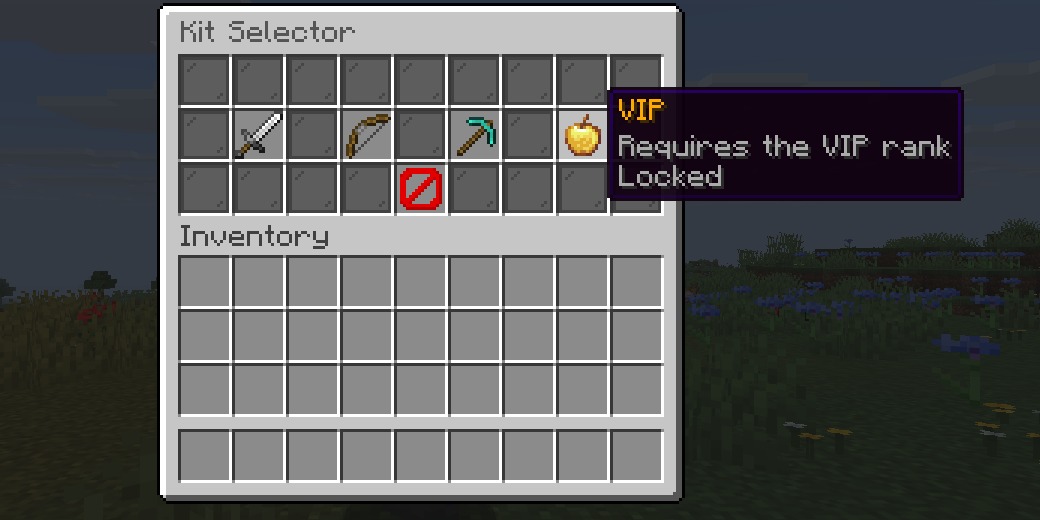
// gui_read, trimmed
{
  "open": true, "title": "Kit Selector", "type": "ContainerScreen",
  "hovered": { "slot": 16, "item": { "id": "minecraft:golden_apple", "name": "VIP", "lore": ["Requires the VIP rank", "Locked"] } },
  "slots": [
    { "slot": 14, "id": "minecraft:diamond_pickaxe", "name": "Miner", "lore": ["Efficiency V pickaxe", "Click to select", "..."] },
    { "slot": 22, "id": "minecraft:barrier", "name": "Close", "lore": [] }
  ]
}
Bots that plugins treat as players
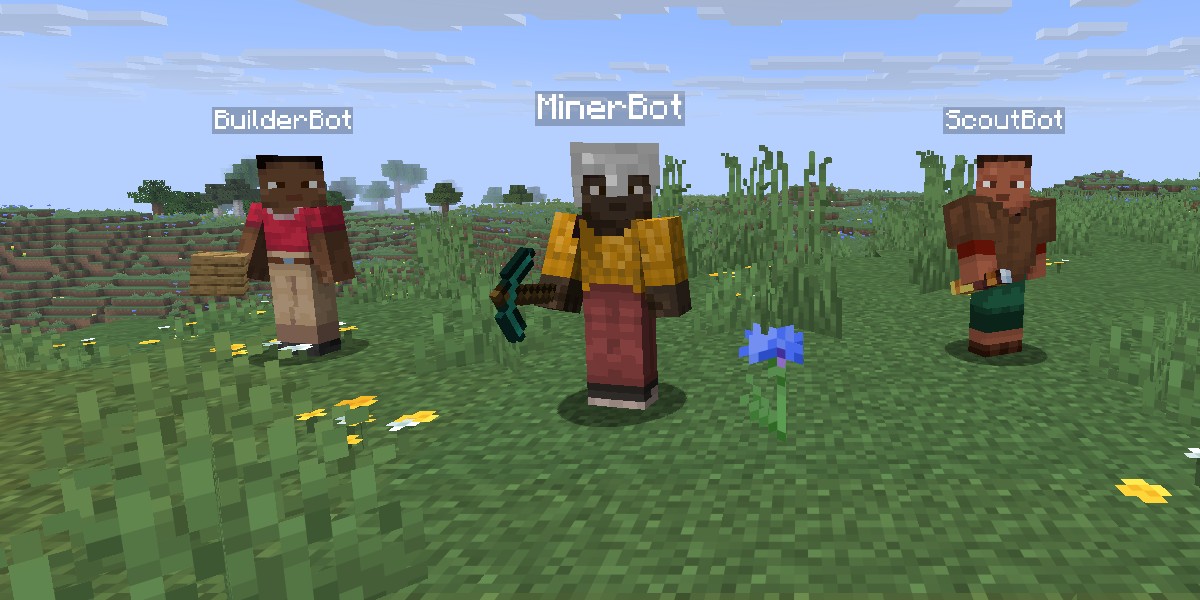
bot_spawn puts fake players on the Paper server. They join with a join event and a tab-list entry. bot_action makes them chat, run commands (and returns what the server answered), walk, look, use items, attack, break blocks, sneak, sprint, jump, drop items, open and click plugin menus, and read their own HUD (scoreboard sidebar, tab list, boss bars, titles). move_to finds a path: around walls, up steps, down drops, through doors and gates, up ladders and through water, never into lava or fire. Plugins see the same events a real client would cause, so you can test a shop, a minigame or a permission check without a second account.
On Folia the bots tick on their own region threads. Put them in far-apart regions and exceptions names the line of your plugin that touched a block or entity from the wrong thread, and the scheduler to use instead.
Drive the server and your plugin dev loop
server_commandruns console commands and returns their output.server_evalruns JavaScript with the full Bukkit API.world_queryandworld_editread and change blocks, and take snapshots you can restore.world_renderdraws a region as an image on the server, no client needed: a map from above, a floor plan at one height, or a front view, with a coordinate grid and players marked.server_processstarts, stops and restarts a local Paper server. It never accepts the EULA for you.eventsrecords every Bukkit event, your plugin's own events included: what fired, with which values, whether it ended up cancelled, and which plugins listen to it.exceptionsgroups the stack traces of the server and the clients into distinct bugs, with a count and the plugin and line to blame.plugin_deploybuilds your plugin (Gradle or Maven), swaps the jar, restarts the server and reports whether the plugin enabled and what it logged. Compiler errors come back asfile:line.
"Build my plugin, deploy it to ~/servers/test, spawn two bots, have one open /shop and buy the first item, and tell me what the plugin answered."
Find what makes the game lag
profile samples the server's tick (or a client's frame) for a few seconds and tells you whose code uses the time: each plugin or mod by name, the listener and the event it handles or the scheduler task, the hot methods, and the tick times (average, p95, the slowest ticks). Mixins count for the mod that injected them. trace then times every call of one method without changing any code (Java Flight Recorder method tracing): call counts, average and worst times, and who called it.
// profile, trimmed
{ "thread": "Server thread", "busyPercent": 31.4,
  "owners": [ { "owner": "MyShop", "kind": "plugin", "percent": 18.2 }, { "owner": "minecraft", "kind": "minecraft", "percent": 9.1 } ],
  "entryPoints": [ { "owner": "MyShop", "kind": "plugin", "method": "com.example.shop.MoveListener.onMove", "event": "PlayerMoveEvent", "percent": 17.9 } ],
  "ticks": { "count": 200, "msptAvg": 15.7, "p95": 22.3, "over50ms": 0 } }
client_eval runs JavaScript on a client, like server_eval on a server: read a mod's state or the client's, call a method, check a value no other tool shows. Its engine (GraalJS) is downloaded on first use and checked against a sha256 list.
"The server lags when players walk around. Spawn ten bots, make them walk, profile it and tell me which plugin is responsible and why."
Test your plugin with scenarios
A scenario is a plugin test written as JSON: bots run commands and click menus, and checks wait for the message, the block, the item or the event that should follow. When a check fails you get the expected and actual values plus what the bots saw, which events fired and which exceptions were logged at that moment. Run them from the AI with scenario_run, or in CI with npx craftwire test --server <dir> --junit report.xml. See docs/scenarios.md.
{ "name": "shop sells a diamond", "bots": ["Buyer"],
  "steps": [
    { "bot": "Buyer", "command": "/shop" },
    { "bot": "Buyer", "action": "gui_click", "slot": 13 },
    { "expect_message": { "bot": "Buyer", "matches": "you bought a diamond" } },
    { "expect_no_exceptions": {} } ] }
Give the AI your plugin's own tools
A plugin or mod can add its own tools through a small API (craftwire-api, no dependencies), for example myshop_coins to read a player's balance, or a tool that sets up a test auction in one call. They appear next to the built-in tools, run on the game thread, and are removed when the plugin is disabled. See docs/extensions.md.
Let the AI run its own client
You don't have to keep the game open. client_process starts a Minecraft client the hub runs itself:
- The window is hidden, the client runs in offline mode, and it joins the server that
server_processstarted. - Every client tool then works on it: screenshots, menus, input, the HUD.
- The first start downloads Minecraft and Fabric straight from Mojang and Fabric (about 250 MB, cached in
~/.craftwire/client). Later starts take about 10 seconds. modsloads extra jars next to the agent, such as the Fabric mod you are building or Sodium.- No server needed for a mod:
worldopens a singleplayer world instead, or creates one (flat,voidornormal, creative with cheats by default;replacestarts fresh every run).
The launcher is part of Craftwire: no third-party launcher, every file checked against its published sha1, and your own .minecraft is never touched. Offline mode needs a dev server with online-mode=false. You still need to own Minecraft Java Edition; this is the same model as Fabric's development client.
"Start a client, open /kits on the test server and show me what the VIP kit's tooltip looks like."
"Start a client in a fresh void world with my mod, place my machine block and show me what it looks like running."
Install
You need three parts:
- The hub, which your AI client starts. It is the
craftwirenpm package and needs Node.js 20 or newer. - The agent mod for the Minecraft client (
craftwire-agent-fabric-<version>.jar). It is a Fabric mod and needs Fabric API. - The plugin for a Paper server (
craftwire-paper-<version>.jar), if you want the server tools.
Both jars are on Releases. One jar of each runs on Minecraft 26.2 and 26.3: it picks the right code for the game it is loaded into.
1. Connect your AI client
Claude Code: plugin (hub, skills and updates in one)
/plugin marketplace add uxplima/craftwire
/plugin install craftwire@uxplima
Codex
npx craftwire setup codex
This adds [mcp_servers.craftwire] to ~/.codex/config.toml and copies the Craftwire skills to ~/.codex/skills/.
Gemini CLI
npx craftwire setup gemini
This adds craftwire to ~/.gemini/settings.json and copies the skills to ~/.gemini/skills/.
Antigravity
npx craftwire setup antigravity
This adds craftwire to ~/.gemini/config/mcp_config.json.
Cursor · Windsurf · VS Code · Claude Desktop
npx craftwire setup cursor          # ~/.cursor/mcp.json
npx craftwire setup windsurf        # ~/.codeium/windsurf/mcp_config.json
npx craftwire setup vscode          # user mcp.json (Copilot agent mode)
npx craftwire setup claude-desktop  # claude_desktop_config.json
Any other MCP client
Run it over stdio: command npx, arguments -y craftwire. On Windows use cmd /c npx -y craftwire.
npx craftwire setup with no client lists the ones it finds on your computer. Add --dry-run to see the change without writing it. Setup only touches the craftwire entry, and it backs the old file up as .bak first. Manual configs for every client are in docs/clients.md. Restart the client afterwards.
2. Add the game side
- Client: put the agent mod and Fabric API in your Fabric profile's
mods/folder and start the game. When the hub is running, a green ⚡ Craftwire connected appears in the top-left corner. F8 pauses AI control at any time. - Server: put the plugin in the Paper (or Folia) server's
plugins/folder and start it. The plugin connects to the hub on its own. The first start downloads GraalJS (forserver_eval), so it needs network access once.
Then ask your AI: "take a screenshot of what I'm looking at" or "what's the TPS, and which plugins logged errors since startup?".
One hub for several AI clients, or another machine
npx craftwire serve runs the hub as a server with MCP over HTTP: several AI clients share the same game and server, an AI on another machine can connect (--allow-remote, TLS), and --read-only gives observers only the tools that change nothing. Every request needs a bearer token. See docs/http.md.
Tools
| Area | Tools |
|---|---|
| Hub | list_instances · wait_for · get_request_status · logs · exceptions |
| Client | screenshot · record · camera · gui_read · gui_action · input · chat · hud_read · player_state · client_settings |
| Server | server_command · server_eval · world_query · world_edit · world_render · server_info · plugin_manage · events |
| Dev loop | server_process · plugin_deploy · client_process · scenario_run |
| Bots | bot_spawn · bot_action · bot_remove |
| Debugging | profile · trace · client_eval |
| CLI | npx craftwire setup · npx craftwire doctor · npx craftwire test · npx craftwire serve |
Resources: craftwire://instances, craftwire://exceptions, each game's log (craftwire://instances/<name>/log), a client's chat and a fresh screenshot, and the docs (craftwire://docs/scenarios, extensions, http, video). Prompts: test_plugin, debug_lag, write_scenario and setup.
Skills that teach the agent the workflows ship with the Claude Code plugin, and setup installs them for Codex and Gemini CLI:
craftwire: the tools in general.paper-plugin-dev: the plugin dev loop.fabric-mod-dev: Fabric mod development.minecraft-promo-shots: promo screenshots and videos.
How it works
AI client ──stdio──▶ craftwire hub ◀──WebSocket (127.0.0.1)── Fabric agent mod (your game)
                                    ◀──────────────────────── Paper plugin (your server)
The hub listens on 127.0.0.1 only. It writes its port and a random token to ~/.craftwire/hub.json, and the mod and the plugin read that file to connect to it. The game and the server open no ports of their own. Every tool call is logged to ~/.craftwire/logs/.
Security
- Use it on development servers only. Anyone who can run the hub on your computer gets full control of the game and the server: console commands, JavaScript, world edits. The plugin logs a warning on every start.
- The
plugins/Craftwire/config.ymlfile has a switch for each risky feature:allow-eval,allow-world-edit,allow-botsandmax-edit-volume. A disabled feature answersPERMISSION_DISABLED. - On a client,
client_evalcan be turned off withallow-eval=falseinconfig/craftwire.properties(or-Dcraftwire.allowEval=false). - Bots skip the login checks (whitelist and bans). Their player data is deleted when they leave.
- F8 in the game stops all AI input until you press it again.
FAQ
Do I have to keep the game open while the AI works?
No. Ask it to use client_process: the hub starts a hidden client of its own and joins your dev server. Your server needs online-mode=false, because these clients play offline. Open the game yourself only when you want to watch, or when you want shots with your own resource packs and shaders.
Nothing connects. Where do I start?
Run npx craftwire doctor. It checks Node.js, Java, the running hub, and the games and servers connected to it, including their versions. Add --server <folder> to check a server folder as well: the server jar, the EULA and the plugin.
Can I use two AI clients at once?
No, use one at a time. Each client starts its own hub, and the mod and the plugin follow the newest hub in hub.json. Close the other client, or remove craftwire from its config. See docs/clients.md.
Does it work with ChatGPT?
No. ChatGPT only connects to remote HTTPS MCP servers, and the hub never leaves 127.0.0.1 by design. Use Codex, OpenAI's coding agent, instead: npx craftwire setup codex.
Does it work on online servers, or with other mods?
- The client mod works on any server you join. Screenshots, menus and input happen on your own client.
- The server tools need the Craftwire plugin, so they only work on servers you run.
- The camera and screenshots are tested with Sodium.
Does it work on Folia?
Yes, on Minecraft 26.2 (Folia has no newer build yet). The same plugin jar runs on Paper and Folia. A few tools behave differently there: server_eval takes at or asPlayer to run where the data is, and plugin_manage cannot enable or disable plugins. See docs/folia.md.
On Windows the server does not start in my client.
Many clients start commands without a shell and cannot find npx. craftwire setup already writes the cmd /c npx form for this. If you write the config by hand, use "command": "cmd", "args": ["/c", "npx", "-y", "craftwire"].
Development
- Hub:
cd hub && npm install && npm test - Agents:
./gradlew build(unit tests, both jars, andcheckCompat: every game class, method and field the jars use must exist in every supported version) - Client game tests, per version:
./gradlew :fabric-gametest-v26_2:runClientGameTest(orv26_3); they load the built agent jar - Paper plugin:
./gradlew :agent-paper:integrationTest -Pmc=26.3(downloads that Paper build and runs the plugin in a real server; default 26.2) - Dev-loop E2E with a real Paper server: run
./gradlew :agent-paper:build :test-fixtures:build, thencd hub && npm run test:e2e(CRAFTWIRE_E2E_MC=26.3for the other version) - Supported versions live in
versions/<mc>.propertiesandmc_versionsingradle.properties; version-specific code inagent-fabric/compat/<mc>andagent-paper/compat/<mc> - Dev client with the built mod:
./gradlew :fabric-gametest-v26_3:runClient(orv26_2)
By UXPLIMA · MIT licensed


