Listed from the MCP registry; nobody on Odel publishes it.

RepoMagpie
Your agent checks your notes before installing and stops on packages you or your team ruled out.
Runs on your machine from its package; the steps are below.
What it does
- Reads
- Writes
- High impact
At most: creates or changes data: records, files, settings.
What it costs
FreeOdel charges nothing per call. The publisher may charge for its own service.
Runs locally over stdio
This server isn't hosted — your MCP client launches it from a package registry. Use one of the commands below, or drop the config into your client (e.g. Claude Desktop).
Run
npx -y repomagpie
MCP client config
{
  "mcpServers": {
    "repomagpie": {
      "command": "npx",
      "args": [
        "-y",
        "repomagpie"
      ]
    }
  }
}English · Türkçe · Deutsch · Español · 简体中文 · 日本語

RepoMagpie
Your coding agent remembers the repos you've tried, and what you thought of them.
RepoMagpie is your personal journal of the open-source repos and tools you've tried (libraries, CLIs, MCP servers, agent skills), with your own verdict on each. Your coding agent checks it before it picks a tool: it suggests what worked for you, and it stops on what you ruled out.


Quick start · How it works · What each agent gets · FAQ · Documentation
npm install -g repomagpie
repomagpie setup
Months ago you tried pdfkit and gave up on it. Today your agent is about to install it again, and in Claude Code, RepoMagpie's hook asks you first, with your own note:
$ npm install pdfkit

RepoMagpie: you noted to avoid pdfkit (personal journal)
Verdict: "avoid: async streams painful; use puppeteer"
Alternatives in your personal journal: "puppeteer" (Verdict: "default for PDF rendering")
~/.magpie/notes/npm--pdfkit.md

Do you want to proceed?
- Remember: write your verdict, in your own words, on every repo and tool you try: when to use it, when to avoid it, and what to use instead.
repomagpie note pdfkit "avoid: async streams painful; use puppeteer"writes one, and your agent offers, once at a task's end, to save a decision with your reason. Each note is a Markdown file you own. - Recall: your agent checks those verdicts before it picks a tool, through the skill and the MCP server. Ask "what do I have for browser testing?" in any language, or let
repomagpie suggestlist the notes that fit a project. If your agent tries to install something you ruled out, the hook stops it so that you're asked first. - Discover: find new repos on GitHub by words, concern and kind, and add them to your journal with your take:
repomagpie discover, or the app. Each result says why it is there.
It works in seven coding agents, among them Claude Code, Codex CLI, Cursor and Gemini CLI. Everything stays local: plain Markdown files on your machine, no account, no cloud server. For teams, the same notes can live in the repository and be shared through git (below).
Status: stable and in active development. The changelog lists every version; the roadmap shows what comes next.
Quick start
-
Install the
repomagpiecommand and set it up in your coding agents:bashnpm install -g repomagpie repomagpie setupsetupshows which files it will change, asks first, and backs up each file it edits;repomagpie setup --dry-runonly shows the plan (agents). -
Check what is wired in each agent:
bashrepomagpie doctordoctoralso listssetup's backups, which can hold your agents' secrets (SECURITY.md);repomagpie setup --delete-backupsdeletes them. -
Write your first note. A GitHub URL also fetches the repository's licence, topics and agent skills, and
--use-whenlets you find the note later by what you need:bashrepomagpie note pdfkit "avoid: async streams painful; use puppeteer" --type npm --alternative puppeteer repomagpie note https://github.com/microsoft/playwright-cli "use for agent browser tests" --use-when "an agent checks a web UI"GitHub allows 60 requests an hour without a token. To raise the limit, sign in with the GitHub CLI (
gh auth login): RepoMagpie uses its login. Or setGITHUB_TOKENorGH_TOKEN.repomagpie doctorsays which one it uses.
Important
RepoMagpie comes only from this repository, the npm package repomagpie and the agent skill on skills.sh. There are no installers, no .exe or other downloads, no other packages and no other website: anything else that calls itself RepoMagpie is not ours (SECURITY.md).
How it works
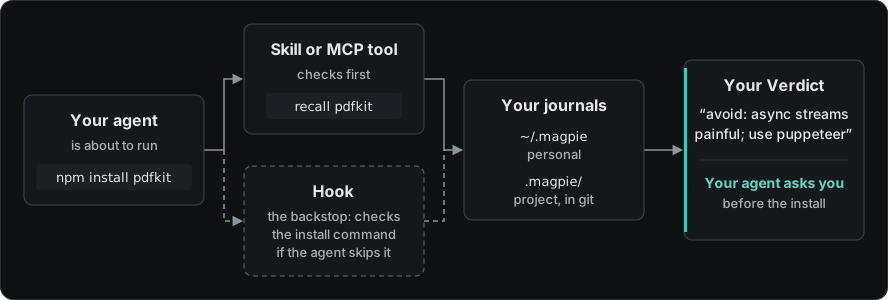
Before your agent picks a tool, the skill tells it to check your journals: search or suggest while it chooses, and recall before an install, as MCP tools or repomagpie commands. Your verdicts come back first. What worked for you is suggested; when a note says to avoid a package, your agent shows it to you and asks first. The hook checks the install command itself, in case the agent skips that step.
There is no extra model, no API key and no telemetry. RepoMagpie works as well as your agent follows the skill; without a hook, that includes the check before an install.
Ask your agent
- What do I have for browser testing? Your agent searches your journals and answers with the notes it finds, Verdict first.
- How should database security work in this project? Your agent answers with your notes in the security and database domains that fit the project, and says why.
- Install pdfkit. Your agent recalls it first, shows your avoid note with its alternatives, and asks you before it installs anything.
- Which of my tools fit this project?
suggestreads the project's manifests and README; your agent picks the notes that fit and names any dependency in use that you noted to avoid.
What each agent gets
What repomagpie setup sets up in each agent, on Linux, Windows or macOS with Node.js 22.12 or later (agents):
| Agent | MCP | Skill | Hook | When a note says to avoid a package |
|---|---|---|---|---|
| Claude Code | yes | yes | yes | the hook asks you |
| Codex CLI | yes | yes | yes | the hook stops the first try; your agent asks you |
| Cursor | yes | yes | yes | the hook stops the first try; your agent asks you |
| Gemini CLI | yes | yes | yes | the hook asks you |
| VS Code (GitHub Copilot) | yes | yes | no | no hook; the MCP server and the skill check it |
| Antigravity CLI | yes | yes | yes | the hook asks you |
| Copilot CLI | yes | yes | yes | the hook stops the first try; your agent asks you |
Codex CLI runs a new hook only after you trust it in /hooks. Other agents with MCP or Agent Skills can use the server or the skill: see setting up by hand. The package has no runtime dependencies, and paths with letters outside ASCII work.
Share notes with your team
A project journal is a .magpie/ folder in the repository, committed with the code. RepoMagpie's hook and recall read it for every contributor, next to each person's own journal.
repomagpie note pdfkit "avoid: async streams painful; use puppeteer" --to project
git add .magpie && git commit -m "Add our note on pdfkit"
Or copy one of your own notes there: repomagpie adopt pdfkit. When a teammate's agent is about to run npm install pdfkit, the hook asks them first, and their search and suggest find the note too. Anyone who can read the repository can read its notes.
In repomagpie ui, the Project view names the repository and says whether its shared notes are committed and pushed.
The local app
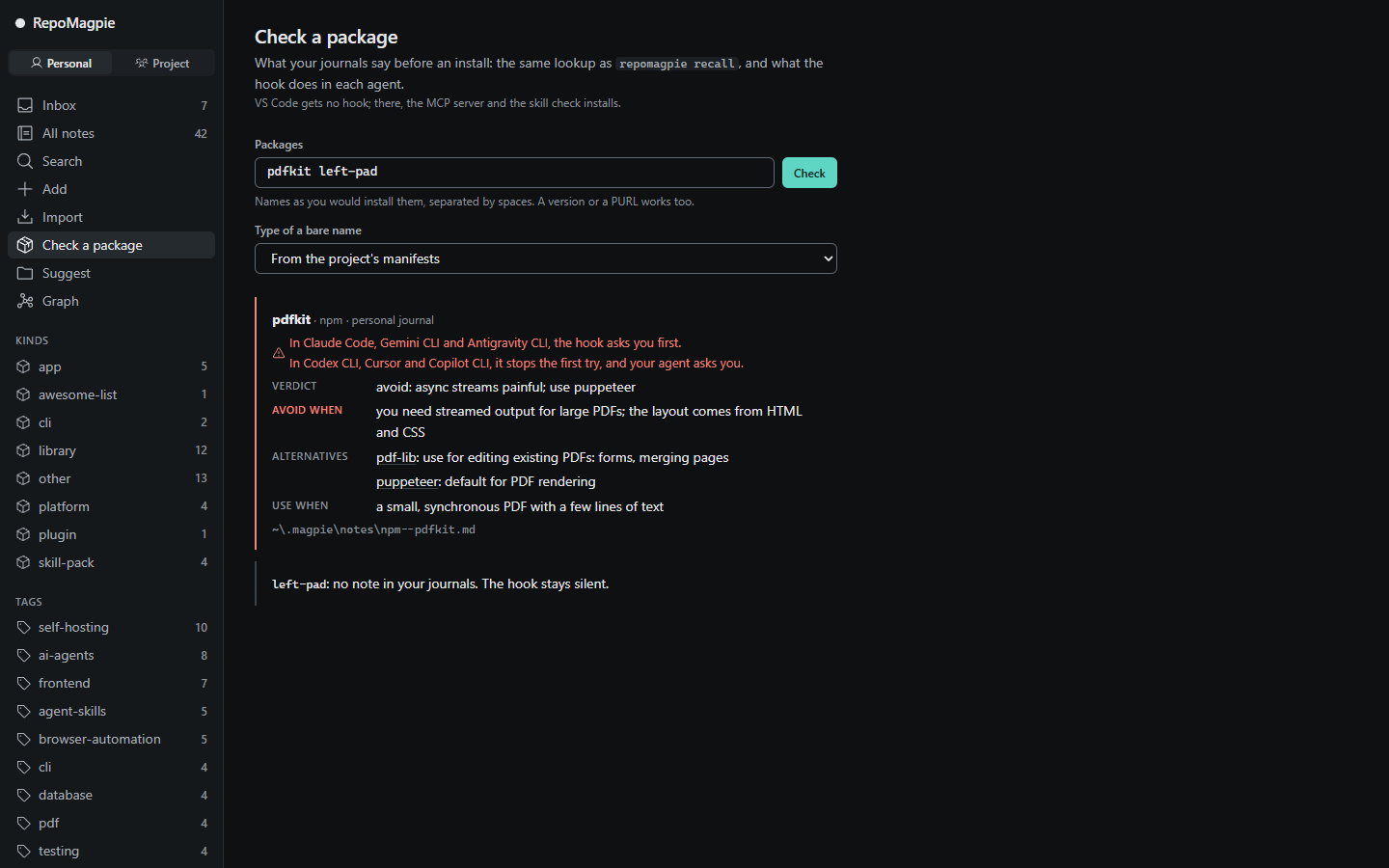
repomagpie ui opens your journals in the browser. Search lists your notes before you type, and Import takes a list you paste. Review an inbox note: write the Verdict, set kind, domains, tags and rating, and press Ctrl+Enter.
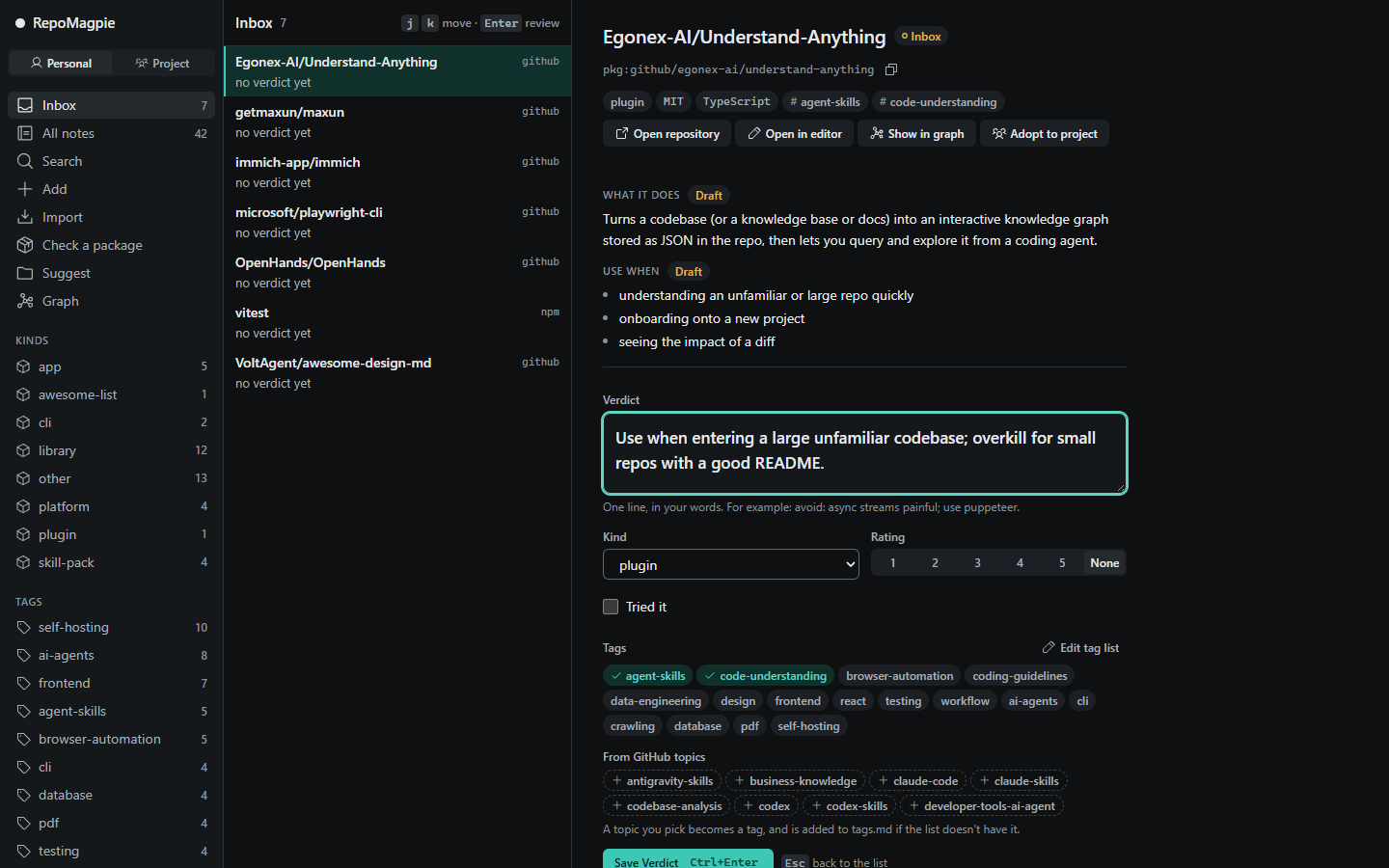
Check a package: what your journals say before an install, and what the hook does in each agent.
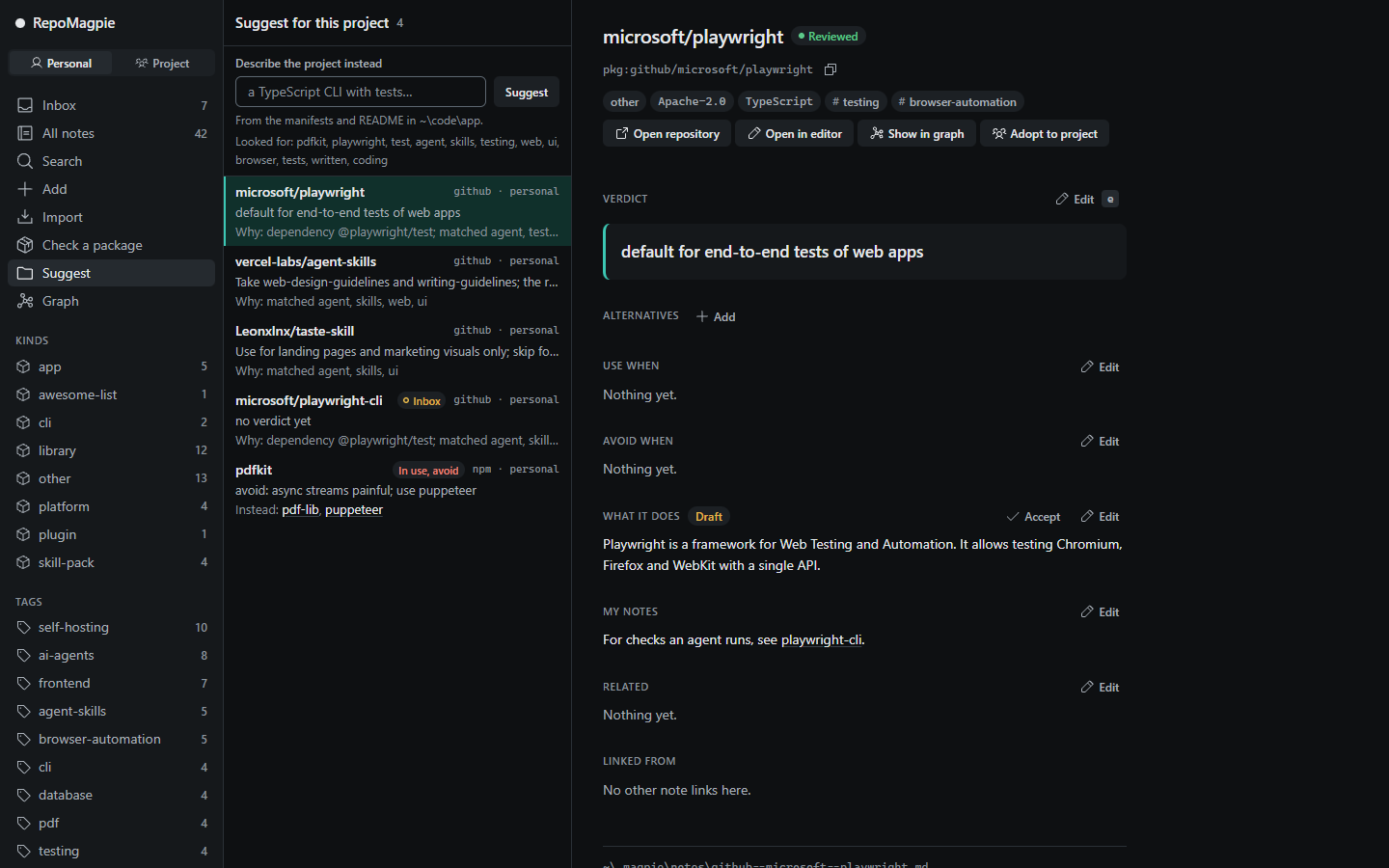
Suggest for this project: the notes that fit, and why each one is a candidate.
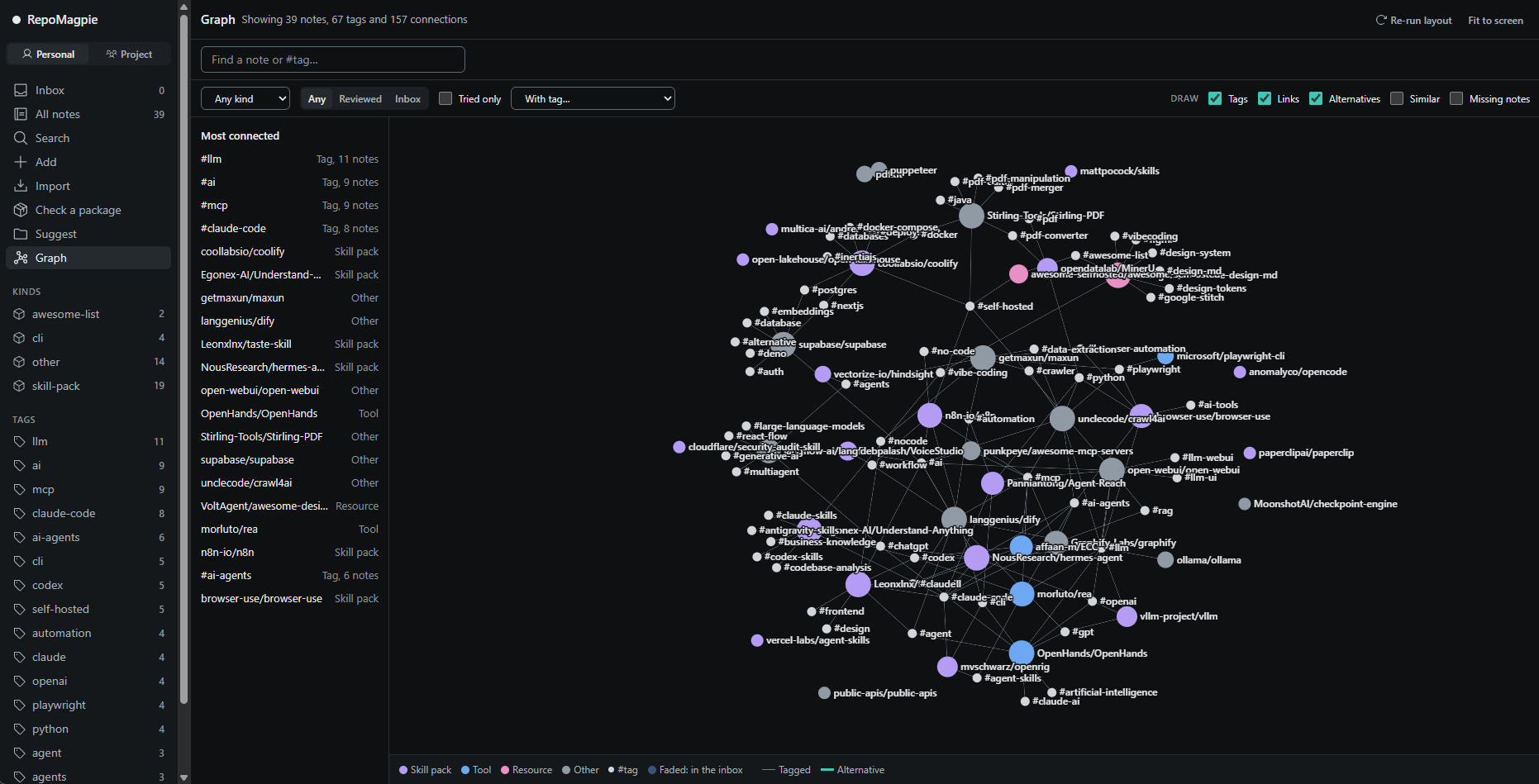
See a journal as a graph: notes, their tags, [[links]] and alternatives, coloured by domain if you choose. Click a note to read and edit it beside the graph.
How it compares
| Tool | What it knows | When you see it |
|---|---|---|
| Star managers, such as Starcat and GithubStarsManager | The repositories you starred, with tags and notes | When you search them later |
| Supply-chain scanners, such as Socket Firewall Free | Malware, vulnerabilities and popularity, from global data | Before an install |
| RepoMagpie | Your verdicts and your team's | Before an install, when you search, and when you start a project |
A line like "avoid pdfkit" in CLAUDE.md covers one project. A RepoMagpie note works across projects, shows up in search, and the hook checks it on every install. It isn't session or conversation memory: it remembers your decisions about tools, which you write. A star list or an awesome list holds no opinion your agent can use; a note does. RepoMagpie isn't a scanner: it never claims to detect malware or vulnerabilities, so run one next to it (vision).
FAQ
Does RepoMagpie send my notes anywhere?
No. Your journals are Markdown files on your machine, and there is no telemetry. The only network requests are read-only calls to GitHub's API, when you add a note from a GitHub repository or search with discover: they send that repository's name or your search, and your GitHub token if there is one (GITHUB_TOKEN, GH_TOKEN or the GitHub CLI's login), never your notes. repomagpie ui listens on 127.0.0.1 only. Your agent's model provider sees the notes your agent reads. See SECURITY.md.
Does RepoMagpie use AI?
Not a model of its own: its commands match names and words, and call no model. The AI is the coding agent you already use, which reads and saves your notes through the skill and the MCP tools. The skill tells it never to write your Verdict for you, never to delete a note you didn't name, and never to install a package you noted to avoid without asking you; a hook checks that last one too.
Does the hook block installs?
Never for good, and it never approves one. When a note says to avoid the package, the hook asks you, or stops the first try so that your agent asks you (the table); after a stop, the same install goes through for 10 minutes. Any other note, or an error in RepoMagpie, never stops an install. See the hook contract.
How do I remove it?
Run repomagpie setup --remove. It takes out only RepoMagpie's own MCP entries, hooks and skill folders, never restores a backup over your later changes, and leaves your journals and setup's backups. With --agents, the shared skill folder stays while another agent still reads it. Then repomagpie setup --delete-backups deletes the backups after asking, and npm uninstall -g repomagpie removes the command.
Can a team agree on rules with it?
Yes. The project journal, .magpie/ in the repository, is committed with the code, and every teammate's agent reads it after git pull. When it and a personal note disagree, the project note wins. Review rule changes in pull requests, and let leads approve them with a CODEOWNERS line. See working as a team.
Where are my notes, and can I edit them by hand?
Each note is one Markdown file with YAML frontmatter, in ~/.magpie/notes/ or a project's .magpie/notes/ (note schema). Edit them in any editor: RepoMagpie reads hand-written notes even with fields or sections missing, and never rewrites your sections. Set MAGPIE_HOME or pass --home to keep your journal elsewhere. repomagpie delete moves a note to the journal's .trash/.
Documentation
- Spec: every command, flag and
--jsondocument (repomagpie --helplists the commands) - Agents: what each coding agent supports, and setting up by hand
- Note schema: the format of a note
- The local app: screens, API and security rules
- Testing the beta: the steps for a week with the beta, and how to send feedback
- Vision, competitors and decisions
Open an issue for bugs and ideas. The project doesn't take pull requests yet (CONTRIBUTING.md). To report a vulnerability, see SECURITY.md.
Licence
MIT © 2026 Yusuf Suat Babacan