Listed from the MCP registry; nobody on Odel publishes it.

WalletWall
Stablecoin intelligence and vault readiness through WalletWall MCP.
Runs on your machine from its package; the steps are below.
What it does
- Reads
- Writes
- High impact
At most: only reads or looks up information.
What it costs
FreeOdel charges nothing per call. The publisher may charge for its own service.
Runs locally over stdio
This server isn't hosted — your MCP client launches it from a package registry. Use one of the commands below, or drop the config into your client (e.g. Claude Desktop).
Distributed as an MCP bundle (`https://github.com/Wallet-Wall/walletwallrus-copilot/releases/download/v0.2.1/walletwall.mcpb`) — download it and import the bundle in your MCP client.
Stablecoin intelligence and vault readiness for GitHub Copilot.
WalletWall is a local, read-only Copilot plugin and MCP server for inspecting stablecoin identity, source lineage, conflicts and vault-readiness signals.
Status: Pre-release
WWEP: 0.1
Registry: point-in-time verified
WalletWall does not sign, custody, trade, broadcast transactions, provide investment advice or certify regulatory compliance. Nothing here has been published to npm or a Copilot marketplace. Source and release artifacts are on GitHub Releases (v0.2.0), and the local MCP server's metadata is listed in the official MCP Registry as io.github.Wallet-Wall/walletwall.
Inspect stablecoin identity, wallet state, source lineage, conflicts, and vault readiness through WalletWall MCP.
What you get
| Part | What it is |
|---|---|
| WalletWall (plugin) | The Copilot plugin in plugin/: manifest, skill, bundled MCP server and canvas |
| WalletWall MCP | A local, offline, read-only MCP server (stdio only) with six tools and eleven static resources. Exact contract: security/tool-manifest.json |
| WalletWall (canvas) | A panel that shows one bundle: Sources, Support, Freshness, Conflicts, Limitations and "Why WalletWall says this", exactly as WalletWall MCP returned them |
| Skill | Tells the model to report what the sources support, surface limitations and never over-claim |
| Tool | Purpose |
|---|---|
resolve_asset | Registry lookup by chain ID + address, or symbol candidates. Symbols are never identity |
normalize_observation | Canonical observation, RFC 8785 + SHA-256 digests, exact decimal rendering |
inspect_evidence | Support, freshness, finality, authority, limitations and conflicts per assertion |
check_invariants | The 13 WWEP invariants plus declared-versus-computed |
trace_provenance | W3C PROV-JSON-shaped source lineage for one assertion |
assess_vault_readiness | VAULT_TECHNICAL_READINESS rules 0.1.0-draft |
The canvas
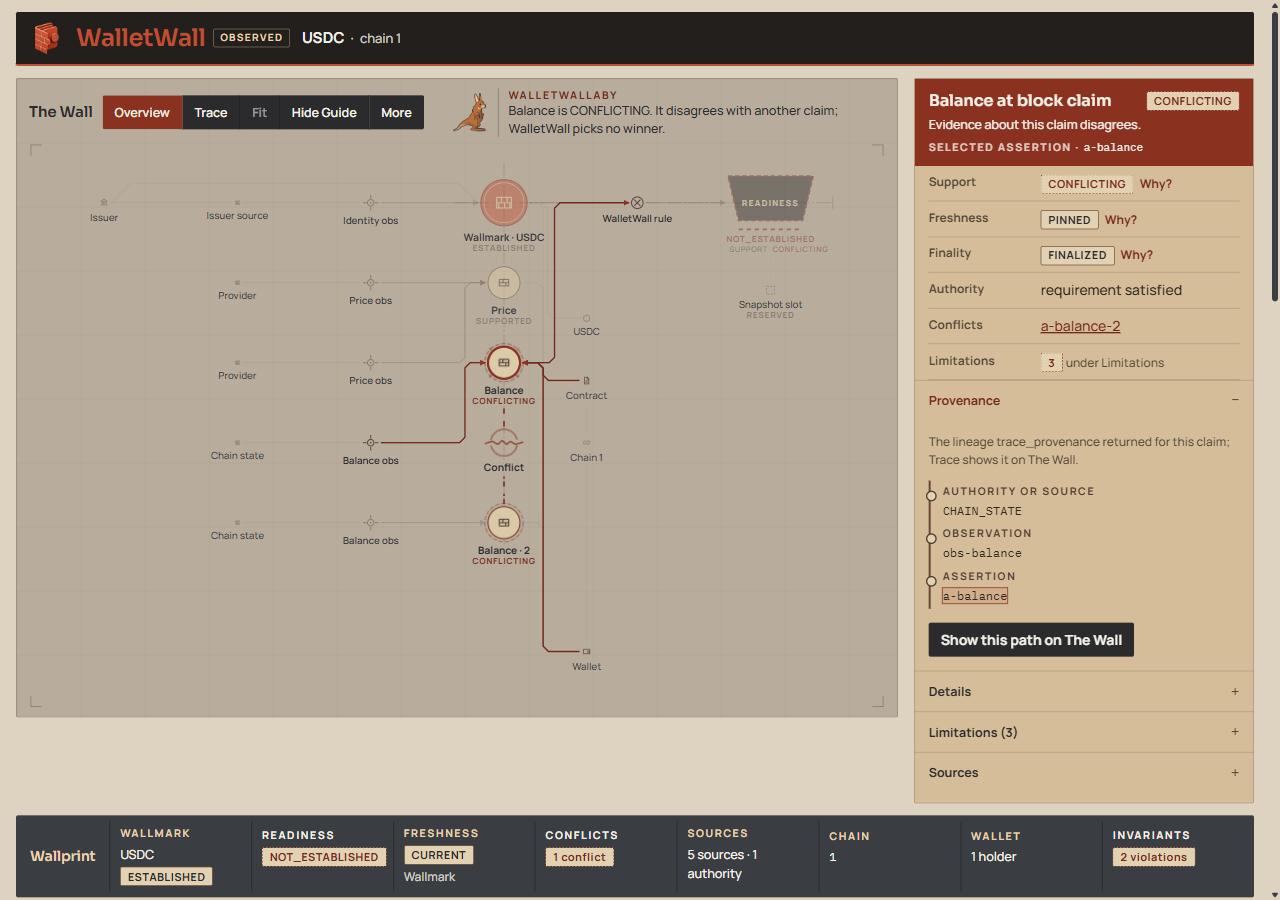
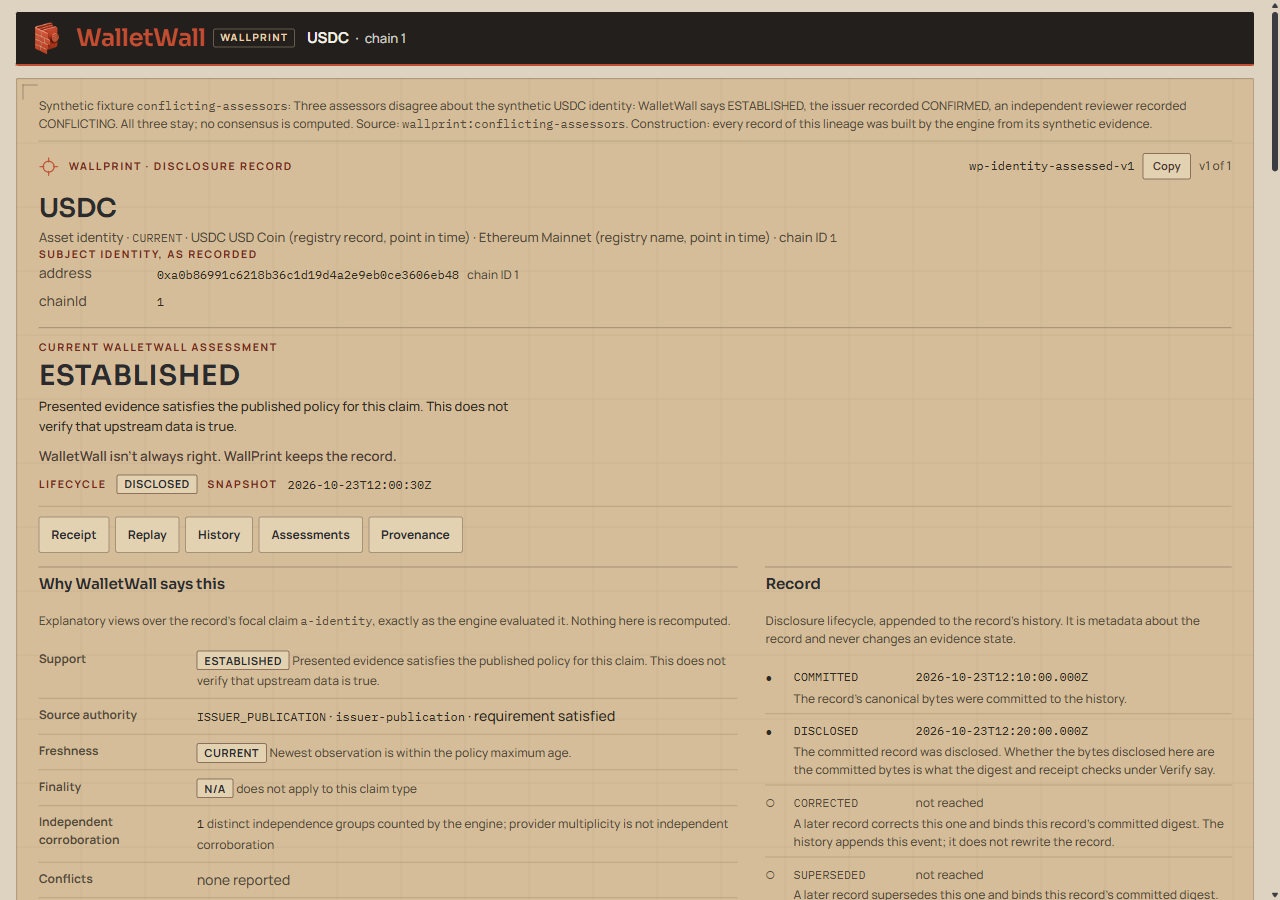
Screenshots of the current canvas, rendered in a browser from its loopback page with synthetic bundles (not live data).
The Wall. Every source, observation, claim and derivation of one bundle, with the selected claim's state, provenance and limitations beside it. Here two balance claims disagree; WalletWall marks the conflict and picks no winner.
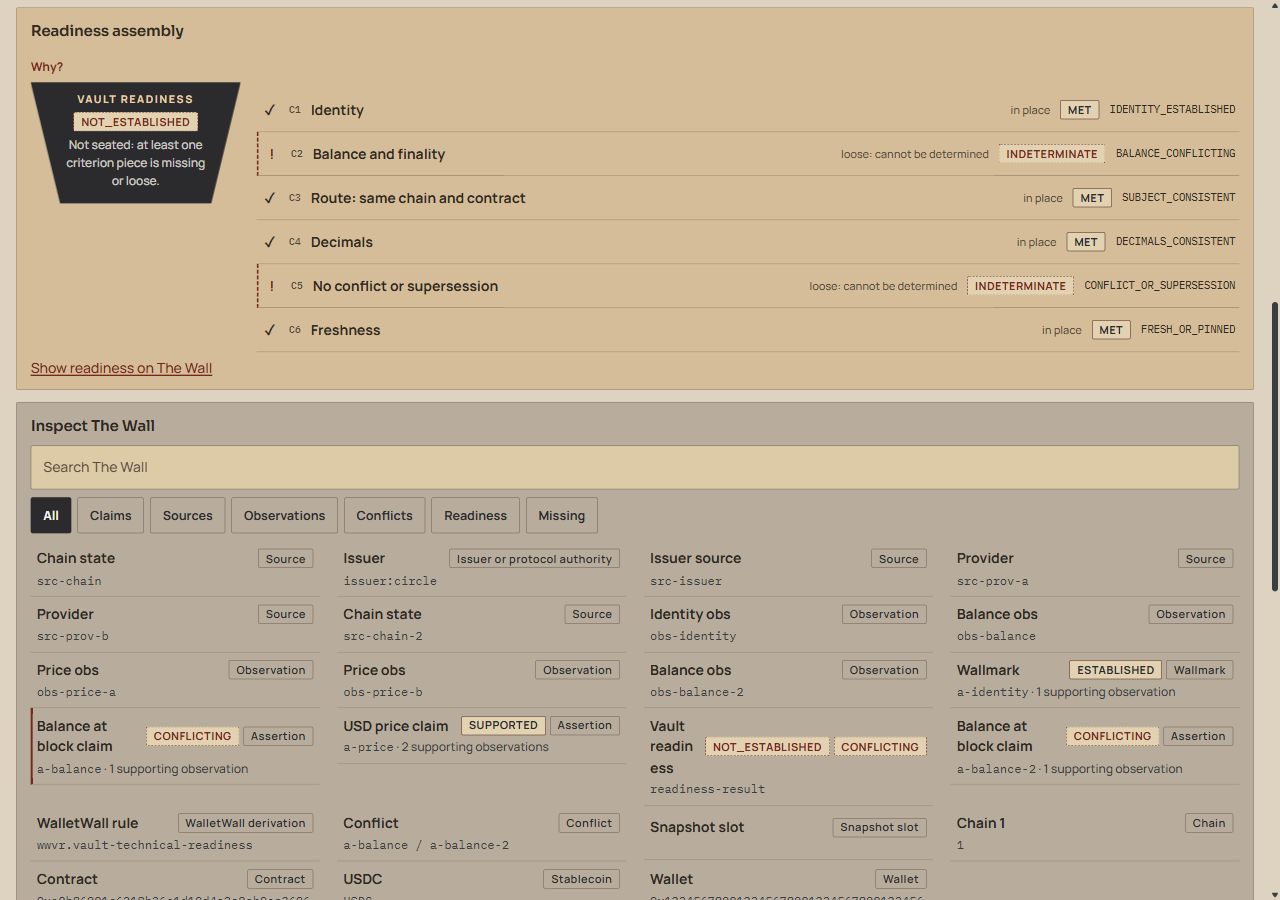
Readiness assembly. Each vault-readiness criterion with its outcome and reason code, and a searchable list of every piece on The Wall.
WallPrint disclosure record. A bundled synthetic disclosure lineage in which three assessors disagree and all three stay on the record.
What it will not say
A support state such as ESTABLISHED means the presented evidence satisfies a published policy. It does not mean the evidence is true.
WalletWall reports what identified sources and authority policies support. A supported result does not guarantee that upstream information is correct.
The bundled registry (five stablecoin deployments on Ethereum, Base and Arbitrum) is a point-in-time snapshot verified on 2026-10-24. It is not live or current-chain data. WalletWall fetches nothing at runtime. See docs/REGISTRY_SOURCES.md.
Privacy
WalletWall-controlled code does not retain MCP query history or transmit query data to WalletWall infrastructure. GitHub Copilot and the selected model provider may independently process prompts and tool data under their own policies.
Wallet addresses you put in a prompt are processed by Copilot and the model provider, not by WalletWall. Details and the limits of what is tested: PRIVACY.md, docs/PLUGIN_PATH_PRIVACY.md.
Install
From this repository on GitHub (verified with GitHub Copilot CLI 1.0.103 against the public repository, with no credentials):
copilot plugin marketplace add Wallet-Wall/walletwall-copilot
copilot plugin install walletwall@walletwall
Or from a local checkout:
copilot plugin marketplace add <path to this checkout>
copilot plugin install walletwall@walletwall
The marketplace and the plugin are both named walletwall. Verified with GitHub Copilot CLI 1.0.103: copilot plugin list --json reports walletwall from marketplace walletwall, version 0.2.0. This repository is the plugin source only; the plugin is not an accepted listing in any GitHub or Copilot marketplace or catalog. The official MCP Registry listing covers the MCP server's metadata only and is discovery, not endorsement or certification.
In the GitHub Copilot app: Customize → Plugins → marketplace settings → add this repository → Install. A new session then has the six WalletWall MCP tools, the skill and the WalletWall canvas. What was verified on Windows and what was not: docs/DESKTOP_INSTALL_PROOF.md. Requires node on PATH.
Claude Managed Agent (optional)
The shipped Copilot MCP remains stdio-only. For a user-owned Claude Managed Agent, a separate opt-in loopback Streamable HTTP adapter is available from a source checkout. It is off unless started with --enable, binds only to loopback and requires a per-process bearer token that is printed once on your terminal:
node scripts/claude-mcp-http.ts --enable --port 8787
It exposes http://127.0.0.1:8787/mcp for connection through the user's own Anthropic MCP tunnel, which must send Authorization: Bearer <token>. The adapter lives outside the packages/mcp publish surface, is not part of any release artifact or the bundled Copilot runtime, does not create a WalletWall-hosted endpoint, and does not change the six-tool WalletWall MCP contract. See docs/CLAUDE_MANAGED_AGENT.md for the full boundary, including what it does not protect against.
Develop
Requires Node.js 22.18 or newer (tested on 24).
npm ci
npm run verify
Generated files are committed and verified in CI on Linux and Windows. See CONTRIBUTING.md for which command regenerates what.
Documents
CONTRIBUTING.md · SECURITY.md · PRIVACY.md · BOUNDARIES.md · THREAT_MODEL.md · DATA_SOURCES.md · docs/REGISTRY_SOURCES.md · docs/DEPENDENCY_POLICY.md · docs/PUBLIC_RELEASE_AUDIT.md · docs/PUBLIC_DISCOVERY_READINESS.md · docs/CLAUDE_MANAGED_AGENT.md · TRADEMARKS.md · LICENSE
Layout: plugin/ (the plugin), packages/mcp/ (engine, registry, authority policies, tests), spec/ (WWEP 0.1 draft), conformance/ (conformance and adversarial corpus), security/ (manifests and hashes), evals/ (Copilot agent evals, separate from conformance), docs/.
License
Apache License 2.0 (LICENSE), copyright 2026 WalletWall. The license covers the software and documentation in this repository. It does not grant rights to the WalletWall name, logos or marks: see TRADEMARKS.md. Third-party components keep their own licenses (plugin/THIRD_PARTY_NOTICES.md).