Listed from the MCP registry; nobody on Odel publishes it.

Runs on your machine from its package; the steps are below.
What it does
- Reads
- Writes
- High impact
At most: only reads or looks up information.
What it costs
FreeOdel charges nothing per call. The publisher may charge for its own service.
Runs locally over stdio
This server isn't hosted — your MCP client launches it from a package registry. Use one of the commands below, or drop the config into your client (e.g. Claude Desktop).
Run
uvx mcp-document-converter
MCP client config
{
  "mcpServers": {
    "document-converter": {
      "command": "uvx",
      "args": [
        "mcp-document-converter"
      ]
    }
  }
}MCP Document Converter
MCP (Model Context Protocol) Document Converter - A powerful MCP tool for converting documents between multiple formats, enabling AI agents to easily transform documents.









Features
- Multi-format Support: Supports 5 mainstream document formats: Markdown, HTML, DOCX, PDF, and Text
- Bidirectional Conversion: Any format can be converted to any other format (5×5=25 conversion combinations)
- MCP Protocol: Compliant with MCP standards, can be used as a tool for AI assistants like Trae IDE
- Plugin Architecture: Easy to extend with new parsers and renderers
- Syntax Highlighting: HTML and PDF outputs support code syntax highlighting
- Style Customization: Support for custom CSS styles
- Metadata Preservation: Preserves document title, author, creation time, and other metadata during conversion
📚 Documentation
User Guide · API Reference · Contributing · Changelog · License
Architecture
flowchart TB
    subgraph Parsers["Parsers"]
        MD[Markdown]
        DOCX1[DOCX]
        HTML1[HTML]
        PDF1[PDF]
        TXT1[Text]
    end

    subgraph IR["Intermediate Representation (IR)"]
        DT[Document Tree]
        META[Metadata]
        ASSETS[Assets]
    end

    subgraph Renderers["Renderers"]
        HTML2[HTML]
        PDF2[PDF]
        MD2[Markdown]
        DOCX2[DOCX]
        TXT2[Text]
    end

    MD --> IR
    DOCX1 --> IR
    HTML1 --> IR
    PDF1 --> IR
    TXT1 --> IR

    IR --> HTML2
    IR --> PDF2
    IR --> MD2
    IR --> DOCX2
    IR --> TXT2
Core Components
- DocumentIR (Intermediate Representation): Unified abstraction for all documents, containing document tree, metadata, assets, etc.
- BaseParser (Parser Base Class): Defines the parser interface, parses various formats into DocumentIR
- BaseRenderer (Renderer Base Class): Defines the renderer interface, renders DocumentIR into various formats
- ConverterRegistry (Registry): Manages all parsers and renderers, provides format lookup and auto-matching
- DocumentConverter (Conversion Engine): Coordinates parsers and renderers to complete document conversion
Supported Formats
Input Formats (Parsers)
| Format | Extensions | MIME Type | Features |
|---|---|---|---|
| Markdown | .md, .markdown, .mdown, .mkd | text/markdown | YAML Front Matter, GFM extensions |
| HTML | .html, .htm | text/html | Semantic tag parsing |
| DOCX | .docx | application/vnd.openxmlformats-officedocument.wordprocessingml.document | Styles, tables, images |
| application/pdf | Text extraction and structure recognition | ||
| Text | .txt, .text | text/plain | Auto encoding detection and structure recognition |
Output Formats (Renderers)
| Format | Extension | MIME Type | Features |
|---|---|---|---|
| HTML | .html | text/html | Beautiful styling, code highlighting, responsive design |
| Markdown | .md | text/markdown | Standard Markdown format, YAML Front Matter |
| DOCX | .docx | application/vnd.openxmlformats-officedocument.wordprocessingml.document | Word document format, style preservation |
| application/pdf | Generated with WeasyPrint, pagination support | ||
| Text | .txt | text/plain | Plain text, basic formatting preserved |
Conversion Matrix
flowchart LR
    subgraph Sources["Source Formats"]
        MD_S[Markdown]
        HTML_S[HTML]
        DOCX_S[DOCX]
        PDF_S[PDF]
        TXT_S[Text]
    end

    subgraph Targets["Target Formats"]
        MD_T[Markdown]
        HTML_T[HTML]
        DOCX_T[DOCX]
        PDF_T[PDF]
        TXT_T[Text]
    end

    MD_S --> Targets
    HTML_S --> Targets
    DOCX_S --> Targets
    PDF_S --> Targets
    TXT_S --> Targets
Installation
Using pip (Recommended)
pip install mcp-document-converter
From Source
git clone https://github.com/xt765/mcp-document-converter.git
cd mcp-document-converter
pip install -e .
MCP Tools
This server provides the following tools:
convert_document
Convert a document from one format to another.
Arguments:
source_path(string, required): Path to the source document.target_format(string, required): Target format (html,pdf,markdown,docx,text).output_path(string, optional): Path for the output file.source_format(string, optional): Format of the source file (auto-detected if not provided).options(object, optional): Additional options liketemplate,css, andpreserve_metadata.
Configuration
Using in Trae IDE / Claude Desktop
Add the following to your MCP configuration file:
Option 1: Using PyPI (Recommended)
{
  "mcpServers": {
    "mcp-document-converter": {
      "command": "uvx",
      "args": [
        "mcp-document-converter"
      ]
    }
  }
}
Option 2: Using GitHub repository
{
  "mcpServers": {
    "mcp-document-converter": {
      "command": "uvx",
      "args": [
        "--from",
        "git+https://github.com/xt765/mcp-document-converter",
        "mcp-document-converter"
      ]
    }
  }
}
Option 3: Using Gitee repository (Faster access in China)
{
  "mcpServers": {
    "mcp-document-converter": {
      "command": "uvx",
      "args": [
        "--from",
        "git+https://gitee.com/xt765/mcp-document-converter",
        "mcp-document-converter"
      ]
    }
  }
}
Option 4: Using pip (Manual installation)
First install the package:
pip install mcp-document-converter
Then add to configuration:
{
  "mcpServers": {
    "mcp-document-converter": {
      "command": "mcp-document-converter",
      "args": []
    }
  }
}
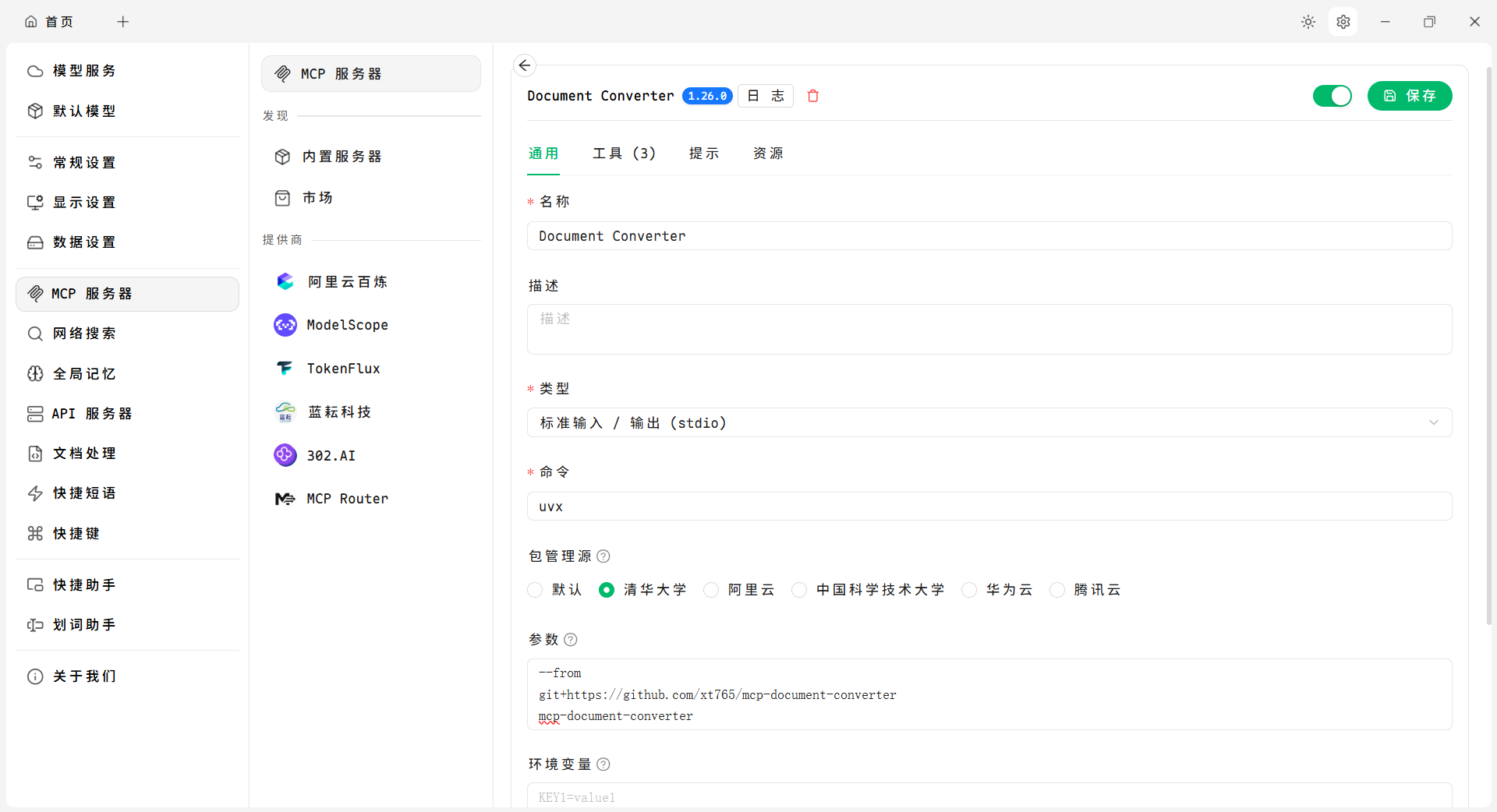
Using in Cherry Studio
Cherry Studio is a powerful open-source desktop AI client assistant that supports integrating various tools through the MCP protocol
Configuration Example:
Usage Example:
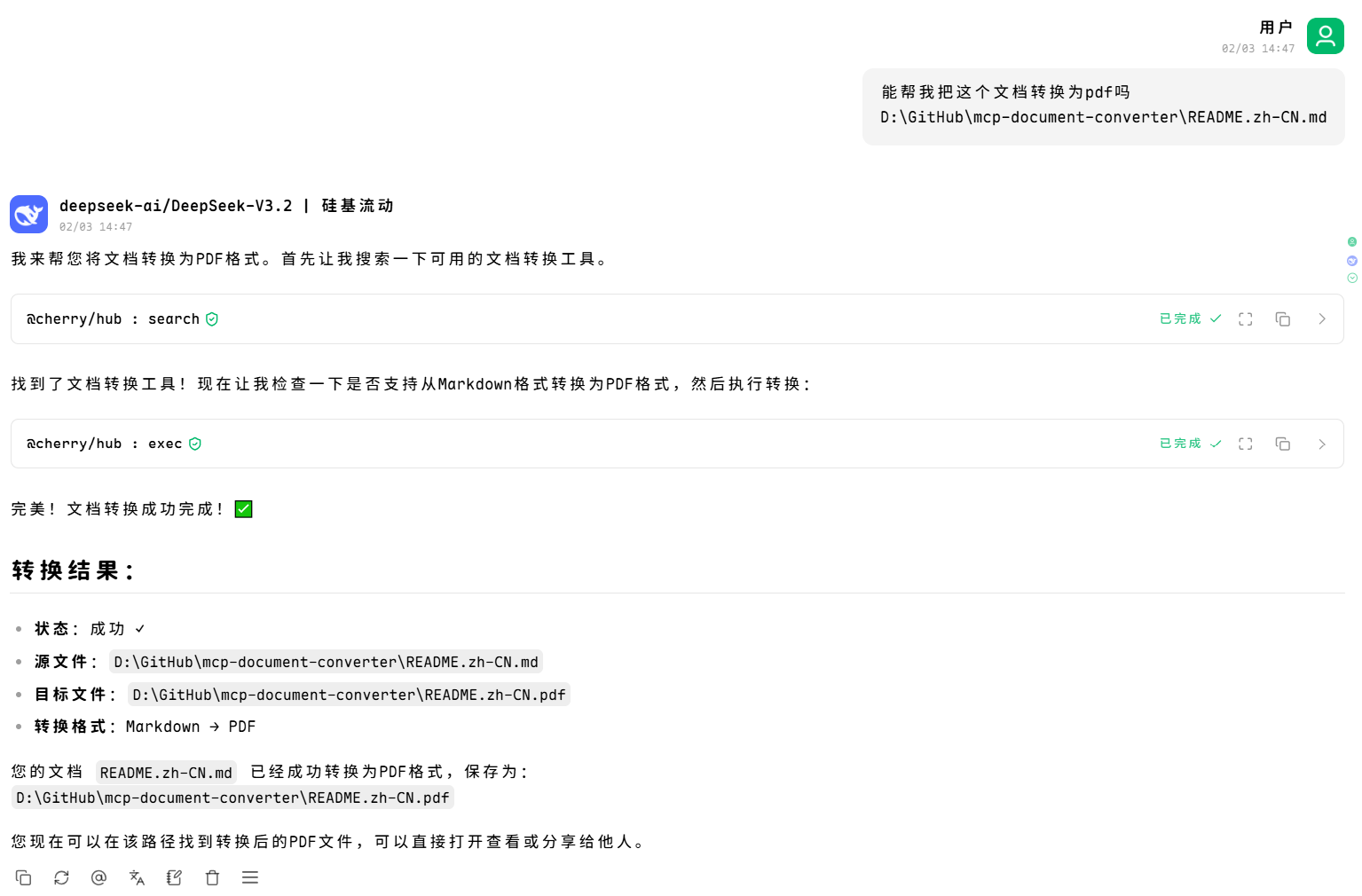
Usage
As an MCP Tool
After configuration, AI assistants can directly call the following tools:
1. convert_document (Recommended)
Use a unified interface to convert any supported document type.
# Markdown to HTML
convert_document(
    source_path="document.md",
    target_format="html"
)

# HTML to PDF
convert_document(
    source_path="document.html",
    target_format="pdf"
)

# DOCX to Markdown
convert_document(
    source_path="document.docx",
    target_format="markdown"
)

# Conversion with options
convert_document(
    source_path="document.md",
    target_format="html",
    output_path="output.html",
    options={
        "css": "custom.css",
        "preserve_metadata": True
    }
)
2. list_supported_formats
List all supported document formats.
list_supported_formats()
3. get_conversion_matrix
Get the complete format conversion matrix.
get_conversion_matrix()
4. can_convert
Check if conversion from source format to target format is supported.
can_convert(source_format="markdown", target_format="pdf")
5. get_format_info
Get detailed information about a specific format.
get_format_info(format="markdown")
As a Python Library
from mcp_document_converter import DocumentConverter
from mcp_document_converter.registry import get_registry
from mcp_document_converter.parsers import MarkdownParser, HTMLParser
from mcp_document_converter.renderers import HTMLRenderer, PDFRenderer

# Register parsers and renderers
registry = get_registry()
registry.register_parser(MarkdownParser())
registry.register_parser(HTMLParser())
registry.register_renderer(HTMLRenderer())
registry.register_renderer(PDFRenderer())

# Create converter
converter = DocumentConverter(registry)

# Convert document
result = converter.convert(
    source="input.md",
    target_format="html",
    output_path="output.html"
)

if result.success:
    print(f"✅ Conversion successful: {result.output_path}")
else:
    print(f"❌ Conversion failed: {result.error_message}")
Tool Interface Details
convert_document
Convert a document from one format to another.
Parameters:
| Parameter | Type | Required | Description |
|---|---|---|---|
source_path | string | ✅ | Source file path, supports absolute or relative paths |
target_format | string | ✅ | Target format: html, pdf, markdown, docx, text |
output_path | string | ❌ | Output file path (optional, defaults to source filename) |
source_format | string | ❌ | Source format (optional, auto-detected from file extension) |
options | object | ❌ | Conversion options |
Options:
| Option | Type | Default | Description |
|---|---|---|---|
template | string | - | Template name |
css | string | - | Custom CSS styles |
preserve_metadata | boolean | true | Whether to preserve metadata |
extract_images | boolean | true | Whether to extract images |
Example:
{
  "source_path": "/path/to/document.md",
  "target_format": "html",
  "output_path": "/path/to/output.html",
  "options": {
    "css": "body { font-family: Arial; }",
    "preserve_metadata": true
  }
}
Extension Development
Adding a New Parser
from typing import List, Union
from pathlib import Path
from mcp_document_converter.core.parser import BaseParser
from mcp_document_converter.core.ir import DocumentIR, Node, NodeType

class MyParser(BaseParser):
    @property
    def supported_extensions(self) -> List[str]:
        return [".myext"]

    @property
    def format_name(self) -> str:
        return "myformat"

    @property
    def mime_types(self) -> List[str]:
        return ["application/x-myformat"]

    def parse(self, source: Union[str, Path, bytes], **options) -> DocumentIR:
        # Read source file
        content = self._read_source(source)

        # Parse into DocumentIR
        document = DocumentIR()
        document.title = "My Document"

        # Add content nodes
        document.add_node(Node(
            type=NodeType.PARAGRAPH,
            content=[Node(type=NodeType.TEXT, content="Hello World")]
        ))

        return document
Adding a New Renderer
from typing import Any
from mcp_document_converter.core.renderer import BaseRenderer
from mcp_document_converter.core.ir import DocumentIR

class MyRenderer(BaseRenderer):
    @property
    def output_extension(self) -> str:
        return ".myext"

    @property
    def format_name(self) -> str:
        return "myformat"

    @property
    def mime_type(self) -> str:
        return "application/x-myformat"

    def render(self, document: DocumentIR, **options: Any) -> str:
        # Render DocumentIR to target format
        parts = []

        if document.title:
            parts.append(f"# {document.title}")

        for node in document.content:
            # Render each node
            pass

        return "\n".join(parts)
Registering Extensions
from mcp_document_converter.registry import get_registry

# Register new parser and renderer
registry = get_registry()
registry.register_parser(MyParser())
registry.register_renderer(MyRenderer())
Testing
# Run all tests
python tests/test_conversion.py

# Run specific test
python tests/test_conversion.py::test_markdown_to_html
Environment Variables
| Variable | Description | Default |
|---|---|---|
MCP_CONVERTER_LOG_LEVEL | Log level | INFO |
MCP_CONVERTER_TEMP_DIR | Temporary files directory | System temp directory |
Dependencies
Core Dependencies
mcp>= 1.26.0 - MCP protocol implementationpydantic>= 2.12.5 - Data validation
Parser Dependencies
markdown>= 3.5.0 - Markdown parsingbeautifulsoup4>= 4.12.0 - HTML parsingpython-docx>= 1.1.0 - DOCX parsingpypdf>= 6.7.4 - PDF parsingchardet>= 5.0.0 - Encoding detectionpyyaml>= 6.0.0 - YAML parsing
Renderer Dependencies
weasyprint>= 60.0 - PDF renderingpygments>= 2.17.0 - Code highlightingjinja2>= 3.1.6 - Template enginereportlab>= 4.0.0 - PDF generation
Development Dependencies
pytest>= 7.0.0 - Testing frameworkpytest-asyncio>= 0.21.0 - Async testing supportpytest-cov>= 4.0.0 - Coverage reportingbasedpyright>= 1.0.0 - Type checkingruff>= 0.1.0 - Linting and formatting
License
MIT License
Contributing
Issues and Pull Requests are welcome!
Related Projects
- MCP Document Reader - MCP document reader supporting multiple document formats
- Model Context Protocol - Official Model Context Protocol documentation







