Unterm
The terminal AI agents can drive: spawn panes, run commands, read screens, scrolling screenshots.
Runs on your machine from its package; the steps are below.
What it does
- Reads
- Writes
- High impact
At most: moves money, runs code or commands, deletes data, or sends messages for you.
What it costs
FreeOdel charges nothing per call. The publisher may charge for its own service.
Runs locally
This server runs on your machine over stdio, but its source registry didn't list a distribution package. Check the source repository for setup instructions.
The terminal AI agents can drive.


If Unterm is useful to you, a ⭐ on GitHub helps other people find it.
Cross-platform terminal (macOS / Linux / Windows) built on Unterm's native
next-core terminal engine, with one design bet: the terminal itself is
controllable from the outside by any AI agent over MCP. Claude Code, Codex,
Gemini CLI, Cursor, Aider, your own scripts — they all get the same JSON-RPC
surface (152 authenticated methods plus auth.login) to spawn shells, run
commands, read pane state, capture screenshots, record sessions, and run the
Agent Cockpit. (Theme, language and unterm.conf are not on MCP; they are set
through Web Settings, unterm-cli, or the file.)
Since v0.68 the terminal is also something an orchestrator can govern rather than merely call: it publishes what it can do and how dangerous each capability is, works under leases that expire and cannot be replayed, keeps agents inside workspaces that cannot see each other, and can hand you an evidence bundle for a task that somebody who was not there can verify.
Since v0.55 the relationship runs both ways: agents drive the terminal from outside, and the terminal is an Agent Cockpit for the agents running inside it — live per-pane agent state, a waiting-first Inbox, fleets of N agents on one task in N isolated git worktrees, and a Review page to diff / merge / roll back what they produced.
The other 2026 terminals each pick a different side: Warp embeds AI inside a closed cloud (Oz), Ghostty stays out of your way and lets you bring your own tools, iTerm2 is Mac-only. Unterm picks the third side — terminal as MCP-controllable surface, deliberately keep AI generation out of the terminal, let external agents grip it through the API, and give the human one cockpit to run them all from.
Practical implications:
- Every Unterm window starts a local MCP server (line-delimited JSON-RPC over TCP) and a local HTTP settings server (Web Settings page) on auto-allocated ports. Both are auth-token gated, both are 127.0.0.1-only, no cloud round trip.
- Settings live in the browser, not the terminal. Cell-grid TUIs can't deliver modern form UX (no proper text inputs, no live preview, no color picker). The in-terminal
▼menu holds quick actions and links out to the Web Settings page — configuration itself happens in the browser. - 9 languages out of the box: en / 简体中文 / 繁體中文 / 日本語 / 한국어 / Deutsch / Français / Italiano / हिन्दी. Auto-detects from system locale, can be overridden in Web Settings or via
unterm-cli lang set <code>. - Multi-instance discovery: every running Unterm process owns one NATO-named instance (alpha, bravo, charlie…) and writes its ports + auth token to
~/.unterm/instances/<name>.json. Agents that drive several windows at once enumerate that directory. - Cross-platform parity is a correctness property: if a feature works on Windows but bails on macOS or Linux, that's a bug, not "not supported yet."
- Subtraction over decoration: no AI chat overlay inside the terminal and no cloud dependency for core operation. Proxy settings auto-detect the system by default and also support explicit HTTP/SOCKS overrides, node pools, rotation, and Clash/mihomo controllers. Finder integration on macOS uses the native Finder right-click extension and Services.
The GUI and terminal runtime now use Unterm's native next-core engine. The
repository still carries selected upstream components and attribution where
they remain dependencies, but WezTerm mux/window state is no longer the
product kernel.
Agent Cockpit
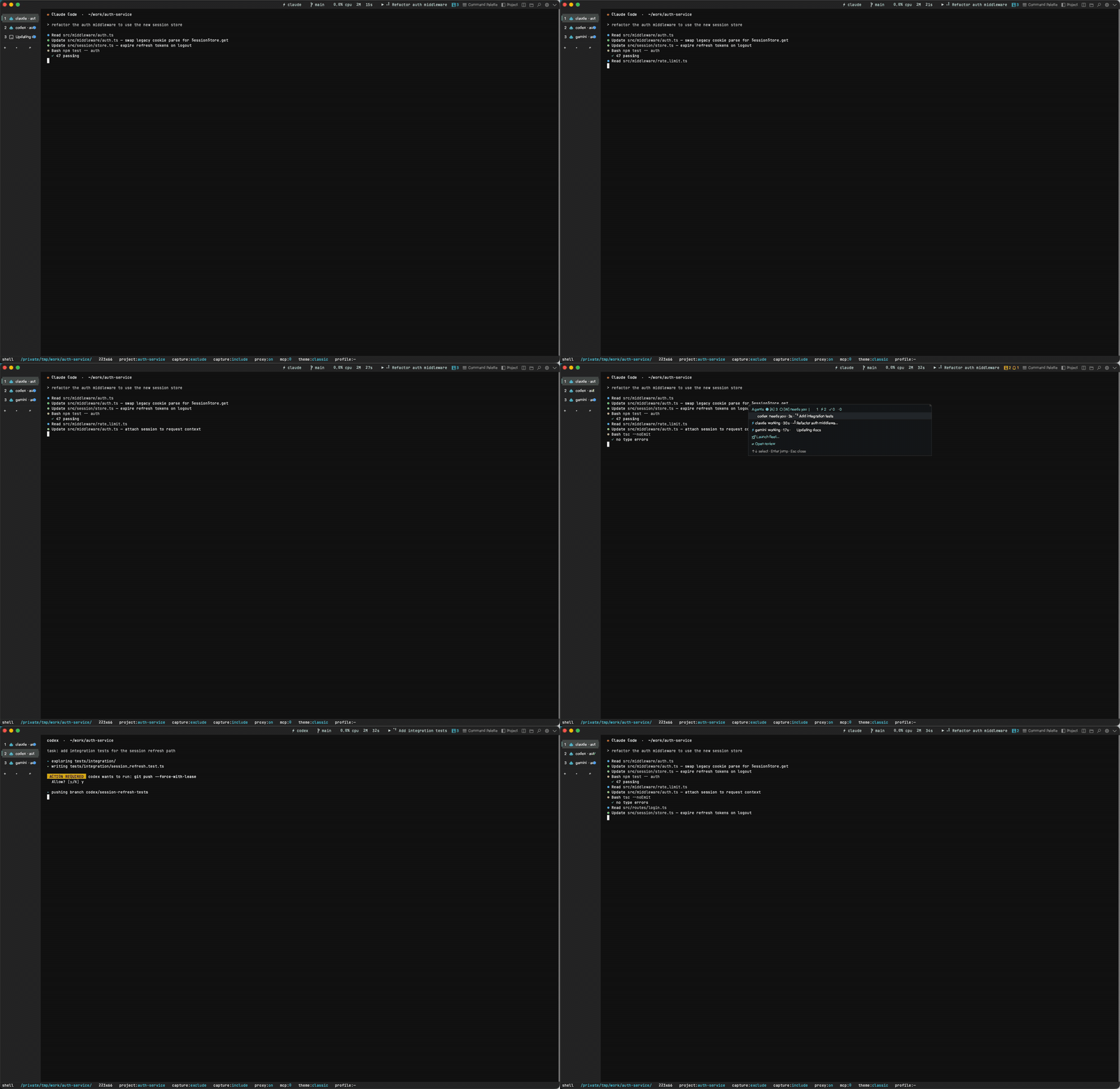
Run Claude Code, Codex, Gemini CLI, or Aider in any pane and Unterm sees them — no configuration, no wrapper. Five pillars, all local:
- Agent state engine — every pane's agent and its state (working / waiting-for-you / idle / done), read from OSC progress + title signals, process fingerprints, and optional official hooks. Tab badges + a cross-window tally chip in the top bar.
- Inbox (
Ctrl+Shift+A) — every agent that's waiting for you in one queue, longest-waiting first. Enter jumps to the pane; one keystroke later you've answered its prompt. - Fleet — one task × N agents × N isolated git worktrees (
../<repo>.fleet/), one tab each. Same agent ×3 for throughput, orclaude,codex,geminifor a bake-off. - Review — agents get checkpointed before they touch a repo (dangling-commit snapshots; nothing touches your HEAD or index). A Web Review page shows per-member diffs with squash-merge (stops at staged — the commit stays yours), discard, and rollback. Since v0.57, Review also verifies each member (inferred or explicit validation command), ranks members by verification + change size, gates merge on a passing run, and can retry a failed member in its existing worktree.
- Everything scriptable — the cockpit itself is MCP + CLI:
agent.status,cockpit.inbox,fleet.launch,review.merge… an orchestrating agent can run fleets and review diffs with no human in the chair.
unterm-cli agent status                                  # who's running where, in what state
unterm-cli agent inbox                                   # who's waiting for you
unterm-cli agent enable-hooks                            # exact state via official hooks (merge-only, backed up)
unterm-cli fleet launch --agents claude,codex "fix the flaky auth test"
unterm-cli review verify --fleet <id> --member 1         # run the member's validation
unterm-cli review list && unterm-cli review open         # ranked diffs in the browser
Full docs: unterm.app/docs/agent-cockpit.
Install
Pre-built artifacts are published on GitHub Releases:
https://github.com/zhitongblog/unterm/releases
| Platform | Artifact |
|---|---|
| macOS | Unterm-macos-<version>.dmg (universal arm64+x86_64, signed + notarized) |
| Linux | unterm-<version>.deb or Unterm-<version>-x86_64.AppImage |
| Windows | Unterm-<version>-x64.msi or Unterm-windows-x64-<version>.zip |
macOS
Double-click Unterm-macos-<version>.dmg, then drag Unterm.app onto the
Applications shortcut. The DMG is signed with a Developer ID and Apple-
notarized, so Gatekeeper opens it on first launch without warnings.
Finder integration is bundled in the DMG. After the first launch, Finder's
right-click menu can show Open in Unterm for folders and files; if macOS
doesn't refresh the extension immediately, run Repair Finder Integration.app
from the DMG once.
Linux (Debian / Ubuntu)
sudo apt install ./unterm-<version>.deb
unterm
Other distros — use the AppImage:
chmod +x Unterm-<version>-x86_64.AppImage
./Unterm-<version>-x86_64.AppImage
Windows
Run the MSI installer; it places unterm.exe in Program Files\Unterm and creates a Start Menu shortcut.
What's new
- v0.68 — A terminal something else can govern. Unterm now hosts CLI
agents as sessions rather than shelling out and waiting for an exit code
(
agent_session.*: what it said, what it asked to run, how it ended, with your own task ids carried through untouched). It can lease a browser from Unzoo and be leased from in turn —terminal.manifestpublishes what this terminal can do and how dangerous each family is, taken from the same table the gateway refuses by. Approvals can finally be answered: Settings shows what an agent is waiting on, with "allow once / for this task / always". Workspaces are roots that cannot see each other, and a shell thatcds out stops being inside. The audit trail is hash-chained, so an edit to it disagrees with the next line.unterm-cli provider | scope | artifact | evidence | system— 46 new MCP methods (149 total at the time; 152 today). - v0.57 — Fleet verification loop + new brand mark. Review now verifies each fleet member automatically (Cargo / Go / npm / pnpm / yarn / Python / Maven / Gradle / .NET inferred, or your own command), ranks members by verification and change size, gates squash-merge on a passing run (audited
forceoverride), and retries failed members in their existing worktree without losing work —review.verify/fleet.retryover MCP + CLI. The sidebar gains repository-grouped navigation with always-on fuzzy search. Every logo surface moves to the new command-loop mark. - v0.55 — Agent Cockpit. The terminal now sees the agents inside it: live per-pane state with tab badges and a cross-window tally, the waiting-first Agent Inbox (
Ctrl+Shift+A), fleets running one task across N agents in N isolated worktrees, and a Review page with checkpoints, diffs, rollback, and squash-merge. 12 new MCP methods, 3 new CLI families. - v0.54 — 2.8× faster cold start (~780ms → ~280ms) via five startup-path wins, and no more CPU core burned on Windows output floods (~91% → ~4%); MCP stays responsive mid-flood.
- v0.53 — Composer + Git panel. A prompt queue (
Ctrl+Shift+J) that runs batched prompts into an agent pane with smart auto-advance through confirmation prompts, and a read-only Git status panel (Ctrl+Shift+G). - v0.52 — More agents out of the box. Kimi Code CLI and Trae Agent join the baked manifest (7 agent CLIs total); reworked per-frame paint paths; steadier Windows clipboard and window sizing.
Documentation
The full Unterm docs live at https://unterm.app/docs/:
- Agent Cockpit — agent state engine, Inbox, Fleet, Review: run and supervise CLI agents from one terminal
- Agent integration — how to drive Unterm from Claude Code / Cursor / Aider / your own client
- Agent recipes — copy-paste patterns for common agent-drives-terminal workflows
- Product roadmap — what is being built now and what comes later
- Product requirements — complete product scope, functional requirements, MCP/CLI coverage, and acceptance criteria
- Detailed product planning — Chinese execution plan covering user scenarios, version roadmap, priorities, validation, and next-core migration
- Next-core product plan — staged plan to stabilize the current engine while building Unterm's own terminal core
- Next-core technical architecture — Chinese architecture plan for replacing the WezTerm core without growing into a larger terminal monolith
- MCP reference — every JSON-RPC method, parameters, return shape
- Multi-instance — NATO names, instances directory, picking the right window
- Identity profiles — one window per identity. Bind GitHub / AWS / npm / OpenAI tokens, git identity, SSH key routing all at once. CLI + MCP.
- CLI reference —
unterm-clisubcommands, flags, exit codes - Configuration — every file under
~/.unterm/ - Config file reference — every key in
unterm.conf, including[env]and[keys] - Architecture — what we forked from WezTerm and why
This README is the short version. The site is the long version.
Features
- GPU-accelerated rendering on all three platforms through wgpu: Metal on macOS, Direct3D 12 on Windows and Vulkan on Linux. If the hardware path fails, Unterm tries OpenGL, then the same two in software (WARP on Windows), and on Windows finally Vulkan — so a machine with no usable graphics driver still opens a window.
UNTERM_GPU_BACKEND=dx12|vulkan|gl|metalpins one backend. - Pictures in the terminal — the kitty graphics protocol, iTerm2 inline images (
OSC 1337 File=) and sixel, sochafa,img2sixel,viu,timgandunterm-cli imgcatshow the image itself. Pictures scroll with their text, stay in the scrollback, are clipped at pane edges and keep to the screen (main or alternate) they were drawn on.screen.images/unterm-cli session imageslist them for agents. - MCP server on
127.0.0.1:<auto-port>(default 19876) — line-delimited JSON-RPC over TCP, loopback-only and auth-token gated. It exposes 152 authenticated methods plusauth.login;meta.surface(orunterm-cli reference) returns the authoritative live inventory in one call. - Agent Cockpit — per-pane agent state, waiting-first Inbox, worktree fleets, checkpoint + review. See the section above.
- Governed agent work — one gateway every door goes through (MCP, CLI, brain, workflow, raw PTY write), capability leases with expiry and replay protection, workspaces that cannot see each other, a hash-chained audit trail, and evidence bundles somebody else can verify. An agent cannot drive a browser around the front door: raw CDP, Playwright, Puppeteer and Selenium are refused inside a managed session, with the supported path named in the refusal.
- Web Settings UI on
127.0.0.1:<auto-port>(default 19877) — open in any browser viaunterm-cli settings openor theSettings (Web)item in the▼menu. Tailwind-styled SPA, supports all 9 languages, keyboard + mouse. - Proxy management — reads macOS System Preferences / Windows registry /
GNOME gsettings / proxy environment variables, and falls back to common
local ports.
~/.unterm/proxy.jsonalso persists manual HTTP/SOCKS URLs,no_proxy, named nodes, rotation, and Clash/mihomo controller settings. - Region screenshots from the status bar (left-click excludes the Unterm window, right-click includes it). PNG lands on disk under
~/.unterm/screenshots/, on the system image clipboard, and the path on the text clipboard. Over MCP,capture.screen,capture.windowandcapture.select(a rectangle) work on macOS and Windows; on Linux they currently return "not implemented on this platform yet".capture.scrollbackandcapture.clipboardwork everywhere. - Scrolling (long) screenshots, both directions:
capture.scrollbackre-renders a pane's entire history into one tall PNG headlessly (exact fonts/theme, streaming-encoded, works while occluded);capture.window_scrolllong-shots another app's window by synthesizing wheel events and stitching frames via row-hash matching with sticky-header/footer detection (macOS). Both also in the▼menu andunterm-cli screenshot --scrollback / --scroll-app. - Session recording → markdown with OSC 133 block segmentation and built-in redaction (GitHub tokens /
KEY=value/ 40+ char hex/base64 patterns are masked). Recordings are stored in the project directory under<cwd>/.unterm/sessions/<date>/<tab>-<time>.md, or in~/.unterm/sessions/_orphan/when no writable project context. - Right-click in the terminal pastes — every time, with or without a selection, and in every pane, including mouse-aware programs such as vim or Claude Code (the click is not passed to them). Copying is done by selecting: releasing the button puts the selection on the clipboard. On macOS a plain Ctrl+click counts as a right-click; the middle button pastes too. On the tab strip, right-click opens the tab context menu (new tab, split, rename, move, close) instead — chrome right-clicks never fall through to paste.
- Quick menu on the tab bar's
▼button, with live key chords from the binding table:- New Tab / Split Right
- Directory Jump (cd current pane or open in new tab) / File Tree
- Git Panel / Toggle Left Tab Strip
- Find / Command Palette
- Toggle Session Recording / Export Current Session / Scrollback Long Screenshot
- Settings (Web), plus the version/website row
- One unified top bar instead of a separate title bar, with buttons that follow the desktop: traffic lights on macOS, Fluent caption buttons (with Snap Layouts on Windows 11) on Windows, GNOME-style round buttons on Linux.
Identity profiles
Bind a window to a coherent developer identity — GitHub PAT, AWS keys, npm token, git author, SSH keys — all in one shot. New window for a different identity. The chip in the tab bar tells you which one you're in. Secrets live in the OS-native vault (Keychain / Credential Manager / Secret Service), never in ~/.unterm/.
unterm-cli profile create "Work — Acme"
unterm-cli profile set-secret "Work" GITHUB_TOKEN
unterm-cli profile spawn "Work"           # → new window bound to Work
unterm-cli profile set-default "Work"     # plain `unterm` now binds to Work
unterm-cli profile import                 # scans gh/aws/npm/ssh/docker/gcloud/netrc
                                          #   for existing credentials, read-only
Inside a profile-bound shell:
$ env | grep UNTERM_PROFILE
UNTERM_PROFILE=work-acme
# GITHUB_TOKEN, GIT_AUTHOR_NAME, AWS_*, etc. all set from the profile
Full docs: unterm.app/docs/profiles.
Multi-instance
Every running Unterm process is one instance with a NATO-phonetic name: alpha, bravo, charlie, … zulu. The first window claims alpha, the second bravo, etc. When all 26 are taken at once, the next one wraps to alpha2. Names are easy to pronounce and AI agents handle them right — no UUIDs, no ports in your head.
Each GUI instance writes its metadata (mcp_port, http_port, auth_token, pid, started_at, version, platform) to ~/.unterm/instances/<name>.json. Agents that need to drive a specific instance enumerate that directory and pick by id, cwd, or title.
The headless Core writes core.json to its platform data directory — %LOCALAPPDATA%\Unterm on Windows, ~/.local/share/Unterm on Linux, ~/Library/Application Support/Unterm on macOS — not to ~/.unterm. (UNTERM_STATE_DIR overrides both, which is how the two got confused: every test that set it saw them agree.) unterm-cli mcp-stdio and MCP-backed CLI commands prefer that Core record so terminal sessions keep working across GUI restarts, and it is on instance.list as the instance core when no window is open — unterm-cli --instance core reaches it.
An instance is a front end, not a window: since v0.68 one process holds several windows, each with an id of its own. instance.windows lists them, instance.new_window opens one and returns its id, and instance.focus takes one.
For old single-target agents, ~/.unterm/active.json points at the current live GUI instance, and ~/.unterm/server.json mirrors that same record for backward compat.
The MCP instance.* namespace exposes this directly: instance.list, instance.info, instance.set_title, instance.focus. See the multi-instance docs for examples and the discovery protocol.
CLI
The unterm-cli binary exposes the full Unterm product surface, transparently routing to the local MCP server. New integrations should use unterm-cli mcp-stdio or unterm-cli directly; they resolve core.json, live GUI instance records, and legacy files in the right order. Scripts that bypass the CLI can read core.json in the Core's platform data directory (%LOCALAPPDATA%\Unterm, ~/.local/share/Unterm, ~/Library/Application Support/Unterm) for the Core MCP endpoint, ~/.unterm/instances/<name>.json for a specific GUI instance, or ~/.unterm/server.json for the legacy active-GUI pointer. Note the two directories are different: only the Core's record lives outside ~/.unterm.
# Settings + Web UI
unterm-cli settings open                       # open the Web Settings page
unterm-cli theme list / set <id>               # agent-inbox / standard / midnight / daylight / classic / notion-dark / notion-light
unterm-cli lang list / set <code> / current    # en-US / zh-CN / zh-TW / ja-JP / ko-KR / de-DE / fr-FR / it-IT / hi-IN

# Proxy
unterm-cli proxy status                        # auto-detect health
unterm-cli proxy nodes / switch <name> / disable / env / rotation

# Agent Cockpit
unterm-cli agent status                        # per-pane agent state (working/waiting/idle/done)
unterm-cli agent inbox                         # agents waiting for you, longest first
unterm-cli agent enable-hooks [--dry-run]      # wire Claude Code / Codex / Aider lifecycle hooks
unterm-cli fleet launch --agents claude,codex "task"   # N agents × N worktrees, one tab each
unterm-cli fleet list / clean
unterm-cli review list / diff / merge / discard / rollback
unterm-cli review open                         # Review page in the browser

# Capability providers — the browser and anything else outside this process
unterm-cli provider list                       # what can be reached, and what conflicts
unterm-cli provider bind unzoo                 # contact it; the first bind pins who answered
unterm-cli provider diagnose unzoo             # handshake, lease, evidence, idempotency, replay
unterm-cli provider acquire browser --ttl 300  # ask for a lease; answers `waiting` when it is not there
unterm-cli provider call <lease> tab_list --seq 1 --capability browser
unterm-cli provider chain <lease>              # lease → grant → approval → the calls made under it
unterm-cli provider approvals                  # what is waiting on you (answer these in Settings)
unterm-cli provider pause / resume / unbind / revoke <lease>

# Workspaces — named roots that cannot see each other
unterm-cli scope create alpha ~/code/alpha
unterm-cli scope check <workspace> <path> [--access write]
unterm-cli scope list / archive <workspace>

# What tasks produced, and proving it to somebody who was not there
unterm-cli artifact list [--task <id>] / usage / verify <id> / forget <id>
unterm-cli evidence export <task> ./bundle     # the whole story as plain files + hashes
unterm-cli evidence verify ./bundle            # recomputes; does not take your word for it
unterm-cli evidence audit                      # walk the audit hash-chain, report the first break

# The processes, and the data behind them
unterm-cli system status                       # core / gui / mcp, and "can work without a window"
unterm-cli system diagnostics [--out FILE]     # redacted: versions and health, no tokens or paths
unterm-cli system snapshot / snapshots / restore <id>
unterm-cli system upgrade --live X --staged Y --to 0.69.0   # rolls back if the new one does not answer
unterm-cli system installs                     # every copy on this machine, and which ones fight
unterm-cli system uninstall-plan [--remove-data]            # describes; never removes

# Sessions / panes
unterm-cli session list                        # list panes in active/latest instance
unterm-cli instance list                       # discover alpha/bravo/... windows
unterm-cli --instance bravo session list       # pin a command to one window
unterm-cli session create [--cwd DIR] [-- CMD] # spawn a new tab
unterm-cli --json session create -- pwsh.exe -NoLogo -NoProfile -Command "Write-Output ok"
unterm-cli session record start [--id N]
unterm-cli session record stop [--id N]
unterm-cli session export [--id N] [-o FILE]
unterm-cli sessions list [--project SLUG]
unterm-cli sessions read <session-id>

# Screenshots
unterm-cli screenshot [--include-window] [-o FILE]
# Long screenshot of a pane's ENTIRE scrollback (headless re-render -> tall PNG)
unterm-cli screenshot --scrollback [--pane N] [--max-rows N] [-o FILE]
# Long screenshot of ANOTHER app's window: scroll + stitch (macOS)
unterm-cli screenshot --scroll-app Safari [--scroll-title SUBSTR] [--max-frames N] [-o FILE]
Pass --json to any subcommand for raw JSON-RPC output (suitable for scripts); place it before -- CMD so it is parsed by unterm-cli, not the child command. session create preserves multi-token commands as argv, while a single command string still runs through the platform shell. Pass --lang <code> to override the locale for one invocation. Pass --instance <id> (or set UNTERM_INSTANCE=<id>) when several Unterm windows are open and you need a deterministic target.
Multi-instance discovery is available through MCP and CLI: call
instance.list, run unterm-cli instance list, or inspect
~/.unterm/instances/.
AI agent auto-discovery
Unterm makes every AI coding agent on the machine aware of it, so they can drive the terminal without manual setup. On first launch (per version) the GUI runs unterm-cli setup-ai, which detects installed agents — Claude Code, Codex, Gemini CLI, Cursor, Windsurf, OpenCode — and, for each:
- registers the
untermMCP server into the agent's global config (merging into existing config, never clobbering), so the agent can list/run/read/screenshot the real terminal the moment it starts; - drops a short, marker-delimited Unterm note into the agent's global context file (
CLAUDE.md/AGENTS.md/GEMINI.md) so even an agent that never loads the MCP server knows Unterm is here.
The registered bridge (unterm-cli mcp-stdio) self-discovers the live control server at connect time, preferring unterm-core and falling back to GUI instance records, so a static registration keeps working across restarts and multiple windows. Agents that connect also receive a usage brief via the MCP initialize instructions field.
unterm-cli setup-ai              # detect agents + register (idempotent; safe to re-run)
unterm-cli setup-ai --dry-run    # show what would change, write nothing
unterm-cli setup-ai --no-context # register the MCP server only, don't touch context files
unterm-cli setup-ai --remove     # undo: strip the server entry + context block from every agent
Configuration
User config lives at:
| Platform | Location |
|---|---|
| macOS | ~/.unterm/ |
| Linux | ~/.unterm/ |
| Windows | %USERPROFILE%\.unterm\ |
Files:
| File | Purpose |
|---|---|
core.json | Headless Core endpoint + auth token + pid (preferred for MCP-backed automation) |
server.json | Active GUI instance's MCP/HTTP ports + auth token + pid (auto, mirrors the active GUI for back-compat) |
active.json | Pointer at the current active GUI instance id (auto, updated only when previous active dies) |
instances/<name>.json | Per-instance metadata (NATO id, ports, token, pid, started_at, version, platform) |
auth_token | Legacy mirror of the active auth token (for back-compat) |
proxy.json | Auto/manual proxy URLs, exclusions, nodes, rotation, and Clash controller state |
theme.json | Active theme id |
lang.json | Persisted locale override |
compat.json | {"term_program": "..."} override for $TERM_PROGRAM |
scrollback.json | Override the default scrollback line count |
update_check.json | Background update-poller state (last check, latest seen version) |
onboarded.json | First-run flags (which ▼ items have been seen) |
recording.json | Recording config (redaction patterns, etc.) |
unterm.conf | Terminal config: fonts, colours, window, shell, [env], [keys] — see config reference |
tasks.db | Durable task store; Agent Cockpit fleets (members, worktrees, branches, review state) live here. An old fleets.json is imported once. |
checkpoints.json | Pre-agent-work snapshots per repo (dangling-commit SHAs, most recent 20 per repo) |
sessions/ | Recording metadata index (per-project subdirs) |
screenshots/ | Region screenshots (PNG) |
Development
Prereqs: a recent stable Rust toolchain. Linux additionally needs the system deps in get-deps.
make build        # all binaries (debug)
make check        # static checks
make test         # tests
make clean-release-artifacts  # remove local dmg/msi/zip/deb/AppImage packages
Build a release for the current platform:
cargo build --release -p unterm -p unterm-cli -p unterm-mux -p strip-ansi-escapes
Build platform packages:
# macOS — universal .app + zip (run on macOS)
ci/deploy.sh

# Linux — .deb
ci/deploy.sh
# Linux — AppImage
ci/appimage.sh

# Windows — staged release tree + zip
bash ci/deploy.sh
# Windows — MSI (requires WiX 6 at .\.tools\wix.exe — install via `dotnet tool install --tool-path .\.tools wix --version 6.0.1`)
pwsh -File ci/build-msi.ps1
macOS code-signing + notarization is local-only (no CI step) so the
Developer ID .p12 private key never has to leave your Mac. One-time
setup, on the Mac that holds the cert:
xcrun notarytool store-credentials UntermNotary \
  --apple-id <your-apple-id> --team-id 6NQM3XP5RF
Release tagging
Unterm release tags may use either minor tags (v0.50) or patch tags (v0.50.0). Use the tag form that matches the changelog and package version for the release. Cut a tag only when a coherent batch of fixes / features is ready to ship.
git tag -a vX.Y.Z -m "Unterm vX.Y.Z" && git push origin vX.Y.Z
make release-mac                    # build universal + sign + notarize + upload
make release-mac reads the tag from git describe --exact-match HEAD,
builds universal x86_64+aarch64 binaries, calls ci/sign-macos.sh with
NOTARY_PROFILE=UntermNotary, then gh release uploads the resulting
DMG to the matching GitHub Release. After local validation/upload, run
make clean-release-artifacts to remove root-level release packages while
keeping build caches intact.
CI on every PR runs cargo check against macOS, Linux, and Windows.
Tagged pushes (vX.Y or vX.Y.Z) trigger the release-linux and release-windows
workflows that publish those two platforms' artifacts to GitHub Releases.
macOS sits out of CI by design — see above.
Repository
This repository is the main Unterm project:
https://github.com/zhitongblog/unterm
Unterm includes modified WezTerm components. Upstream WezTerm remains a separate project by Wez Furlong and contributors.
Ambassadors
Unterm is built by a very small team, so most people find it because another developer told them. If you wrote, recorded or talked about Unterm, share the link — no sign-up needed — and it is listed on unterm.app/ambassador with your name. A few honest ground rules apply: say you're a user, write in your own words, post only where self-promotion is welcome, and no fake accounts, fake reviews or bought stars.
If Unterm saves you time, star it on GitHub — it is the main way other people discover it.