Listed from the MCP registry; nobody on Odel publishes it.
Is this yours? Claim it
Kling
MCP server for Kling AI video generation
One address for any MCP client. You sign in at kling.mcp.acedata.cloud once, after adding it.
What it does
- Reads
- Writes
- High impact
At most: creates or changes data: records, files, settings.
What it costs
FreeOdel charges nothing per call. The publisher may charge for its own service.
What it asks for at sign-in
| Access to | Read | Change |
|---|---|---|
| Mcp | Not stated: mcp:access | |
From the sign-in at kling.mcp.acedata.cloud, as the endpoint publishes it. You approve it there.
Tools
None listed · checked 5 Nov 2026Odel could not list its tools without signing in.
KlingMCP


A Model Context Protocol (MCP) server for AI video generation using Kling through the AceDataCloud API.
Generate AI videos, extend clips, and transfer motion directly from Claude, VS Code, or any MCP-compatible client.
Features
- Text to Video - Create AI-generated videos from text prompts
- Image to Video - Generate videos using reference start/end images
- Video Extension - Extend existing videos with additional content
- Motion Transfer - Transfer motion from a reference video to a character image
- Multiple Models - Support for 9 Kling models, including V3, V3 Omni, and canonical Kling O1
- Camera Control - Fine-grained camera movement control
- Task Tracking - Monitor generation progress and retrieve results
Tool Reference
| Tool | Description |
|---|---|
kling_generate_video | Generate AI video from a text prompt using Kling. |
kling_generate_video_from_image | Generate AI video using reference images as start and/or end frames. |
kling_extend_video | Extend an existing video with additional content. |
kling_generate_motion | Transfer motion from a reference video to a character image. |
kling_get_task | Query the status and result of a video generation task. |
kling_get_tasks_batch | Query multiple video generation tasks at once. |
kling_list_models | List all available Kling models for video generation. |
kling_list_actions | List all available Kling API actions and corresponding tools. |
Verify the connection before generating
After installation, discover the server's tools and call kling_list_models with no arguments. This reference tool returns locally defined model or action information without calling a generation API. It does not validate your application key, account balance, service access, or current price. Your client's Chat model can still create separate charges.
To check authenticated access without creating media, query a task already owned by your application using the task-lookup tool and the same original task ID. If you have no existing task, stop after discovery/reference output; do not generate media just to test installation. Review current pricing before any new generation.
For missing tools, reconnect and refresh the tool list. For 401/403, check the existing application's key, service permissions, Allowed APIs, expiration and usage limit before replacing credentials. Keep a task/trace ID for other failures, never your key; do not automatically retry a paid operation.
Connect: hosted OAuth, API token, or local stdio
The hosted endpoint is https://kling.mcp.acedata.cloud/mcp. Choose one route for the MCP client:
| Route | When to use it | Credential setup |
|---|---|---|
| Hosted OAuth | The client supports remote MCP OAuth | Add only the URL, then sign in to AceDataCloud and approve access. No token needs to be pasted into client configuration. |
| Hosted API token | The client cannot finish OAuth, or you need an explicit integration credential | Send an AceDataCloud API token in the Authorization: Bearer … header. Keep it in a local secret store or environment variable. |
| Local stdio | The client runs a local MCP process | Install mcp-kling and pass ACEDATACLOUD_API_TOKEN to that process. It still calls the AceDataCloud API. |
The hosted service advertises OAuth metadata and Dynamic Client Registration (DCR). DCR registers the client application; it is not an API key. OAuth signs you in and the client sends the resulting Bearer token; it may reuse or create an API credential for the account. Browser sign-in still requires an AceDataCloud account. The hosted service can be metered: review current service documentation and displayed pricing before a real operation. Do not configure both an OAuth login and a fixed Authorization header for the same server.
Hosted OAuth examples
- Claude and Claude Desktop chat: Add a remote custom connector in
Customize → Connectors → Add custom connector, enterhttps://kling.mcp.acedata.cloud/mcp, select sign-in, and choose Register automatically if Claude asks how to register its OAuth client. Complete consent. Claude Desktop's localclaude_desktop_config.jsonis a separate setup. Claude connector guide. - Claude Code:
claude mcp add --transport http --scope user kling https://kling.mcp.acedata.cloud/mcp, thenclaude mcp login kling. Check/mcp. Claude Code MCP guide. - Cursor: Add a remote server with only
https://kling.mcp.acedata.cloud/mcp. For a project, merge the entry below into<project>/.cursor/mcp.json; for personal use, use~/.cursor/mcp.json. Cursor MCP guide. - VS Code / Copilot: Run MCP: Add Server, select HTTP, enter
https://kling.mcp.acedata.cloud/mcp, then finish the browser sign-in. New portable workspace configs use<project>/.mcp.json; the VS Code-specific format below uses<project>/.vscode/mcp.jsonor the user profile. Check MCP: List Servers. VS Code MCP setup. - Codex:
codex mcp add kling --url https://kling.mcp.acedata.cloud/mcp, thencodex mcp login kling. Its user settings are in~/.codex/config.toml. Official Codex MCP guide.
Cursor project config (OAuth):
{
  "mcpServers": {
    "kling": {"url": "https://kling.mcp.acedata.cloud/mcp"}
  }
}
VS Code-specific workspace config (OAuth):
{
  "servers": {
    "kling": {"type": "http", "url": "https://kling.mcp.acedata.cloud/mcp"}
  }
}
Hosted API token
- Open Ace Data Cloud → Applications. Sign in, or register an account first.
- Find General application. If it has not been created, choose Initialize General Application. A general key can use the services available to your account; a dedicated application's key is limited to its service. Check the required service/model access and current pricing.
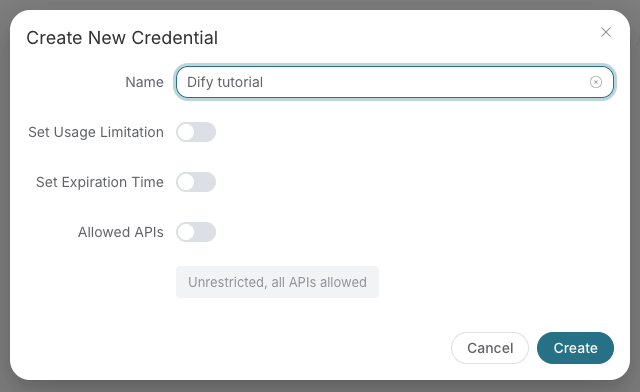
- Copy the API Key from the application card, or open Keys / Manage Keys → Create to create a separate key for this integration. Give it a recognizable name so you can revoke or rotate it independently.
- When creating a key, review Expiration Time, Set Usage Limitation, and Allowed APIs. Enable only the restrictions you need, allow the operations you will call, then click Create and copy the token from the key list. Task lookup does not grant permission to submit a generation. Confirm the application's balance can cover your first request; any trial allowance is whatever your account currently displays.
- Copy only the token value, without quotation marks, spaces, or
Bearer. An API Key / API Token field expects this raw value; only a manually configured HTTPAuthorizationheader needs theBearerprefix. Aplatform-...account-management token cannot replace a generation API key.
Save the key in the client's credential store or the environment variable shown below. Never put it in a prompt, shared workflow, screenshot, or Git commit. If authentication fails, check the full copied value, application/service access, expiration, usage limit, and balance before creating another key.
A fixed Bearer header bypasses OAuth. If the header is invalid, remove it before trying browser sign-in; keep the saved credential private.
For Claude Code, the shell expands the token when you add the server; treat the saved user MCP config as a secret:
export ACEDATACLOUD_API_TOKEN='YOUR_API_TOKEN'
claude mcp add --transport http --scope user kling https://kling.mcp.acedata.cloud/mcp \
  --header "Authorization: Bearer $ACEDATACLOUD_API_TOKEN"
For a Claude Code project config, put a variable reference in <project>/.mcp.json and set that variable in the environment that launches Claude Code:
{
  "mcpServers": {
    "kling": {
      "type": "http",
      "url": "https://kling.mcp.acedata.cloud/mcp",
      "headers": {"Authorization": "Bearer ${ACEDATACLOUD_API_TOKEN}"}
    }
  }
}
Cursor uses a different environment-variable syntax in ~/.cursor/mcp.json or an uncommitted project config:
{
  "mcpServers": {
    "kling": {
      "url": "https://kling.mcp.acedata.cloud/mcp",
      "headers": {"Authorization": "Bearer ${env:ACEDATACLOUD_API_TOKEN}"}
    }
  }
}
In VS Code, run MCP: Open User Configuration and merge this server plus its masked input; ${input:...} is for VS Code's user/workspace format and is not portable to the Agent Host .mcp.json format:
{
  "inputs": [
    {"id": "acedata-kling-token", "type": "promptString", "description": "AceDataCloud API token", "password": true}
  ],
  "servers": {
    "kling": {
      "type": "http",
      "url": "https://kling.mcp.acedata.cloud/mcp",
      "headers": {"Authorization": "Bearer ${input:acedata-kling-token}"}
    }
  }
}
For Cline, use its MCP configuration UI or CLI file ~/.cline/data/settings/cline_mcp_settings.json; its remote transport value is streamableHttp. For JetBrains AI Assistant, add a remote URL from Settings → Tools → AI Assistant → Model Context Protocol (MCP). For Zed, use a context_servers entry with the URL only for OAuth or add a local Bearer header. These clients have different configuration schemas; follow their current UI rather than copying another client's JSON. Cline · JetBrains · Zed.
Local stdio
Install the package and give the local process an API token:
python -m pip install mcp-kling
export ACEDATACLOUD_API_TOKEN='YOUR_API_TOKEN'
mcp-kling
For Claude Desktop local MCP, merge this entry into the file opened by its developer settings (~/Library/Application Support/Claude/claude_desktop_config.json on macOS). uvx requires uv on PATH:
{
  "mcpServers": {
    "kling": {
      "command": "uvx",
      "args": ["mcp-kling"],
      "env": {"ACEDATACLOUD_API_TOKEN": "YOUR_API_TOKEN"}
    }
  }
}
Keep this user-level file private. Self-hosted HTTP uses mcp-kling --transport http --port 8000; expose it only with suitable network and TLS controls. Local execution still calls the AceDataCloud API.
Check before using the service
https://kling.mcp.acedata.cloud/healthreturning{"status":"ok"}checks endpoint reachability only.- Confirm that the MCP client loads tools.
kling_list_modelsis a reference tool; it does not verify downstream API access or balance. - If you need a full API check, call
kling_generate_videowith your own valid input after reviewing current service documentation and displayed pricing. If the result contains a task ID, callkling_get_taskon that same ID until terminal success or failure. Do not resubmit the operation just to check progress.
For 401, check which auth route the client used and whether the token or OAuth session is valid. A 403 may mean an account permission or content moderation failure; read the returned error. Insufficient balance and downstream service failures need their own diagnosis. A listed tool or submitted task does not prove a successful result.
Available Models
| Model | Description | Use Case |
|---|---|---|
kling-v1 | First generation | Basic video generation |
kling-v1-6 | V1 extended | Improved quality over v1 |
kling-v2-master | V2 master (default) | High-quality, balanced performance |
kling-v2-1-master | V2.1 master | Enhanced quality and consistency |
kling-v2-5-turbo | V2.5 turbo | Faster generation, good quality |
kling-o1 | Kling O1 | Omni image/video reference generation |
Configuration
Environment Variables
| Variable | Description | Default |
|---|---|---|
ACEDATACLOUD_API_TOKEN | API token from AceDataCloud | Required |
ACEDATACLOUD_API_BASE_URL | API base URL | https://api.acedata.cloud |
KLING_DEFAULT_MODEL | Default video model | kling-v2-master |
KLING_DEFAULT_MODE | Default generation mode | std |
KLING_DEFAULT_ASPECT_RATIO | Default aspect ratio | 16:9 |
KLING_REQUEST_TIMEOUT | Request timeout in seconds | 300 |
LOG_LEVEL | Logging level | INFO |
Command Line Options
mcp-kling --help

Options:
  --version          Show version
  --transport        Transport mode: stdio (default) or http
  --port             Port for HTTP transport (default: 8000)
Development
Setup Development Environment
# Clone repository
git clone https://github.com/AceDataCloud/KlingMCP.git
cd KlingMCP

# Create virtual environment
python -m venv .venv
source .venv/bin/activate  # or `.venv\Scripts\activate` on Windows

# Install with dev dependencies
pip install -e ".[dev,test]"
Run Tests
# Run unit tests
pytest

# Run with coverage
pytest --cov=core --cov=tools

# Run integration tests (requires API token)
pytest tests/test_integration.py -m integration
Code Quality
# Format code
ruff format .

# Lint code
ruff check .

# Type check
mypy core tools
Build & Publish
# Install build dependencies
pip install -e ".[release]"

# Build package
python -m build

# Upload to PyPI
twine upload dist/*
Project Structure
KlingMCP/
├── core/                   # Core modules
│   ├── __init__.py
│   ├── client.py          # HTTP client for Kling API
│   ├── config.py          # Configuration management
│   ├── exceptions.py      # Custom exceptions
│   ├── oauth.py           # OAuth 2.1 provider
│   ├── server.py          # MCP server initialization
│   ├── types.py           # Type definitions
│   └── utils.py           # Utility functions
├── tools/                  # MCP tool definitions
│   ├── __init__.py
│   ├── video_tools.py     # Video generation tools
│   ├── motion_tools.py    # Motion transfer tools
│   ├── task_tools.py      # Task query tools
│   └── info_tools.py      # Information tools
├── prompts/                # MCP prompts
│   └── __init__.py        # Prompt templates
├── tests/                  # Test suite
│   ├── conftest.py
│   └── __init__.py
├── deploy/                 # Deployment configs
│   └── production/
│       ├── deployment.yaml
│       ├── ingress.yaml
│       └── service.yaml
├── .env.example           # Environment template
├── CHANGELOG.md
├── Dockerfile             # Docker image for HTTP mode
├── docker-compose.yaml    # Docker Compose config
├── LICENSE
├── main.py                # Entry point
├── pyproject.toml         # Project configuration
└── README.md
API Reference
This server wraps the AceDataCloud Kling API:
- Kling Videos API - Video generation (text2video, image2video, extend)
- Kling Motion API - Motion transfer
- Kling Tasks API - Task queries
Contributing
Contributions are welcome! Please:
- Fork the repository
- Create a feature branch (
git checkout -b feature/amazing) - Commit your changes (
git commit -m 'Add amazing feature') - Push to the branch (
git push origin feature/amazing) - Open a Pull Request
Documentation
License
MIT License - see LICENSE for details.
Links
Made with love by AceDataCloud
Turbo, storyboards and commerce
Use kling_generate_turbo_video for V3 Turbo (std 720p / pro 1080p, integer 3–15 seconds). Native audio is included and cannot be disabled. Tail frames, standalone negative prompts, cfg_scale, camera controls and Omni references are unsupported.
Use kling_generate_storyboard for V3/V3 Omni multishot generation: shot_type="intelligence" uses a prompt; customize takes 1–6 indexed multi_prompt shots whose durations sum to the total. For example: {"shot_type":"customize","duration":5,"multi_prompt":[{"index":1,"prompt":"Ocean","duration":2},{"index":2,"prompt":"Beach","duration":3}]}.
Public commerce tools are kling_goods_studio and kling_video_commerce. Both accept a structured request and return a task ID for kling_get_task.
Reference inputs
For kling-o1 or kling-v3-omni, supply one reference video through video_list and cite it as <<<video_1>>> in the prompt. Do not combine a reference video with generate_audio=true. Reference images (image_list, start or end frames) alone do not trigger reference-video pricing.
Successful reference-video requests use a separate billing tier: 1.202 Credits/second in std or 1.602 Credits/second in pro. With refer_type="base" (the default), editing can follow the reference video's length; actual output duration is rounded to integer seconds for billing (5.708 seconds bills as 6; 5.041 bills as 5). With refer_type="feature", billing uses the requested duration. Check the returned usage.reference_video_seconds for final billed seconds rather than treating the submission estimate as the final charge.
For a 5-second kling-o1 result, current Credits are:
| Mode | Without reference video | With reference video (5 billed seconds) |
|---|---|---|
std | 4.005 | 6.010 |
pro | 5.340 | 8.010 |
Confirm current account pricing and balance before submitting; poll the original task ID instead of generating again to check progress.
Use element_list and voice_list only with already valid platform references and the supported model combinations in the current backend guide. Standalone asset creation and management are not published.
API parameter behavior
kling_generate_storyboard can combine supported Omni image/video references and platform element IDs. kling_generate_with_assets also accepts supported Omni references. Model restrictions, reference-count limits and audio/4k incompatibilities still apply. Asset management endpoints remain unpublished.