Listed from the MCP registry; nobody on Odel publishes it.

Plane Workflow
Plan, start, and complete Plane work items under team rules, with previews and idempotent writes.
Runs on your machine from its package; the steps are below.
What it does
- Reads
- Writes
- High impact
At most: creates or changes data: records, files, settings.
What it costs
FreeOdel charges nothing per call. The publisher may charge for its own service.
Runs locally over stdio
This server isn't hosted — your MCP client launches it from a package registry. Use one of the commands below, or drop the config into your client (e.g. Claude Desktop).
Run
uvx plane-workflow-mcp
MCP client config
{
  "mcpServers": {
    "plane-workflow": {
      "command": "uvx",
      "args": [
        "plane-workflow-mcp"
      ]
    }
  }
}Plane Workflow MCP
Your git history already knows what you did. Let your agent put it in Plane.




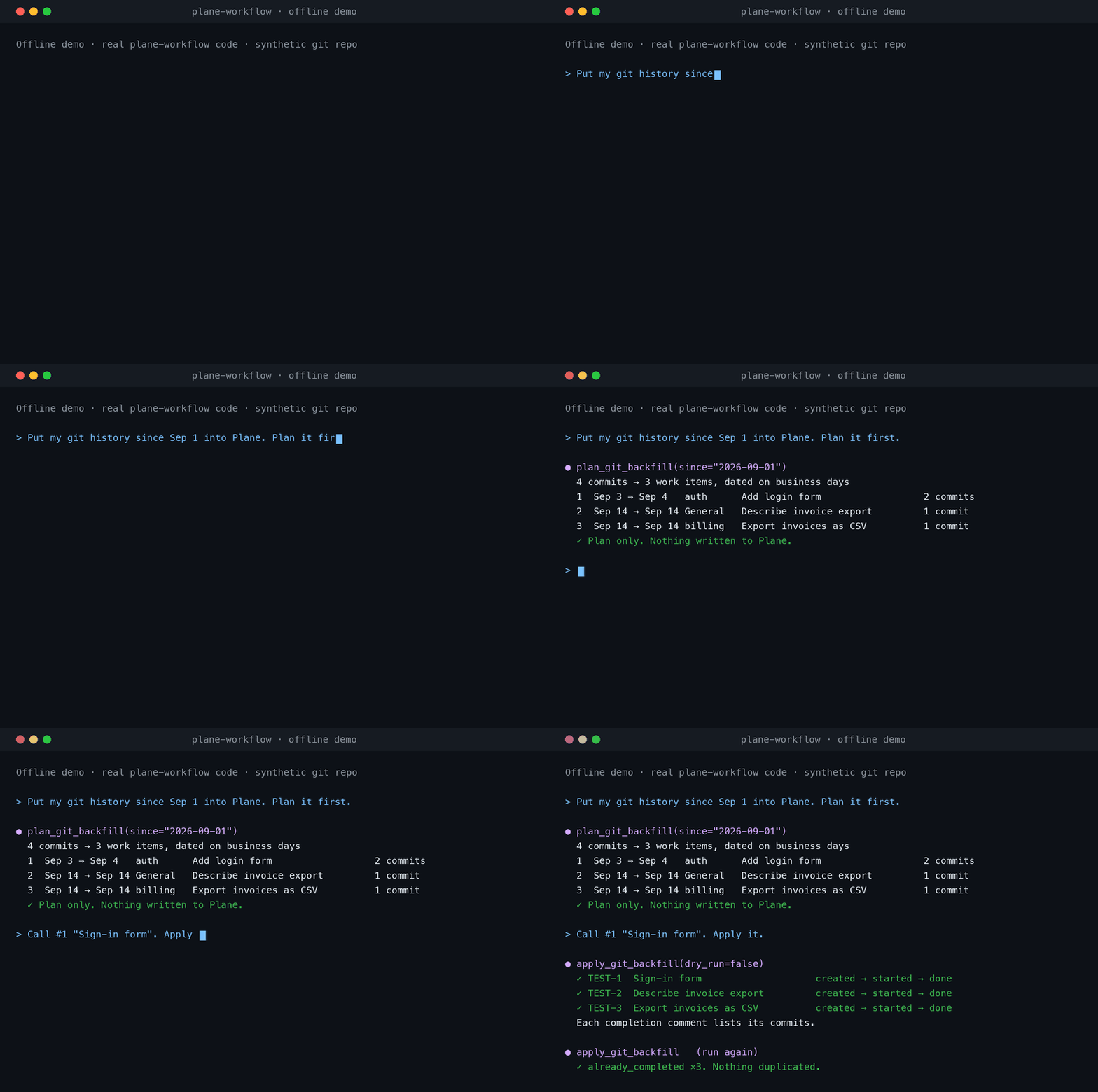
An open-source MCP server and CLI for Plane, cloud or self-hosted. It reads your commits and turns them into Plane work items that are planned, started, and completed on the right business days, with notes that cite the commits. You see the whole plan first; nothing is written until you approve it.
Offline demo: the real server code runs against a test fixture with synthetic data. Reproduce it.
Who it is for: teams on Plane who work through Claude Code, Codex, Cursor, or another MCP client, and whose board falls behind what they actually shipped. It works next to the official Plane MCP server rather than replacing it (how they differ).
Quick start
Requires Python 3.11+, uv, and a Plane API key.
uv tool install plane-workflow-mcp
plane-workflow setup --client claude-code
Setup asks for your Plane URL, workspace, and API key. It checks the connection,
stores the key in your OS keyring, and registers the server with your client. Other
clients: --client codex, cursor, claude-desktop, opencode, or zed; any other
stdio client can run plane-workflow mcp. Add --dry-run to see the change first.
Using Claude Code? You can install it as a plugin instead, which also adds a skill for using the tools safely.
Select a project, then restart your client:
plane-workflow project list
plane-workflow project activate PROJECT_ID
Then preview a backfill from any of your repositories. Nothing is written to Plane
without --apply:
plane-workflow backfill --since 2026-09-01
Update
plane-workflow status shows your version and tells you when a newer release
exists. Update with uv tool install --force plane-workflow-mcp, then restart your client. Your
setup, API key, and selected project are kept, so there is no need to run setup again.
What it does
- Backfill Plane from git.
plan_git_backfillreadsgit logand groups commits into work items by module, scope, or folder. Dates come from the commits and are moved onto your business days. Nothing is written until you approve the plan.apply_git_backfillthen creates, starts, and completes each item, with a comment listing its commits. Re-running it never duplicates items. Also available asplane-workflow backfill --since 2026-09-01. - Plan → start → complete, with evidence. New work gets scope, acceptance criteria, assignee, estimate, and start/target dates that skip your non-business days. Completion requires a started item, a factual summary, and real verification. It never fabricates either.
- Preview first, safe to retry. Write tools support
dry_runpreviews. Creates check for duplicates and are idempotent, so a timeout followed by a retry does not create a second item. Rate limits are retried with backoff. - Know what needs attention. Read-only briefings list overdue, stale, unassigned, unestimated, and unscheduled work. Reports export to DOCX or PDF.
- Never touch the wrong project. Writes are tied to the selected workspace and project, unless one call explicitly confirms another project's identifier.
First prompt
Read this repository's git history since September 1 and propose Plane work items
for it with plan_git_backfill. Show me the plan as a table. Do not write anything
to Plane until I approve.
Or start read-only:
Use Plane Workflow to confirm my active workspace and project, then show overdue
and unassigned work in that project with identifiers and totals. Do not change
any Plane data.
Then try a write with a preview:
Retrying checkout can create two orders. Draft a bug with acceptance criteria in
the active project using its workflow rules. Show the dry-run preview and wait for
my approval before creating it.
More prompts with expected results · Run the offline demo
How it compares
The official Plane MCP server gives broad access to Plane resources and hosted OAuth. This server adds a workflow layer on top of Plane: planning rules, an enforced lifecycle, previews, idempotent writes, and completion records. You can install both. Detailed comparison.
Review happens in your client. The server enforces planning rules and lifecycle checks, but it cannot prove a human approved a call. Plane is updated when the agent calls a tool; there is no background sync.
Documentation
- Installation, clients, and troubleshooting
- Planning rules, lifecycle, batch work, and reports
- Workflow examples · Offline demo
- Optional Mattermost bot
- Changelog
- Contributing · Support · Security
MIT licensed. Community project, not affiliated with Plane.
If it saves your team a round of status updates, a star helps other Plane users find it.