Listed from the MCP registry; nobody on Odel publishes it.
Is this yours? Claim it
Crossmart
Run a multichannel catalog: products, stock, store listings on Shopify and eBay.
One address for any MCP client. You sign in at api.crossmart.io once, after adding it.
What it does
- Reads
- Writes
- High impact
At most: only reads or looks up information.
What it costs
FreeOdel charges nothing per call. The publisher may charge for its own service.
What it asks for at sign-in
| Access to | Read | Change |
|---|---|---|
| Catalog | ||
| Orders | ||
| Stores | ||
| Reports | ||
| Suggestions | ||
| Webhooks |
From the sign-in at api.crossmart.io, as the endpoint publishes it. You approve it there.
Tools
None listed · checked 21 Nov 2026Odel could not list its tools without signing in.
crossmart
The open-source multichannel listing platform for sellers and their AI agents.
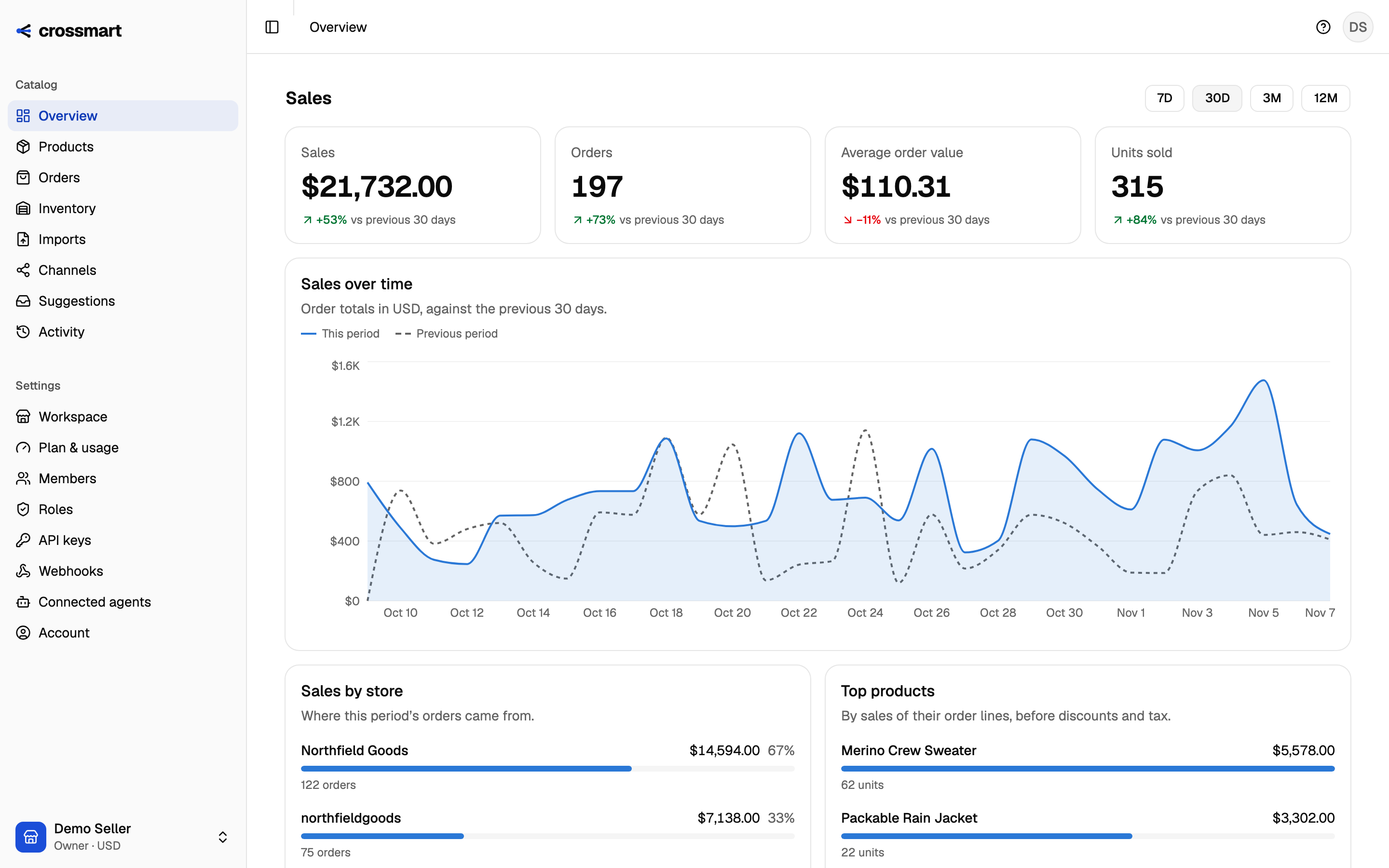
Manage listings, inventory and orders on Shopify and eBay today, with Google Merchant and Etsy on the way, from one dashboard or straight from Claude & ChatGPT.
Website · Docs · Developers · Architecture
Note
Crossmart is young and moving fast. Shopify and eBay are live, and more channels are on the way. Until 1.0, APIs may change; breaking changes are announced and versioned under /api/v1.
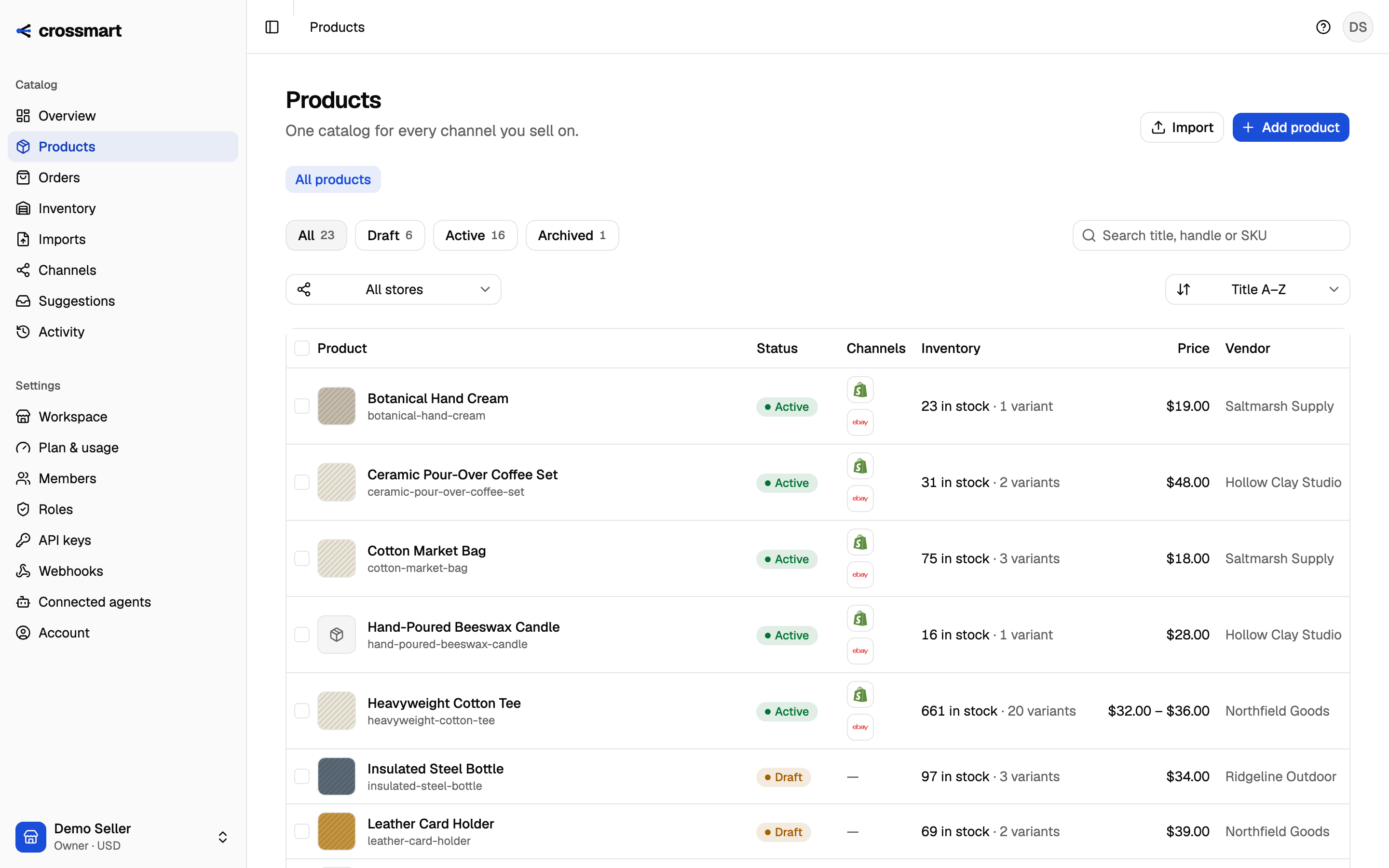 | 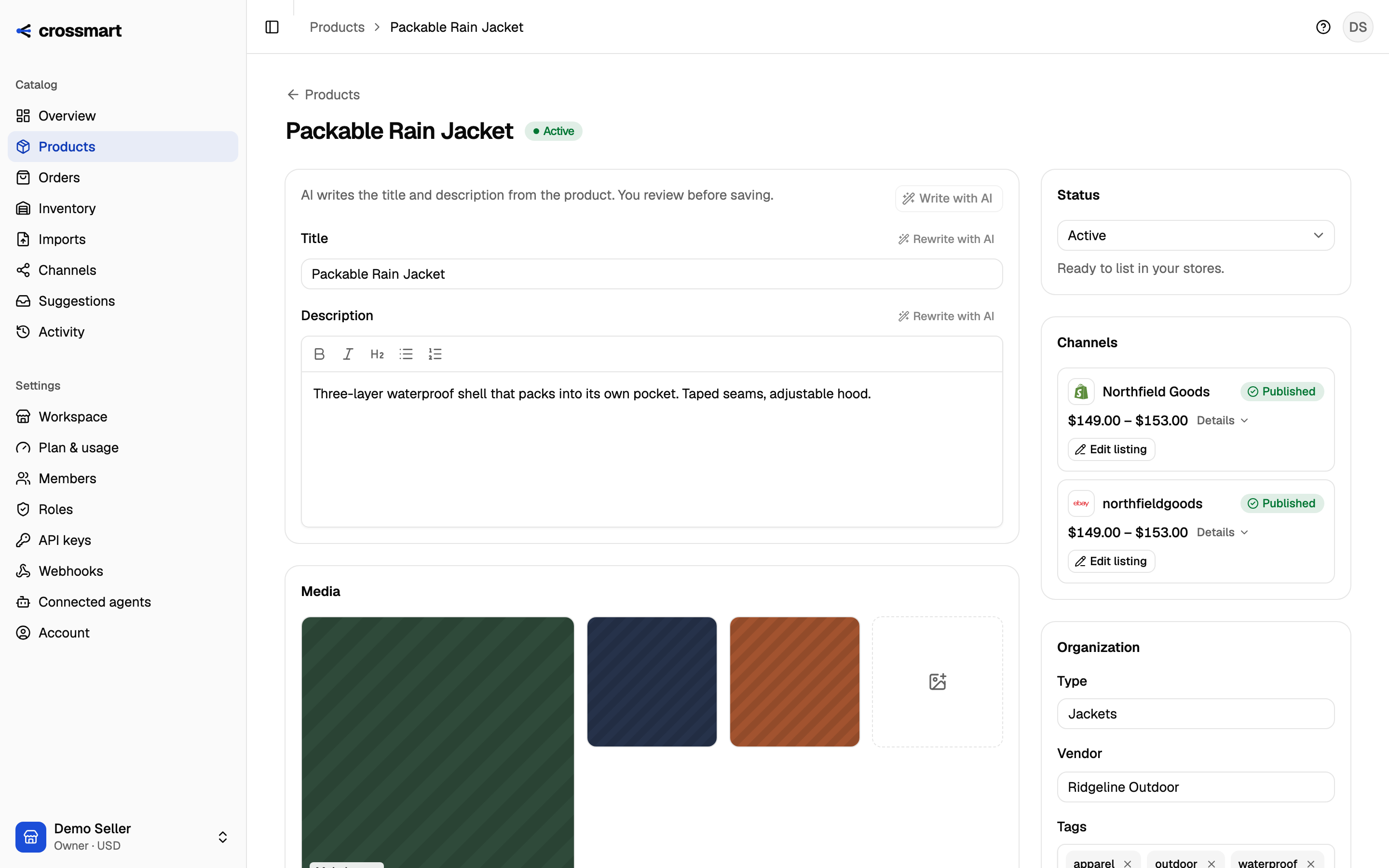 |
| One catalog for every channel | Publish a product to every store |
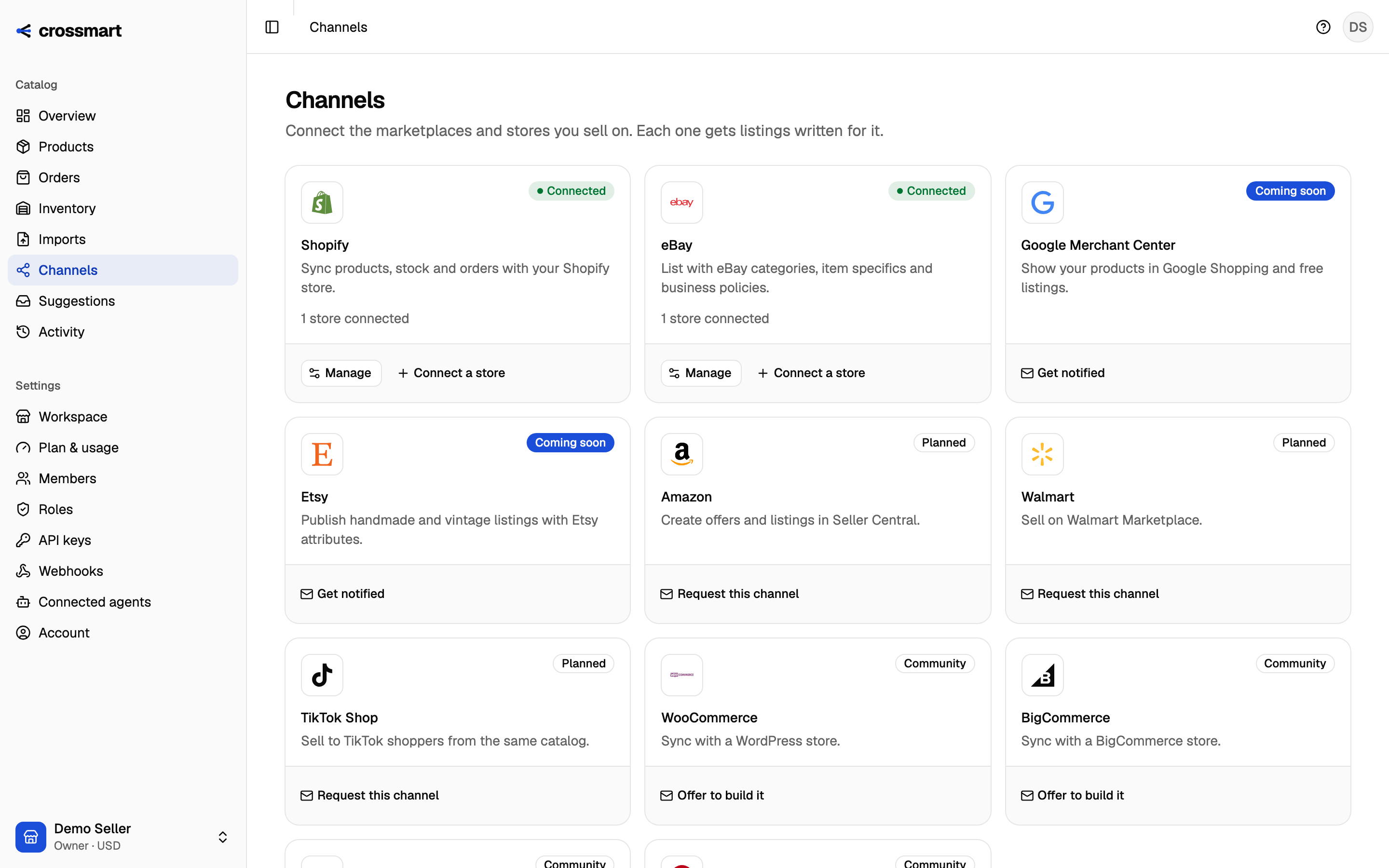 | 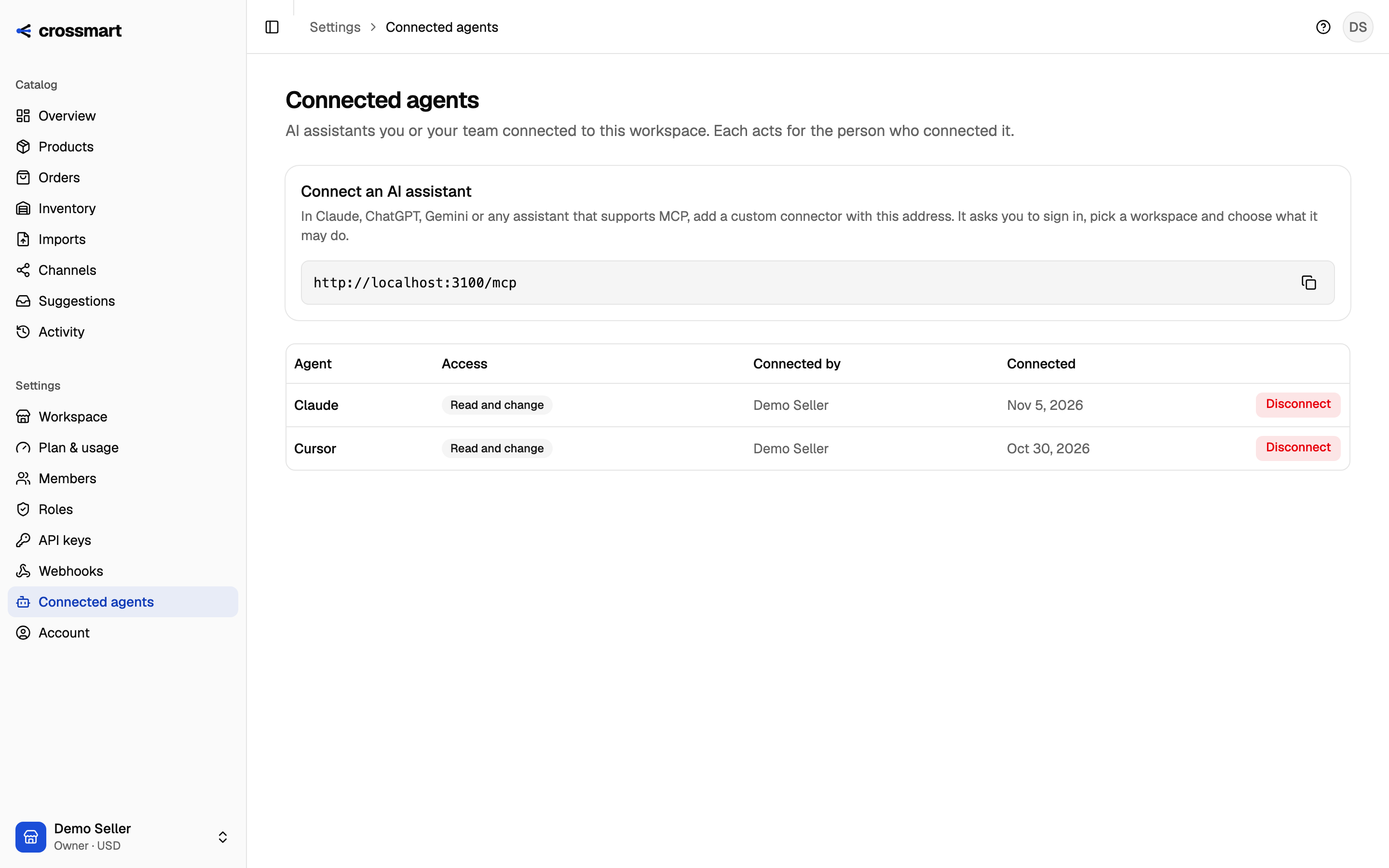 |
| Connect your stores | Let your AI agents work through MCP |
Why Crossmart
- One catalog, every marketplace. Create or import products once, then publish tailored listings to every channel.
- AI does the busywork. Agents write channel-specific content, map categories and attributes, and fix marketplace rejections. You review and approve.
- Built for agents. Everything in the dashboard is available through a REST API and an MCP server, so your own AI agent can run your catalog.
- No overselling. A single inventory ledger with real-time order ingestion and last-unit protection keeps every channel in sync.
- Open source. Self-host it for free, or use Crossmart Cloud and skip marketplace app approvals.
Project status
Crossmart is pre-1.0. The catalog, the stock ledger, the REST API, the SDKs and the MCP server work end to end, but APIs and data models can still change between releases.
| Channel | Status |
|---|---|
| Shopify | Live |
| eBay | Live (a self-hosted instance uses eBay sandbox keys by default) |
| Google Shopping (Merchant Center) | Coming soon |
| Etsy | Coming soon |
| Mercado Libre | Coming soon |
| Falabella (Chile, Colombia, Peru) | Preview |
| Amazon, Walmart, TikTok Shop | Planned |
| WooCommerce, BigCommerce and others | Community contributions welcome |
The channel status page is kept up to date as connectors ship.
Plans: Crossmart Cloud has plans sized by active listings. On a self-hosted instance plan
limits are reported but not enforced unless you set ENTITLEMENTS_ENFORCED=true.
Repository layout
| Path | What it is |
|---|---|
apps/api | REST API (NestJS) |
apps/worker | Background jobs: channel sync, orders, AI agents (BullMQ) |
apps/mcp | MCP server that exposes the API to AI agents |
libs/core | Domain modules shared by the API and worker (tenancy, …) |
libs/common | Configuration, constants and shared utilities |
libs/database | Prisma schema, migrations and client |
libs/connectors | Marketplace connector SDK and connectors |
sdks/typescript | @crossmart/sdk, the TypeScript client of the REST API |
sdks/python | crossmart on PyPI, the Python client of the REST API |
sdks/php | crossmart/crossmart-php, the PHP client of the REST API |
integrations/n8n | n8n-nodes-crossmart, n8n nodes and a polling trigger |
The web app lives in crossmart-io/crossmart-web.
Quick start (development)
Requirements: Node.js 22 or 24 (.nvmrc pins 24, the version the Docker images use), pnpm 10,
and Docker (or your own PostgreSQL and Redis, see below).
pnpm install
cp .env.example .env                  # then fill in the secrets, see below
docker compose up -d postgres redis   # set POSTGRES_PORT / REDIS_PORT if 5432 / 6379 are taken
pnpm db:generate                      # generates the Prisma client; the build needs it
pnpm db:deploy                        # applies the migrations
pnpm start:api                        # http://localhost:3000/api/docs
pnpm start:worker
In .env, set:
| Variable | How |
|---|---|
BETTER_AUTH_SECRET | openssl rand -base64 32 |
POSTGRES_PASSWORD / REDIS_PASSWORD | openssl rand -hex 24, and put the same values in DATABASE_URL and REDIS_URL |
CREDENTIALS_MASTER_KEY | openssl rand -base64 32. It encrypts channel credentials; without it no store can be connected |
Everything else is optional for running locally. The channel credentials (SHOPIFY_*, EBAY_*,
GOOGLE_*, ETSY_*, MERCADOLIBRE_*) only turn on connecting that channel; see
docs/channels.
Without ANTHROPIC_API_KEY the app runs as usual and the AI features say AI is not configured.
GET /api/v1/health reports whether the API is up. It checks the database connection only.
Without Docker
If you already run PostgreSQL 16+ and Redis 7+, skip docker compose and point DATABASE_URL
and REDIS_URL in .env at them. POSTGRES_PASSWORD and REDIS_PASSWORD are only read by
compose.yaml.
Another port
API_PORT defaults to 3000. If you change it, change the URLs that contain it too:
BETTER_AUTH_URL, MEDIA_PUBLIC_URL and CROSSMART_API_URL in .env, and VITE_API_URL in
the web app's .env.local.
Demo data
With the API running, pnpm seed:demo creates a local demo account and fills it with 23 products
and 116 variants from invented brands: sizes and colours, stock with a few sell-outs, drafts, and
products missing images or barcodes, so every screen has something to show. It goes through the
public API, so the data passes the same validation as anything a seller enters. It prints the demo
login when it is done (DEMO_EMAIL and DEMO_PASSWORD override it), and does nothing if that
workspace already has products. It talks to API_URL, http://localhost:3000 by default. Never run it against a server other people can reach.
Self-hosting
export BETTER_AUTH_SECRET="$(openssl rand -base64 32)"
export POSTGRES_PASSWORD="$(openssl rand -hex 24)"
export REDIS_PASSWORD="$(openssl rand -hex 24)"
docker compose --profile app up -d --build
This starts PostgreSQL, Redis, applies migrations, and runs the API and worker. Keep the three
secrets (for example in .env next to compose.yaml): compose refuses to start without them.
PostgreSQL and Redis require their passwords and publish their ports on 127.0.0.1 only, so
they are not reachable from other machines.
Compose also passes CREDENTIALS_MASTER_KEY, the channel credentials (SHOPIFY_*, EBAY_*,
GOOGLE_*, ETSY_*, MERCADOLIBRE_*), ANTHROPIC_API_KEY and ENTITLEMENTS_ENFORCED from the
shell or .env to the API and worker. Set CREDENTIALS_MASTER_KEY before you connect a store.
What compose does not include:
- The web app. It lives in crossmart-io/crossmart-web.
Its Docker image takes the API address as a build argument:
docker build --build-arg VITE_API_URL=https://api.example.com .(see its Dockerfile). - The MCP server. Build it with
docker build --build-arg APP=mcp .or run it from source (see Using Crossmart from Claude, ChatGPT or Cursor).
The stack assumes the API at http://localhost:3000 and the web app at http://localhost:5173.
For another address, set BETTER_AUTH_URL, CORS_ORIGINS and WEB_APP_URL (in the shell or
.env), and change the published port in compose.yaml if needed.
Upgrading an existing stack: PostgreSQL sets its password only when the data volume is first
created. Keep the old one (crossmart) as POSTGRES_PASSWORD, or change it first with
ALTER USER crossmart PASSWORD '…' and then set the new value. Redis picks up REDIS_PASSWORD
when its container is recreated; add it to REDIS_URL (redis://:<password>@host:6379) for the
API and worker you run outside compose.
Build on Crossmart
The developer guide covers the REST API (authentication, errors, pagination), a quickstart from product to store to order, the TypeScript, Python and PHP SDKs, the n8n nodes and the MCP server for AI agents.
Authentication
- People sign up and sign in through Better Auth at
/api/auth/*(email and password for now). The session is a cookie. Every new user gets an organization and a workspace they own. - Programs (the MCP server, scripts) use a workspace API key in the
x-api-keyheader. Keys are created atPOST /api/v1/workspaces/{workspaceId}/api-keys, carry a role no higher than their creator's, are shown once and stored only as a SHA-256 hash. - Roles per workspace:
OWNER,ADMIN,EDITOR,APPROVER,VIEWER, each a set of fine-grained permissions (docs/permissions.md). Routes declare the permission they need; callers outside the workspace get404.
Catalog
- Products have base content (title, HTML description, vendor, type, tags, status), up to three options (Size, Color, Material) and up to 250 variants. Handles are unique per workspace, and so are SKUs. Prices are exact decimal strings (
"19.90") in the workspace currency. - Stock lives in an append-only ledger (
inventory_movements). Each variant'savailablecaches the sum of its movements. - Edit with
PUT /api/v1/workspaces/{workspaceId}/products/{productId}. Variants sent with theiridkeep it, new ones are added, and missing ones are removed. A changedquantityis written to the ledger as an adjustment. Descriptions are sanitized on every write. - Images upload to
POST /api/v1/workspaces/{workspaceId}/media/product-images, which returns a URL to use inmedia. The format is read from the file's bytes: JPEG, PNG, WebP or GIF, never SVG. WithSTORAGE_DRIVER=localthe API stores files inSTORAGE_LOCAL_DIRand serves them at/media. Each file is at most 20 MB, and each workspace stores at most 5 GB of files (413past it); images a product no longer uses still count until orphan cleanup exists. - Import a Shopify product export with
POST /api/v1/workspaces/{workspaceId}/product-imports(multipart:format=shopify_csv,file). Products whose handle is already in the catalog are skipped, never overwritten. Invalid rows are reported with their spreadsheet row number. To add another format, implementCatalogFileParserand register it inCatalogModule.
Using Crossmart from Claude, ChatGPT or Cursor
Crossmart has an MCP server, so an AI agent can run the catalog with the same rules as the dashboard. Create an API key in Settings → Developers → API keys (an Editor key is enough for most work), then add the server to your client. See docs/mcp.md for the tools and the details.
Remote (Crossmart Cloud, or your own deployment run with MCP_TRANSPORT=http):
{
  "mcpServers": {
    "crossmart": {
      "url": "https://mcp.crossmart.io/mcp",
      "headers": { "Authorization": "Bearer <your API key>" }
    }
  }
}
Local (stdio), after pnpm build:mcp:
{
  "mcpServers": {
    "crossmart": {
      "command": "node",
      "args": ["/path/to/crossmart/dist/apps/mcp/main.js"],
      "env": { "CROSSMART_API_URL": "http://localhost:3000", "CROSSMART_API_KEY": "<your API key>" }
    }
  }
}
Contributing
Contributions are welcome. Read CONTRIBUTING.md first. It covers the code standards, the commit format and the Contributor License Agreement.
Getting help
- Questions and chat: join the community on Discord.
- Ideas and longer threads: GitHub Discussions.
- Bugs: GitHub Issues.
- Security vulnerabilities: report them privately through GitHub private vulnerability reporting or security@crossmart.io, never in a public issue. See SECURITY.md.
- Anything else: hello@crossmart.io.
See SUPPORT.md for what to expect.
License
Copyright YIOT LLC.
- The platform (this repository, unless stated otherwise) is licensed under the GNU Affero General Public License v3.0.
- The SDKs in
sdks/and the n8n node inintegrations/n8nare licensed under the MIT License (see theLICENSEfile in each). - The agent skill in
skills/crossmartis licensed under MIT-0.
"Crossmart" and the Crossmart logo are trademarks of their owner and are not covered by the code license.