Listed from the MCP registry; nobody on Odel publishes it.

CrossPad
Development workflow server for CrossPad — build, test, run, screenshot, and navigate code
Runs on your machine from its package; the steps are below.
What it does
- Reads
- Writes
- High impact
At most: moves money, runs code or commands, deletes data, or sends messages for you.
What it costs
FreeOdel charges nothing per call. The publisher may charge for its own service.
Runs locally over stdio
This server isn't hosted — your MCP client launches it from a package registry. Use one of the commands below, or drop the config into your client (e.g. Claude Desktop).
Run
npx -y crosspad-mcp-server
MCP client config
{
  "mcpServers": {
    "crosspad": {
      "command": "npx",
      "args": [
        "-y",
        "crosspad-mcp-server"
      ]
    }
  }
}crosspad-mcp




Talk to your CrossPad. Let Claude do the toolchain.
crosspad-mcp is an MCP server that teaches Claude Code (or any MCP client) how to develop for the CrossPad pad controller. You say "flash the new build and check that it boots"; it runs the ESP-IDF build, asks you to confirm the flash, opens the console, runs the smoke scenario and tells you what happened — with the hardware traps already built in, so you don't have to remember which serial port reboots the board when you open it.
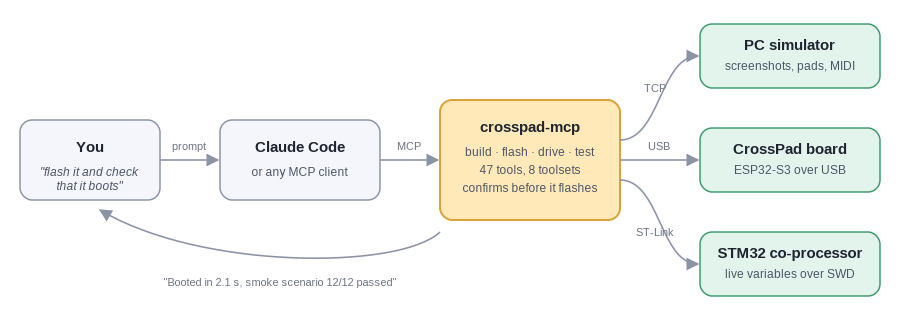
What you can do with it
Every card is a real prompt. The tools named underneath are what runs — you never have to call them yourself.
| Say this… | …and this happens |
|---|---|
| "Build the firmware and flash it over OTA." | crosspad_build platform=idf streams the build, crosspad_flash transport=ota asks for confirmation, then streams the upload. New app directories are detected and the fullclean is done for you. |
| "Show me what's on the simulator screen." | crosspad_run launches the PC sim, crosspad_screenshot returns the LCD as an image Claude can actually look at. Then "press pad 5", "turn the encoder left twice" — crosspad_input. |
| "Play a drum pattern on the pads and record what comes out." | crosspad_stimulus hits the pads with real timings, crosspad_capture records the board through its own USB-audio endpoint, crosspad_analyze gives a verdict (onsets, clicks, silence, velocity curve). |
| "Why did it crash?" | crosspad_diagnose_crash — reset reason, registers, backtrace decoded against the ELF that is actually flashed, heap after restart. One call. |
| "Watch the battery charger state machine while I plug the cable in." | crosspad_trace polls STM32 variables live over ST-Link without halting the core, and plots them. |
| "Install the sampler app and rebuild." | crosspad_apps_install app_name=sampler adds the submodule from the crosspad-apps registry, then a clean build. |
"Where is IPadLogicHandler implemented?" | crosspad_interface_implementations across every repo of the ecosystem, or crosspad_symbol for clangd-precise definitions and call hierarchies. |
| "Is my board even connected?" | crosspad_devices and crosspad_doctor — which USB mode it is in, which ports belong to it, what is missing on the host, and how to fix each thing. |
Quick start
One plugin brings the server and the skills (the ecosystem map, per-role guides, hardware traps, the game/kit port guide). In a terminal:
claude plugin marketplace add CrossPad/crosspad-mcp
claude plugin install crosspad@crosspad
(or /plugin marketplace add CrossPad/crosspad-mcp and
/plugin install crosspad@crosspad inside Claude Code). The plugin starts the
server through plugin/launch.mjs, which installs the matching
crosspad-mcp-server from npm into ~/.local/crosspad-mcp on first start and
finds your platform-idf checkout itself: the folder you opened Claude in, so a
fork anywhere on disk works. Node.js 18 or newer is all it needs.
Open Claude Code in your platform-idf folder, then ask:
is my CrossPad connected, and is the toolchain set up?
That runs crosspad_doctor. Every failed check comes with a fix.
Without the plugin: claude mcp add crosspad -- npx -y crosspad-mcp-server.
That server assumes your repos live side by side under ~/GIT/ — if they
don't, set the paths once. Use one of the two,
never both: they would register the server twice.
How it is organised
Only the core toolset is visible when the server starts, so the tool list
stays small. Claude enables the others as the conversation needs them — or you
start the server with --toolsets device,sim.
flowchart LR
    core["core · always on<br/>devices · doctor · snapshot<br/>build · flash · repo status · tasks<br/>bench lease"]
    sim["sim<br/>PC simulator: run, screenshot,<br/>input, MIDI, settings, tests"]
    device["device<br/>the board over USB: console,<br/>CDC verbs, UI driving, USB mode"]
    hil["hil<br/>scenarios, pad stimulus,<br/>audio capture + analysis, BLE"]
    code["code<br/>symbols, interfaces,<br/>docs search"]
    git["git<br/>submodule drift,<br/>update, commit"]
    apps["apps<br/>crosspad-apps registry"]
    trace["trace<br/>SWD live variables"]
    core --> sim & device & code & git & apps
    device --> hil
    core --> trace
Anything that writes to a device or your host is tiered. Flashing, DFU and
SWD writes come back as confirmation required first; --read-only removes
every writing tool from the list entirely. Long operations (builds, flashes,
scenarios) run as tasks you can check on, wait for or cancel.
Who is it for
- You build and drive CrossPad firmware — mostly the simulator, sometimes the board. Start with the user guide.
- You work on the firmware itself — flash, console, HIL scenarios, crash diagnosis, SWD. Read the firmware developer guide and HIL testing.
- You want to extend this server — the contributor guide and the Development section.
Going deeper
- Usage reference — every install path, every tool and toolset, resources and prompts, configuration, HTTP transport, the v10 migration table.
- FAQ — the questions that cost people an afternoon.
- CHANGELOG
License
GPL-3.0-or-later — see LICENSE. Part of the CrossPad project. Releases up to 10.3.0 were published under MIT.