Listed from the MCP registry; nobody on Odel publishes it.

sprint-review
Write a sprint review deck from git history, with every line checked against the real commits.
Runs on your machine from its package; the steps are below.
What it does
- Reads
- Writes
- High impact
At most: creates or changes data: records, files, settings.
What it costs
FreeOdel charges nothing per call. The publisher may charge for its own service.
Runs locally over stdio
This server isn't hosted — your MCP client launches it from a package registry. Use one of the commands below, or drop the config into your client (e.g. Claude Desktop).
Run
npx -y @guuskeunen/sprint-review
MCP client config
{
  "mcpServers": {
    "sprint-review": {
      "command": "npx",
      "args": [
        "-y",
        "@guuskeunen/sprint-review"
      ]
    }
  }
}

Turn a sprint's git history into a review deck anyone can follow.
AI writes the words. Code checks every claim. You click publish.





Website · Live demo deck · Get started
Every sprint, someone spends half a day turning commit messages like refactor(planner): optimize status count queries into slides that marketing, sales and management actually understand. sprint-review does that in about a minute, and builds a polished deck with the before and after screenshots, the roadmap and the speaker notes.
export ANTHROPIC_API_KEY=sk-ant-...
npx @guuskeunen/sprint-review
That's all you need to start: no config, no account, nothing to host. You get a single HTML deck that opens anywhere.
Why it's different
Most AI summary tools hand your history to a model and hope for the best. sprint-review treats the model as a writer, not a source of truth:
- Every point has to name a real commit. A point that points nowhere is dropped. That's how invented features stay off the slides.
- Code does everything that can be checked. Word limits, no ticket numbers or hashes, no exclamation marks, the numbers, the pictures, the page itself. The model never writes HTML or counts anything.
- A second AI reads it like your audience would. It sees only the slide text and flags whatever someone outside the team wouldn't understand. Those lines are rewritten once, and the rewrite has to pass every check again.
- Tooling never becomes a theme. CI, test and dependency changes go under the hood automatically.
- Real screenshots, no customer data. It reuses the pictures your visual tests already take (or photographs your staging pages, with private bits masked), finds the screens that actually changed, and crops to the change.
- Nothing is published on its own. You get a draft, the check log and an editable
review.json.
What you get
| File | What it is |
|---|---|
deck.html | The presentation. One self-contained file: arrow keys, presenter window with notes and timer, full screen, prints to PDF. |
review.json | Everything on the slides. Edit it, then sprint-review render rebuilds the deck. |
review.md | A Markdown summary for a pull request, Slack or an email. |
checks.md | What the checks corrected, moved or dropped, and what the second reader flagged. |
deck.pptx | Optional (--pptx): the same deck as an editable PowerPoint, with speaker notes. |
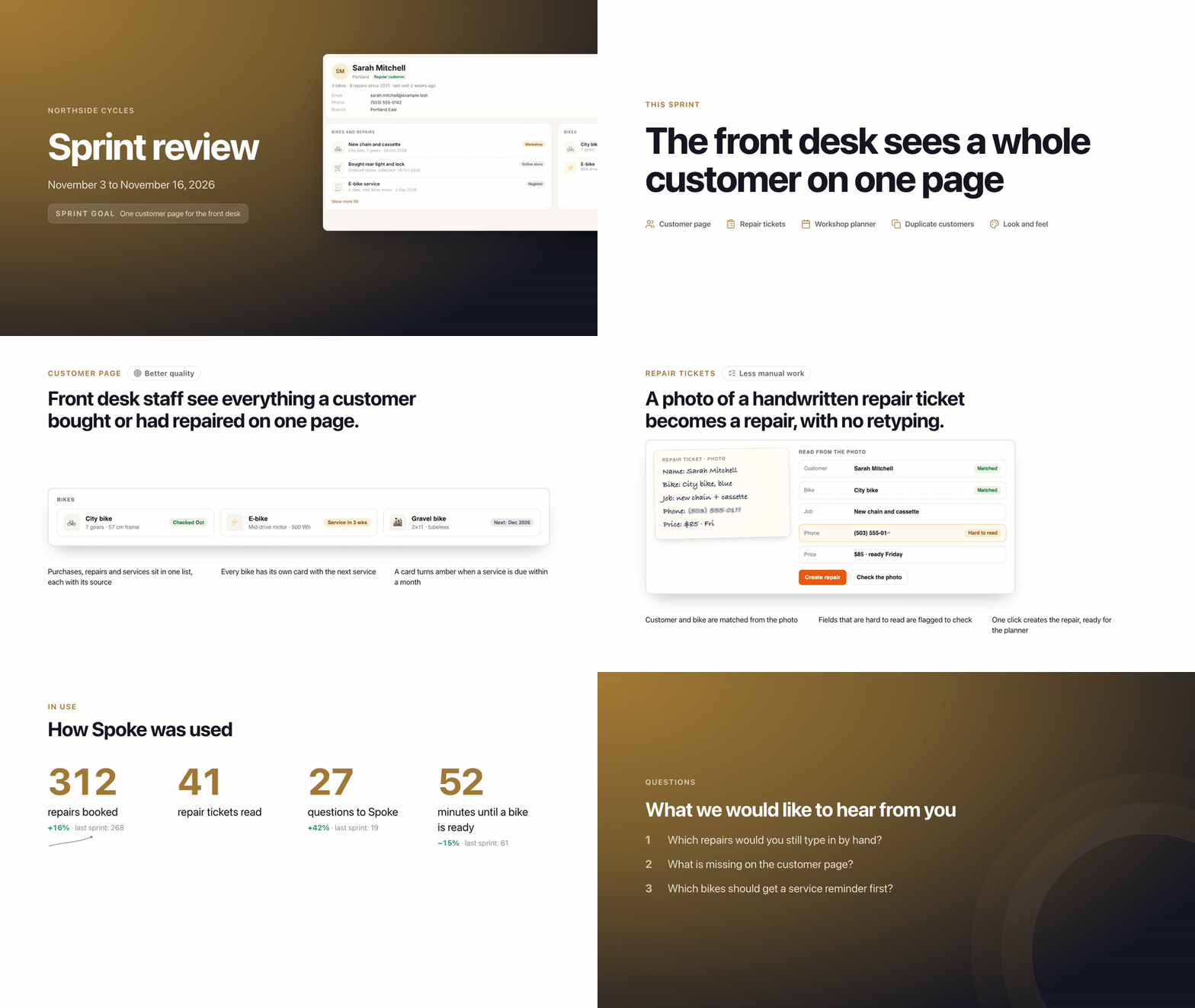
The deck tells the sprint as a story: a cover with your logo and color, the sprint in one sentence, one slide per big theme whose title says what users can do now (with a screenshot when one fits), the smaller themes as cards, before and after slides, what else shipped, the roadmap, usage numbers, and questions for your audience. It follows presentation research: four text sizes, nothing under 24 px, one message per slide. See how the deck is designed.
Real decks from real repositories
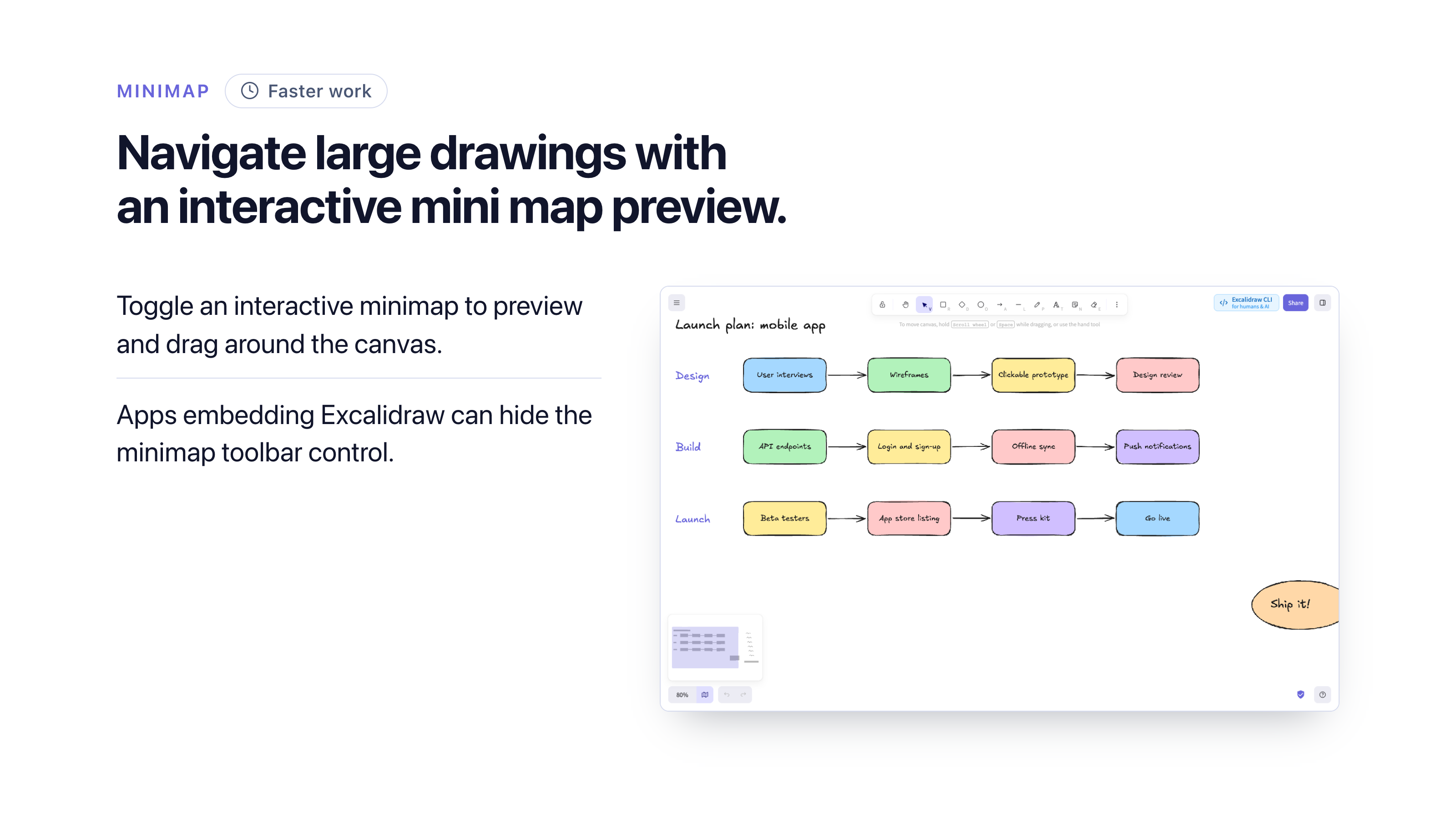
A slide from the Excalidraw review, with a screenshot sprint-review took of the live app. The same two weeks (November 9 to 22, 2026) of four well-known open-source projects, not edited by hand:
| Project | Commits | Deck | Written by | Cost |
|---|---|---|---|---|
| VS Code | 1,298 | open the deck | Claude Sonnet 5.5 | $0.21 |
| Next.js | 252 | open the deck | Claude Sonnet 5.5 | $0.28 |
| Supabase | 355 | open the deck | Claude Sonnet 5.5 | $0.22 |
| Excalidraw | 16 | open the deck (with a screenshot) | Gemini 3.6 Flash | $0.02 |
Made from each project's public git history and pull requests, as examples; not affiliated with or endorsed by these projects. How they were made and what they found: the benchmark.
Quick start
# 1. In your repository
npx @guuskeunen/sprint-review init      # writes sprint-review.config.yml

# 2. See what it will read, for free
npx @guuskeunen/sprint-review --dry-run

# 3. Write the review
export ANTHROPIC_API_KEY=sk-ant-...
npx @guuskeunen/sprint-review
open sprint-reviews/*/deck.html
More options:
sprint-review --since 2026-11-03 --until 2026-11-16   # a date range
sprint-review --from v1.4.0 --to v1.5.0              # between two tags
sprint-review edit sprint-reviews/2026-11-16/review.json   # editor beside the live deck
sprint-review render sprint-reviews/2026-11-16/review.json # rebuild after a hand edit
sprint-review --pptx --slack                          # also PowerPoint, and post to Slack
sprint-review --no-edit                               # don't open the editor afterwards
sprint-review capture                                 # photograph your staging pages
sprint-review doctor                                  # check the setup
Run it every sprint with GitHub Actions
name: Sprint review
on:
  schedule:
    - cron: '0 7 * * 5'   # the morning of review day
  workflow_dispatch:

jobs:
  review:
    runs-on: ubuntu-latest
    steps:
      - uses: actions/checkout@v4
        with:
          fetch-depth: 0            # history back to before the sprint
      - uses: guuskeunen/sprint-review@v0
        id: review
        with:
          anthropic-api-key: ${{ secrets.ANTHROPIC_API_KEY }}
      - uses: actions/upload-artifact@v4
        with:
          name: sprint-review
          path: ${{ steps.review.outputs.dir }}
The review also lands in the job summary. Want a pull request to review and a shareable link on GitHub Pages instead? → GitHub Action guide
Use it from Claude Code, Cursor or any MCP client
/plugin marketplace add guuskeunen/sprint-review
/plugin install sprint-review@sprint-review
The Claude Code plugin brings the skill and the MCP server. Other clients: npx -y @guuskeunen/sprint-review mcp. Then ask "make our sprint review for the last two weeks". → Integrations: MCP, OpenAI, Slack, pull requests, GitLab
Configuration at a glance
product:
  name: Spoke
  description: the planning and customer app of a chain of bike repair shops
organization: Northside Cycles
audience: business          # business, executives, customers, team, or your own words
language: English           # or Dutch, German, nl, de-DE …
sprint: { days: 14 }
brand: { color: "#ea580c", logo: ./logo.png }   # or: brand: { from: https://www.example.com } (or a .pptx)
productPaths: [src/]
screenshots:
  source: git
  dir: e2e/__screenshots__
  ignore: { left: 240, top: 64 }
→ Full configuration reference
Documentation
- Getting started: from zero to your first deck in five minutes
- Configuration: every option, with defaults
- Screenshots: before and after slides from your visual tests, a folder, or captured from URLs
- GitHub Action: scheduled reviews, pull requests, GitHub Pages, Slack, GitLab
- Editing and presenting: the editor, presenting, PDF and PowerPoint
- Integrations: MCP server, Claude Code skill, Slack, pull request context
- Models and providers: Claude, Bedrock, Azure, OpenAI, OpenRouter, Gemini, Mistral, Ollama, LM Studio
- Security and privacy: what it reads, what it sends where, what it never does
- Quality benchmark: how every prompt and model change is measured
- How it works: the pipeline and every check
- Using it as a library: the Node API
- Troubleshooting and FAQ
- Guides: How to run a sprint review · Sprint review template
Privacy and cost
- What leaves your machine: commit subjects, bodies and file names of the sprint, pull request titles and descriptions when a GitHub token is set, plus your product description, sent to the AI provider you choose with your own key. Never source code, never screenshots. No sprint-review server, no telemetry. With a local model (Ollama, LM Studio) nothing leaves your network at all. → Security and privacy
- What it costs: two or three API calls per review, billed to your own account: a few cents with Gemini Flash, more with Claude Opus.
--dry-runestimates the cost before you spend anything, every run prints what it cost, andsprint-reviews/costs.csvkeeps the total. Pick a smaller model in the config if you want it cheaper.
Roadmap
- CLI, GitHub Action, deck, Markdown summary, check log
- Before and after screenshots from git, a folder, or captured from URLs
- Slide labels in English, Dutch, German, French and Spanish, any language for the content
- Pull request descriptions as extra context
- One automatic revision pass for lines the second reader flags
- Brand from an existing deck: color, fonts and logo from a
.pptx - PowerPoint export with speaker notes
- Local editor (
sprint-review edit) - GitLab CI template, Slack posting
- More models: Bedrock, Azure, OpenAI, OpenRouter, Gemini, Mistral, Ollama, LM Studio
- MCP server, Claude Code skill and plugin
- A quality benchmark for every prompt and model change
- Linked issues (GitHub, Jira, Linear) as extra context
- Export into your own PowerPoint layouts, not just its look
- More slide languages built in
Ideas and bugs: open an issue.
Contributing
PRs welcome. See CONTRIBUTING.md. npm test runs the whole pipeline against a fake repo and a fake model, so you don't need an API key. Prompt changes come with a benchmark run, before and after.