Listed from the MCP registry; nobody on Odel publishes it.

IP2Location Io
IP Geolocation MCP server that query the geolocation information using IP2Location.io API.
Runs on your machine from its package; the steps are below.
What it does
- Reads
- Writes
- High impact
At most: only reads or looks up information.
What it costs
FreeOdel charges nothing per call. The publisher may charge for its own service.
Runs locally over stdio
This server isn't hosted — your MCP client launches it from a package registry. Use one of the commands below, or drop the config into your client (e.g. Claude Desktop).
Run
uvx mcp-ip2location-io
MCP client config
{
  "mcpServers": {
    "ip2location-io": {
      "command": "uvx",
      "args": [
        "mcp-ip2location-io"
      ]
    }
  }
}IP2Location.io MCP Server

An Model Context Protocol (MCP) server for looking up IPv4 and IPv6 geolocation and network intelligence using the IP2Location.io API. Connect it to an MCP-compatible AI client to investigate IP addresses in natural language.
Features
- IP geolocation: Country, region, city, coordinates, ZIP/postal code and time zone.
- Network intelligence: ASN, AS name, ISP, domain, connection speed, usage type and other connection attributes.
- Security signals: Proxy, VPN, Tor, threat and fraud-related data on eligible plans.
- IPv4 and IPv6: Single-IP and multi-IP lookup support.
- Bulk lookups: Attempts the Bulk API for multiple IPs, with fallback to individual lookups if the bulk request fails.
- Asynchronous Requests: Uses httpx for asynchronous API requests.
Data availability depends on your IP2Location.io plan. Get an API key before configuring the server.
Quick start
There are two ways to use this MCP server:
- Cloud-hosted MCP server: Connect to the hosted endpoint without running the server locally. Use direct HTTP or an
npxbridge, depending on your MCP client. - Local-hosted MCP server: Run the server on your own machine using
uvx.
Choose the connection method supported by your MCP client:
| Method | Best for | Requirements |
|---|---|---|
| Cloud-hosted: Direct HTTP | Clients supporting remote MCP over HTTP | MCP client, API key |
Cloud-hosted: npx bridge | Clients supporting stdio only | Node.js, npx, API key |
Local-hosted: uvx | Running the MCP server on your machine | Python 3.13+, uv, API key |
Method 1: Cloud-Hosted server — Direct HTTP Connection
For clients that support remote MCP servers, configure:
{
  "mcpServers": {
    "ip2location": {
      "type": "http",
      "url": "https://mcp.ip2location.io/",
      "headers": {
        "X-API-Key": "YOUR_API_KEY"
      }
    }
  }
}
For Claude Code, you can alternatively run:
claude mcp add --transport http ip2location https://mcp.ip2location.io/ --header "X-API-Key: YOUR_API_KEY"
Client configuration formats vary. Use the remote-server configuration supported by your MCP client.
Method 2: Cloud-hosted server — npx bridge
For stdio-only clients, connect to the hosted service using mcp-remote:
{
  "mcpServers": {
    "ip2location": {
      "command": "npx",
      "args": [
        "-y",
        "mcp-remote@latest",
        "https://mcp.ip2location.io/",
        "--header",
        "X-API-Key:YOUR_API_KEY"
      ]
    }
  }
}
Method 3: Local-hosted server — uvx
Install uv and use this configuration in a stdio-compatible MCP client:
{
  "mcpServers": {
    "ip2location": {
      "command": "uvx",
      "args": ["mcp-ip2location-io"],
      "env": {
        "IP2LOCATION_API_KEY": "YOUR_API_KEY"
      }
    }
  }
}
Replace YOUR_API_KEY with your key and reload or restart the MCP client. For Claude Desktop, edit claude_desktop_config.json using the MCP client setup guide.
Authentication: The hosted connection uses the X-API-Key HTTP header; the local Python server reads the IP2LOCATION_API_KEY environment variable. Never commit keys to a repository or print them in logs.
Usage Examples
Once connected, ask your MCP client:
| Use case | Example prompt |
|---|---|
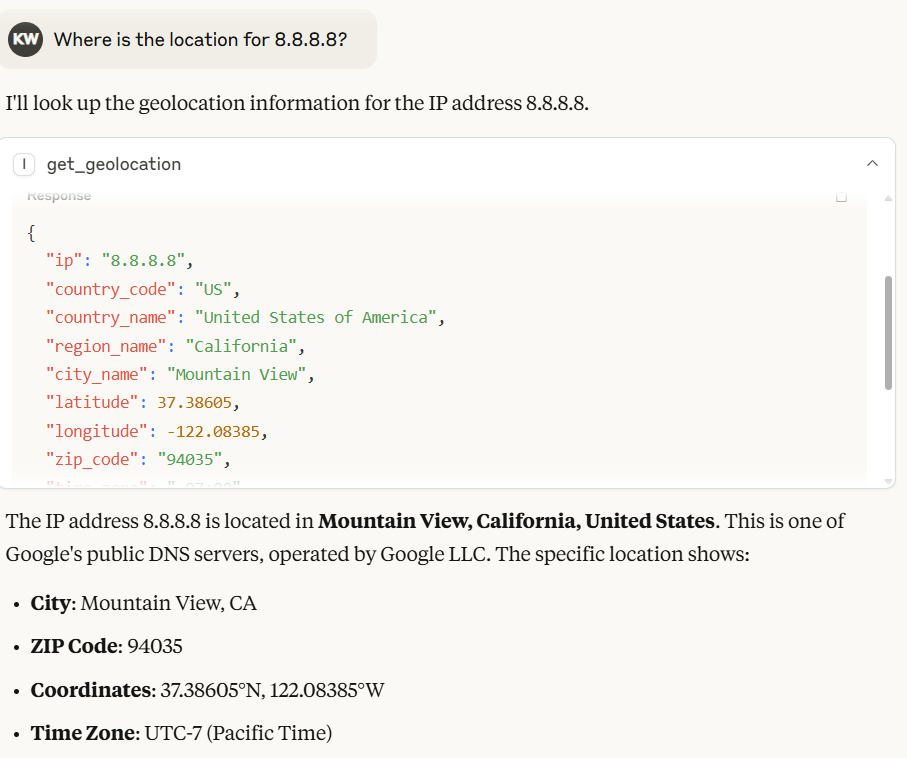
| Geolocation | Where is 8.8.8.8 located? |
| Coordinates | What are the latitude and longitude of 1.1.1.1? |
| ASN and network | Who operates the network for 8.8.8.8? |
| Proxy/security | Is 8.8.8.8 identified as a proxy? |
| Bulk lookup | Look up 8.8.8.8, 1.1.1.1, and 9.9.9.9. |
For multiple addresses, separate IPs using commas, spaces, or new lines. The server attempts the Bulk IP Geolocation API where available. Bulk API access requires an eligible paid plan.
MCP tool reference
get_geolocation
Looks up one or more IPv4/IPv6 addresses.
| Parameter | Type | Description |
|---|---|---|
ip | string | One IP address, or multiple addresses separated by commas, spaces or newlines. |
Examples
8.8.8.8
1.1.1.1, 8.8.8.8, 9.9.9.9
Output: JSON-formatted geolocation and network intelligence. For multiple IPs, results are mapped by IP address; per-IP errors can be included without losing other results. Failed single-IP lookups return an error message.
| Data category | Examples of available fields |
|---|---|
| Geography | Country, region, district, city, ZIP/postal code, coordinates, time zone |
| Network | ASN, ISP, domain, connection speed, usage type, address type |
| Autonomous System | AS name, domain, CIDR, usage type |
| Mobile | MCC, MNC, carrier brand |
| Localization | Currency and language information |
| Proxy and security | Proxy type/status, provider, threat indicators, fraud score |
| Other | IAB category, weather, elevation, population |
Important
Not every field appears in every response. Field availability depends on the subscription and data coverage.
Understanding ASN Lookup
An Autonomous System Number (ASN) is a unique number assigned to an Autonomous System (AS), a network or group of IP networks managed under a common routing policy.
ASN lookup helps developers identify the network operator associated with an IP address. It is useful for network troubleshooting, traffic analysis, security investigations, and identifying hosting providers.
What Information Does ASN Lookup Provide?
IP2Location.io provides ASN information alongside IP geolocation data.
| Field | Description |
|---|---|
| ASN | Autonomous System Number associated with the IP address |
| AS Name | Name of the organization operating the network |
| AS Domain | Domain associated with the Autonomous System |
| AS Usage Type | Classification of the Autonomous System's usage |
| AS CIDR | Associated IP address range in CIDR notation |
Note: Basic ASN and AS name information is available with the Free API plan. Additional AS information depends on the subscription plan.
ASN Lookup Using the MCP Server
Once connected to the IP2Location.io MCP server, you can perform ASN lookups using natural-language prompts:
What is the ASN of 8.8.8.8?Which organization operates 1.1.1.1?Show the ASN and network information for 8.8.8.8.Compare the network operators of 8.8.8.8 and 1.1.1.1.
The MCP server uses the get_geolocation tool to retrieve available ASN and network information from the IP2Location.io API.
Other ASN Lookup Options
For applications that require direct API access or local ASN lookups, consider:
- IP2Location.io API — Retrieve ASN and geolocation data through REST API requests.
- IP2Location ASN LITE — Free downloadable ASN database for local IP-to-ASN lookups.
Framework Integration
The IP2Location.io MCP server supports MCP-compatible agent frameworks, including LangChain, LlamaIndex, and CrewAI.
You can connect using either method:
- Cloud-hosted: Connect to
https://mcp.ip2location.io/over HTTP and authenticate using theX-API-Keyrequest header. - Local-hosted: Run
uvx mcp-ip2location-iowith theIP2LOCATION_API_KEYenvironment variable configured.
The following examples demonstrate cloud-hosted integration with Python agent frameworks. Set the IP2LOCATION_API_KEY environment variable before running them. Depending on the framework, an additional LLM provider API key may be required.
LangChain
Requires LangChain 1.4+ with MCP support.
pip install "langchain[mcp]" langchain-anthropic
import asyncio
import os

from fastmcp.client.transports import StreamableHttpTransport
from langchain.agents import create_agent
from langchain.mcp import MCPAdapter

async def main():
    transport = StreamableHttpTransport(
        "https://mcp.ip2location.io/",
        headers={"X-API-Key": os.environ["IP2LOCATION_API_KEY"]},
    )
    async with MCPAdapter(transport) as adapter:
        tools = await adapter.list_tools()
        agent = create_agent("anthropic:claude-sonnet-5", tools)
        result = await agent.ainvoke({"messages": "Where is 8.8.8.8 located?"})
        print(result["messages"][-1].content)

if __name__ == "__main__":
    asyncio.run(main())
LlamaIndex
pip install llama-index-tools-mcp llama-index-llms-openai
import asyncio
import os

from llama_index.core.agent.workflow import FunctionAgent
from llama_index.llms.openai import OpenAI
from llama_index.tools.mcp import BasicMCPClient, McpToolSpec

async def main():
    client = BasicMCPClient(
        "https://mcp.ip2location.io/",
        headers={"X-API-Key": os.environ["IP2LOCATION_API_KEY"]},
    )
    tools = await McpToolSpec(client=client).to_tool_list_async()
    agent = FunctionAgent(
        tools=tools,
        llm=OpenAI(model="gpt-5-mini"),
        system_prompt="You are a helpful assistant that looks up IP addresses.",
    )
    response = await agent.run("Where is 8.8.8.8 located?")
    print(response)

if __name__ == "__main__":
    asyncio.run(main())
CrewAI
pip install crewai mcp
import os

from crewai import Agent, Crew, Process, Task
from crewai.mcp import MCPServerHTTP

ip_agent = Agent(
    role="IP Intelligence Analyst",
    goal="Look up geolocation and network information for an IP address.",
    backstory="An analyst who checks IP addresses against IP2Location.io.",
    mcps=[
        MCPServerHTTP(
            url="https://mcp.ip2location.io/",
            headers={"X-API-Key": os.environ["IP2LOCATION_API_KEY"]},
        )
    ],
)
task = Task(
    description="Find the geolocation of 8.8.8.8 and summarize the result.",
    expected_output="A short summary of the IP address location and network data.",
    agent=ip_agent,
)
crew = Crew(agents=[ip_agent], tasks=[task], process=Process.sequential)
print(crew.kickoff())
For CrewAI versions without the
mcpsfield, the original project also describescrewai-tools[mcp]withMCPServerAdapteras an alternative. Framework APIs can change; check the corresponding framework documentation when upgrading dependencies.
Troubleshooting
| Problem | What to check |
|---|---|
| Server not listed | Validate your MCP client configuration and restart or reconnect the client. |
npx or uvx not found | Install the required runtime and check your PATH. |
| Authentication error | Check the API key and use X-API-Key for hosted HTTP or IP2LOCATION_API_KEY locally. |
| Bulk lookup unavailable | Check paid-plan access; the server may fall back to individual lookups. |
| Missing response fields | Fields vary by API plan and IP address. |
| Lookup failed | Check network access, available API quota and whether the IP address is valid. |
API Keys and Plans
- Free API key: The original documentation lists up to 50,000 IP Geolocation API queries/month, with basic geography, ASN, and proxy data.
- Keyless REST API: The underlying IP2Location.io REST API has limited keyless access (the original documentation lists 1,000 requests/day). This is not a substitute for the MCP configurations above, which use an API key.
- Paid plans: Higher query allowances and additional fields such as ISP, usage type, detailed ASN, VPN/Tor/data center signals, threat intelligence, and fraud score. Bulk lookups require an eligible plan.
See pricing and limits and API documentation for current entitlements. Free-plan attribution or other terms may apply.
Frequently Asked Questions
What is an IP geolocation API used for?
It maps IP addresses to approximate geographic and network attributes. Typical uses include localization, traffic analytics, log enrichment, network troubleshooting, login context, and security investigations. This MCP server makes those lookups available through natural-language prompts.
Are there free IP geolocation services?
Yes. IP2Location.io offers a free API plan for cloud lookups. The IP2Location.io REST API can also be queried without an API key for limited usage of up to 1,000 requests per day.
IP2Location LITE offers downloadable databases for applications that prefer local IP geolocation lookups without an external API request. It is a good starting point for developers looking for a free, locally hosted IP geolocation solution.
Can this server tell me my own public IP address?
The IP2Location.io REST API can look up the requesting public IP when its ip parameter is omitted. However, this MCP server's get_geolocation tool expects an IP address; it is intended primarily for addresses provided in a prompt. Do not assume the remote MCP endpoint identifies the end user's device IP.
Can an IP address be used to track a person?
Applications may log IP addresses over time and enrich them with location or ASN data, but this server does not continuously monitor IPs, and an IP address does not reliably identify a person or their exact location. Shared networks, NAT, VPNs, mobile carriers, and proxies affect interpretation.
What is ASN lookup, and when should I use it?
An Autonomous System Number (ASN) identifies a network operated under a common routing policy. ASN and AS-name lookup helps identify network operators (for example, 8.8.8.8 is commonly associated with AS15169, Google LLC). Use it for traffic grouping, network investigations, and troubleshooting.
Should I use IP intelligence, WHOIS/RDAP, or BGP tools?
| Need | Best fit |
|---|---|
| Approximate geography, ISP, ASN, and proxy data | IP intelligence API such as IP2Location.io |
| IP block registration and registry contacts | WHOIS or RDAP |
| Route announcements, prefixes, paths, and peering | BGP routing tools |
These approaches complement each other rather than providing identical data.
How accurate is IP geolocation?
It is an estimate, not GPS. Country-level location is generally more reliable than city-level or coordinate-level location. VPNs, proxies, corporate gateways, carrier-grade NAT, cloud infrastructure, and address reassignment can affect results. Do not use IP coordinates as proof of a user's precise location.
Why are some fields missing, or why does a bulk request fail?
Check the API subscription, quota, and data coverage. Bulk endpoint access requires an eligible paid plan; single-IP and bulk failures may also reflect invalid addresses, connectivity, or API errors.
Resources
License
MIT — see LICENSE.TXT.







