Listed from the MCP registry; nobody on Odel publishes it.
Is this yours? Claim it
Kalanos Robotics Dataset Audits
Find public robotics dataset audits, including LeRobot. See what was checked and flagged.
One address for any MCP client. No sign-in needed on this server.
What it does
6 read
Grouped by tool name. At most: only reads or looks up information.
What it costs
FreeOdel charges nothing per call. The publisher may charge for its own service.
Tools
6 · grouped by tool name · checked 26 Nov 2026Read · 6Look things up
- list_datasets
- search_datasets
- search_combined_datasets
- get_report
- get_findings
- search_episodes
Kalanos MCP
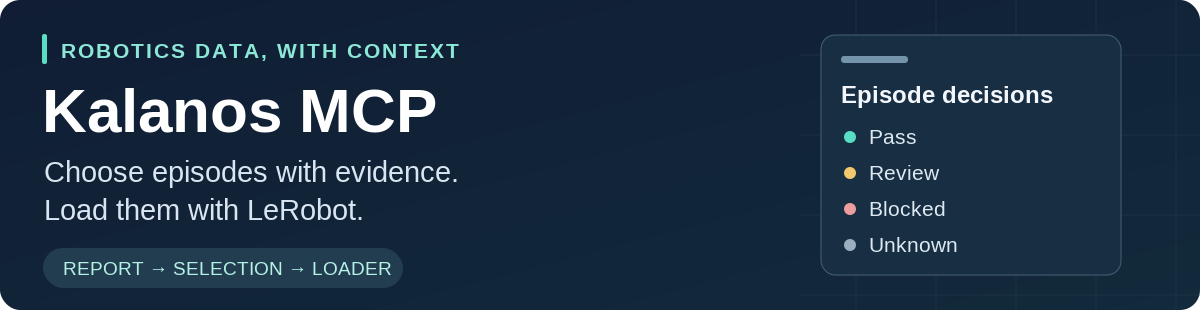










Choose robotics training episodes with evidence. Load them with LeRobot.
For robotics engineers preparing imitation-learning experiments, Kalanos MCP connects published dataset reports to an explicit, reproducible episode selection. See which episodes need review, verify that the report matches your local data, and pass the selected source indices to your existing LeRobot loader.
Start with LeRobot, the first available integration. You do not need to run the Kalanos grader CLI or host an MCP server.
Status: source preview. Install from this repository; it is not on PyPI yet. The hosted Kalanos MCP service already exists, and its server is not part of this repository.
Explore the Data Hub · Run the LeRobot walkthrough · Replay the captured report · See the verified example · Visit Kalanos
Connect to the hosted Kalanos MCP
Use https://mcp.kalanos.ai/mcp with Streamable HTTP and no authentication.
See the client setup guide for examples. This repository
contains integrations and Registry metadata, not the hosted server source.
Example client configuration (VS Code .vscode/mcp.json; other clients take the
same URL and transport):
{
  "servers": {
    "kalanos": {
      "type": "http",
      "url": "https://mcp.kalanos.ai/mcp"
    }
  }
}
No API key, sign-in or local install is needed. Anonymous requests are rate limited per IP.
| Tool | What it returns |
|---|---|
search_datasets | Published datasets relevant to a text query. |
list_datasets | An alphabetical list of published datasets, optionally filtered by a substring. |
search_combined_datasets | Dataset results for combined filters such as task, objects, and scene. |
get_report | A published assessment with its score, coverage, and report revision. |
get_findings | Episode decisions and evidence for an exact report revision. |
search_episodes | Episodes matching task, object, or scene labels within a dataset; label matches are not audit findings. |
Try asking: “Show the published audit for lerobot/pusht and tell me what was
checked.” The service reads published evidence only. It cannot grade a dataset,
publish a report, or access local or private data. To run an audit on your own
data, use the Kalanos Grader CLI.
From a dataset report to your training input
You have a dataset and a training pipeline. Before the next run, you need to know which episodes to include, which to inspect, and how to reproduce that choice later.
This repository provides tool-specific integrations that read existing Kalanos reports through MCP, the Model Context Protocol. The current LeRobot adapter:
- Collects the report and all episode decision pages.
- Verifies source episode indices against your pinned local dataset checkout.
- Separates selected episodes from those held out for review or other decisions.
- Exports a JSON selection manifest and LeRobot loader arguments.
- Checks that LeRobot actually loads the intended episodes and frame counts.
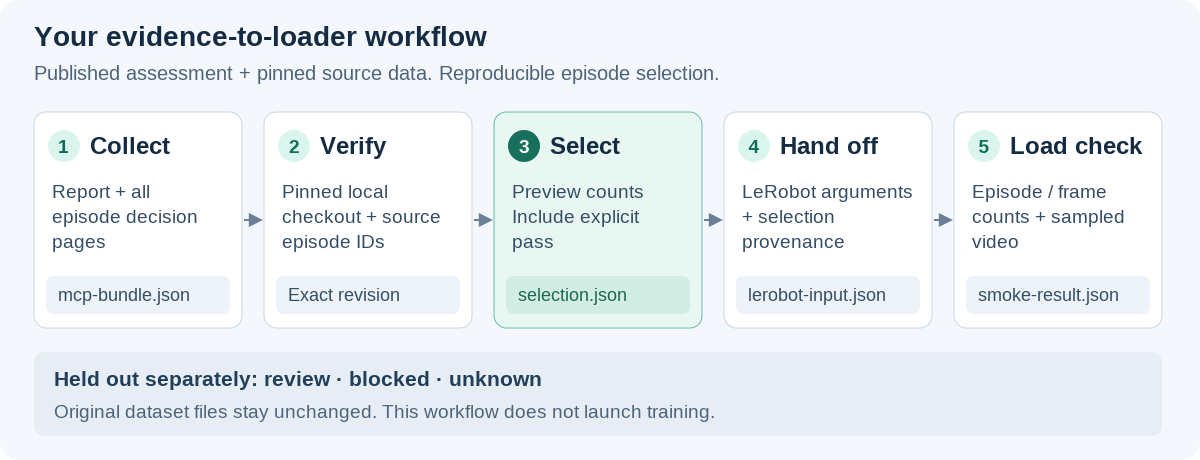
The adapter prepares the dataset input. You choose the policy model, training configuration and evaluation protocol.
What you get
| Your question | What the integration gives you |
|---|---|
| Which episodes should I inspect before a run? | Separate pass, review, blocked and unknown counts, with the underlying report evidence retained. |
| Do these episode IDs refer to my local data? | Source-index checks against committed LeRobot metadata, rather than assuming report keys are loader indices. |
| Can I reproduce this selection? | A manifest with the source commit, report identity, selection policy and selected episode indices. |
| Can I keep my existing training stack? | Arguments for LeRobot's LeRobotDataset, without replacing the loader or trainer. |
| Did the handoff actually work? | A smoke check of every loaded episode ID and per-episode frame count, plus sampled video decoding. |
The initial policy includes only explicit pass decisions. It holds out
review, blocked and unknown separately. A review flag is a reason to
inspect an episode, not proof that it would harm training.
Is this for you?
Good fit: you use LeRobot with a v3.0 dataset from the Hugging Face Hub that has a published Kalanos report, you are preparing an imitation-learning experiment, and you want a reproducible, verified episode selection.
Not a fit: a dataset with no published report, v2 datasets, streaming loads, or stacks other than LeRobot. Those need an assessment first or a different adapter.
Try it with a public LeRobot dataset
Requirements: Python 3.12, Git and uv. The complete example was tested on macOS with LeRobot 0.7.0 and dataset format v3.0. Packages are installed from this repository; this is a source preview, not a PyPI release.
1. Install and collect the report
git clone https://github.com/KalanosAI/kalanos-mcp.git
cd kalanos-mcp/integrations/lerobot
uv sync --frozen --extra lerobot
source .venv/bin/activate

export RUN_DIR="$PWD/artifacts/xarm-demo"
mkdir -p "$RUN_DIR"
kalanos-lerobot fetch lerobot/xarm_lift_medium_replay \
  -o "$RUN_DIR/mcp-bundle.json"
This reads published evidence from https://mcp.kalanos.ai/mcp. It does not
start a new assessment or download the dataset. Public collection requires no
account. For collection and export without the LeRobot loader, omit
--extra lerobot.
2. Download the matching source revision
Follow the pinned-dataset download steps
to create DATASET_ROOT from the exact source commit recorded in your bundle.
The xArm example is approximately 18.9 MB, including video.
Use a hydrated Hugging Face Git checkout, not an arbitrary folder or a checkout of the latest branch. The adapter verifies the local source before exporting indices.
3. Preview, export and verify loading
Once DATASET_ROOT points to that checkout:
kalanos-lerobot preview "$RUN_DIR/mcp-bundle.json" --dataset "$DATASET_ROOT"

kalanos-lerobot export "$RUN_DIR/mcp-bundle.json" --dataset "$DATASET_ROOT" \
  -o "$RUN_DIR/selection.json"

kalanos-lerobot handoff "$RUN_DIR/selection.json" --dataset "$DATASET_ROOT" \
  -o "$RUN_DIR/lerobot-input.json"

HF_HUB_OFFLINE=1 kalanos-lerobot smoke "$RUN_DIR/selection.json" \
  --dataset "$DATASET_ROOT" -o "$RUN_DIR/smoke-result.json"
Use a fresh output directory for another run. Existing files are not silently overwritten. The complete walkthrough includes the Python loader example, captured-report replay and troubleshooting.
What you keep with the experiment
| File | Purpose |
|---|---|
mcp-bundle.json | Report and complete episode decision inventory from one report revision. |
selection.json | Verified pass-only episode selection and provenance. |
lerobot-input.json | Local loader arguments, selection metadata and manifest hash. |
smoke-result.json | Actual load-check results and sampled observation shapes. |
These are selection and evidence artifacts, not a newly merged or rewritten dataset. Source files stay in your local checkout. Regenerate the handoff on another machine because its local dataset path is machine-specific.
A real example: 800 episodes, two held for review
The recorded run used
lerobot/xarm_lift_medium_replay,
with the task instruction “Pick up the cube and lift it.”
| Recorded result | Value |
|---|---|
| Episodes assessed | 800 |
| Selected under the pass-only policy | 798 |
| Held for review | Source indices 38 and 46 |
| Review evidence | Brightness deviation relative to the same-camera baseline |
| Frames loaded by LeRobot | 19,950 |
| Sampled video check | Six frames decoded successfully |
The verification record includes the exact source and report revisions, checks and retained evidence. These are recorded results, not promised counts for a future live report. No training or model-performance improvement was measured.
The captured evidence files can be browsed without installing anything in
integrations/lerobot/examples/xarm-lift-demo.
Replaying the report still needs the pinned source download described above.
Available now, with room for more tools
| Integration | Status | Output |
|---|---|---|
| LeRobot | Source preview; recorded end-to-end load test | Verified episode manifest and loader arguments |
Each integration has its own dependencies, examples and tests. Additional adapters can live alongside LeRobot without becoming dependencies of it. See the integration contract to contribute one.
This repository contains clients of the hosted MCP service, not its server implementation. It is separate from the Kalanos grader CLI.
Know the scope before using a selection
- Existing reports only: MCP reads published assessments. It does not grade an unassessed local dataset or upload your dataset files.
- Scope matters: a pass applies to the recorded checks. Missing or unchecked evidence is not a pass, and a selection does not establish task success.
- Current adapter: LeRobot 0.7.0, v3.0 metadata and non-streaming loading. Multi-dataset mixing, format conversion and human decision overrides are not implemented by this adapter.
- No automatic training or publishing: commands do not launch training, tracker uploads, dataset publication or deployments.
- Saved evidence, not report history: the service does not offer historical report retrieval. Keep your bundle and refresh it when currentness matters.
- Local checks have limits: the adapter verifies consumed index metadata; it does not continuously rehash every video or data file. A manifest hash identifies its bytes, not the publisher's authenticity.
See the LeRobot guide and trust boundaries for details.
Contribute and validate
From an integration directory:
uv sync --frozen
uv run --frozen ruff check .
uv run --frozen ruff format --check .
uv run --frozen pytest
Unit tests do not call external services. See CONTRIBUTING.md for validation expectations and architecture for the shared design. Report suspected vulnerabilities privately using SECURITY.md. For other questions or reports, email reports@kalanos.ai.
License and attribution
Integration code is licensed under Apache-2.0. Datasets and upstream tools retain their own licenses. LeRobot and Hugging Face are trademarks of their respective owners. Other product and project names identify compatibility only. This independent Kalanos AI integration is not affiliated with, sponsored by or endorsed by their owners.