Listed from the MCP registry; nobody on Odel publishes it.
Is this yours? Claim it
Kove Journal
Private health journal for your AI assistant: food looked up, calories added up, workouts, sleep.
One address for any MCP client. You sign in at app.kovejournal.com once, after adding it.
What it does
- Reads
- Writes
- High impact
At most: only reads or looks up information.
What it costs
FreeOdel charges nothing per call. The publisher may charge for its own service.
What it asks for at sign-in
| Access to | Read | Change |
|---|---|---|
| Kove |
From the sign-in at app.kovejournal.com, as the endpoint publishes it. You approve it there.
Tools
None listed · checked 10 Nov 2026Odel could not list its tools without signing in.
Kove: calorie and workout tracking for your AI assistant
Your health journal, in the assistant you already use.
Tell Claude, ChatGPT, Grok or Cursor what you ate, how you trained and how you slept.
Kove does the counting, keeps the record and checks what goes with what.
Setup guide · kovejournal.com · Questions · Privacy

Connect Kove in one message
Paste this into your assistant:
Set up Kove: add the remote MCP server https://app.kovejournal.com/mcp
Your assistant adds Kove and opens Kove's sign-in in your browser. Sign in or create an account, press Allow, and you're set. There is no key to paste, and the first 30 days are free.
If your assistant can't change its own settings, add the address yourself as a custom connector or MCP server. The steps for each app are below.
https://app.kovejournal.com/mcp

What to say
The way you would tell a friend, in any language:
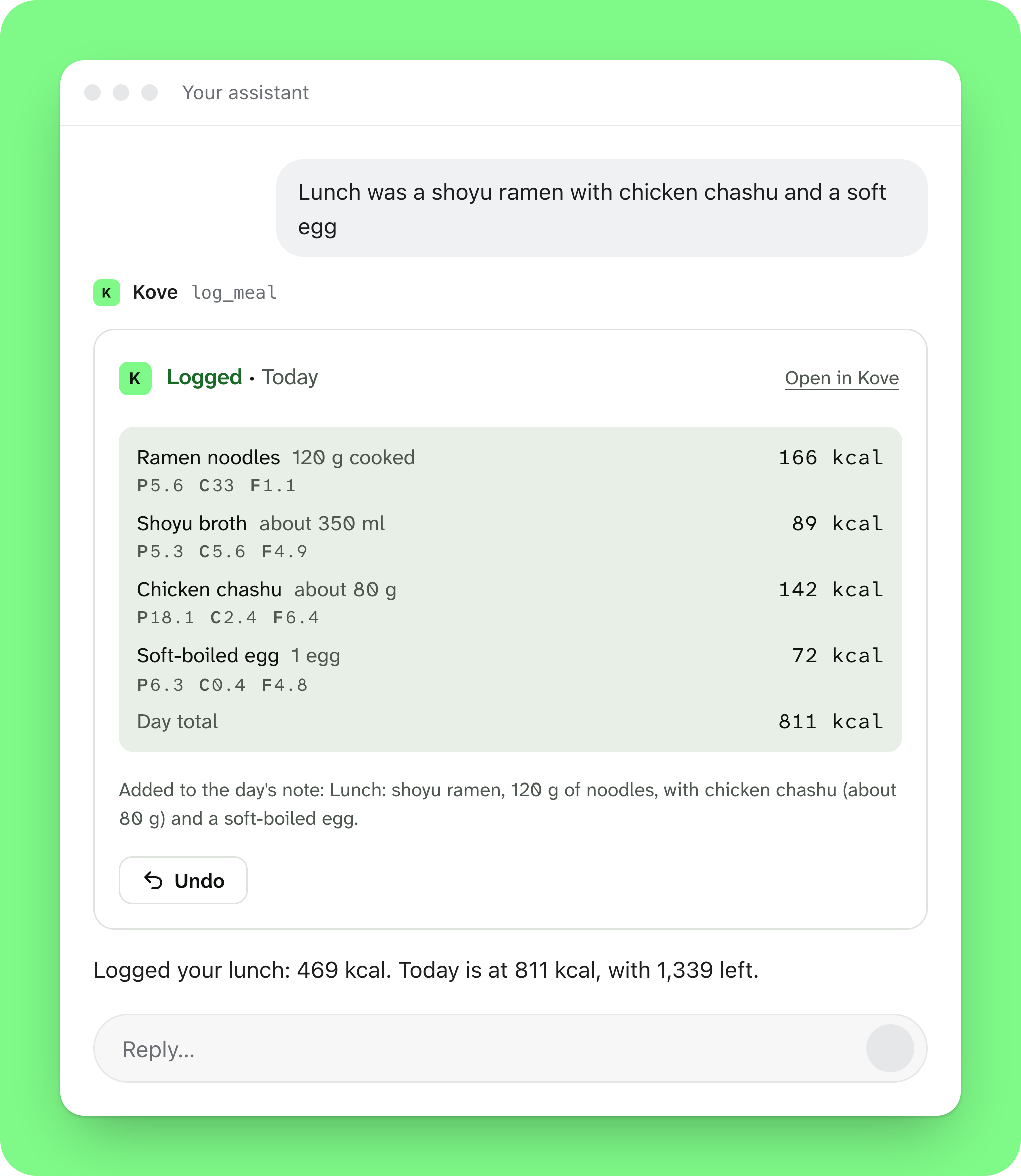
- "Lunch was a shoyu ramen with chicken chashu and a soft egg"
- "I weighed 78.4 this morning and drank another half litre of water"
- "Bench press today, 3 sets of 8 at 60 kg"
- "Save this recipe, it serves 4: 320 g ditalini, 400 g chickpeas, 2 tbsp olive oil"
- "How's today going?"
- "How did my sleep and training go this week, compared with the week before?"
- "What's different about the days I get headaches?"
- "Start tracking magnesium, I take 300 mg most evenings"
- "Undo what you logged this morning"
Your assistant answers in your language, and your journal keeps your own field names.

Find what goes with what
Ask what's different about the days you get headaches, or whether you sleep worse after a late dinner. Left alone, an assistant will find a pattern in anything, and tell you about it with total confidence.
Kove checks before anyone calls it a pattern. Your assistant suggests what to look at, Kove tests each idea against your own days and against chance, and you hear which ones hold. Kove also looks by itself, across everything you track, including the day before and the day after.

A pattern means two kinds of days that differ. It doesn't mean one causes the other, and Kove never says it does. On a short record Kove is careful, and the longer you log, the more it can tell you. The patterns you want to follow stay on your Insights page in Kove.
Why Kove, and not just your assistant
Your assistant is good at understanding what you say. It is not a good place to keep a record: ask it twice how many calories are in a plate of pasta and you may get two answers, and a chat is not something you can look back on. Kove is the part that keeps the numbers straight.
- The numbers are Kove's. It looks up each food in its own food tables, packaged products by brand or barcode, and the foods you saved, then adds up the day. Your assistant never does the math, and Kove measures how close it gets in public.
- It keeps everything, exactly. Every day you log stays in Kove. Ask for an average, a total or this week against last, and Kove works out the exact figure.
- Anything you track. Weight, sleep, water, a headache, magnesium, your waist. Kove adds a new field only after you say yes.
- Training. Log your sets, read your history, and build plans you run at the gym in the Kove app.
- Nothing grades you. Kove states your numbers as facts. It keeps no streaks and never calls a day good or bad.
- Undo for 7 days. Every change your assistant makes shows up in Kove, with Undo.
Add Kove to your app
Every app uses the same address, https://app.kovejournal.com/mcp, and signs in with OAuth. The first time, Kove
opens in your browser: sign in, choose Read and write or Read only if it asks, and press Allow.
Sign in only on app.kovejournal.com. Kove never asks for your password in a chat.
Claude
On claude.ai or in the desktop app, open Customize, then Connectors (in older versions, under Settings). Click + Add, then Add custom connector, name it Kove and paste the address. In a chat, turn Kove on from the + menu. Once it's added, it works in the phone app too.
ChatGPT
On a Business, Enterprise or Edu workspace, open Plugins on chatgpt.com, click +, then Add custom MCP server. Name it Kove, paste the address as the Server URL, choose OAuth, then I understand and want to continue and Create as a plugin. On Pro a custom server can only read, and Plus, Go and the free plan can't add one.
Grok
On grok.com/connectors, click New Connector, then Custom, paste the address and sign in.
Grok Bot
Ask it in a chat to add the MCP server at Kove's address, then sign in and press Allow. Grok Bot connects through Cursor, so Kove's Allow screen names Cursor.
Claude Code
The plugin brings Kove and its skills together:
/plugin marketplace add kovejournal/kove-skills
/plugin install kove@kove
Then run /mcp, pick Kove and sign in.
Cursor
Add Kove to Cursor
in one click, or add this to ~/.cursor/mcp.json:
{
  "mcpServers": {
    "kove": { "url": "https://app.kovejournal.com/mcp" }
  }
}
VS Code
In GitHub Copilot's agent mode: Add Kove to VS Code in one click, or run MCP: Add Server from the Command Palette, choose HTTP and paste the address.
Codex
codex mcp add kove --url https://app.kovejournal.com/mcp
If Codex doesn't open Kove's sign-in by itself, run codex mcp login kove.
Gemini CLI
gemini mcp add --transport http kove https://app.kovejournal.com/mcp
Then run /mcp auth kove in Gemini CLI and sign in.
Any other MCP client
Add a remote server (Streamable HTTP) at Kove's address. It signs in with OAuth, so there is no key or token to paste.
The skills
Kove works without them. With them, your assistant knows how Kove counts, how to correct and undo, when to ask you first, and how to talk about your numbers: as facts, never as verdicts. In Claude Code the plugin above brings them. In Cursor, Codex, Gemini CLI and most other agents:
npx skills add kovejournal/kove-skills
They are also listed on skills.sh.
| Skill | What it is for |
|---|---|
kove | Everything day to day: logging food and anything else, recipes, workouts, corrections, undo, new fields, goals, reminders, looking back. |
kove-weekly-review | "How did my week go?": a short, exact review from Kove's own figures. |
kove-training-plan | Building and adjusting training plans you run in the Kove app. |
In the Claude app, you can also download the skills/kove folder as a zip and upload it in Settings, under
Skills. The skills are plain text: nothing in this repository runs on your computer.
Your data
- Your record stays on Kove's server in the EU.
- What your assistant reads from Kove goes to the company that runs the assistant, under your agreement with them, and may be outside the EU. Whether they keep it or train on it depends on their terms and your settings.
- You choose read or read and write when you connect. Kove emails you when an assistant is connected, and Settings › Account in the app lists every connection with Disconnect. A password reset disconnects every assistant.
- Your assistant can ask for a full copy of your data. Nothing is sent until you approve it in the Kove app, each time, and your pictures go only if you tick them.
- Kove's privacy policy and terms say what connecting an assistant means, in full.
Kove is a journal, not medical advice.
Price
Kove is free for 30 days, then 39 € a year or 4.99 € a month. Connecting an assistant is included. Try Kove.
Help
- Questions: hello@kovejournal.com, or the FAQ.
- A skill that leads your assistant wrong: open an issue.
- Security: see SECURITY.md.
- Contributing: see CONTRIBUTING.md.
License
The skills and manifests are under the Apache License 2.0. The Kove name and logo are not covered by
it (see NOTICE): a fork may reuse the text, but not publish itself as Kove. The app logos in
assets/works-with-*.png belong to their makers and are shown only to say Kove works with them.