AgentSUMO
MCP server for LLM-driven SUMO traffic simulation, scenario design, and result analysis.
Runs on your machine from its package; the steps are below.
What it does
- Reads
- Writes
- High impact
At most: creates or changes data: records, files, settings.
What it costs
FreeOdel charges nothing per call. The publisher may charge for its own service.
Runs locally over stdio
This server isn't hosted — your MCP client launches it from a package registry. Use one of the commands below, or drop the config into your client (e.g. Claude Desktop).
Run
uvx agentsumo-mcp
MCP client config
{
  "mcpServers": {
    "agentsumo": {
      "command": "uvx",
      "args": [
        "agentsumo-mcp"
      ]
    }
  }
}AgentSUMO
An Agentic Framework for Interactive Simulation Scenario Generation in SUMO via Large Language Models






Documentation · Installation · Tools · Schema · Tutorials
Overview
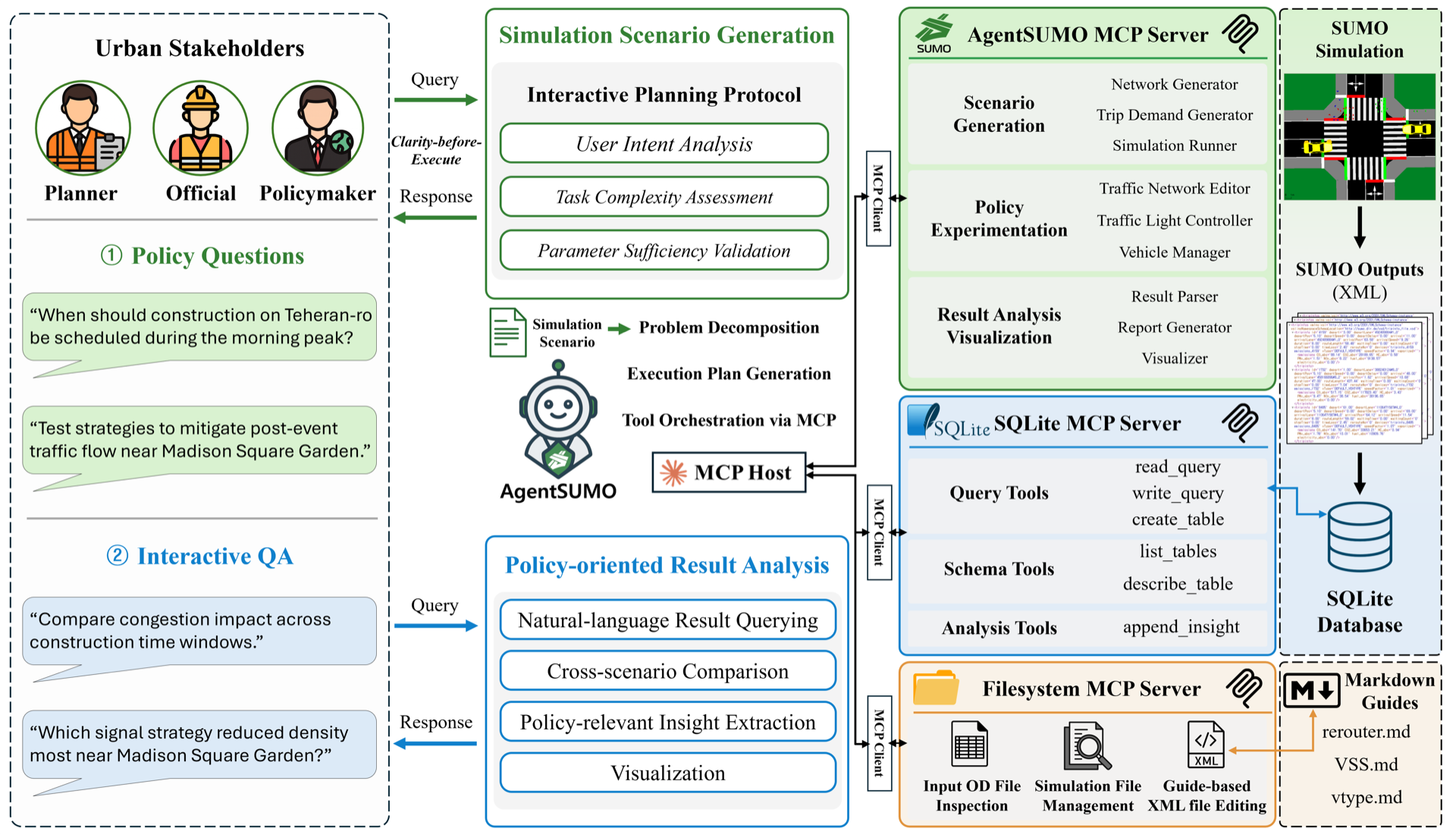
AgentSUMO lets non-expert stakeholders design, execute, and analyze SUMO traffic simulations through natural-language interaction. The Planner Agent translates abstract policy questions into executable simulation plans, drives them via the Model Context Protocol (MCP), and surfaces results through a web dashboard.
- Conversational scenario design — describe a policy question, get a runnable simulation
- Policy experiments — road closures, lane reductions, signal optimization, demand changes
- Cross-scenario analysis — SQL-based comparison across runs, with auto-generated HTML reports
- Web dashboard — geospatial visualization, time-series charts, and trip replay
Demo
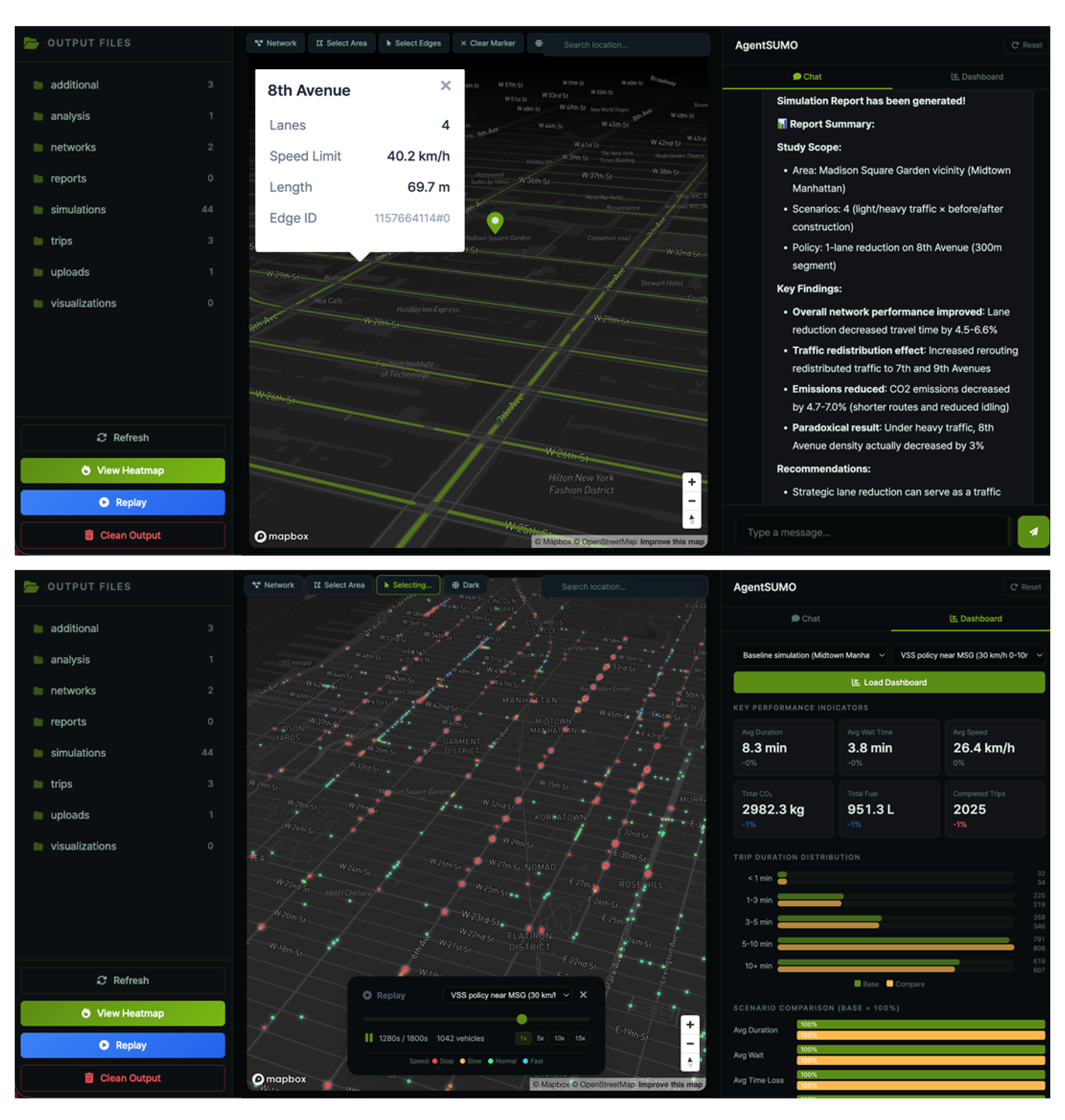
Web interface: conversational planning panel, scenario list, and live simulation status.
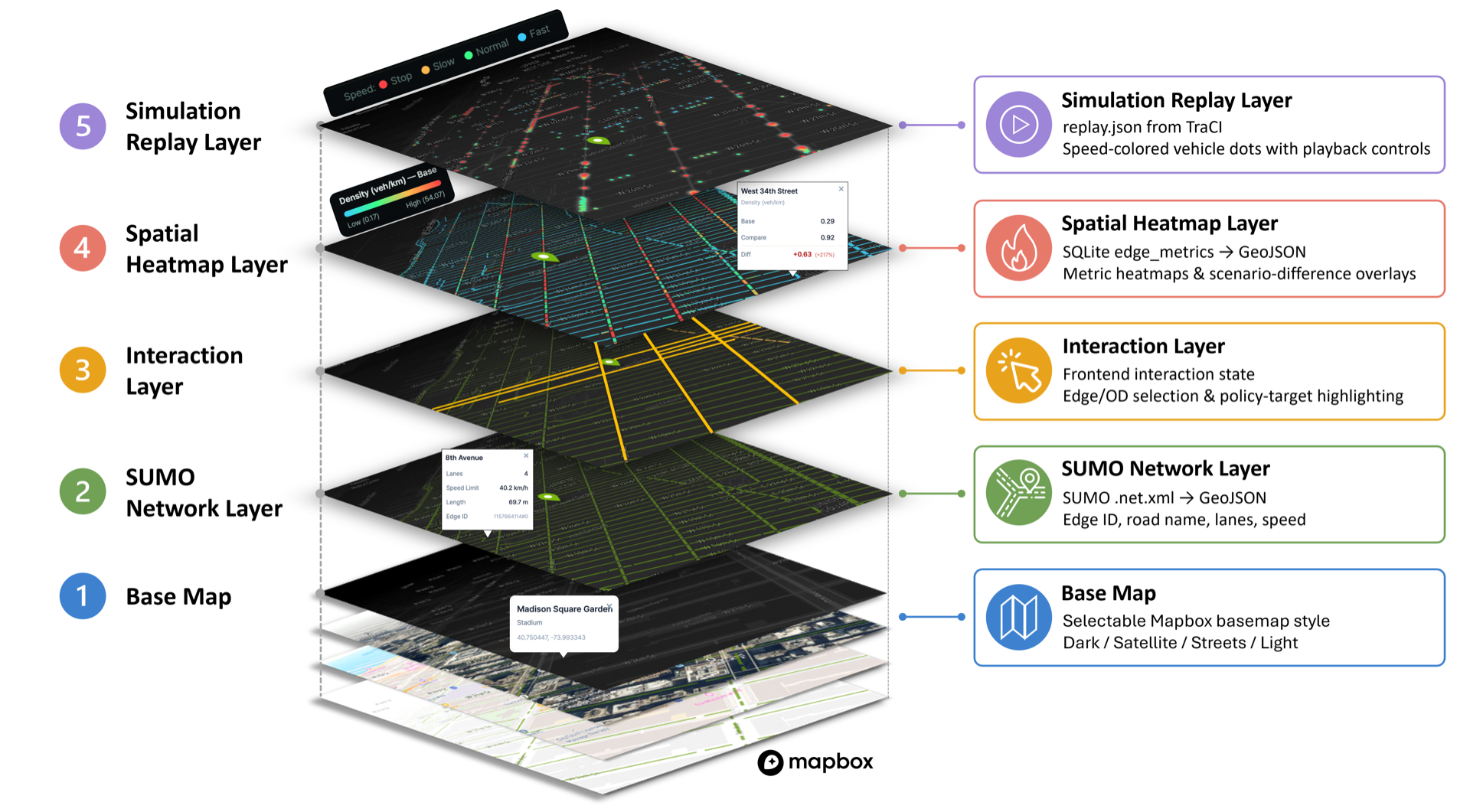
Geospatial visualization: per-edge metrics, congestion overlays, and trip replay on the 2.5D basemap.
Architecture
User (natural language)
    |
    v
Planner Agent (Claude LLM, Interactive Planning Protocol)
    |
    +--> AgentSUMO MCP Client --> AgentSUMO MCP Server (PyPI: agentsumo-mcp) --> SUMO
    |
    +--> SQLite MCP Client    --> SQLite MCP Server (Anthropic, open source)  --> simulations.db
    |
    +--> Filesystem MCP Client --> Filesystem MCP Server (Anthropic, open source) --> additional XML files
The reasoning layer (Planner Agent) lives in this repository. The execution layer (agentsumo-mcp) is published to PyPI and installed automatically as a dependency.
Tool Layer
The AgentSUMO MCP Server exposes 26 tools grouped into five capability categories that follow the simulation workflow. Full reference at agentsumo.readthedocs.io/.../tools.
| Category | Purpose | Representative tools |
|---|---|---|
| Scenario Generation | Build a baseline SUMO simulation: OSM → network → trips → routes → run | osm_extract, net_convert, trip_generate, route_generate, sumo_runner |
| Policy Experimentation | Apply infrastructure, demand, and signal-control interventions | edge_edit_tool, reduce_lanes_tool, vehicle_generation_tool, flow_generation_tool, tls_offset_tool, tls_adaptation_tool |
| Result Analysis | Convert SUMO XML output to SQLite and render HTML reports | xml_to_sqlite_tool, simulation_report_tool |
| Visualization | Render networks, highlighted edges, and per-edge metric heatmaps | visualize_net_tool, visualize_edge_tool, visualize_policy_target_tool, visualize_edgedata_tool |
| Utility Functions | Network statistics, routing, road-name ↔ edge-id resolution, OD-coordinate validation, web-search grounding | network_summary_tool, route_analysis_tool, validate_od_coordinates_tool, web_search_tool |
Installation
Requirements
- Python 3.10 or later
- SUMO 1.24 or later (locally installed, with
SUMO_HOMEset) - Anthropic Claude API key (bring-your-own-key)
- Mapbox access token (used by the web map renderer)
1. Install SUMO
macOS
brew install sumo
Or download the installer from the Eclipse SUMO downloads page.
Windows — Download the installer from the Eclipse SUMO downloads page.
Linux (Ubuntu/Debian)
sudo add-apt-repository ppa:sumo/stable
sudo apt-get update
sudo apt-get install sumo sumo-tools sumo-doc
2. Set up the Python environment
Install uv:
# macOS / Linux
curl -LsSf https://astral.sh/uv/install.sh | sh

# Windows (PowerShell)
powershell -c "irm https://astral.sh/uv/install.ps1 | iex"
Clone the repository, create a virtual environment, and install AgentSUMO:
git clone https://github.com/mw-jeong/AgentSUMO
cd AgentSUMO

# Create a Python 3.12 venv
uv venv --python 3.12

# Activate the venv
source .venv/bin/activate              # macOS / Linux
# .venv\Scripts\activate               # Windows

# Install AgentSUMO and all dependencies
# (this also pulls agentsumo-mcp from PyPI as a dependency)
uv pip install -e .
3. Configure environment variables
AgentSUMO reads API keys and the SUMO path from environment variables. The easiest way is a .env file at the project root:
cp .env.example .env
Open .env in your editor and fill in:
ANTHROPIC_API_KEY (required) — Claude API key that drives the Planner Agent. Get one at the Anthropic Console.
ANTHROPIC_API_KEY=sk-ant-api03-xxxxxxxxxxxxxxxxxxxxxxxxxxxxxxxx
MAPBOX_TOKEN (required for the web UI) — used to render the basemap. Get one at the Mapbox access tokens page.
MAPBOX_TOKEN=pk.eyJ1Ijoixxxxxxxxxxxxxxxxxx
SUMO_HOME (required) — absolute path to your local SUMO installation. The directory must contain bin/sumo (or bin/sumo.exe on Windows).
# macOS (Homebrew)
SUMO_HOME=/opt/homebrew/share/sumo

# macOS (Eclipse SUMO installer)
SUMO_HOME=/Library/Frameworks/EclipseSUMO.framework/Versions/<version>/EclipseSUMO  # e.g. 1.24.0; use the directory name installed under Versions/

# Windows
SUMO_HOME=C:\Program Files (x86)\Eclipse\Sumo

# Linux
SUMO_HOME=/usr/share/sumo
AGENTSUMO_MCP_OUTPUT_BASE (optional) — override the base directory where the MCP server writes simulation outputs (networks, trips, results). Defaults to the current working directory.
AGENTSUMO_MCP_OUTPUT_BASE=/path/to/your/output/dir
4. Run
# Web interface (opens at http://localhost:8000)
python web.py

# CLI mode
python chat.py

# Clean up simulation outputs
python clean.py
Project Structure
AgentSUMO/
├── agentsumo/
│   ├── agent/        # Planner Agent (Claude orchestrator + prompts)
│   ├── client/       # MCP clients (AgentSUMO, SQLite, Filesystem)
│   └── core/         # Configuration
├── agentsumo_mcp/    # AgentSUMO MCP Server source (also published to PyPI)
│   └── defaults/     # Packaged fixtures (e.g., vehicle_types.add.xml)
├── packaging/mcp/    # PyPI build configuration for agentsumo-mcp
├── web/              # Web interface (FastAPI + Jinja2 templates)
├── docs/             # Sphinx documentation source
├── tests/            # Unit tests
├── assets/           # README images
├── output/           # Runtime artifacts (auto-populated; 8 categories tracked
│                     #   via .gitkeep — simulations/, networks/, trips/,
│                     #   analysis/, reports/, uploads/, visualizations/, additional/)
├── chat.py           # CLI entry point
├── web.py            # Web server entry point
└── .env.example      # Environment variable template
Use the MCP Server Standalone
The AgentSUMO MCP Server can be used independently from this framework with any MCP-compatible LLM client (Claude Desktop, OpenAI tool clients, Gemini, local LLMs):
pip install agentsumo-mcp
Or via uvx without installing:
uvx agentsumo-mcp
The server is registered in the official MCP Registry under io.github.mw-jeong/agentsumo-mcp.
Troubleshooting
SUMO path error — Verify SUMO_HOME in your .env. The directory must contain bin/sumo (or bin/sumo.exe on Windows).
API key error — Verify ANTHROPIC_API_KEY in your .env is set to a valid Claude API key. The Planner Agent will refuse to start without it.
Dependency error — Re-resolve dependencies:
uv pip install -e . --upgrade
Legacy token files (deprecated, scheduled for removal in 0.2.0) — AgentSUMO still falls back to claude_api.txt and mapbox_token.txt at the project root when the corresponding environment variables are missing, but those code paths now emit a DeprecationWarning at import time. Use the .env workflow for new installations.
Documentation
Full documentation lives at agentsumo.readthedocs.io.
- Installation — SUMO, Python 3.10+, environment setup
- Tools — reference for all MCP tools
- Schema —
simulations.dbER diagram and column reference - Tutorials — walkthroughs of the paper case studies
Citation
If you use AgentSUMO in academic work, please cite:
@article{jeong2025agentsumo,
  title         = {AgentSUMO: An Agentic Framework for Interactive Simulation Scenario Generation in SUMO via Large Language Models},
  author        = {Jeong, Minwoo and Chang, Jeeyun and Yoon, Yoonjin},
  journal       = {arXiv preprint arXiv:2511.06804},
  year          = {2025},
  url           = {https://arxiv.org/abs/2511.06804}
}
License
MIT. See LICENSE.
Developed at