Listed from the MCP registry; nobody on Odel publishes it.

Secrets-LE
Detect hardcoded secrets in source and config. Reports masked previews, never the values.
Runs on your machine from its package; the steps are below.
What it does
- Reads
- Writes
- High impact
At most: creates or changes data: records, files, settings.
What it costs
FreeOdel charges nothing per call. The publisher may charge for its own service.
Runs locally over stdio
This server isn't hosted — your MCP client launches it from a package registry. Use one of the commands below, or drop the config into your client (e.g. Claude Desktop).
Run
npx -y secrets-le-mcp
MCP client config
{
  "mcpServers": {
    "secrets-le": {
      "command": "npx",
      "args": [
        "-y",
        "secrets-le-mcp"
      ]
    }
  }
}

Secrets-LE: Zero Hassle Secret Detection
Find hardcoded credentials across your workspace, then redact them in place
API keys, tokens, passwords, private keys — 100% local, nothing leaves your machine




Useful? A star or rating is how other developers find it — ★ GitHub · ★ Open VSX · ★ Marketplace
What it does
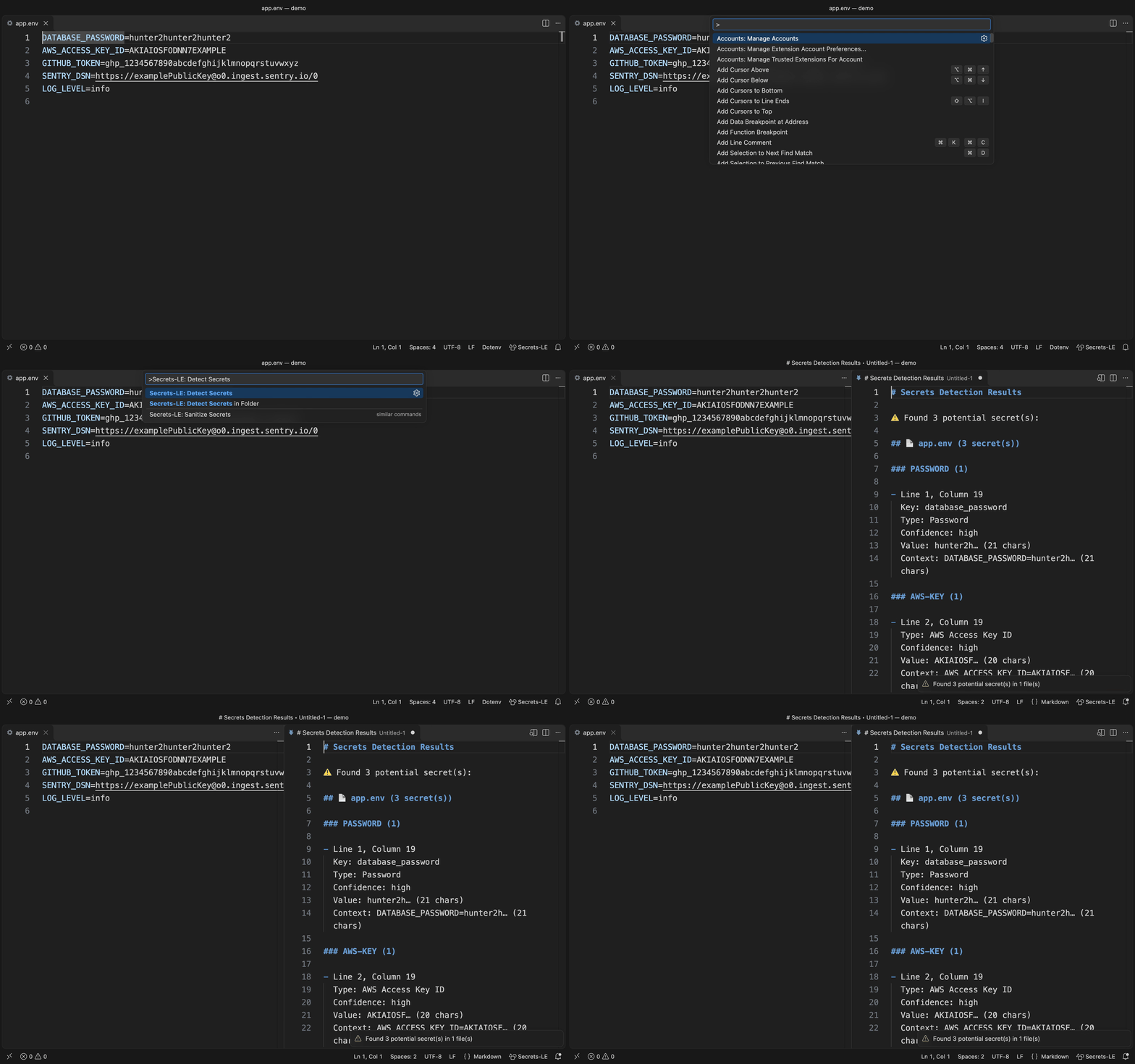
Open a workspace, run Secrets-LE: Detect Secrets, and every detected secret lands in a results document — grouped by file, with line/column positions pointing at the value itself. Run Secrets-LE: Sanitize Secrets to replace the secrets in the active file with a placeholder. Works in VS Code and in VS Code–based editors like Cursor and VSCodium (installable from Open VSX).
Detection is regex-based over the full text of each file, so it works on any text format — code, configs, .env files, YAML, JSON, logs. It is a pre-commit safety net, not a guarantee: a scanner built on patterns can miss secrets and can flag non-secrets. Review the results.
Install
| Where | What you get | Install |
|---|---|---|
| VS Code | Detection and in-place sanitising, in your editor | Marketplace |
| Cursor, VSCodium, Windsurf | The same extension | Open VSX |
| A terminal or a CI step | The same run over a whole tree, with exit codes | cargo install secrets-le · crates.io |
| A terminal, via Node | The same command line, held to the Rust one byte for byte | npx secrets-le · npm |
| Any MCP agent, via Node | detect_secrets over stdio | npx secrets-le-mcp · npm |
Use it from an AI agent
The same engine runs as an MCP server, so an agent can call it directly instead of you running a command.
| Editor | How |
|---|---|
| VS Code 1.101+ | Nothing to install — the extension registers detect_secrets with agent mode |
| Claude Code | claude mcp add secrets-le -- npx -y secrets-le-mcp |
| Cursor, Windsurf, anything else | point it at npx secrets-le-mcp |
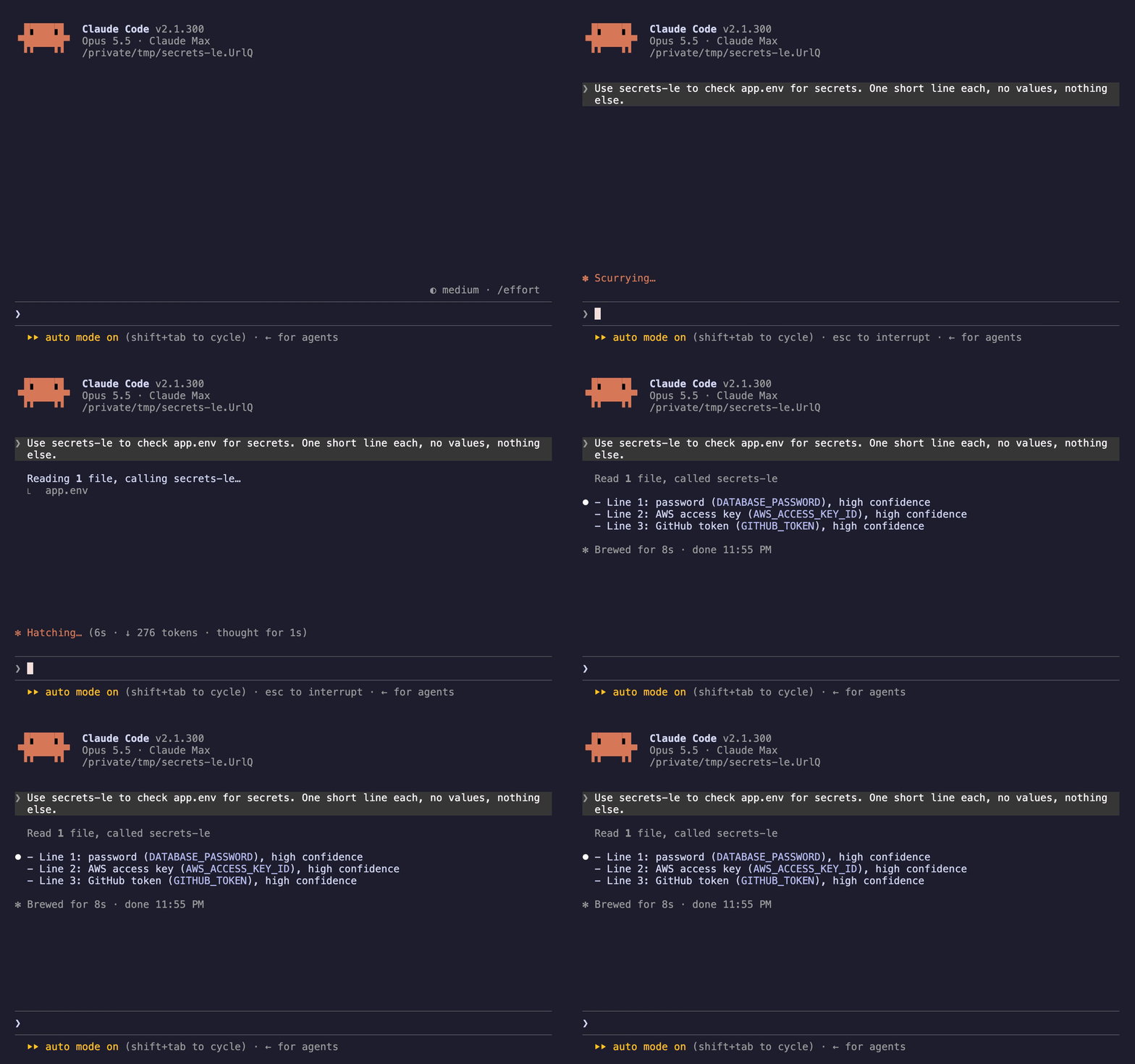
detect_secrets(content, sensitivity?, includeApiKeys?, includePasswords?, includeTokens?, includePrivateKeys?, maxResults?)
Reports each finding by type, confidence, key name and 1-based position. Values are never returned — previews are truncated and length-annotated, and the context line has the secret masked out, so a finding can be located without the credential leaving the machine it was found on.
The server takes content and returns data — it reads no files and makes no network requests of its own. Published as secrets-le-mcp on npm and as io.github.nolindnaidoo/secrets-le in the MCP registry.
Configuring it by hand — any host with an MCP config file
Most hosts read a JSON config. Add one entry:
{
  "mcpServers": {
    "secrets-le": {
      "command": "npx",
      "args": ["-y", "secrets-le-mcp"]
    }
  }
}
-y skips the install prompt on first run. Pin a version if you would rather not track releases — secrets-le-mcp@2.5.0.
Prefer not to go through npx on every launch? Install it once and point at the binary instead:
npm install -g secrets-le-mcp
{
  "mcpServers": {
    "secrets-le": { "command": "secrets-le-mcp" }
  }
}
It speaks MCP over stdio and needs no environment variables, no API key and no configuration of its own. To check it before wiring it into anything:
echo '{"jsonrpc":"2.0","id":1,"method":"tools/list"}' | npx -y secrets-le-mcp
That prints the tool list and exits — if you see detect_secrets, the server works.
Across a folder or a workspace
Detect reads files from disk and gives one report, grouped by file.
- The whole workspace: run
Secrets-LE: Detect Secretsfrom the command palette. - One folder: right-click it in the Explorer and choose
Detect Secrets in Folder, or runSecrets-LE: Detect Secrets in Folderand pick one.
# Secrets Detection Results

⚠️ Found 2 potential secret(s):

## 📄 .env (1 secret(s))

### PASSWORD (1)

- Line 1, Column 19
  Key: database_password
  Type: Password
  Confidence: high
  Value: hunter2… (14 chars)
  Context: DATABASE_PASSWORD=hunter2… (14 chars)

## 📄 src/config.ts (1 secret(s))

### API-KEY (1)

- Line 1, Column 17
  Key: apikey
  Type: Generic API key
  Confidence: high
  Value: sk_demo_… (40 chars)
  Context: const apiKey = "sk_demo_… (40 chars)";


---

# Warnings

- Not read: dependency folders, build output, caches and lockfiles; images, fonts, archives and other binary files; 1 file(s) ignored by .gitignore. The `secrets-le.workspace.*` settings change this.
What a scan reads. Files come from disk, so an unsaved edit is not seen. A file over the safety size, or one that is not UTF-8 text, is left unread. It stops at 10,000 files or 10,000 listed secrets. The report ends with a line for each thing it left out.
.env files are read even though .gitignore leaves them out. That is where a project keeps its secrets, and it is what this tool is run to look at. scanAlwaysInclude holds **/.env and **/.env.* by default. Empty it to leave them to .gitignore.
A scan that skips is not a clearance. A secret in a dependency folder, in another file .gitignore leaves out, or in a binary file is not reported. To screen everything, turn the three switches off.
What it skips, and how to change that. Three switches are on by default, and each can be turned off on its own in Settings:
| Switch | Skips |
|---|---|
scanUseDefaultExcludes | Dependency folders, build output, tool caches and lockfiles. The full list is below |
scanRespectGitignore | Whatever the project's .gitignore files skip |
scanSkipBinaryFiles | Images, fonts, archives and other files that are not text |
Two lists adjust the result without turning a switch off. To skip more, add a pattern to scanExcludes. To read something a switch would skip, add it to scanAlwaysInclude:
{
	// Also skip the test fixtures.
	"secrets-le.workspace.scanExcludes": ["**/fixtures/**"],
	// Keep reading .env files, and read the vendored code as well.
	"secrets-le.workspace.scanAlwaysInclude": ["**/.env", "**/.env.*", "**/vendor/**"]
}
Secrets-LE: Open Settings opens all of these in the Settings editor.
The built-in list
Folders, wherever they appear:
.git, .hg, .svn, node_modules, bower_components, jspm_packages, .pnpm-store, .yarn, vendor, site-packages, Pods, Carthage, dist, build, out, target, _build, _site, dist-newstyle, zig-out, storybook-static, cdk.out, DerivedData, CMakeFiles, .next, .nuxt, .output, .svelte-kit, .angular, .astro, .docusaurus, .vuepress, .expo, .turbo, .parcel-cache, .cache, .sass-cache, .jekyll-cache, .dart_tool, .pub-cache, .gradle, .kotlin, .cxx, .externalNativeBuild, captures, ephemeral, .symlinks, .swiftpm, .build, .bundle, .stack-work, .zig-cache, .godot, elm-stuff, .vercel, .netlify, .serverless, .aws-sam, .terraform, .venv, venv, __pycache__, .tox, .nox, .mypy_cache, .pytest_cache, .ruff_cache, .ipynb_checkpoints, .eggs, coverage, htmlcov, .nyc_output, .vscode-test, .idea, .vs, xcuserdata, *.egg-info
Files, wherever they appear:
*.min.js, *.min.css, *.map, *.snap, *.lock, package-lock.json, pnpm-lock.yaml, npm-shrinkwrap.json, go.sum, *.pbxproj, *.iml, local.properties, output-metadata.json, .flutter-plugins, .flutter-plugins-dependencies, .packages, Generated.xcconfig, flutter_export_environment.sh, GeneratedPluginRegistrant.*, fastlane/report.xml, fastlane/test_output/**, doc/api/**
Not on the list, because they are ordinary folders in many projects: bin, obj, tmp, logs, public, generated. A project that generates those ignores them in git, and the scan reads .gitignore.
In the Problems panel. Turn on secrets-le.workspace.scanProblemsEnabled and each secret is also a warning on its line. Each scan replaces the last one's. A message names the kind of secret, never its value.
The settings that shape a scan are under Settings.
The CLI
The same detection runs from a terminal or a CI step: a Rust CLI in
crate/, sharing one pattern table with the extension
— crate/signatures/patterns.toml —
so the two can never disagree about what counts as a credential. The
same command line also ships on npm as secrets-le, for a machine with
Node and no Rust, and CI holds it to the crate byte for byte on three
operating systems.
secrets-le .                        # scan a tree
secrets-le --sensitivity high .     # only high-confidence findings
secrets-le --no-ignore --hidden .   # reach .env and everything git ignores
secrets-le mcp                      # the same detection over MCP on stdio
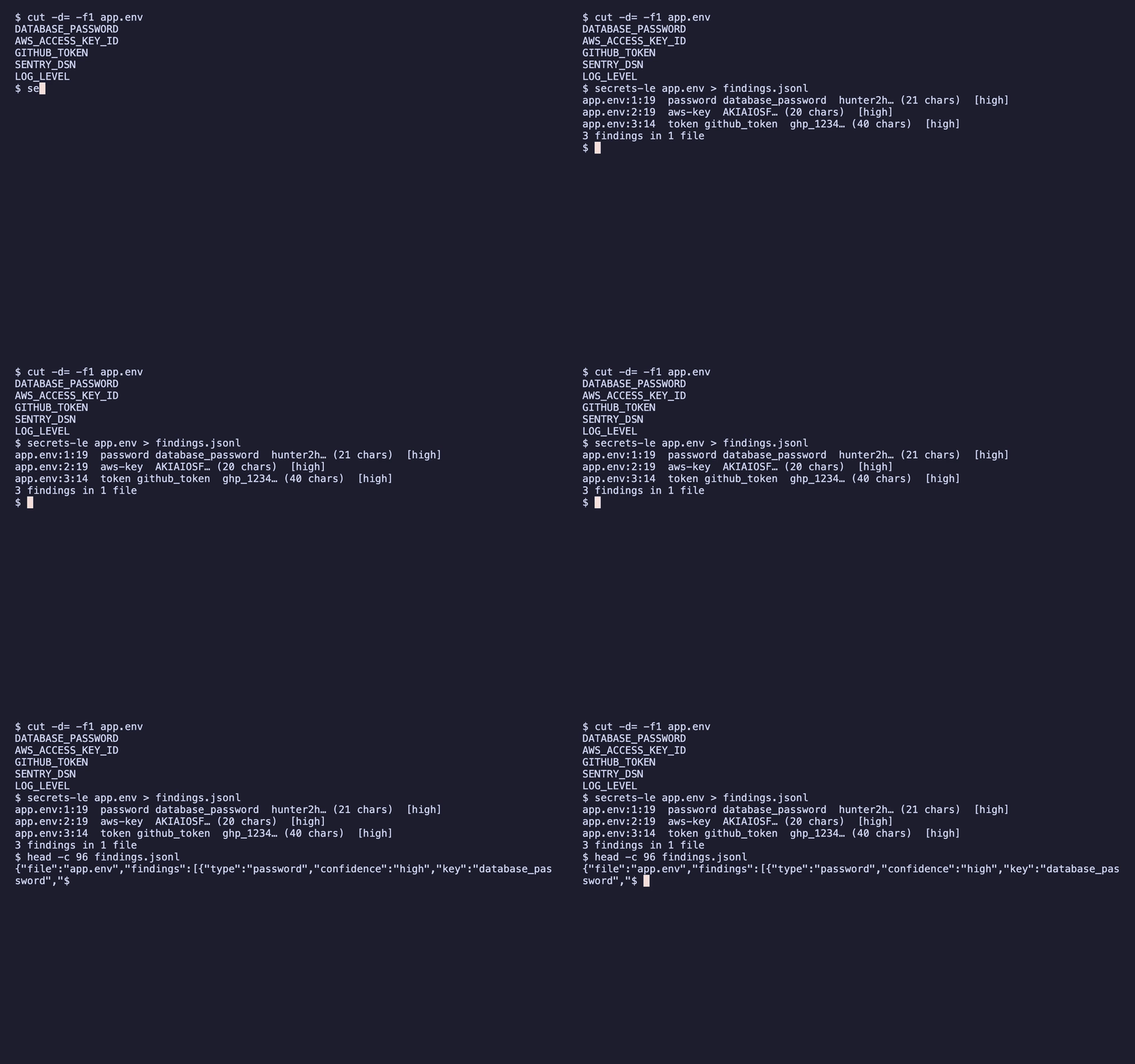
Install it from npm (secrets-le) or from crates.io (secrets-le). Both install the same secrets-le command.
npm install -g secrets-le   # or run it once: npx secrets-le
cargo install secrets-le
The exit code is the answer: 0 nothing found · 1 findings · 2 the
question was malformed — so secrets-le . is a CI step as it stands.
It never prints a credential. A scanner's output goes into a CI log, which is archived, often world-readable, and outlives the secret; a scanner that printed what it found would disclose it more widely than the commit would have. Previews are capped at eight characters and at half the value's length, context lines are masked, and there is no flag that changes either. The extension is the half that can fix what it finds; the binary only reports.
What gets detected
Thirty-four patterns, in crate/signatures/patterns.toml — the one table
both frontends load.
| Category | Types |
|---|---|
| Named issuers | Anthropic sk-ant-, OpenAI sk-/sk-proj-, xAI xai-, Groq gsk_, Hugging Face hf_, Replicate r8_, GitHub ghp_/gho_/ghu_/ghs_/ghr_/github_pat_, GitLab, Slack xox?- and webhook URLs, Discord webhook URLs, Stripe sk_/rk_ live and test keys and whsec_ webhook secrets, Google AIza… and OAuth client secrets GOCSPX-, Linear lin_api_, DigitalOcean dop_v1_/doo_v1_/dor_v1_, Doppler dp.pt./dp.st., SendGrid, Mailgun, Sentry, npm, PyPI, Docker Hub, HashiCorp Vault, Terraform Cloud, Supabase, Shopify, Square, Azure SAS |
| Cloud credentials | AWS Access Key IDs (AKIA…, no key name needed), AWS Secret Access Keys, Azure account keys, GCP/Google Cloud keys |
| Tokens | Generic tokens, bearer tokens, access/refresh tokens, OAuth tokens, JWTs (key-based or bare eyJ… form) |
| Passwords | password/passwd/pwd values, including compound keys (DATABASE_PASSWORD) |
| Private keys | Multi-line PEM blocks — RSA/EC, OpenSSH, PGP |
| Connection data | Database URLs with embedded user:pass@ credentials, connection strings, session IDs, cookies |
Key-based patterns accept quoted and unquoted keys, so JSON ("apiKey": "…"), YAML (api_key: …), env (API_KEY=…), and code (apiKey = '…') all match.
Intentional non-detections: template placeholders (${VAR}, {{var}}, <your-key>, xxxxxxxx), version numbers and hostnames that merely look dotted (1.2.3 is not a JWT), GCP project ids (identifiers, not credentials), and database URLs without embedded credentials.
Known limitations: detection is pattern-based — obfuscated, split, or unconventionally named secrets are missed; JWTs whose header isn't standard base64 JSON (eyJ…) are missed; a high-entropy string without a recognizable key name or prefix is not reported.
Commands
| Command | Description |
|---|---|
Secrets-LE: Detect Secrets | Scan the workspace and open a results document |
Secrets-LE: Detect Secrets in Folder | The same for one folder. Also on a folder in the Explorer |
Secrets-LE: Sanitize Secrets | Replace detected secrets in the active file (asks for confirmation first) |
Secrets-LE: Open Settings | Open Secrets-LE settings |
Secrets-LE: Help | Built-in documentation |
No command is bound to a key by default. Give any of them one under Keyboard Shortcuts in the editor.
Settings
| Setting | Default | Description |
|---|---|---|
secrets-le.detection.sensitivity | medium | low reports everything, medium drops low-confidence matches, high keeps only high-confidence ones |
secrets-le.detection.includeApiKeys | true | Detect API keys and cloud credentials |
secrets-le.detection.includePasswords | true | Detect passwords |
secrets-le.detection.includeTokens | true | Detect tokens and JWTs |
secrets-le.detection.includePrivateKeys | true | Detect PEM private-key blocks |
secrets-le.sanitization.replaceWith | ***REDACTED*** | Replacement text used by Sanitize |
secrets-le.workspace.scanPatterns | ["**/*"] | The files a folder or workspace scan reads |
secrets-le.workspace.scanUseDefaultExcludes | true | Skip dependency folders, build output, caches and lockfiles |
secrets-le.workspace.scanRespectGitignore | true | Skip what the project's .gitignore files skip |
secrets-le.workspace.scanSkipBinaryFiles | true | Skip images, fonts, archives and other files that are not text |
secrets-le.workspace.scanExcludes | [] | More files to skip, as glob patterns |
secrets-le.workspace.scanAlwaysInclude | ["**/.env", "**/.env.*"] | Files to read even when one of the three above would skip them |
secrets-le.workspace.scanMaxFiles | 10000 | The most files one scan reads |
secrets-le.workspace.scanMaxResults | 10000 | The most secrets one scan lists before it stops reading |
secrets-le.workspace.scanProblemsEnabled | false | Also show the secrets a scan finds in the Problems panel |
secrets-le.safety.enabled | true | Guardrails for very large files |
secrets-le.safety.fileSizeWarnBytes | 1000000 | Skip/refuse files above this size |
secrets-le.dedupeEnabled | false | Collapse identical value+type detections in results |
secrets-le.showPositions | true | Show the line and column of each secret found |
secrets-le.copyToClipboardEnabled | false | Also copy results to the clipboard |
secrets-le.clipboardIncludesPositions | true | Include the line and column in that copy |
secrets-le.openResultsSideBySide | true | Open results beside the current editor |
secrets-le.notificationsLevel | important | all = every notification, important = warnings + errors, silent = errors only |
secrets-le.statusBar.enabled | true | Show the status bar item |
secrets-le.telemetryEnabled | false | Local-only event log (see Privacy) |
Languages
Twelve languages besides English:
German · Spanish · French · Indonesian · Italian · Japanese · Korean · Portuguese (Brazil) · Russian · Ukrainian · Vietnamese · Chinese (Simplified)
Both halves are covered — the manifest (command titles, setting names and descriptions) and everything shown while the extension runs (notifications, the status bar, quick-picks and prompts). The extension follows VS Code's display language, so it matches whatever the editor is already set to; no setting of its own.
Privacy & security
- No network access. The extension never sends data anywhere. The
telemetryEnabledsetting only writes events to a local Output Channel you can inspect (Secrets-LE Telemetry). - The MCP server never returns a secret. Its output goes to whatever model called it, so previews are truncated and length-annotated and the surrounding context line is masked, using the same
utils/maskhelpers as the report. There is no argument that turns this off, and the bundle gate fails the build if a value ever appears in a response — verified by making the tool leak on purpose and watching the gate catch it. - Error notifications redact home directories and credential-shaped fragments before display.
- Sanitize always asks for confirmation before editing your file, and edits are normal undo-able document edits.
- One rating prompt, at most twice. On the 3rd successful use the extension asks once whether you would rate it, and once more on the 20th if you chose Later or dismissed it. Don't Ask Again ends it. Setting
notificationsLeveltoimportantorsilentyourself turns it off. The counts are kept in VS Code's extension storage and nothing is sent anywhere; Rate opens the listing you installed from — the VS Code Marketplace or Open VSX — in your browser.
Documentation
| What | Where |
|---|---|
| What the tool is allowed to say — scope, output contract, refusals, non-goals | crate/SPEC.md |
| How the extension is built and held together — architecture, invariants, toolchain, release | AGENTS.md |
| How the CLI is built and held together | crate/AGENTS.md |
| What changed | CHANGELOG.md · crate/CHANGELOG.md |
| The tool's page, and the other fifteen | letools.dev/tools/secrets-le |
Performance
| Input | Size | Found | Time | Rate | Scan speed |
|---|---|---|---|---|---|
| Source with credentials | 1.97 MB | 40,000 | 132.32 ms | 302,301/sec | 14.9 MB/s |
| Clean source | 1.92 MB | 0 | 70.88 ms | — | 27.2 MB/s |
| Env file | 0.60 MB | 0 | 21.88 ms | — | 27.4 MB/s |
Median of 7 runs after warmup, on Apple M5 Pro, 24 GB RAM, Node 24.3.0. Inputs are generated
by scripts/benchmark.ts rather than checked in, so the sizes above are
exactly what was measured. Reproduce with bun run benchmark.
These are machine-specific and are not asserted in CI — a benchmark that gates a build only tells you how busy the runner was.
Testing
| Metric | Coverage |
|---|---|
| Statements | 87.63% |
| Branches | 80.21% |
| Functions | 85.85% |
| Lines | 89.30% |
436 test cases across 25 files, plus an integration suite that runs
in a real VS Code extension host and an end-to-end test that installs the
built .vsix into a clean profile.
Generated from a real run — coverage/coverage-summary.json and
coverage/test-results.json — by scripts/coverage-readme.js, and
bun run coverage:readme:check says whether it has drifted since. Reproduce
with bun run test:coverage, and the case count is the one vitest prints.
More from the LE family
Sixteen single-purpose tools for the work in front of every model. Each ships a Rust CLI and an MCP server. One page: letools.dev
Get it out
- String-LE — Extract every string in a codebase, so a person can read them
- Numbers-LE — Extract every hardcoded number in a codebase, so a person can check them
- Units-LE — Extract every quantity with its unit, normalized, and refuse the ambiguous ones by name
- Dates-LE — Extract every date and timestamp, and the exact instant each one resolves to
- IDs-LE — Extract every UUID, ULID, NanoID, ObjectId and Snowflake, and decode the time inside
- IPs-LE — Extract every IP address, CIDR block and MAC, normalized and classified by scope
- URLs-LE — Extract every URL in a codebase, with its protocol and exact position
- Paths-LE — Extract every file path in a codebase, and say whether it still points at anything
- Colors-LE — Extract every color in a codebase, and say which ones are not in your palette
Check it
- Regex-LE — Find every regex in a codebase, and report which can be driven into catastrophic backtracking
- Versions-LE — Find where one dependency is constrained differently across a repository's manifests
- i18n-LE — Identify the i18n library a project uses, then audit its catalogs by that library's rules
- Scrape-LE — Check whether a page is scrapeable before the scraper is written, and say when it cannot tell
Guard it
- Secrets-LE — Find hardcoded credentials in a codebase, and never print one into the report
- EnvSync-LE — Compare the dotenv files in a tree, and say which keys are missing from which
- Unicode-LE — Find the Unicode that hides meaning — bidi controls, invisibles, homoglyphs, mixed scripts
Each stands on its own: no shared crate, no published core. Where two of them agree, it is because the same answer was right twice.
Contact — nolindnaidoo.com · GitHub · LinkedIn
Also by nolindnaidoo
Rust — pixelcoords and pixelactions are one loop: pixelcoords answers where, pixelactions acts there. Their own tools, their own voice — not part of the LE family.
- pixelcoords — Freeze your screen, mark regions, get pixel-exact coordinates and crops pixelcoords.dev · crates.io · docs.rs
- pixelactions — Consume human-verified coordinates, perform the interaction, confirm it landed pixelactions.dev · crates.io · docs.rs
License
MIT © nolindnaidoo