Listed from the MCP registry; nobody on Odel publishes it.

Agrus Scanner
Network recon for agents: ping sweep, port scan, and AI/ML and MCP service discovery.
Runs on your machine from its package; the steps are below.
What it does
- Reads
- Writes
- High impact
At most: creates or changes data: records, files, settings.
What it costs
FreeOdel charges nothing per call. The publisher may charge for its own service.
Runs locally over stdio
This server isn't hosted — your MCP client launches it from a package registry. Use one of the commands below, or drop the config into your client (e.g. Claude Desktop).
Run
docker run -i --rm ghcr.io/nybaywatch/agrus-mcp@sha256:df54971ce18e1c0f934c004b5eee01106a5f7201652c3b9f46c2772e9c0968af
MCP client config
{
  "mcpServers": {
    "agrus-scanner": {
      "command": "docker",
      "args": [
        "run",
        "-i",
        "--rm",
        "ghcr.io/nybaywatch/agrus-mcp@sha256:df54971ce18e1c0f934c004b5eee01106a5f7201652c3b9f46c2772e9c0968af"
      ]
    }
  }
}





Network reconnaissance tool with deep AI/ML service detection. Scans your network to discover hosts, open ports, and identifies AI services running across your infrastructure.
Built for security teams, IT admins, and researchers who need visibility into shadow AI, rogue LLM deployments, and GPU infrastructure on their networks.
Why
There is a growing concern for shadow AI, and this provides a simple way to scan networks. Also many of the typical scanning tools for windows are slow and have poorly written interfaces, specifically for anyone running a 4k+ monitor. Agrus Scanner is built in native C#/.NET with WPF — no Electron, no embedded browser — so it launches fast, scans fast, and stays light on resources. I've been tired of trying to read tiny print so when a friend/client was looking for a way to scan for shadow AI, and without any windows type tool available, it seemed like a natural fit together.
It also works as a straightforward network scanner — ping sweeps, port scanning, and hostname resolution are all built in. You don't need a separate tool for basic recon. But where Agrus really stands out is AI detection: it goes beyond port scanning by actively probing discovered services with AI-specific API calls, pulling back model names, GPU details, container info, and version data. If someone on your network is running an AI service, Agrus finds it and tells you exactly what it is.
It also runs as an MCP server, so AI agents like Claude Code and OpenClaw can use it as a tool — scan networks, probe hosts, and pull back results autonomously. Point your agent at the endpoint and it handles the rest.
Install
Download the latest installer from Releases, or directly:
AgrusScanner-Setup-1.0.6.msi — self-contained, no .NET runtime needed.
Also available on the Microsoft Store. Or visit the Tools page for the download link, checksum, and winget install command.
Requires Windows 10/11. The installer and the installed binaries are Authenticode-signed (Azure Trusted Signing, publisher Joseph Fago). Once installed, detection signatures keep themselves current; you only need a new installer when the app itself changes.
What's New
Signatures — November 15, 2026
- NVIDIA GPU Exporter detection (GPU Infra) — the popular
nvidia-smi-backed Prometheus exporter (utkuozdemir/nvidia_gpu_exporter) used on homelab/workstation GPUs, complementing the data-center-focused DCGM Exporter already detected; identified via thenvidia_smi_gpu_infoidentity metric on its documented default port 9835 - Probe catalog grows to 135 definitions; signatures ship automatically through the rolling feed — no app update needed
- Dependency check:
Microsoft.NET.Test.Sdk18.11.0 → 18.12.0 (test-only, no runtime impact); no vulnerable packages found
Signatures — November 8, 2026
- Comet Opik detection (LLM) — self-hosted LLM/RAG/agent observability and evaluation platform, no auth by default; identified via its frontend page title on its standard docker-compose port 5173
- Agenta detection (LLM) — self-hosted LLMOps platform for prompt management, evaluation and observability; identified via its root page title
- Attu detection (Vector DB) — official web GUI for self-hosted Milvus, commonly bundled in Milvus docker-compose stacks with no auth by default; identified via its root page title
- Easy Diffusion detection (Image Gen) — one-click self-hosted Stable Diffusion web app, unauthenticated by default; identified via its root page title on its distinctive default port 9000
- ClearML detection (ML Platform) — self-hosted open-source MLOps platform for experiment tracking and pipeline management; identified via its webserver root page tagline
- Rasa detection (Agent Platform) — self-hosted conversational AI/chatbot framework; identified via
/version'sminimum_compatible_versionfield on its default REST server port 5005 - Chainlit detection (AI Platform) — popular self-hosted Python framework for building LLM chat apps, publicly accessible with no auth by default; identified via a generator marker on its root page
- FastGPT detection (RAG Platform) — self-hosted open-source LLM knowledge-base/RAG platform; identified via its root page branding on its docker-compose default port 3000
- Probe catalog grows to 134 definitions; signatures ship automatically through the rolling feed — no app update needed
Features
- Ping Sweep - Fast ICMP discovery across subnets (256 concurrent)
- Port Scanning - TCP connect scan with preset profiles (Quick, Common, Extended, AI, Deep AI)
- AI Service Detection - 135 probe definitions identifying 100+ AI/ML services and MCP servers
- Self-updating Signatures - detection definitions arrive automatically through a signed feed; no reinstall for new services
- Docker Container Enumeration - Detects AI containers via exposed Docker API
- GPU Infrastructure - Finds NVIDIA DCGM exporters and inference metrics
- Export Results - Save scan results to CSV or TXT via the toolbar EXPORT button
- Real-time Results - Live-updating UI as scan progresses
- MCP Server - Expose scanning tools to AI agents via Model Context Protocol
- Agent Skills - Works with Claude Code, OpenClaw, Cursor, and other AgentSkills-compatible tools
AI Detection Categories
| Category | Services Detected |
|---|---|
| LLM | Ollama, vLLM, HF TGI, llama.cpp, KoboldCpp, LM Studio, LiteLLM, Jan.ai, GPT4All, LocalAI, FastChat, Tabby, Xinference, SGLang, text-generation-webui, NVIDIA NIM, NVIDIA Dynamo, NVIDIA TensorRT-LLM, OpenLLM, MLX-LM, llamafile, Aphrodite Engine, llama-swap, LMDeploy, exo, TabbyAPI, Lemonade Server, DeepSpeed-MII, MLC LLM, Portkey AI Gateway, Helicone, Comet Opik, Agenta |
| Image Gen | Stable Diffusion (A1111), ComfyUI, InvokeAI, SD WebUI Forge, Fooocus-API, Easy Diffusion |
| Video Gen | SwarmUI, HunyuanVideo |
| Voice / STT / TTS | Speaches, whisper.cpp, OpenedAI-Speech, F5-TTS, GPT-SoVITS, XTTS-API-Server, Coqui XTTS Streaming, Kokoro-FastAPI, Chatterbox-TTS-Server, VoiceStudio, Dia-TTS-Server |
| ML Platform | NVIDIA Triton, TorchServe, TensorFlow Serving, MLflow, Ray Serve, BentoML, KServe, MindsDB, ClearML |
| AI Platform | Open WebUI, AnythingLLM, LibreChat, Flowise, Dify, SillyTavern, n8n, PrivateGPT, Gradio apps, NextChat, LobeChat, AstrBot, h2oGPT, Chainlit |
| Agent Platform | AutoGen Studio, Letta, OpenHands, CrewAI Studio, Langflow, OpenClaw, Agent Zero, Rasa |
| RAG Platform | Onyx, R2R, kotaemon, RAGFlow, Quivr, Verba, Khoj, Hayhooks (Haystack), FastGPT |
| Embeddings | HF Text Embeddings Inference (TEI), Infinity |
| Vector DB | Qdrant, ChromaDB, Weaviate, Milvus, Typesense, Attu |
| MCP Server | Any MCP server over Streamable HTTP (initialize / server/discover) or legacy HTTP+SSE, plus Home Assistant MCP; reports name, version, and tools/resources/prompts |
| GPU Infra | NVIDIA DCGM Exporter, Triton Metrics, TorchServe Metrics, NVIDIA GPU Exporter |
| Container | Docker API with 70+ AI image pattern matches |
Detection goes beyond port scanning - the prober queries service-specific API endpoints, extracts model names, versions, GPU info, and container details.
Detection Signatures
Starting with 1.0, what Agrus can detect is separate from the app itself, the same way an antivirus separates its engine from its definitions.
How it works
- Every probe, AI port preset entry, and Docker image pattern lives in one catalog. A copy is built into each release as the baseline, so the app works fully offline.
- New signatures are published to the
signaturesfeed on GitHub, typically weekly as new AI services appear. The app checks the feed a few seconds after launch and once a day after that. - The active signature version and probe count are shown in Settings and the help popup, and in the status bar when an update is available. Versions are dated, e.g.
2026.09.22.1.
Your choices (Settings → Updates → Detection signatures)
| Mode | Behavior |
|---|---|
| Auto-install (default) | New signatures download and activate silently and apply from the next probed host onward |
| Notify only | A link appears in the status bar; click it to install |
| Off | Never contacts the feed; the built-in baseline is used |
How it stays safe
- Each package is signed in CI with a private key that exists only as a GitHub Actions secret. The app carries the matching public key and refuses any package that fails verification, is older than what is already active, needs a newer app version, or fails structural checks (no duplicates, no shrinking, valid categories).
- A signature package can only add or refine detection. It cannot add code, change what ports are scanned outside the AI preset, or make the scanner send anything other than the fixed set of read-only discovery requests (POST is limited to MCP
initialize/server/discover/ping). - If a downloaded file is tampered with, corrupted, or served by the wrong host, it is discarded and the last good set stays active. Nothing is ever loaded from disk without the same checks.
What still needs an app update
Rich detail extraction for a brand-new service (model lists, GPU names) is code, so a signature can label a service before the next release shows its details. Engine, UI, and MCP-tool changes are also app releases, which the existing update check announces.
Contributing a signature
Add an entry to signatures/catalog.json and open a pull request; the catalog gates in CI validate it and, once merged, the feed publishes automatically. Details are in docs/DEVELOPER.md.
Usage
GUI Mode
- Enter an IP range (CIDR, range, or single IP)
- Select a scan preset:
- Quick - 6 common ports
- Common - 22 well-known ports
- Extended - 58 service ports
- AI Scan - 49 AI/ML-specific ports with service probing
- Deep AI Scan - All 65535 ports with full AI probing (slow but complete)
- No port scan - Ping sweep only
- Click START
- After scanning, click EXPORT to save results as CSV or TXT
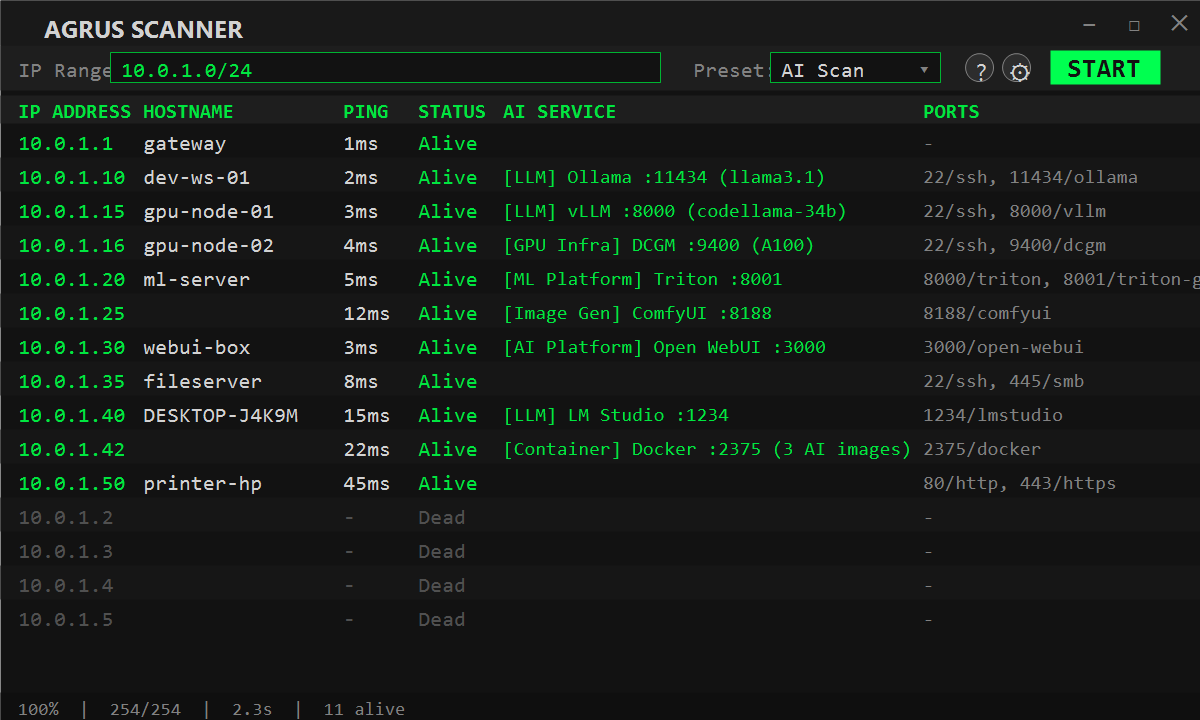
AI Scan results show detected services with extracted details:
[LLM] Ollama :11434 (llama3, mistral) | [GPU Infra] NVIDIA DCGM :9400 (RTX 4090)
MCP Server Mode
Run the scanner as a headless MCP server with a system tray icon:
AgrusScanner.exe --mcp-only
This starts a Streamable HTTP MCP server on http://localhost:8999/mcp (port configurable in settings). AI agents can then call the scanning tools directly.
Security note: The MCP server binds to
localhostonly and validates Host headers to block DNS rebinding attacks. Only processes on your own machine can connect. Do not expose this server to the network via reverse proxy or tunnel without adding your own auth layer.
MCP Tools:
| Tool | Description |
|---|---|
scan_network | Ping sweep + port scan + DNS + AI probing across an IP range |
probe_host | Deep-scan a single IP with port scan and AI detection |
export_results | Write the last scan or probe results to a JSON or CSV file |
list_presets | List available scan presets with port counts |
Headless MCP Server (Docker / stdio)
AgrusScanner.McpServer is a cross-platform console build of the same MCP tools, with no UI or Windows dependency. It shares the scanning engine and tool definitions with the desktop app through linked sources, so both expose an identical tool surface.
# stdio transport (what MCP clients launch; default)
dotnet run --project AgrusScanner.McpServer

# Streamable HTTP on 127.0.0.1:8999/mcp
dotnet run --project AgrusScanner.McpServer -- --http 8999
HTTP mode binds to loopback and checks Host and Origin headers, like the desktop app. Pass --bind 0.0.0.0 to listen on all interfaces (the default inside a container). A non-loopback listener refuses to start unless MCP_TOKEN is set, which makes every request require Authorization: Bearer <token>; --no-auth overrides that check and is not recommended.
A Dockerfile at the repo root builds it into a container:
docker build -t agrus-mcp .
docker run -i --rm agrus-mcp                                        # stdio
docker run --rm -p 8999:8999 -e MCP_TOKEN=secret agrus-mcp --http   # HTTP at http://localhost:8999/mcp
The image runs as a non-root user. Scanning your LAN from inside a container requires host networking (--network host on Linux) so the scanner can reach the subnet. Inside a container the server binds to all interfaces so Docker's port mapping works, which is why HTTP mode there requires MCP_TOKEN.
AI Agent Integration
Claude Code
The project includes a .mcp.json that connects Claude Code to the scanner. Start the MCP server, then use Claude Code in this project:
// .mcp.json (already included)
{
  "mcpServers": {
    "agrus-scanner": {
      "type": "http",
      "url": "http://localhost:8999/mcp"
    }
  }
}
A Claude Code skill is also included at .claude/skills/agrus-scanner/SKILL.md that teaches the agent when and how to use the scanning tools.
OpenClaw
Install the bundled OpenClaw plugin:
openclaw plugins install ./openclaw-plugin
Configure in OpenClaw settings:
{
  "plugins": {
    "entries": {
      "agrus-scanner": {
        "enabled": true,
        "config": { "mcpUrl": "http://localhost:8999/mcp" }
      }
    }
  }
}
Other AgentSkills-Compatible Tools
The skill at .claude/skills/agrus-scanner/SKILL.md follows the open AgentSkills format and works with any compatible agent (Cursor, Gemini CLI, OpenClaw, etc.). Point your tool at the MCP endpoint and the skill provides usage instructions.
Privacy & Updates
Agrus Scanner makes two kinds of outbound requests, both optional and both visible in Settings → Updates:
- App update check on startup to
api.jpftech.com, sending only the app version and OS version. No personal data, machine IDs, or IP addresses are stored. Toggle: Check for app updates on startup. - Signature feed check to
downloads.jpftech.comon startup and daily, fetching a small manifest and, when newer, the signed package. No identifying data is sent; the server only counts how many checks happen per day, which is what the "Active installs" badge shows. Toggle: Detection signatures → Off.
Scan traffic itself only goes to the IP range you enter. Settings are stored in %LOCALAPPDATA%\AgrusScanner\settings.json; an installed signature package lives alongside it as signatures.agsig.
Security
Hardening carried through to 1.0:
- Code signing — MSI, exe, and dll are Authenticode-signed (Azure Trusted Signing); the release pipeline refuses to publish if any signature is missing or invalid
- Signed detection feed — signature packages are ECDSA P-256 signed and verified before use; downgrade, oversize, decompression-bomb, and malformed packages are rejected, and a package cannot introduce arbitrary requests (see Detection Signatures)
- Bounded probes — streaming (SSE) responses are cut off at 1.5 s / 64 KB; MCP sessions opened during detection are closed immediately and no tools are ever invoked
- Input limits — CIDR and range parsing capped at 65,536 addresses to prevent memory exhaustion
- Path traversal protection — MCP
export_resultsrestricted to the user's Documents folder - DNS rebinding defense — MCP server validates Host headers, rejecting non-localhost requests
- Response size cap — HTTP probe responses capped at 1 MB to block memory bombs from malicious servers
- CSV injection prevention — Export escapes formula-injection characters (
=,+,-,@) - NTLM protection — Removed SMB shell-open to prevent credential disclosure to untrusted hosts
- Diagnostic logging — Suppressed exceptions now log to
System.Diagnostics.Tracefor visibility - No hardcoded secrets — Build signing credentials moved to environment variables
Keyboard Shortcuts
| Key | Action |
|---|---|
| Ctrl + C | Copy selected IP address |
| Ctrl + = | Zoom in |
| Ctrl + - | Zoom out |
| Ctrl + 0 | Reset zoom |
| Ctrl + Scroll | Zoom |
| Right-click | Context menu (copy, open services) |
License
MIT License — use at your own risk. See LICENSE for full terms.







