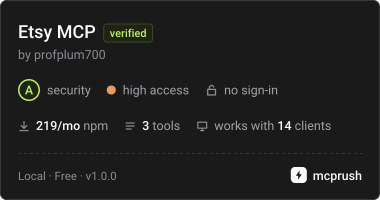
Listed from the MCP registry; nobody on Odel publishes it.

Etsy
A local read-only MCP server for Etsy shops, active listings, and listing variation inventory.
Runs on your machine from its package; the steps are below.
What it does
- Reads
- Writes
- High impact
At most: only reads or looks up information.
What it costs
FreeOdel charges nothing per call. The publisher may charge for its own service.
Runs locally over stdio
This server isn't hosted — your MCP client launches it from a package registry. Use one of the commands below, or drop the config into your client (e.g. Claude Desktop).
Run
npx -y @profplum700/etsy-mcp-server
MCP client config
{
  "mcpServers": {
    "etsy": {
      "command": "npx",
      "args": [
        "-y",
        "@profplum700/etsy-mcp-server"
      ]
    }
  }
}Etsy API v3 Client



A modern, universal TypeScript/JavaScript client for the Etsy Open API v3 with full OAuth 2.0 PKCE authentication support. It ships builds for Node.js, browsers and Web Workers. Every API call sends your app's shared secret, so a public web app makes its Etsy calls from a server (see Browser Usage).
This repository is heavily based on the official Etsy OpenAPI specification (https://www.etsy.com/openapi/generated/oas/3.0.0.json), as referenced in Etsy's API documentation (https://developers.etsy.com/documentation/reference).
🚀 Features
- Universal Builds: ESM, CommonJS and browser bundles for Node.js, browsers and Web Workers. API calls need your shared secret, so public web apps make them from a server
- OAuth 2.0 PKCE Authentication: Full support for secure authentication flow
- TypeScript First: Complete type definitions with IntelliSense support
- Rate Limiting: Built-in request throttling to respect API limits
- Token Management: Automatic token refresh with configurable storage
- Caching: Optional response caching to improve performance
- Error Handling: Comprehensive error types for different failure scenarios
- Zero Dependencies: No external runtime dependencies
📦 Installation
npm install @profplum700/etsy-v3-api-client
yarn add @profplum700/etsy-v3-api-client
pnpm add @profplum700/etsy-v3-api-client
🤖 Connect an agent to your Etsy shop
The companion @profplum700/etsy-mcp-server package runs locally over stdio and exposes read-only shop, active-listing, and listing-inventory tools. It requires Node.js 24+, your own approved Etsy developer app, and an OS credential store. It does not use a hosted endpoint.
Register http://localhost:3030/oauth/redirect as the Etsy app callback if required, then run this in a local interactive terminal:
npx --yes @profplum700/etsy-mcp-server@latest setup
Enter your keystring and shared secret in the hidden terminal prompts, authorize only shops_r and listings_r in Etsy, then choose whether to add the server to your user-level Codex MCP configuration. For another stdio client, configure npx --yes @profplum700/etsy-mcp-server@latest serve as its launch command.
You can connect multiple shops without replacing earlier profiles. Run setup --reuse-app --manual-browser to reuse the saved developer app credentials, then open the printed authorization URL in the browser profile signed in to the shop you want to add. Use status to see saved shops and use <shop name or ID> to choose which one MCP tools query. disconnect removes only the active shop; disconnect --all removes every saved profile. Use remove-codex to remove the Codex entry without disconnecting any shop.
Prompt for an agent: “Set up the local Etsy MCP server. Do not ask me to paste Etsy credentials into chat or save them in a repository or environment file. Run the setup command in an interactive local terminal so I can enter them there; request only shops_r and listings_r, verify my shop, and offer the user-level Codex connection.”
🔧 Quick Start
Basic Setup
import { EtsyClient, AuthHelper } from '@profplum700/etsy-v3-api-client';

// Create authentication helper
const authHelper = new AuthHelper({
  keystring: 'your-api-key',
  redirectUri: 'https://your-app.com/callback',
  scopes: ['shops_r', 'listings_r']
});

// Get authorization URL
const authUrl = await authHelper.getAuthUrl();
console.log('Visit this URL to authorize:', authUrl);

// After user authorization, exchange code for tokens
const state = await authHelper.getState();
await authHelper.setAuthorizationCode('authorization-code-from-callback', state);
const tokens = await authHelper.getAccessToken();

// Create API client
const client = new EtsyClient({
  keystring: 'your-api-key',
  sharedSecret: 'your-shared-secret', // REQUIRED for v3 API compliance
  accessToken: tokens.access_token,
  refreshToken: tokens.refresh_token,
  expiresAt: tokens.expires_at
});

// Make API calls
const user = await client.getUser();
console.log('User:', user);
Browser Usage
Etsy expects your keystring and shared secret together in the x-api-key header of every API call, and EtsyClient requires the shared secret. Anything shipped to a browser is public, so in a public web app keep EtsyClient on your server and have the page call your own routes (see the browser example). To skip writing a route per call, use the server proxy: createEtsyProxyClient() in the page sends each call to one route on your server, and createEtsyProxyHandler() runs it there with an EtsyClient for that user (see @profplum700/etsy-react). Load the browser bundle only in a trusted environment, such as an internal tool that only your team can reach:
<script type="module">
import { EtsyClient, AuthHelper } from 'https://unpkg.com/@profplum700/etsy-v3-api-client/dist/browser.esm.js';

// Your code here...
</script>
Or using UMD:
<script src="https://unpkg.com/@profplum700/etsy-v3-api-client/dist/browser.umd.js"></script>
<script>
const { EtsyClient, AuthHelper } = EtsyApiClient;
// Your code here...
</script>
Node.js Usage
// CommonJS
const { EtsyClient, AuthHelper } = require('@profplum700/etsy-v3-api-client');

// ES Modules
import { EtsyClient, AuthHelper } from '@profplum700/etsy-v3-api-client';
🔐 Authentication
OAuth 2.0 Flow
- Create AuthHelper with your app credentials
- Generate authorization URL for user to visit
- Handle callback with authorization code
- Exchange code for tokens
- Use tokens with EtsyClient
import { AuthHelper, ETSY_SCOPES } from '@profplum700/etsy-v3-api-client';

const authHelper = new AuthHelper({
  keystring: 'your-api-key',
  redirectUri: 'https://your-app.com/callback',
  scopes: [
    ETSY_SCOPES.SHOPS_READ,
    ETSY_SCOPES.LISTINGS_READ,
    ETSY_SCOPES.PROFILE_READ
  ]
});

// Step 1: Get authorization URL
const authUrl = await authHelper.getAuthUrl();
// Redirect user to authUrl

// Step 2: Handle callback (in your callback endpoint)
const { code, state } = getCallbackParams(); // Your implementation
const expectedState = await authHelper.getState();

if (state === expectedState) {
  await authHelper.setAuthorizationCode(code, state);
  const tokens = await authHelper.getAccessToken();
  // Store tokens securely
}
Available Scopes
import { ETSY_SCOPES, COMMON_SCOPE_COMBINATIONS } from '@profplum700/etsy-v3-api-client';

// Individual scopes
const scopes = [
  ETSY_SCOPES.SHOPS_READ,
  ETSY_SCOPES.LISTINGS_WRITE,
  ETSY_SCOPES.TRANSACTIONS_READ
];

// Pre-defined combinations
const readOnlyScopes = COMMON_SCOPE_COMBINATIONS.SHOP_READ_ONLY;
const managementScopes = COMMON_SCOPE_COMBINATIONS.SHOP_MANAGEMENT;
🏪 Client Usage
Creating a Client
import { EtsyClient } from '@profplum700/etsy-v3-api-client';

const client = new EtsyClient({
  keystring: 'your-api-key',
  sharedSecret: 'your-shared-secret', // Get this from Your Apps page on Etsy
  accessToken: 'user-access-token',
  refreshToken: 'user-refresh-token',
  expiresAt: new Date('2024-12-31T23:59:59Z'),

  // Optional configuration
  rateLimiting: {
    enabled: true,
    maxRequestsPerSecond: 5,
    maxRequestsPerDay: 5000 // Conservative local fallback; Etsy response headers report this app's actual quota
  },
  caching: {
    enabled: true,
    ttl: 300 // 5 minutes
  }
});
Making API Calls
// Get current user
const user = await client.getUser();

// Get user's shops
const shops = await client.getUserShops();

// Get shop listings
const listings = await client.getListingsByShop('shop-id');

// Get specific listing
const listing = await client.getListing('listing-id');

// Search listings
const searchResults = await client.findAllListingsActive({
  keywords: 'vintage',
  taxonomy_id: 123,
  limit: 25
});
Error Handling
import { EtsyApiError, EtsyAuthError, EtsyRateLimitError } from '@profplum700/etsy-v3-api-client';

try {
  const user = await client.getUser();
} catch (error) {
  if (error instanceof EtsyAuthError && error.code === 'REAUTH_REQUIRED') {
    // Etsy refused the refresh token (invalid_grant): send the user through OAuth again
    console.error('Re-authorisation needed');
  } else if (error instanceof EtsyAuthError && error.code === 'TOKEN_SAVE_FAILED') {
    // Saving rotated tokens failed; error.cause is the storage/callback error.
    // The new tokens are only in memory until a retry saves them. Do not log
    // error.cause as-is: a custom save callback's error may contain tokens.
    console.error('Token save failed:', error.code);
  } else if (error instanceof EtsyAuthError) {
    // Other auth errors, e.g. TOKEN_REFRESH_FAILED or TOKEN_REFRESH_TIMEOUT
    // for a transient refresh failure; the stored tokens are kept
    console.error('Auth error:', error.message, error.code);
  } else if (error instanceof EtsyRateLimitError) {
    // Handle rate limiting
    console.error('Rate limited. Retry after:', error.retryAfter);
  } else if (error instanceof EtsyApiError) {
    // Handle API errors
    console.error('API error:', error.statusCode, error.message);
  } else {
    // Handle other errors
    console.error('Unexpected error:', error);
  }
}
💾 Token Storage
Built-in Storage Options
The client provides several storage mechanisms:
import {
  createDefaultTokenStorage,
  LocalStorageTokenStorage,
  SessionStorageTokenStorage,
  FileTokenStorage,
  MemoryTokenStorage
} from '@profplum700/etsy-v3-api-client';

// Automatic storage selection based on environment
const storage = createDefaultTokenStorage();

// Browser localStorage
const localStorage = new LocalStorageTokenStorage('etsy-tokens');

// Browser sessionStorage
const sessionStorage = new SessionStorageTokenStorage('etsy-tokens');

// Node.js file storage
const fileStorage = new FileTokenStorage('./tokens.json');

// In-memory storage (not persistent)
const memoryStorage = new MemoryTokenStorage();
Using Storage with the Client
EtsyClient takes a single config object and does not accept a storage object. To keep tokens across restarts, load the saved set from your storage when you create the client, and save every refreshed set through refreshSaveAsync. The client waits for that save before it uses the new access token. Etsy invalidates the old refresh token on each refresh, so a refresh that is never saved locks the app out on the next start.
import { EtsyClient, TokenStorage, createDefaultTokenStorage } from '@profplum700/etsy-v3-api-client';

async function createClientFromStorage(storage: TokenStorage): Promise<EtsyClient> {
  // Load the tokens saved after the user authorised the app
  const saved = await storage.load();
  if (!saved) throw new Error('No saved tokens: authorise the app first');

  return new EtsyClient({
    keystring: process.env.ETSY_API_KEY!,
    sharedSecret: process.env.ETSY_SHARED_SECRET!,
    accessToken: saved.access_token,
    refreshToken: saved.refresh_token,
    expiresAt: saved.expires_at,
    // Save every refreshed token set before the client uses it
    refreshSaveAsync: (accessToken, refreshToken, expiresAt) =>
      storage.save({
        access_token: accessToken,
        refresh_token: refreshToken,
        expires_at: expiresAt,
        token_type: 'Bearer',
        scope: saved.scope
      }),
    // Delete the saved tokens when client.clearTokens() is called
    refreshClearAsync: () => storage.clear()
  });
}

const client = await createClientFromStorage(createDefaultTokenStorage());
The authentication guide has more storage examples.
Custom Storage
import { TokenStorage } from '@profplum700/etsy-v3-api-client';

class CustomTokenStorage implements TokenStorage {
  async save(tokens: EtsyTokens): Promise<void> {
    // Your save implementation
  }

  async load(): Promise<EtsyTokens | null> {
    // Your load implementation
  }

  async clear(): Promise<void> {
    // Your clear implementation
  }
}
Refresh Token Rotation
Etsy issues a new refresh token on every refresh, and the old one may stop working. The client saves the new tokens (token storage, refreshSave or refreshSaveAsync) before it uses them. If that save fails, the call throws EtsyAuthError with code TOKEN_SAVE_FAILED, and error.cause is the original storage or callback error. The new tokens are then held only in memory, and the next refresh retries the save without asking Etsy again. If the process exits before a save succeeds, the new refresh token is lost and Etsy may require the user to authorise again. Handle TOKEN_SAVE_FAILED: fix the storage and let a later call retry the save before the process exits.
🚦 Rate Limiting
The client includes built-in rate limiting to respect Etsy's API limits:
const client = new EtsyClient({
  // ... other config
  rateLimiting: {
    enabled: true,
    maxRequestsPerSecond: 5,     // Conservative QPS fallback
    maxRequestsPerDay: 5000,     // Conservative rolling 24-hour fallback
    minRequestInterval: 200      // Minimum ms between requests (5 QPS fallback)
  }
});

// Check remaining requests in the rolling local window
const remaining = client.getRemainingRequests();
console.log(`${remaining} requests remaining in the rolling 24-hour window`);
rateLimiting.enabled: false turns off local pacing only (the per-second interval, the local daily count and the shared cooldown). It does not turn off 429 handling: a read that gets a 429 is still retried with backoff, and every 429 still throws EtsyRateLimitError. With pacing off, the retry options in rateLimiting (maxRetries, baseDelayMs, maxDelayMs, jitter) are ignored and the defaults apply (3 retries). A read is not retried when Etsy reports that the daily quota is used up.
Every 429 throws EtsyRateLimitError. A read that gets a 429 is retried with backoff first. A write (POST, PUT, PATCH, DELETE) is never replayed: it throws at once, with retryAfter set to Etsy's Retry-After in seconds (or the client's own cooldown when Etsy sends none). The exception is a used-up daily quota (isRetryable() is false): there retryAfter is set only when Etsy sends Retry-After.
Each attempt reads the access token just before it is sent, so a request that waited for a rate-limit slot or a backoff never sends an expired token. When Etsy answers 401 and a refresh token is held, the client refreshes the token once and resends once; a second 401 is thrown as EtsyApiError.
When building a custom transport around the exported EtsyRateLimiter, keep the reservation ID attached to its response so concurrent, out-of-order headers cannot incorrectly restore exhausted quota:
const reservationId = await rateLimiter.waitForRateLimitWithReservation();
let response: Response;
try {
  response = await fetch(url);
} catch (error) {
  rateLimiter.releaseRequestSlot(reservationId);
  throw error;
}
rateLimiter.updateFromHeaders(response.headers, reservationId);
waitForRateLimit() remains available for source compatibility when you only need dispatch pacing. For custom transports that also feed response headers back to the limiter, use the reservation-aware method above; uncorrelated positive headers cannot safely reopen exhausted quota.
🔄 Caching
Optional response caching to improve performance:
const client = new EtsyClient({
  // ... other config
  caching: {
    enabled: true,
    ttl: 300 // Cache for 5 minutes
  }
});

// Clear cache when needed
await client.clearCache();

// Sign out: clears the tokens and the response cache, so cached
// answers are not served after the tokens are gone
await client.clearTokens();
Cache keys are built from the request alone, not from the Etsy account. Do not share one caching.storage between clients signed in to different Etsy accounts, or they may read each other's cached responses.
🌐 Environment Support
Browser
- Modern browsers with ES2020+ support, for trusted environments only, because API calls need your shared secret (see Browser Usage)
- Web Workers
- Service Workers
Node.js
- Node.js 20+
- Full CommonJS and ES Module support
Package Exports
The package provides optimized builds for different environments:
{
  "imports": {
    "@profplum700/etsy-v3-api-client": "./dist/index.esm.js",
    "@profplum700/etsy-v3-api-client/browser": "./dist/browser.esm.js",
    "@profplum700/etsy-v3-api-client/node": "./dist/node.esm.js"
  }
}
📚 API Reference
EtsyClient Methods
User Methods
getUser()- Get current user infogetUserShops(userId?)- Get user's shops
Shop Methods
getShop(shopId)- Get shop detailsgetShopByOwnerUserId(userId)- Get shop by owner user ID
Personalization Methods (New)
getListingPersonalizations(listingId)- Get personalization questions for a listingupdateListingPersonalization(shopId, listingId, params)- Create or update personalization questionsdeleteListingPersonalization(shopId, listingId)- Delete personalization
Listing Methods
getListing(listingId)- Get listing detailsgetListingsByShop(shopId, options?)- Get shop's listingsfindAllListingsActive(options?)- Search active listings
Listing Management Endpoint Support
| Category | Endpoint | Supported |
|---|---|---|
| BuyerTaxonomy | getBuyerTaxonomyNodes | Yes |
| BuyerTaxonomy | getPropertiesByBuyerTaxonomyId | No |
| SellerTaxonomy | getSellerTaxonomyNodes | Yes |
| SellerTaxonomy | getPropertiesByTaxonomyId | Yes |
| ShopListing | createDraftListing | Yes |
| ShopListing | getListingsByShop | Yes |
| ShopListing | deleteListing | Yes |
| ShopListing | getListing | Yes |
| ShopListing | findAllListingsActive | Yes |
| ShopListing | findAllActiveListingsByShop | No |
| ShopListing | getListingsByListingIds | No |
| ShopListing | getFeaturedListingsByShop | No |
| ShopListing | deleteListingProperty | No |
| ShopListing | updateListingProperty | Yes |
| ShopListing | getListingProperty | No |
| ShopListing | getListingProperties | Yes |
| ShopListing | updateListing | Yes |
| ShopListing | getListingsByShopReceipt | No |
| ShopListing | getListingsByShopReturnPolicy | No |
| ShopListing | getListingsByShopSectionId | No |
| ShopListing | getListingPersonalization | Yes |
| ShopListing | updateListingPersonalization | Yes |
| ShopListing | deleteListingPersonalization | Yes |
| ShopListing File | deleteListingFile | No |
| ShopListing File | getListingFile | No |
| ShopListing File | getAllListingFiles | No |
| ShopListing File | uploadListingFile | No |
| ShopListing Image | deleteListingImage | Yes |
| ShopListing Image | getListingImage | Yes |
| ShopListing Image | getListingImages | Yes |
| ShopListing Image | uploadListingImage | Yes |
| ShopListing Inventory | getListingInventory | Yes |
| ShopListing Inventory | updateListingInventory | Yes |
| ShopListing Offering | getListingOffering | No |
| ShopListing Product | getListingProduct | No |
| ShopListing Translation | createListingTranslation | No |
| ShopListing Translation | getListingTranslation | No |
| ShopListing Translation | updateListingTranslation | No |
| ShopListing VariationImage | getListingVariationImages | No |
| ShopListing VariationImage | updateVariationImages | No |
| ShopListing Video | deleteListingVideo | No |
| ShopListing Video | getListingVideo | No |
| ShopListing Video | getListingVideos | No |
| ShopListing Video | uploadListingVideo | No |
| Other | ping | No |
| Other | tokenScopes | No |
| Ledger Entry | getShopPaymentAccountLedgerEntry | Yes |
| Ledger Entry | getShopPaymentAccountLedgerEntries | Yes |
| Payment | getShopPaymentByReceiptId | No |
| Payment | getPaymentAccountLedgerEntry | No |
| Payment | getPayments | No |
| Shop Receipt | getShopReceipt | Yes |
| Shop Receipt | updateShopReceipt | Yes |
| Shop Receipt | getShopReceipts | Yes |
| Shop Receipt | searchAllShopReceipts | No |
| Shop Receipt Transactions | getShopReceiptTransaction | Yes |
| Shop Receipt Transactions | getShopReceiptTransactionsByListing | No |
| Shop Receipt Transactions | getShopReceiptTransactionsByReceipt | Yes |
| Shop Receipt Transactions | getShopReceiptTransactionsByShop | No |
| Review | getReviewsByListing | Yes |
| Review | getReviewsByShop | Yes |
| Shop HolidayPreferences | getShopHolidayPreferences | No |
| Shop HolidayPreferences | updateShopHolidayPreferences | No |
| Shop ProcessingProfiles | createShopShippingProfileUpgrade | No |
| Shop ProcessingProfiles | getShopShippingProfileUpgrades | Yes |
| Shop ProcessingProfiles | deleteShopShippingProfileUpgrade | No |
| Shop ProcessingProfiles | getShopShippingProfileUpgrade | No |
| Shop ProcessingProfiles | updateShopShippingProfileUpgrade | No |
| Shop ShippingProfile | getShippingCarriers | No |
| Shop ShippingProfile | createShopShippingProfile | Yes |
| Shop ShippingProfile | getShopShippingProfiles | Yes |
| Shop ShippingProfile | deleteShopShippingProfile | Yes |
| Shop ShippingProfile | getShopShippingProfile | Yes |
| Shop ShippingProfile | updateShopShippingProfile | Yes |
| Shop ShippingProfile | createShopShippingProfileDestination | Yes |
| Shop ShippingProfile | getShopShippingProfileDestinationsByShippingProfile | Yes |
| Shop ShippingProfile | deleteShopShippingProfileDestination | Yes |
| Shop ShippingProfile | updateShopShippingProfileDestination | Yes |
| Shop ShippingProfile | createShopShippingProfileUpgrade | No |
| Shop ShippingProfile | getShopShippingProfileUpgrades | Yes |
| Shop ShippingProfile | deleteShopShippingProfileUpgrade | No |
| Shop ShippingProfile | updateShopShippingProfileUpgrade | No |
| Shop | getShop | Yes |
| Shop | updateShop | Yes |
| Shop | getShopByOwnerUserId | Yes |
| Shop | findShops | No |
| Shop ProductionPartner | getShopProductionPartners | Yes |
| Shop Section | createShopSection | Yes |
| Shop Section | getShopSections | Yes |
| Shop Section | deleteShopSection | Yes |
| Shop Section | getShopSection | Yes |
| Shop Section | updateShopSection | Yes |
| Shop Return Policy | consolidateShopReturnPolicies | No |
| Shop Return Policy | createShopReturnPolicy | No |
| Shop Return Policy | getShopReturnPolicies | No |
| Shop Return Policy | deleteShopReturnPolicy | No |
| Shop Return Policy | getShopReturnPolicy | No |
| Shop Return Policy | updateShopReturnPolicy | No |
| User | getUser | Yes |
| User | getMe | No |
| UserAddress | deleteUserAddress | No |
| UserAddress | getUserAddress | No |
| UserAddress | getUserAddresses | No |
Review Methods
getReviewsByListing(listingId, options?)- Get reviews for a listinggetReviewsByShop(shopId, options?)- Get reviews for a shop
Session Methods
clearTokens()- Clear the tokens (memory, token storage andrefreshClearAsync) and the response cacheclearCache()- Clear the response cache only
Search Methods
findAllListingsActive(params)- Search listings with filters
AuthHelper Methods
getAuthUrl()- Generate authorization URLsetAuthorizationCode(code, state)- Set auth code from callbackgetAccessToken()- Exchange code for tokensgetState()- Get current state parametergetCodeVerifier()- Get PKCE code verifier
TokenManager Methods
getAccessToken()- Get current access token (refreshes if needed)refreshToken()- Manually refresh tokensgetCurrentTokens()- Get current token setisTokenExpired()- Check if token is expiredclearTokens()- Clear stored tokens
🛠️ Configuration Options
interface EtsyClientConfig {
  keystring: string;                    // Required: Your API key
  sharedSecret: string;                 // Required: Your shared secret (from Your Apps page)
  accessToken?: string;                 // User's access token
  refreshToken?: string;                // User's refresh token
  expiresAt?: Date;                     // Token expiration date
  refreshSave?: (token, refresh, expires) => void; // Token save callback
  tokenRefreshTimeoutMs?: number;       // Deadline for a token refresh request (default 30000)

  rateLimiting?: {
    enabled?: boolean;                  // Local pacing only; false does not stop 429 retries
    maxRequestsPerSecond?: number;      // Requests per second limit
    maxRequestsPerDay?: number;         // Daily request limit
    minRequestInterval?: number;        // Minimum interval between requests (ms)
    limiter?: EtsyRateLimiter;          // Share one limiter between clients of one API key; replaces the options above
  };

  caching?: {
    enabled?: boolean;                  // Enable response caching
    ttl?: number;                       // Cache TTL in seconds
  };
}
📝 Examples
Complete Authentication Flow
import { AuthHelper, EtsyClient, createDefaultTokenStorage } from '@profplum700/etsy-v3-api-client';

async function authenticateAndFetchData() {
  // Step 1: Initialize authentication
  const authHelper = new AuthHelper({
    keystring: process.env.ETSY_API_KEY!,
    redirectUri: 'http://localhost:3000/callback',
    scopes: ['shops_r', 'listings_r', 'profile_r']
  });

  // Step 2: Get authorization URL
  const authUrl = await authHelper.getAuthUrl();
  console.log('Visit:', authUrl);

  // Step 3: Handle callback (pseudo-code)
  const { code, state } = await waitForCallback();
  const expectedState = await authHelper.getState();

  if (state !== expectedState) {
    throw new Error('State mismatch');
  }

  // Step 4: Exchange for tokens
  await authHelper.setAuthorizationCode(code, state);
  const tokens = await authHelper.getAccessToken();

  // Step 5: Save the tokens, then create a client that saves every refresh
  const storage = createDefaultTokenStorage();
  await storage.save(tokens);
  const client = new EtsyClient({
    keystring: process.env.ETSY_API_KEY!,
    sharedSecret: process.env.ETSY_SHARED_SECRET!,
    accessToken: tokens.access_token,
    refreshToken: tokens.refresh_token,
    expiresAt: tokens.expires_at,
    refreshSaveAsync: (accessToken, refreshToken, expiresAt) =>
      storage.save({
        access_token: accessToken,
        refresh_token: refreshToken,
        expires_at: expiresAt,
        token_type: 'Bearer',
        scope: tokens.scope
      }),
    refreshClearAsync: () => storage.clear()
  });

  // Step 6: Use the API
  const user = await client.getUser();
  const shops = await client.getUserShops();

  if (shops.length > 0) {
    const listings = await client.getListingsByShop(shops[0].shop_id.toString());
    console.log(`Found ${listings.length} listings`);
  }
}
Browser Example
A public web page must not hold your shared secret, so the server runs the OAuth flow and makes the API calls, and the page only talks to your server. The server here is the authentication guide's complete authentication example: /auth/etsy starts the login, Etsy redirects back to /callback, and /dashboard returns the shop and its first 10 active listings. Its routes sit behind your app's own authentication. That example's callback ends with res.redirect('/dashboard'), which returns JSON; when you serve this page, change it to redirect to this page's path instead.
<!DOCTYPE html>
<html lang="en">
<head>
    <meta charset="UTF-8">
    <meta name="viewport" content="width=device-width, initial-scale=1.0">
    <title>Etsy Shop Dashboard</title>
</head>
<body>
    <h1>Etsy Shop Dashboard</h1>
    <!-- A plain link: the server creates the PKCE verifier and checks the state -->
    <a id="connect" href="/auth/etsy" hidden>Connect your Etsy shop</a>
    <section id="shop" hidden>
        <h2 id="shopName"></h2>
        <p id="listingCount"></p>
        <ul id="listings"></ul>
    </section>

    <script type="module">
        // The page loads no Etsy library and holds no keys or tokens
        const res = await fetch('/dashboard', {
            credentials: 'include',
            headers: { Accept: 'application/json' },
            redirect: 'manual' // the server redirects to /auth/etsy when not connected
        }).catch(() => null); // fetch rejects when the server can't be reached

        if (!res) {
            document.getElementById('listingCount').textContent =
                "Couldn't reach the server. Reload the page to try again.";
            document.getElementById('shop').hidden = false;
        } else if (res.type === 'opaqueredirect') {
            // Not connected yet: the server redirected to /auth/etsy
            document.getElementById('connect').hidden = false;
        } else if (!res.ok) {
            // A server or Etsy error: show it rather than asking to reconnect
            document.getElementById('listingCount').textContent =
                `Couldn't load the shop (HTTP ${res.status})`;
            document.getElementById('shop').hidden = false;
        } else {
            const { shop, activeListings, listings } = await res.json();
            document.getElementById('shopName').textContent = shop;
            document.getElementById('listingCount').textContent =
                `Showing ${activeListings} active listings`;

            // textContent, not innerHTML: listing titles come from Etsy users
            const list = document.getElementById('listings');
            for (const listing of listings) {
                const item = document.createElement('li');
                item.textContent = listing.title;
                list.append(item);
            }
            document.getElementById('shop').hidden = false;
        }
    </script>
</body>
</html>
This example demonstrates:
- Keeping the shared secret, the tokens and the OAuth flow on the server
- A page that only calls your own routes
- Showing a connect link when the shop isn't connected yet
- Rendering Etsy data with
textContent, so user-written titles can't inject HTML
React Hook Example
EtsyClient sends your shared secret with every request, and anything in a React bundle (including REACT_APP_* variables) is public. So keep the client on your server, behind your app's own authentication, and have React call your own routes. The authentication guide's complete example shows such a server; its /dashboard route returns the shop and listings. For ready-made hooks backed by a server route, use @profplum700/etsy-react with createEtsyProxyClient().
import { useState, useEffect } from 'react';

interface Dashboard {
  shop: string;
  activeListings: number;
  listings: { listing_id: number; title: string }[];
}

// Calls a route on your own server, which uses EtsyClient there
function useEtsyDashboard() {
  const [data, setData] = useState<Dashboard | null>(null);
  const [needsAuth, setNeedsAuth] = useState(false);
  const [error, setError] = useState<unknown>(null);

  useEffect(() => {
    // The server redirects to /auth/etsy when the shop isn't connected. fetch
    // can't follow that into Etsy's login page, so stop at the redirect and
    // let the page navigate there instead.
    fetch('/dashboard', { credentials: 'include', redirect: 'manual' })
      .then(async (res) => {
        if (res.type === 'opaqueredirect') {
          setNeedsAuth(true);
          return;
        }
        if (!res.ok) throw new Error(`Request failed: ${res.status}`);
        setData((await res.json()) as Dashboard);
      })
      .catch(setError);
  }, []);

  return { data, needsAuth, error };
}

// In a component:
//   const { data, needsAuth } = useEtsyDashboard();
//   if (needsAuth) window.location.assign('/auth/etsy'); // or render a link
📚 Documentation
Comprehensive documentation and examples are available in the docs/ directory:
Guides
- Getting Started - Quick start guide and basic usage
- Authentication - Complete OAuth 2.0 authentication guide
- Listing Management - Creating and managing listings
- Order Fulfillment - Processing orders and shipments
- Shipping Profiles - Managing shipping profiles
- Webhooks - Real-time event notifications
Troubleshooting
- Common Issues - Solutions to common problems
Example Applications
Complete, working example applications demonstrating various use cases:
- Simple Shop Manager - Basic CLI shop management
- Bulk Listing Updater - Batch operations on listings
- Order Fulfillment App - Automated order processing
- Inventory Sync - Real-time inventory synchronization
- Analytics Dashboard - Shop metrics and reporting
- Production Template - Production-ready deployment template
🤝 Contributing
Contributions are welcome! Please read our Contributing Guidelines for details.
- Fork the repository
- Create your feature branch:
git checkout -b feature/amazing-feature - Commit your changes:
git commit -m 'Add amazing feature' - Push to the branch:
git push origin feature/amazing-feature - Open a Pull Request
📄 License
This project is licensed under the MIT License - see the LICENSE file for details.
🔗 Links
❓ Support
If you have questions or need help:
- Check the API Documentation
- Search GitHub Issues
- Create a new issue if your question isn't answered
🏷️ Changelog
See CHANGELOG.md for version history and release notes.