Listed from the MCP registry; nobody on Odel publishes it.

whyreach
Read-only Docker network diagnosis: why one container can't reach another, with evidence.
Runs on your machine from its package; the steps are below.
What it does
- Reads
- Writes
- High impact
At most: creates or changes data: records, files, settings.
What it costs
FreeOdel charges nothing per call. The publisher may charge for its own service.
Runs locally over stdio
This server isn't hosted — your MCP client launches it from a package registry. Use one of the commands below, or drop the config into your client (e.g. Claude Desktop).
Run
docker run -i --rm ghcr.io/sandstrompl/whyreach:0.2.0
MCP client config
{
  "mcpServers": {
    "whyreach": {
      "command": "docker",
      "args": [
        "run",
        "-i",
        "--rm",
        "ghcr.io/sandstrompl/whyreach:0.2.0"
      ]
    }
  }
}What is it? A tool that tells you why one Docker container can't connect to another container or to the host. It shows the proof and the fix, and it changes nothing. You can run it yourself or let your AI coding agent run it.
Why does it exist? Errors like Connection refused or a timeout don't say what's wrong. The cause could be a wrong address or port, a service that only listens to itself, containers on different networks, or a service that isn't ready yet. whyreach finds the real one.
Who is it for? Developers who run several services with Docker Compose on Linux, or on Windows inside WSL2 (from v0.2), often together with an AI coding agent such as Claude Code, Codex or Cursor. Docker Desktop on macOS and native Windows builds come later.
Why was it needed? Finding the cause by hand takes many commands, and you need to know Docker networking well. Small images often don't have the tools to check from inside. AI agents doing the same take many steps and may run commands that change things.
Why use it?
- One step: one command gives you the cause, the proof and the fix.
- Safe: it only looks. It doesn't change your containers, networks, firewall or DNS (details).
- Sees what the container sees: it looks at the network from the container's side, where
localhostmeans the container itself. - Honest: if it can't check something, it tells you instead of guessing.
- Made for AI agents: it works as an MCP server with 4 tools and built-in safety limits.
- Light: one static binary, no telemetry.
How it works
When a service gets Connection refused, a timeout or a name that doesn't resolve, whyreach collects evidence from the right network namespaces: Docker metadata, the listening sockets inside each container, DNS as the source container sees it, and a TCP connect from the source. Then it names the cause from a catalog of 20 rules, such as localhost used inside a container, a server bound to 127.0.0.1, or two Compose projects that share no network. Each finding comes with the evidence behind it and a fix.
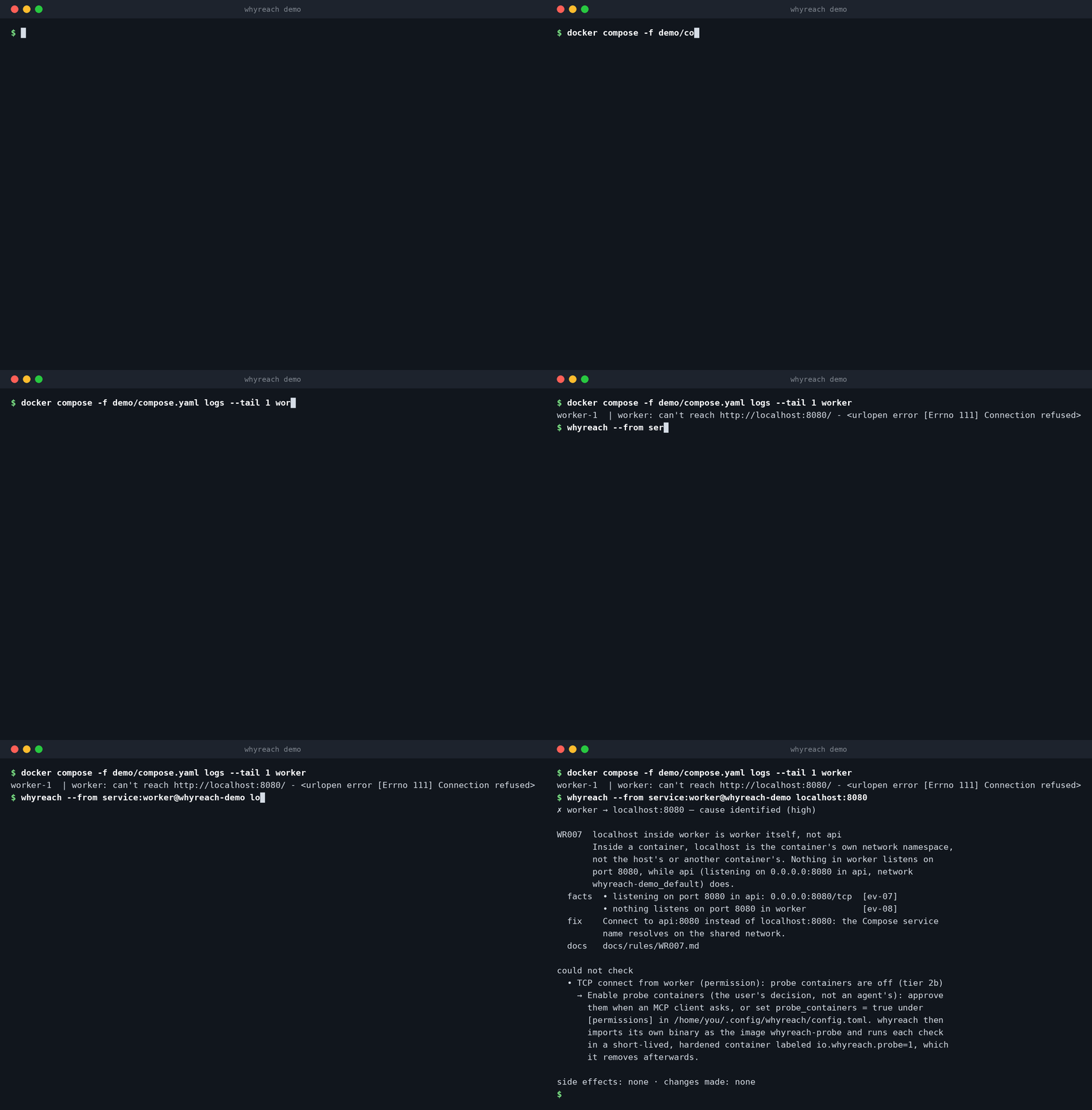
$ whyreach --from service:worker@whyreach-demo localhost:8080
✗ worker → localhost:8080 — cause identified (high)

WR007  localhost inside worker is worker itself, not api
       Inside a container, localhost is the container's own network namespace,
       not the host's or another container's. Nothing in worker listens on
       port 8080, while api (listening on 0.0.0.0:8080 in api, network
       whyreach-demo_default) does.
  facts  • listening on port 8080 in api: 0.0.0.0:8080/tcp  [ev-07]
         • nothing listens on port 8080 in worker           [ev-08]
  fix    Connect to api:8080 instead of localhost:8080: the Compose service
         name resolves on the shared network.
  …
Status: v0.2. Linux with Docker Engine, and Windows through WSL2 (Docker Engine in the distro, or Docker Desktop's WSL integration): docs/wsl2.md. v0.2 also adds six causes (
localhostthat means IPv6 too, an internal network, a Docker subnet that takes a VPN's or a LAN's range, a silent drop, the host's firewall, a stale container address) and CI mode. Docker Desktop on macOS and native Windows builds come later (INITIAL.md §3.7).
Install
You need Linux on amd64 or arm64, Docker Engine, and access to the Docker socket (your user in the docker group). whyreach is one static binary. On Windows, it runs inside WSL2: see docs/wsl2.md.
Download the archive for your machine and checksums.txt from the releases page, check the checksum, and put the binary on your PATH:
VERSION=0.2.0 ARCH=amd64   # or ARCH=arm64; uname -m says x86_64 for amd64, aarch64 for arm64
curl -fsSLO "https://github.com/SandstromPL/whyreach/releases/download/v${VERSION}/whyreach_${VERSION}_linux_${ARCH}.tar.gz"
curl -fsSLO "https://github.com/SandstromPL/whyreach/releases/download/v${VERSION}/checksums.txt"
sha256sum --ignore-missing -c checksums.txt
mkdir whyreach && tar -xzf "whyreach_${VERSION}_linux_${ARCH}.tar.gz" -C whyreach
install -D -m 0755 whyreach/whyreach ~/.local/bin/whyreach
The archive holds the binary, this README, the license, and the demo (demo/compose.yaml). If ~/.local/bin isn't on your PATH, install to /usr/local/bin with sudo instead. Each release also has a signed build-provenance attestation, which gh can check: gh attestation verify whyreach_${VERSION}_linux_${ARCH}.tar.gz --repo SandstromPL/whyreach.
Then check that whyreach can do its job here:
whyreach doctor
It checks the Docker API, the listening sockets it can read, and its config, and it tells you what it can't do and why. It changes nothing. Its mcp line gives the command that connects whyreach to Claude Code.
To build from source instead, use Go 1.27 or later and run make build, which writes bin/whyreach.
Connect your AI agent (MCP)
whyreach serves four tools over stdio: diagnose_connection, inspect_environment, run_probe and save_report. Give your MCP client the binary's absolute path and the arguments mcp serve.
Claude Code:
claude mcp add whyreach -- "$HOME/.local/bin/whyreach" mcp serve
This adds whyreach to the current project. Add --scope user to make it available in every project.
Other clients (Cursor, Windsurf, Claude Desktop and most others) take a JSON entry like this one, in their MCP settings file (for Cursor, ~/.cursor/mcp.json). Use the absolute path, without ~:
{
  "mcpServers": {
    "whyreach": {
      "command": "/home/you/.local/bin/whyreach",
      "args": ["mcp", "serve"]
    }
  }
}
VS Code's .vscode/mcp.json uses the same entry under "servers" instead of "mcpServers". Codex reads ~/.codex/config.toml:
[mcp_servers.whyreach]
command = "/home/you/.local/bin/whyreach"
args = ["mcp", "serve"]
Run the MCP server as your own user, not as root. Each tool returns a short structured result that starts with the verdict, plus a text summary. Every call is recorded in ~/.local/state/whyreach/audit.jsonl.
Try it: the demo
The demo is a small Compose project with the most common Docker networking mistake. A worker calls an API at http://localhost:8080/. Inside the worker's container, though, localhost is the worker itself, and the API runs in a container of its own.
The demo file is demo/compose.yaml, in the release archive and in this repository. Start it from the directory that holds demo/. The first run pulls python:3.13-slim.
docker compose -f demo/compose.yaml up -d --wait
docker compose -f demo/compose.yaml logs worker
The worker keeps failing:
worker: can't reach http://localhost:8080/ - <urlopen error [Errno 111] Connection refused>
Ask your agent about it, for example:
In the Compose project whyreach-demo, the worker can't connect to http://localhost:8080. Use whyreach to find out why.
The agent calls diagnose_connection with from: service:worker@whyreach-demo and to: localhost:8080. whyreach answers with rule WR007 at high confidence: localhost inside the worker means the worker, and the service is api:8080. You can ask the same from the CLI:
whyreach --from service:worker@whyreach-demo localhost:8080
To fix the demo, set API_URL: http://api:8080/ in demo/compose.yaml and run the up command again. The worker's log then says worker: reached http://api:8080/. When you're done, remove the demo:
docker compose -f demo/compose.yaml down
whyreach settled this cause from Docker's metadata and the containers' listening sockets alone, without starting anything. Some causes also need a check from inside the source container, which needs a probe container (see What whyreach may do).
How it compares to a shell
An agent can already debug Docker networking with a shell: docker inspect, ss, curl. To see what whyreach adds, two headless Claude Code agents on Claude Haiku got the same problem report for each of the 27 lab scenarios (test/lab; the 28th needs a host firewall set up for it). One had only a shell, held to read-only access to the lab. The other had only whyreach's four MCP tools, in whyreach's default configuration.

| Shell agent | whyreach agent | |
|---|---|---|
| Named the right cause | 21 of 27 | 22 of 27 |
| Tool calls, median | 6 | 3 |
| Tokens, median | 49.7k | 20.2k |
| Time, median | 17.0 s | 6.6 s |
| Cost, all 27 runs | $0.090 | $0.034 |
| Commands that would change something, attempted | 21, in 21 runs | 0 |
whyreach's agent named 22 of the 27 causes and the shell agent 21. whyreach's agent used about 40% of the tokens and of the time. Three of its misses need a check from inside the container, which takes a probe container, and the benchmark runs whyreach in its default configuration, without them. It never tried to change anything. The shell agent tried in 21 of its 27 runs, mostly docker exec to look inside containers, and the benchmark's guard refused each one.
The method was fixed before the first run, in v0.1, over 21 scenarios. For v0.2 it ran again over 27, with the six new causes added to the list both agents choose from; these are that run's numbers. The per-scenario results, the raw data and the caveats are in docs/research/agent-benchmark.md: one model, one run each, and stand-in servers that are easier to read than real applications. To run it yourself, use make lab-bench; it needs Docker, bwrap and the claude CLI.
What whyreach may do
whyreach is read-only. It never changes containers, networks, routes, firewall rules, DNS or files, apart from its own config, state and data directories. It reads Docker's API through an allowlist of endpoints, reads listening sockets from /proc, and makes bounded DNS lookups and TCP connects. A connect closes at once and never sends data. Docker socket access is equivalent to root, so this guarantee comes from whyreach's own code, not from operating-system permissions.
Some checks need permissions that are off by default. These are your decisions. An agent can't turn them on, and an agent that can edit files shouldn't change whyreach's config to give itself more.
- Probe containers. These run DNS and TCP checks from inside a container. whyreach imports its own binary as the local image
whyreach-probe(no registry pull) and runs each batch of checks in a short-lived, locked-down container. The container joins the checked container's network namespace, carries the labelio.whyreach.probe=1, and is removed afterwards. They are off by default because they write to Docker. Through MCP, whyreach asks you once per session when a probe container would change the answer, if your client supports elicitation. To allow them for good, setprobe_containers = true. - Names outside Docker. A DNS lookup sends its name to the servers of the name's domain, so through MCP an agent could pass data out through the names it asks whyreach to look up. Some names are always free: names that Docker's metadata knows (containers, Compose services, aliases), names in the source's hosts file, names without a dot,
localhost, andhost.docker.internal. Any other name, such asexample.com, is looked up only after you approve that exact name when whyreach asks, or when its domain is listed under[probe] names. An approval covers 3 lookups; after them whyreach asks again. Approve only names you expect. Without an approval nothing is sent, and the diagnosis says what it couldn't check. The CLI looks up any name you type. - Private addresses outside Docker. A connect's address, port and timing can carry data to whoever runs the address, so through MCP whyreach connects to a private address (10/8, 172.16/12, 192.168/16) only on Docker's networks (on a macvlan or ipvlan network, only at the containers' own addresses), at this machine's own addresses, or after you approve that exact address and port when whyreach asks. An approval covers 3 connects. To allow an address or a range for good, add it to
[probe] allow(allow = ["loopback", "rfc1918", "docker", "10.20.0.0/16"]). The CLI connects to any address you type that the allowlist admits. - Questions: whyreach asks at most three questions about names and addresses in a session, and doesn't ask again about one you declined.
- Root. Run as root (
sudo whyreach …), whyreach enters containers' network namespaces itself and needs no probe containers. It then reads root's config and writes root's audit log. Usesudo, notsudo -E, and use root for the CLI only.
TCP probes may go only to the address classes in [probe] allow, at most rate_per_minute checks a minute. whyreach never connects to link-local or cloud-metadata addresses. As nameservers, it asks them only when they are this machine's own resolvers, as on some cloud VMs, and only for DNS. One that only a container's own settings name gets no query, and that container's lookups are reported as not made.
Settings live in ~/.config/whyreach/config.toml. Every key is optional; an unknown key is an error:
[permissions]
probe_containers = false   # true: allow probe containers (tier 2b)
netns = true               # false: as root, don't enter network namespaces

[probe]
allow = ["loopback", "rfc1918", "docker"]   # where TCP probes may go; also addresses and CIDRs, which need no approval through MCP
rate_per_minute = 30
names = []                 # domains an agent may have looked up without asking, e.g. ["example.com"]

[timeouts]
diagnosis = "15s"

[report]
redact_private = false     # true: exported reports also hide private addresses
Headless agent runs (claude -p, CI) can't answer a question. Turn on what they need in this file.
The CLI
whyreach [--from SOURCE] HOST:PORT [--json] [--report]   # short for whyreach diagnose
whyreach inspect host | container NAME | service NAME[@PROJECT] | network NAME
whyreach probe tcp HOST:PORT | dns NAME | listeners [--from SOURCE]
whyreach report list | show ID | export ID [--redact-private]
whyreach rules list | explain WRxxx
whyreach doctor
whyreach mcp serve
SOURCE is host (the default), container:<name|id> or service:<name>[@<project>]. HOST:PORT is the destination as your app uses it: a Compose service, container name, alias, DNS name, IP address, localhost or host.docker.internal. Exit codes: 0 no problem reproduced, 1 cause or likely cause found, 2 inconclusive, 3 usage or policy error, 4 internal error.
Reports. --report saves the diagnosis with all its evidence as a bundle in ~/.local/share/whyreach/reports/. The bundle holds a manifest, the diagnosis, the evidence and a Markdown report, and it isn't redacted: it's your own record. To share one, for example in an issue, run whyreach report export ID. It writes a redacted copy, ID.tar.gz, next to the bundle. Public addresses, host names and container IDs become pseudonyms, and your home directory becomes ~. Private addresses are hidden too with --redact-private. Check the copy before you share it. Bundles saved through MCP (save_report) are always redacted.
Rules. whyreach rules list shows the 20 rules, and whyreach rules explain WR007 prints a rule's page: the pitfall, the evidence, the fix and the known false positives. The same pages are in docs/rules.
In CI
When integration tests against a Compose stack fail in CI, whyreach can say why. docs/ci.md has three GitHub Actions steps to copy after your tests. They run only after a failure, install a pinned release (the example pins v0.2.0, the release CI mode ships in) and check its checksum, and diagnose the connections you list, looking inside the containers through probe containers, so the job needs only the Docker access it has for Compose. Each diagnosis goes to the job log, the job summary and an artifact, redacted unless the repository is private. The steps never change the job's result.
As a container
There's an image too, for when you'd rather not install the binary:
docker run --rm -i --network host --pid host -v /var/run/docker.sock:/var/run/docker.sock ghcr.io/sandstrompl/whyreach:0.2.0 mcp serve
For Claude Code: claude mcp add whyreach -- docker run --rm -i --network host --pid host -v /var/run/docker.sock:/var/run/docker.sock ghcr.io/sandstrompl/whyreach:0.2.0 mcp serve. Pass a command instead of mcp serve to use the CLI the same way.
--network hostputs whyreach in the host's network namespace, where it sees the host's interfaces, listening sockets and connections. Without it, the host's side can't be seen from the container, and whyreach reports those checks as unsupported rather than mistake the container for the host.--pid hostlets whyreach read the containers' listening sockets. Without it, whyreach reports those reads as unsupported, and causes that depend on listeners drop to lower confidence.- To see which of the two whyreach has, run your command with
doctorin place ofmcp serve. - Your config: mount it with
-v ~/.config/whyreach:/config/whyreach:ro. - On a cloud VM with systemd-resolved (GCE, Oracle Cloud), Docker gives default-bridge containers the upstream resolver in
/run/systemd/resolve/resolv.conf, often a link-local address. whyreach asks it only as the host's own resolver, which it can tell from inside its image only with-v /run/systemd/resolve:/run/systemd/resolve:ro. - Audit log and reports: they stay in the container unless you mount
/stateand/data.
Development
The design is in INITIAL.md. To contribute, start with CONTRIBUTING.md; coding agents also follow CLAUDE.md.
make build      # static binary in bin/whyreach
make test       # unit tests and rule fixtures (no Docker, no root, no network)
make lint       # golangci-lint v2
make cross      # compile check for macOS and Windows
make lab        # the failure lab in test/lab (needs Docker)
make lab-desktop  # the same lab, with whyreach told it talks to Docker Desktop: every listener read in a probe container
make lab-root   # the same lab as root, where whyreach enters network namespaces itself (asks for your sudo password)
make lab-agent  # a headless agent diagnoses each lab scenario through MCP (needs the claude CLI)
make lab-bench  # the agent benchmark: a sandboxed shell-only agent against a whyreach-only one (needs the claude CLI and bwrap)
make release-snapshot  # the release archives and checksums in dist/, publishing nothing
Contributing
Issues and pull requests are welcome. Read CONTRIBUTING.md first. Report security problems privately, as SECURITY.md explains.
License
Apache-2.0. See LICENSE.







