Listed from the MCP registry; nobody on Odel publishes it.

Lure
Plant fake credentials and get alerted when an attacker uses one. Stdlib-only, no passwords out.
Runs on your machine from its package; the steps are below.
What it does
- Reads
- Writes
- High impact
At most: creates or changes data: records, files, settings.
What it costs
FreeOdel charges nothing per call. The publisher may charge for its own service.
Runs locally over stdio
This server isn't hosted — your MCP client launches it from a package registry. Use one of the commands below, or drop the config into your client (e.g. Claude Desktop).
Run
uvx silentmesh-lure
MCP client config
{
  "mcpServers": {
    "lure": {
      "command": "uvx",
      "args": [
        "silentmesh-lure"
      ]
    }
  }
}
SilentMesh Lure (beta)





See it catch someone in under a minute, on your own machine:
pipx install --pip-args=--pre silentmesh-lure && lure demo
Lure by SilentMesh
Planted credentials that give the attacker away. A quiet safety net for any network, from a home router to a data centre. Deceive, never disrupt.
Free credential lures for everyone, on any network: homes, small offices, company IT, data centres, banks, hospitals and industrial plants.
Attackers often get in with a stolen VPN or jump-host login, then look for more saved passwords on the machines they reach: admin desktops, file shares, home directories and old emails. Lure plants fake ones for them to find. If anyone tries to use one, you get an alert that says which file was found and where you planted it.
- No agent, nothing on the control network. Bait files go on IT-side machines: engineering workstations, jump hosts, vendor shares.
- Alerts on use, not on open. Opening, copying, backing up or antivirus-scanning a bait file does nothing. Only a login attempt with a bait credential fires an alert.
- Your alerts go only to you. The listener sends alerts to your own webhook, syslog, email or terminal. Alert contents, IP addresses and bait details are never sent to us. Lure does send anonymous usage statistics (see Usage statistics); turn them off with
LURE_NO_TELEMETRY=1. - Tested on Linux (x86-64 and ARM, including Raspberry Pi) and Windows, Python 3.9 and newer, standard library only. macOS is not yet supported. Apache-2.0.
Get started in three commands
Install it with pipx install --pip-args=--pre silentmesh-lure (on Kali, Debian and Ubuntu plain pip install is refused; get pipx with sudo apt install pipx), or run it once with no install via uvx silentmesh-lure. From a cloned folder without installing, python3 -m lure works the same as lure. On Windows, type py -m lure wherever this page says python3 -m lure.
lure demo          # 1. watch Lure catch a simulated attacker on this machine (the attack never leaves it)
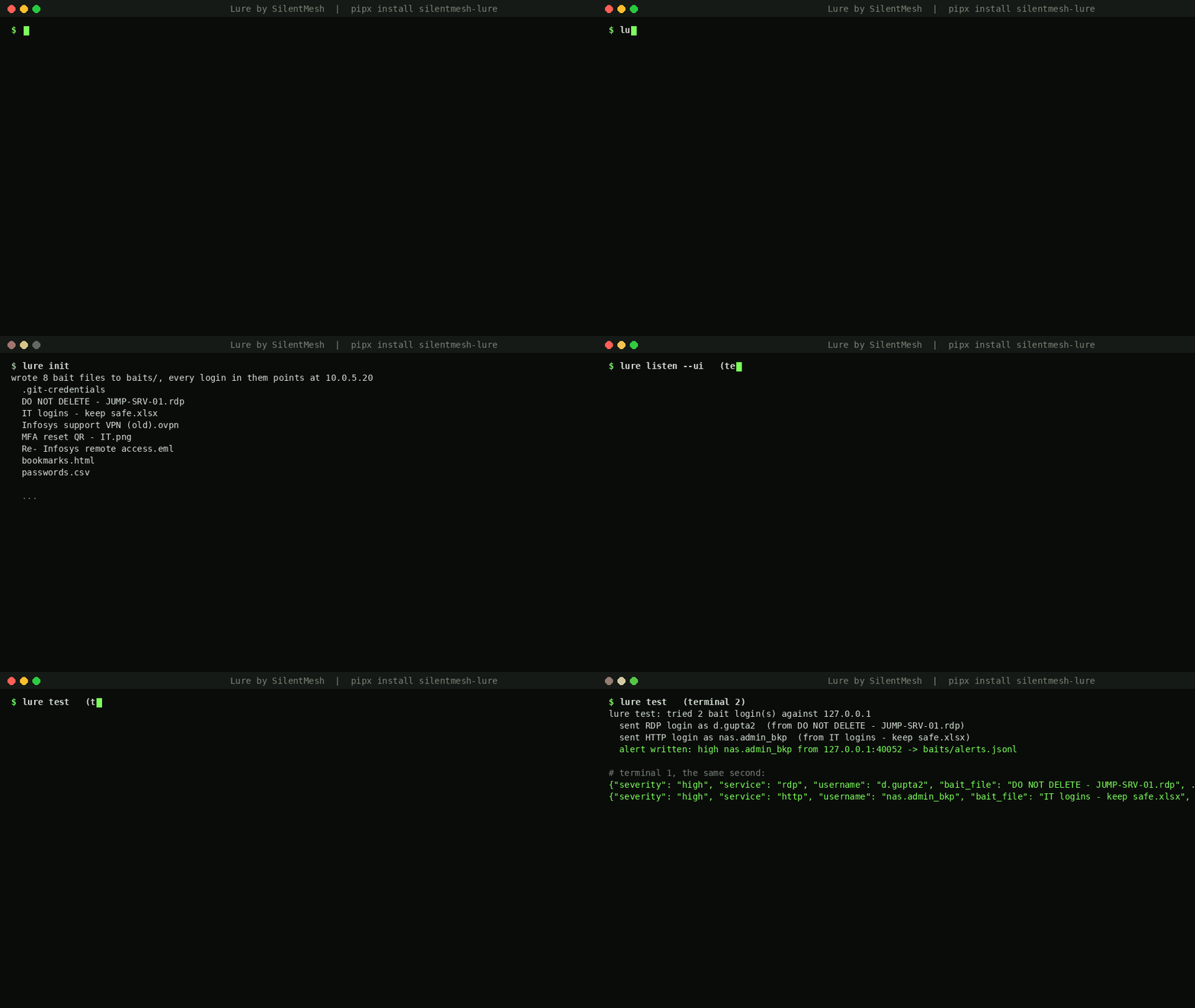
lure init          # 2. write real baits that point at this machine; it prints the next step
lure listen --ui   # 3. wait for someone to use one; dashboard at http://127.0.0.1:8765
Then, from another terminal or machine: lure test. It plays an attacker with one bait and shows you the alert. That is a working install. Copy a bait file or two somewhere an intruder would look (a desktop, a file share) and tell Lure where with lure record.
init asks two things: is this a home or a work computer (home gets a plain password note and a Wi-Fi QR, work gets the office set), and how you want to be told about an alert. Running lure with no arguments prints this guide.
Use cases
| Who | How Lure helps |
|---|---|
Company IT (default it profile) | A safety net behind the firewall and endpoint tools: bait spreadsheets on file servers, a saved RDP file on admin desktops, a vendor VPN profile on the jump host. The first password hunt raises the alarm |
| Ransomware early warning | Ransomware crews harvest credentials for days before they encrypt. A bait used on day one gives you those days back |
| Lost laptops and leaked backups | Bait files inside a stolen laptop, backup or mailbox export fire when someone tries them, even months later, because rotated baits keep alerting |
| Developers | A bait .git-credentials catches anyone raiding home directories for code access. Real git sends it |
Small offices (office) | Payroll, Tally and HR baits on the accounts PC. No security team needed: one alert to your webhook |
Homes (home) | A Raspberry Pi as the listener, router, NAS and CCTV baits on the family PC. Someone on your Wi-Fi hunting passwords pings your phone |
Banks, hospitals, plants (bank, hospital, plant) | Core banking, HIS and PACS, or SCADA and historian logins, in the vocabulary of the place |
| MSSPs and IT service firms | A free control for every client, alerting into their SIEM over syslog or webhook |
| Incident response | Plant baits mid-investigation. If they fire, the attacker is still inside, and the attacker's path shows where they went |
| Red and blue teams | Did the red team take the bait, and how fast did the blue team see it? |
| AI agents (MCP) | An agent checks Lure daily, rotates baits, records placements, and turns an alert and its path into an incident note |
| Teaching and workshops | Deception you can show live on a laptop or a Pi in ten minutes |
Not covered yet: Azure bait keys, a hosted demo listener, and macOS. AWS bait keys are a preview.
The full setup
-
Pick a listener host: any spare Linux machine, VM or Raspberry Pi on the IT side that nobody legitimately logs into.
lure inituses the machine you are on;lure generate --listener IPlets you choose. -
Generate the bait set, pointing it at that host:
lure generate --listener 10.0.5.20 --out baitsThis writes eight bait files, written to be believed:
Bait What it looks like Where to plant it A spreadsheet such as passwords_FINAL_v2.xlsxA real workbook from "IT Support", months old, with a Notes column, a "temporary" shared admin row ("TODO: rotate after the audit") and an "Old - do not use" sheet A file share or a Documents folder DO NOT DELETE - JUMP-SRV-01.rdpA saved Remote Desktop connection with a username filled in An admin or engineering workstation desktop AMC vendor support VPN (old).ovpnA vendor VPN profile with its login in a comment, and a hint about the RDP file A jump host or vendor laptop share passwords.csvA browser password export A Downloads folder .git-credentialsA git credential store; real gitwill send this loginA home directory Re- AMC vendor remote access.emlAn email that leaks a temporary login and points at the VPN profile and the spreadsheet A mailbox export or Documents folder A QR notice such as IT helpdesk - scan to set up VPN.pngA QR code that opens a URL with a hidden token. Scanning it raises an alert A notice board, a printed poster, or a shared Pictures folder bookmarks.htmlAn exported browser favourites file with admin consoles in it, one carrying a token An admin's browser profile or Documents folder manifest.jsonWhich username belongs to which bait (no passwords). Keep it off the network. Only on the listener host Names, vendors and dates change on every run. Usernames look like real accounts (
r.patil_adm,svc_vcenter2,amc.support), never random strings. Vendors are roles ("AMC vendor", "automation vendor"), never real company names, and the files are backdated weeks or months. The baits point at each other, so each one found makes the next more convincing.Pick vocabulary that fits the place with
--profile it(default: NAS, vCenter, intranet),office(payroll, Tally, HR),home(router, NAS, CCTV, for a Raspberry Pi at home),bank(core banking, payment switch),hospital(HIS, PACS, lab) orplant(SCADA, historian, MES). Or bring your own: copyprofiles/legal.json(alsoeducation.json,retail.json), change the systems, vendors and wording, and pass the file with--profile my-org.json. Pull requests with new profiles are welcome.After planting, record exactly where each bait lives, so the alert can say so:
lure record jump-host.rdp "ENG-WS-07:C:\Users\eng\Desktop"
lure record passwords.xlsx "\\files01\engineering"
Planting VPN profiles in several places? Generate one per place with
--vpn-count 3. Each gets its own listener port, so the alert names the exact file even though the VPN login itself is encrypted.Rotate the whole set from time to time with
lure rotate. Fresh baits are written, the old files move intoretired/, and the old credentials stay in the manifest: anyone who stole them earlier still triggers an alert.Keep them fresh. Rotate monthly with cron, or ask your AI agent to do it over MCP:
# crontab -e : 03:00 on the 1st of every month
0 3 1 * * cd /opt/lure && lure rotate --manifest baits/manifest.json && systemctl restart lure-listen
Then replant the new files listed in
baits/. -
Run the listener on the listener host:
lure listen --manifest baits/manifest.json \
    --webhook https://your-alerts.example/hook --syslog 10.0.1.5:514
It listens on RDP (3389), HTTP (8080) and OpenVPN (1194). Binding ports below 1024 is not needed.
-
Prove it works, from any machine that has the manifest:
lure test --manifest baits/manifest.jsonIt plays an attacker: one RDP and one HTTP bait login against the listener, then tells you what landed. On the listener host it confirms the alert in
alerts.jsonl; elsewhere, watch your Slack, Teams or syslog. If a port is closed it says so. Or do it by hand: open the.rdpbait and try to connect. Either way you get one alert like this:json{"severity": "high", "service": "rdp", "source": "10.0.7.31:51544", "username": "r.patil_adm", "bait_file": "DO NOT DELETE - JUMP-SRV-01.rdp", "planted_on": "an admin or engineering workstation desktop", "location": "FIN-WS-07:C:\\Users\\admin\\Desktop", "why": "a bait credential was used: someone found and tried it"}
Intent, not just a touch
One bait login can be an accident. A sequence is harder to explain away. Every bait alert now carries:
depth: for that source address, how many distinct baits it has used, how many attempts, and in what order.after_warning: the HTTP listener answers a bait login with an "authorised personnel only, access is logged" banner and asks again. Entering the bait credential a second time after that warning is flagged in its own alert.evidence: what the alert shows, what it lets you conclude, and what it cannot (who the person is, their motive, or baits found but never tried; the address may be a NAT, VPN or pivot host).
Catch bait logins on your real systems
An attacker may type a bait login into your real VPN, Active Directory, SSH or web login instead of the listener. Lure can watch those systems' logs and alert when a bait username appears:
lure watch /var/log/auth.log /var/log/openvpn.log --manifest baits/manifest.json
# or alongside the listener:
lure listen --manifest baits/manifest.json --watch /var/log/auth.log
It reads any plain-text log: Linux auth logs, VPN and RADIUS logs, web server logs, or Windows Security events forwarded to syslog or exported with wevtutil qe Security /f:text (failed logons 4625 and 4771 carry the user name). Only whole account names match, with or without a DOMAIN\ part.
DNS baits (work through almost any firewall)
Delegate a spare subdomain to the listener host with an NS record (for example backup.example.com), then:
lure generate --listener 10.0.5.20 --out baits --dns-zone backup.example.com
lure listen --manifest baits/manifest.json      # also answers DNS on UDP 53
The spreadsheet and the email then mention an old backup share such as \\vault16.backup.example.com\backup. Anyone who tries to reach it makes a DNS lookup that ends at your listener, from any tool, and you get a high alert. Names outside your zone are refused.
AWS bait keys (preview)
lure aws create --manifest baits/manifest.json --aws-profile my-admin
lure aws watch  --manifest baits/manifest.json --aws-profile my-admin
create makes an IAM user with no permissions and an access key, and writes aws credentials (backup job).txt holding it. The key can do nothing. Anyone who tries it makes a refused AWS call that CloudTrail records, and watch polls CloudTrail's free event history (usually 5 to 15 minutes behind) and alerts. IAM users, keys and CloudTrail event history cost nothing.
Status: request signing is verified against AWS's published Signature Version 4 example; the full create-and-watch loop has not yet been run against a live account. Treat it as a preview.
Being told about an alert
Every alert says, in plain words, who (this computer, a device on your network, or an address on the internet), what bait, how it was used, and what to do next. Pick any mix:
| You have | Use |
|---|---|
| Nothing set up | --desktop: a popup on this computer (Windows, Linux, macOS) |
| A phone | the free ntfy app: subscribe to a topic name nobody would guess, then --webhook https://ntfy.sh/<topic>. A Telegram bot URL or a Discord webhook works too |
| Gmail or Outlook | --email-to you@gmail.com with an app password in LURE_SMTP_PASSWORD (never saved) |
| Slack, Teams, a SIEM | --webhook URL (Slack blocks, Teams cards, plain JSON for anything else) or --syslog HOST |
lure init asks which one you want and saves the answer in your own config folder (%APPDATA%\lure or ~/.config/lure), never next to the baits.
Usage statistics
Lure sends anonymous usage statistics so we can see which commands people use and fix what breaks. Each event carries only: the command (demo, init, listen, test...), the Lure version, the operating system and Python version, the bait profile name, and for each alert only its severity, its service (rdp, http, openvpn...) and whether it came from the demo. Each install gets a random ID that is not linked to you.
Never sent: IP addresses, hostnames, usernames, bait file names or contents, alert details, webhook URLs or email addresses. The code is in lure/telemetry.py.
Turn it off with LURE_NO_TELEMETRY=1 (or the common DO_NOT_TRACK=1). Lure says this once, the first time it runs.
Still listening
When an alert channel is set (--desktop, --email-to or --webhook), lure listen sends a short "Lure is listening" message when it starts and a "still listening" message every 7 days, saying whether any bait was used since the last one. Silence then never means "is it broken?". Change the interval with --heartbeat-days, or turn it off with --heartbeat-days 0.
At work: tell IT first
Before you plant baits on shared or work drives, tell your IT or security team, so a bait alert is handled as a test or a real intrusion, not mistaken for one. lure init asks for your organisation's email domain so the bait email looks like your own mail; you can also pass --email-domain to lure generate.
Updates: nothing installs without you
lure listen asks PyPI once a day whether a newer Lure exists and, if so, says so in the terminal and on the dashboard. It never installs anything. Run lure update to read what changed and type yes to install that exact version. The check sends nothing but a normal request to pypi.org; turn it off with --no-update-check or LURE_NO_UPDATE_CHECK=1. On our side, a release reaches PyPI only after the tests pass on Linux and Windows and a maintainer approves it.
Local dashboard
lure listen --manifest baits/manifest.json --ui
Then open http://127.0.0.1:8765 on the listener host. It is an operator console. The incident queue shows one incident per source; the detail pane says why it was flagged, the timeline with the ATT&CK technique for each step, the impact (including what Lure cannot see), what to do, and its handling status. There is also a 24-hour histogram, a live feed, the bait inventory and the alert channels. Run test fires a real bait login at your own listener; export gives every alert as CSV or JSON. Fonts are bundled, so the page makes no outside requests.
Use it from an AI agent (MCP)
Lure includes an MCP server, so an AI assistant can plant baits, check them and read alerts for you. It speaks the current MCP specification (2026-07-28, including server/discover) and still answers the older initialize handshake (2025-11-25 and 2025-06-18), so older clients keep working:
lure mcp --manifest baits/manifest.json
Add it to your MCP client. For Claude Code: claude mcp add lure -- lure mcp --manifest /path/to/baits/manifest.json. For Claude Desktop or any client using a JSON config:
{"mcpServers": {"lure": {"command": "python3", "args": ["-m", "lure", "mcp", "--manifest", "/path/to/baits/manifest.json"]}}}
| Tool | What it does |
|---|---|
lure_status | Baits live and retired, which were used, open alerts, the attacker's path, and a one-line verdict |
lure_alerts | Recent alerts, filtered by severity or open only |
lure_baits | Every live bait and where it is planted. Never returns passwords |
lure_generate | Write a new bait set (refuses to overwrite an existing one) |
lure_record | Record where a bait was planted |
lure_rotate | Fresh baits; old ones stay retired and keep alerting |
lure_acknowledge | Mark an alert investigated |
Ask it things like "Has anyone touched a bait this week?" or "Rotate the baits and tell me which files to replant." The server reads the manifest and the alert log that lure listen writes; it contacts nothing on the network.
How detection works
A bait file cannot know when it is used. Something has to see the login attempt, and in Lure that is the listener:
lure generatewrites baits whose addresses point only at your listener host, never at a real system.- You plant them, and record where with
lure record. - Anyone who tries a bait has to connect to the listener, so the listener sees the attempt. It reads the bait username from the RDP connection request or the HTTP login; VPN baits are told apart by port.
- The listener matches the username or port to the manifest.
- You get one alert with the exact bait file, where you planted it, the time, and the source address.
Bait logins typed into your real systems are caught by lure watch, which follows their authentication logs (see above).
Tested with a real RDP client (FreeRDP 3), which sends the username Lure reads.
The attacker's path
Alerts from the same source address are joined into a path on the dashboard, oldest first: for example the spreadsheet, then the RDP file, then the VPN. You see how far someone got and in what order.
How alerts are graded
- high: a bait username was used. Someone found a planted file and tried it.
- medium: something connected to the listener host without a bait username, or tried an unknown login. A bare request that is followed within seconds by a bait login (browsers and git always try once without a login) is folded into that one high alert.
- retired: a high alert from a rotated-out bait, meaning it was taken before the last rotation. Nothing legitimate should connect at all, so a medium alert is still worth a look. A scanner you run yourself is the usual cause.
The same source, service and username alert once per 10 minutes, with at most 20 alerts per 10 minutes overall, so one attacker cannot flood your pager.
Data handling
Lure runs entirely on your own machines. The listener records the connecting IP and port, the service, the time and the username it was offered. It sends that only to the sinks you configure. Passwords sent to the listener are never read or stored. SilentMesh receives no data.
Use responsibly
Only plant baits on systems you own or are authorised to protect. The person who runs the listener controls the data it records (IP addresses and usernames can be personal data, for example under India's DPDP Act 2023) and is responsible for handling it under their own law.
Limits
- This is a beta. It catches people who find and use credentials. It does not detect an attacker who never touches the baits.
- The OpenVPN login is encrypted, so VPN baits are identified by their port, not their username.
- Do not point a bait at a real system. In industrial sites, keep baits off the control network.
Going further
Lure is free for everyone. For industrial sites, the full SilentMesh product adds decoy PLCs and controllers on the plant network itself (Modbus/TCP, S7comm, IEC 60870-5-104, DNP3, OPC UA, SMB), off the control path and fail-open. See https://silentmesh.me.
Running the tests
python3 -m unittest discover -s tests
Community
- Questions: Discussions, Q&A
- Ideas, bait types and profiles: Discussions, Ideas
- Show how you use it: Show and tell
- Bugs: issues. Security problems: report privately (see SECURITY.md).
Contributions are welcome, especially new profiles. See CONTRIBUTING.md and CODE_OF_CONDUCT.md.
Licence
Apache License 2.0. See LICENSE.







