Listed from the MCP registry; nobody on Odel publishes it.
Bringup
Design a whole robot or device: board, printed parts, firmware and ROS, checked across domains.
Runs on your machine from its package; the steps are below.
What it does
- Reads
- Writes
- High impact
At most: moves money, runs code or commands, deletes data, or sends messages for you.
What it costs
FreeOdel charges nothing per call. The publisher may charge for its own service.
Runs locally over stdio
This server isn't hosted — your MCP client launches it from a package registry. Use one of the commands below, or drop the config into your client (e.g. Claude Desktop).
Run
npx -y bringup-mcp
MCP client config
{
  "mcpServers": {
    "bringup": {
      "command": "npx",
      "args": [
        "-y",
        "bringup-mcp"
      ]
    }
  }
}Describe a circuit board or a whole robot in a few sentences. Bringup designs it: a custom PCB, the printed parts, the firmware and the parts list.
- Custom PCBs: the schematic and a routed board, with Gerbers, BOM and pick-and-place files in JLCPCB's format, a case whose cutouts match the connectors, and firmware that compiles against the real pin map.
- Entire robots: everything above, plus the chassis and mounts as printable parts (STL, STEP), the motors, battery and sensors chosen and checked against each other, the robot's own firmware driving a physics model of it in simulation, and a ROS 2 package.
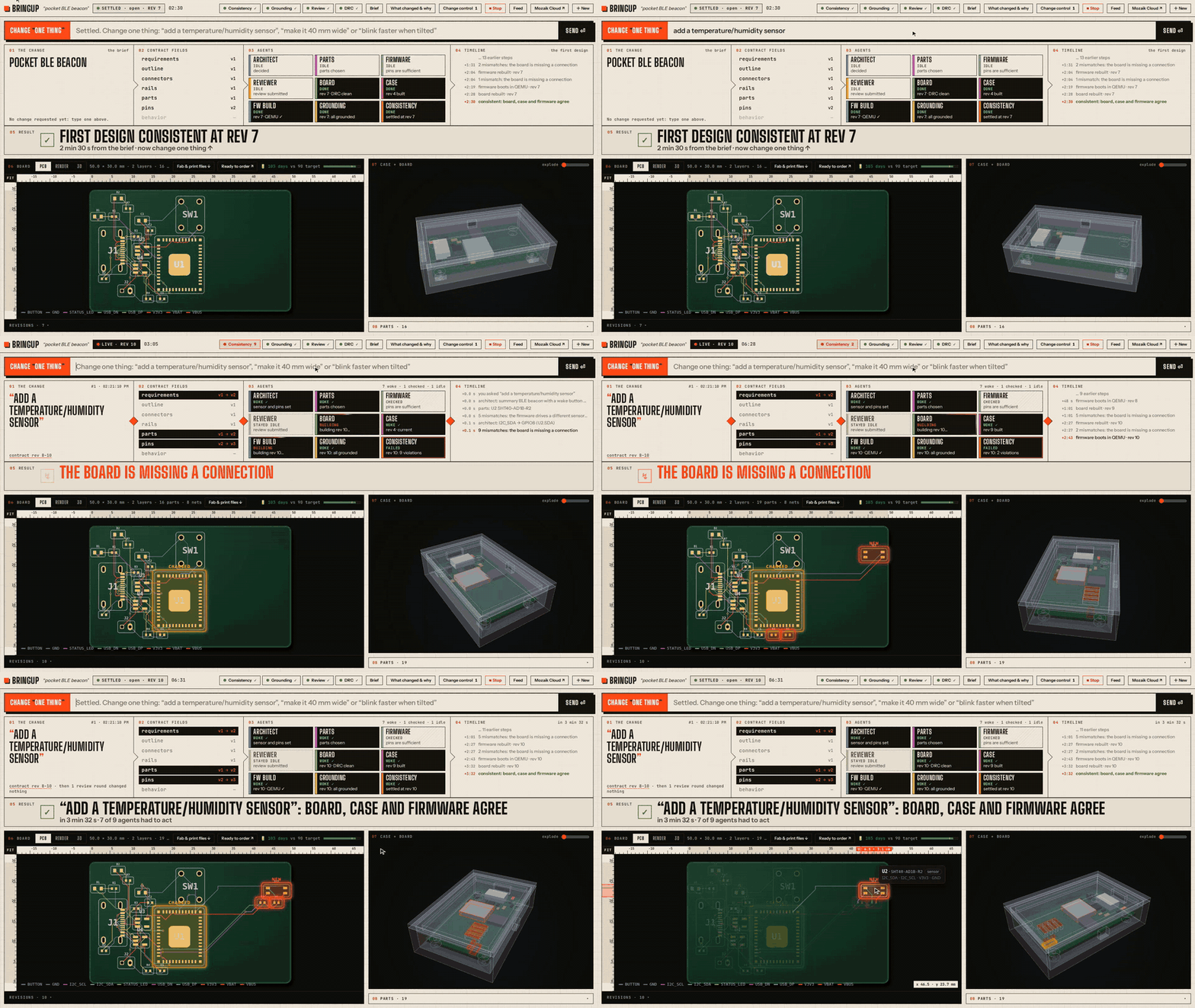
Change “one thing”, and the whole design follows: board, printed parts, firmware and parts, in parallel.
A recorded run with the real tools, shown in Bringup's hosted page; the waiting is cut. ▶ 3-minute demo video
Free and open, plus a hosted page
The engine is open source and free: it runs on your machine and every file it makes is yours. Bringup's hosted page, where you watch and steer a design live, is the paid part, the way Mozaik pairs its open framework with Mozaik Cloud.
| Free and open source (this repo, Apache-2.0) | Bringup's hosted page (paid, coming soon) |
|---|---|
| The engine, the agents, every check, the CLI and the MCP server | The live 3D robot and its simulation in 3D |
| Every file a design produces: KiCad project, Gerbers, BOM, pick-and-place, STL/STEP, firmware, URDF and ROS 2, the report | Editing on the design itself: click a part, change it, watch the change ripple |
| Still pictures of the board and the robot in the build package | Logs and debugging: the timeline, why each change happened, every agent's trace |
| Run history, sharing and teams, with nothing to install |
Install & run
git clone https://github.com/Laki4Ever79/bringup && cd bringup
npm ci
npm run setup -- --robotics                 # the whole toolchain, repo-local; drop --robotics for boards only
npm run bringup -- briefs/rover.md --mock   # a robot from its brief, no API key needed
Needs Linux x86-64, Node 24, uv, Docker without sudo, and libGL and SDL2 (a desktop has
them; on a minimal system, the libgl1 and libsdl2-2.0-0 packages); npm run setup checks them and says what's missing.
On a new machine (an empty container, 22 Nov 2026) setup took 5 min and the rover then settled in 4 min, its simulated
drive passing. Every design's files land in its run folder: the board (KiCad, Gerbers, parts list), the printed parts
(STL, STEP), the firmware, the ROS description and the report. A board-only brief works the same way, for example
npm run bringup -- briefs/logger.md --mock.
What you get
From a short brief (a board: the climate logger; a robot: the Eurobot base):
- A custom PCB: parts with JLCPCB order numbers, a schematic and a routed board, and the fab package (Gerbers, BOM, pick-and-place) to order it; a case whose cutouts match it when the design needs one.
- An entire robot: the chassis and mounts as printable parts, the motors, battery and sensors chosen and checked, the robot's own firmware driving a physics model of it in simulation, and a ROS 2 package.
- Firmware that compiles against the real pin map.
- A parts list with live stock and prices, and a build package with the assembly steps.
- Checks across all of it: wiring, power, motor and battery currents, parts that collide, the competition's rules.
How it works
Concurrent Mozaik agents (electronics, mechanics, firmware, parts) work on one live design contract. A change to one field wakes only the agents it affects, plain code checks every change across domains, and the real tools (tscircuit and KiCad, build123d, PlatformIO, QEMU, MuJoCo) build every revision.
Status: scripted and real-model runs settle with 0 violations on the real tools; no board or robot has been built yet, so a prototype order is next.
More
- docs/overview.md: robots in detail, every feature, the architecture, the honest status
- docs/details.md: every command, the run folder, the tests, the manual install
- MCP server (use Bringup from Claude Code, Cursor or any MCP client):
claude mcp add bringup -- npx -y bringup-mcp, see docs/mcp.md - CONTRIBUTING.md
License
Apache-2.0 (see LICENSE and NOTICE).
Credits
Built on Mozaik (@mozaik-ai/core 4.1.0, by JigJoy): every agent is a Mozaik participant, and the live design contract is Mozaik's shared RuntimeState.
Prior art we credit: Odem, MeshCue Forge, Copperhead, DRCY, Engineering Studio AI, text-to-cad (exact interference, prompt references, URDF checks: the ideas) and cadsmith (py/parts/: ISO fits and holes, servos, motors, bearings, fasteners and gears with named frames, ported under its MIT License, py/parts/LICENSE); tscircuit and KiCad do the real EDA work. What Bringup adds is change propagation across board, case, firmware and parts (details and links in docs/details.md).